NAVIGATION SYSTEM, Diagnostic DTC:58-42, 80-42
| DTC Code | DTC Name |
|---|---|
| 58-42 | Map Disc Read Error |
| 80-42 | Map Disc Read Error |
DESCRIPTION
| DTC No. | DTC Detection Condition | Trouble Area |
|---|---|---|
| 58-42 |
|
|
| 80-42 |
|
INSPECTION PROCEDURE
Tech Tips
After the inspection is completed, clear the DTCs.
PROCEDURE
-
CHECK MAP DISC
-
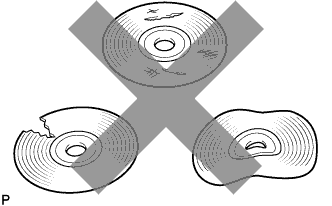
Check that the map disc is not deformed or cracked.
OK No deformations or cracks on the map disc.
NG 
REPLACE MAP DISC Click here
OK 
-
-
MAP DISC CLEANING
-

Map disc cleaning
-
If dirt is on the map disc surface, wipe it clean with a soft cloth from the inside to the outside in a radial direction.
Note
Do not use a conventional record cleaner or anti-static preservative.
-
NEXT
-
-
DTC CLEAR AND RECHECK
-
Clear the DTCs Click here.
-
Recheck for DTCs and check if the same DTC is output again.
OK No DTCs are output.
NG
REPLACE MAP DISC Click here
OK 
END
-
-
REPLACE MAP DISC
-
Replace the map disc.
-
Clear the DTCs and recheck for DTCs.
-
Check if the same DTC is output again.
OK No DTCs are output.
NG 
REPLACE NAVIGATION RECEIVER ASSEMBLY Click here
OK
END
-