NAVIGATION SYSTEM DIAGNOSIS DISPLAY DETAILED DESCRIPTION
Tech Tips
-
This section contains a detailed description of displays within diagnostic mode.
-
Illustrations may differ from the actual vehicle depending on the device settings and options. Therefore, some detailed areas may not be shown exactly the same as on the actual vehicle.
-
SYSTEM CHECK
-
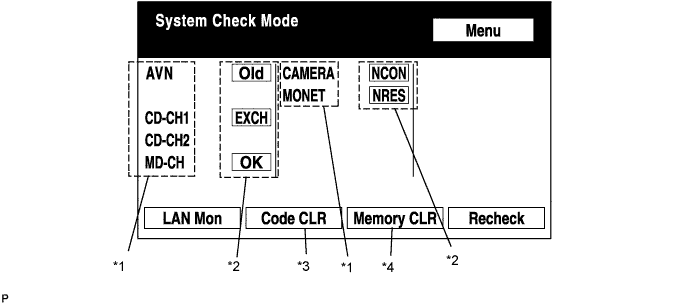
System Check Mode Screen
-
Device Names and Hardware Address/*1
Tech Tips
-
Registered device names are displayed.
-
If a device name is unknown to the system, its physical address is shown instead.
Address No. Name Address No. Name 110 EMV 120 AVX 128 1DIN TV 140 AVN 144 G-BOOK 178 NAVI 17C MONET 190 AUDIO H/U 1AC CAMERA-C 1B0 Rr-TV 1C0 Rr-CONT 19D BT-HF 1C4 PANEL 1C6 G/W 1C8 FM-M-LCD 1D8 CONT-SW 1EC Body 118 EMVN 1F1 XM 1F2 SIRIUS 230 TV-TUNER 240 CD-CH2 250 DVD-CH 280 CAMERA 360 CD-CH1 3A0 MD-CH 17D TEL 440 DSP-AMP 530 ETC 1F6 RSE 1A0 DVD-P 1D6 CLOCK 238 DTV 480 AMP -
-
Check Result/*2
Tech Tips
Result codes for all devices are displayed.
Result Meaning Action OK The device did not respond with a DTC (excluding communication DTCs from the AVC-LAN). - EXCH The device responds with a "replace"-type DTC. Look up the DTC in "Unit Check Mode" and replace the device. CHEK The device responds with a "check"-type DTC. Look up the DTC in "Unit Check Mode". NCON The device was previously present, but does not respond in diagnostic mode.
-
Check power supply wire harness of the device.
-
Check the AVC-LAN of the device.
Old The device responds with an "old"-type DTC. Look up the DTC in "Unit Check Mode". NRES The device responds in diagnostic mode, but gives no DTC information.
-
Check power supply wire harness of the device.
-
Check the AVC-LAN of the device.
-
-
Code Clear/*3
-
Present DTCs are cleared.
-
Press the "Code CLR" switch for 3 seconds.
-
-
Memory Clear/*4
-
Present and past DTCs and registered connected device names are cleared.
-
Press the "Memory CLR" switch for 3 seconds.
-
-
-
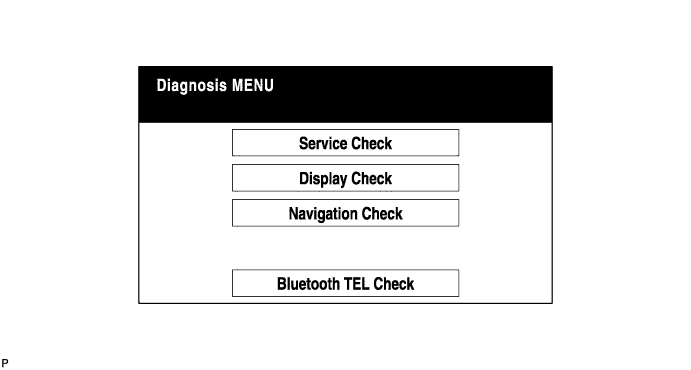
Diagnosis MENU Screen
Tech Tips
Each item is grayed out or not displayed based on the device settings.
-
Unit Check Mode Screen
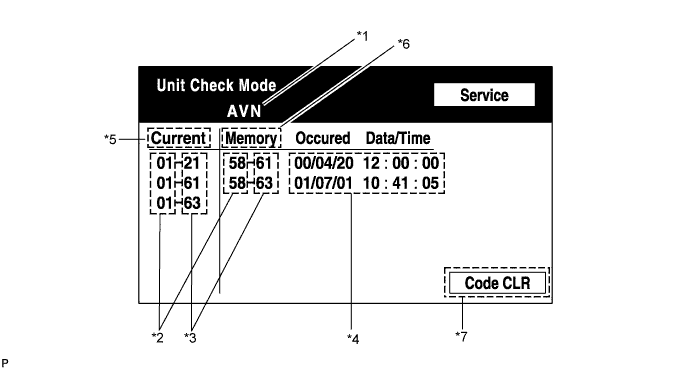
Screen Description: Display Contents Device name/*1 Target device Segment/*2 Target device logical address DTC/*3 DTC (Diagnostic Trouble Code) Timestamp/*4 The time and date of past DTCs are displayed. (The year is displayed in 2-digit format.) Present code/*5 DTCs output at the service check are displayed. Past code/*6 Diagnostic memory results and recorded DTCs are displayed. Diagnosis clear switch/*7 Pushing this switch for 3 seconds clears the diagnostic memory data of the target device. (Both response to diagnostic system check result and the displayed data are cleared.) -
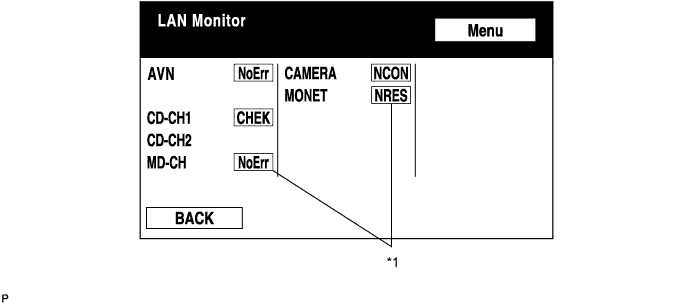
LAN Monitor (Original) Screen
-
Check Result/*1
Tech Tips
Check results of all the devices are displayed.
Result Meaning Action No Err (OK) There are no communication DTCs. - CHEK The device responds with a "check"-type DTC. Look up the DTC in "Unit Check Mode". NCON The device was previously present, but does not respond in diagnostic mode.
-
Check power supply wire harness of the device.
-
Check the AVC-LAN of the device.
Old The device responds with an "old"-type DTC. Look up the DTC in "Unit Check Mode". NRES The device responds in diagnostic mode, but gives no DTC information.
-
Check power supply wire harness of the device.
-
Check the AVC-LAN of the device.
-
-
-
LAN Monitor (Individual) Screen
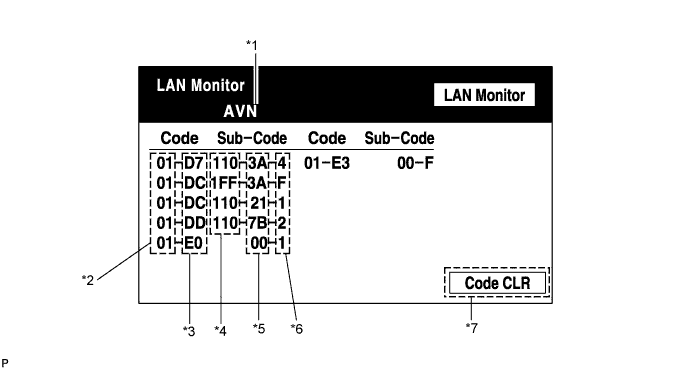
Screen Description: Display Contents Device name/*1 Target device Segment/*2 Target logical address DTC/*3 DTC (Diagnostic Trouble Code) Sub-code (device address)/*4 Physical address stored with DTC (If there is no address, nothing is displayed.) Connection check No./*5 Connection check number stored with DTC DTC occurrence/*6 Number of times the same DTC has been recorded Diagnosis clear switch/*7 Pushing this switch for 3 seconds clears the diagnostic memory data of the target device. (Both response to diagnostic system check result and the displayed data are cleared.)
-
-
DISPLAY CHECK
-
Vehicle Signal Check Mode Screen
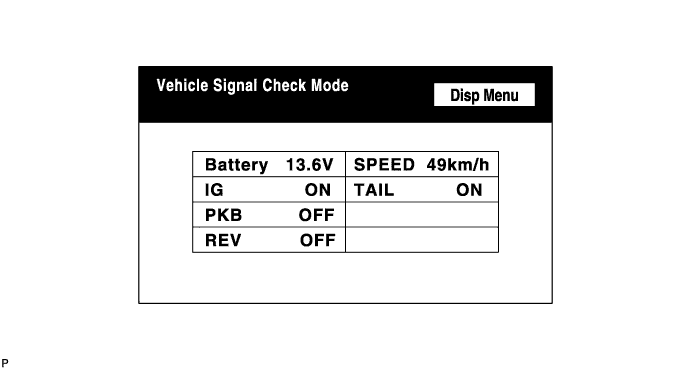
Screen Description: Name Contents Battery Battery voltage is displayed. PKB Parking brake ON/OFF state is displayed. REV Reverse signal ON/OFF state is displayed. IG Power switch ON/OFF state is displayed. TAIL TAIL signal (Light control switch) ON/OFF state is displayed. SPEED Vehicle speed is displayed in km/h. Tech Tips
-
Only items sending a vehicle signal will be displayed.
-
This screen is updated once per second when input signals to the vehicle are changed.
-
-
-
NAVIGATION CHECK
-
Navigation Check Screen
Tech Tips
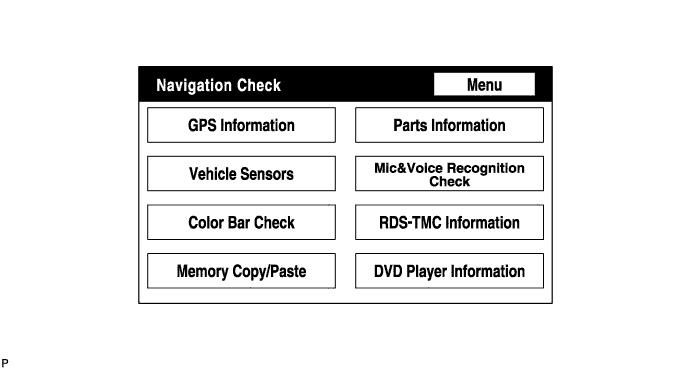
Each item is grayed out or not displayed based on the device settings.
-
GPS Information Screen
-
Satellite information/*1
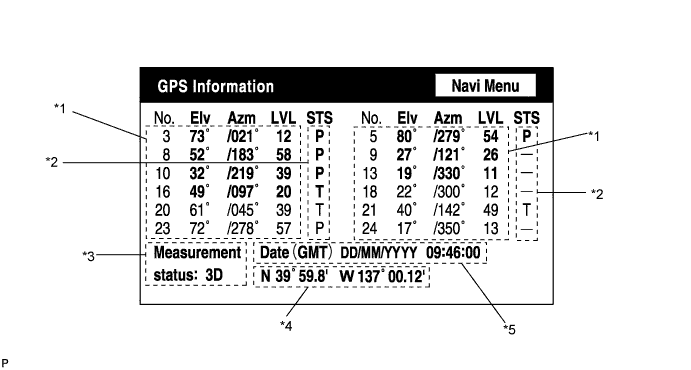
Information from a maximum of 12 satellites is displayed on the screen. This information includes the target GPS satellite number, elevation angle, direction, and signal level.
-
Receiving condition/*2
(DENSO model): Display Contents T The system is receiving a GPS signal, but is not using it for location. P The system is using the GPS signal for location. - The system cannot receive a GPS signal. (AISIN AW model): Display Contents 01H The system cannot receive a GPS signal. 02H The system is tracing a satellite. 03H The system is receiving a GPS signal, but is not using it for location. 04H The system is using the GPS signal for location. Measurement information/*3: Display Contents 2D 2-dimensional location method is being used. 3D 3-dimensional location method is being used. NG Location data cannot be used. Error Reception error has occurred. - Any other state. Position information/*4 Display Contents Position Latitude and longitude information on the current position is displayed. Date information/*5: Display Contents Date The date/time information obtained from GPS signal is displayed in Greenwich mean time (GMT). The last 4 digits are displayed.
-
-
Vehicle Sensors Screen
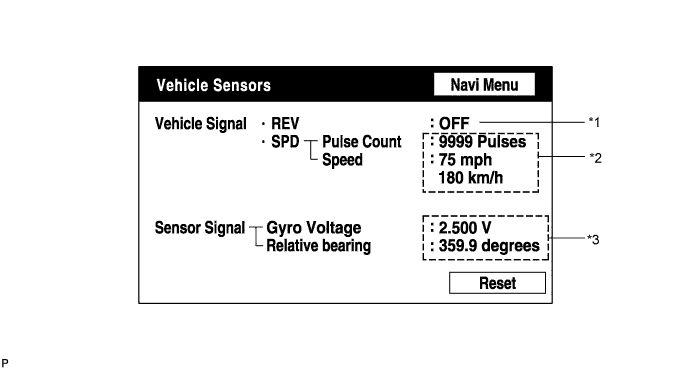
Vehicle signal: Display Contents REV/*1 REV signal ON/OFF state is displayed. SPD/*2 SPD signal condition is displayed. Sensor signal: Display Contents Gyro sensor/*3 Gyro sensor output condition is displayed. Tech Tips
Signals are updated once per second only when vehicle sensor signals are changed.
-
Microphone & Voice Recognition Check Screen
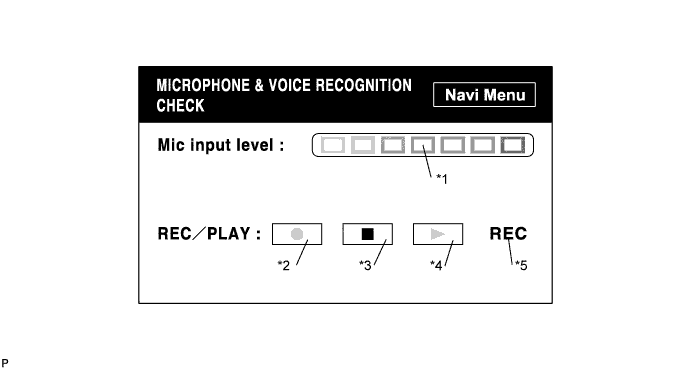
Screen Description: Display Contents Microphone input level meter/*1 Monitors the microphone input level every 100 ms and displays the results in 8 different levels. Recording switch/*2 Starts recording. Stop switch/*3 Stops recording. Play switch/*4 Plays the recorded voice. Recording indicator/*5 Comes on while recording. Tech Tips
-
The microphone input function is on at all times when this screen is displayed.
-
While recording or playing, the switches other than the stop switch cannot be pushed.
-
When no voice is recorded, the play switch cannot be pushed.
-
Recording will stop after 5 seconds or by pushing the stop switch.
-
Select the recording switch with the blower motor of the air conditioning system stopped. If an outlet of the air conditioning system is facing the microphone, noise may be recorded.
-
-
RDS-TMC Information Screen
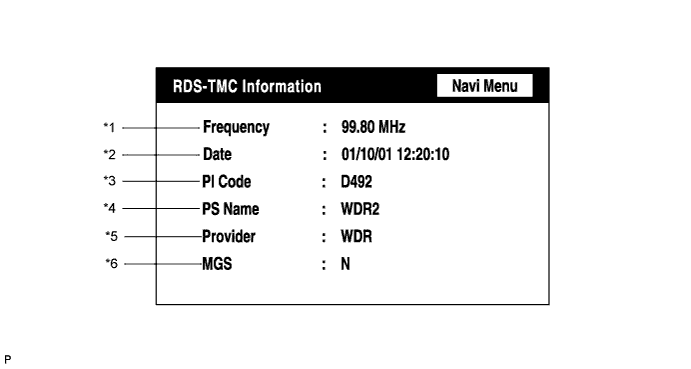
Frequency/*1 Display Contents Frequency The latest received frequency, at which an RDS-TMC signal is detected, is displayed. Date of update/*2 Display Contents Date The latest date and time of TMC signal detection are displayed. (Greenwich mean time) PI code/*3 Display Contents PI code Broadcast station identification code (to identify the content of the program) is displayed. PS name/*4 Display Contents PS name Broadcast station name is displayed. Provider name/*5 Display Contents Provider The name of the TMC provider (TMC information source) is displayed (max. 8 characters). MGS/*6 Display Contents MGS The latest radio reception area is displayed.
The letter "N", "R", and/or "U" is displayed depending on the reception area.
Tech Tips
-
If radio wave has never been received, "-" is displayed for all the items.
-
As for the MGS, "N" shows a domestic level, "R" shows a local level, and "U" shows a city level. If 2 or 3 levels are applicable, the letters are displayed in a line.
-
RDS-TMC information is not updated in DTC mode.
-
-
DVD Player Information Screen
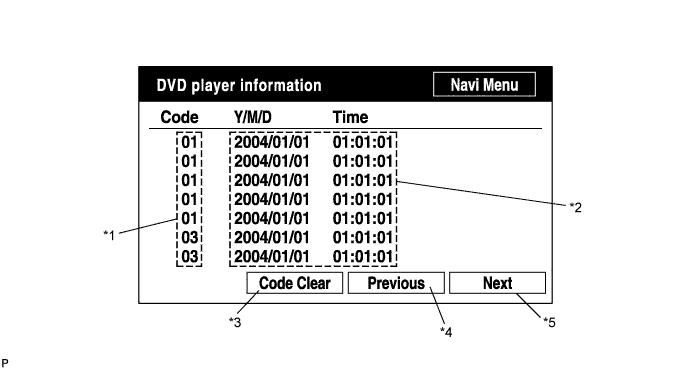
Screen Description: Display Contents Trouble code/*1 Each code corresponding to the malfunctions is displayed. For details, refer to "Trouble Code Description". Occurrence time/*2
-
The date (year, month, day) and time (hour, minute, second) when the trouble code was detected are displayed as a time stamp. (Greenwich mean time)
-
The time data to be displayed are received from the GPS receiver.
Trouble code clear switch/*3 All code data being displayed are cleared by pushing this switch for 3 seconds. Returning switch/*4 The previous page is displayed. If the current displayed page is the first page, this switch cannot be operated. Proceeding switch/*5 The next page is displayed. If the current displayed page is the last page, this switch cannot be operated. Trouble Code Description: Code Malfunction Countermeasure 01 Cannot be recognized Replace navigation receiver assembly. 03 Cannot be read Follow the inspection procedure for DTC 58-42 Click here.
Tech Tips
This is a DVD player check function in the navigation receiver assembly (built-in navigation ECU).
-
-