NAVIGATION SYSTEM BLUETOOTH TEL CHECK MODE
Tech Tips
Illustrations may differ from the actual vehicle depending on the device settings and options. Therefore, some detailed areas may not be shown exactly the same as on the actual vehicle.
-
ENTER DIAGNOSTIC MODE Click here
-
"BLUETOOTH" TEL CHECK
-
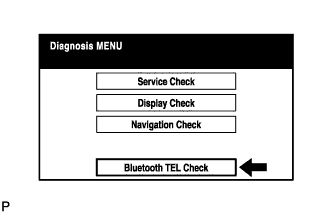
Select "'Bluetooth' TEL Check" from the "Diagnosis MENU" screen.
-
-
"BLUETOOTH" CHECK
-
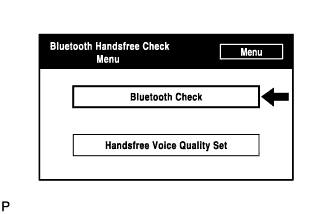
Select "'Bluetooth' Check" from the "'Bluetooth' Handsfree Check Menu" screen.
-
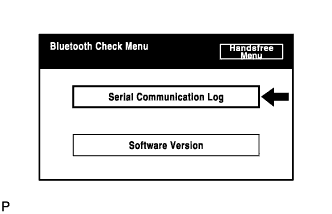
Select "Serial Communication Log" from the "'Bluetooth' Check Menu" screen.
-
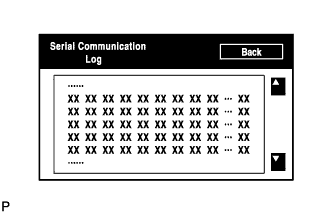
The communication log data in the display ECU are displayed on this screen.
Tech Tips
The displayed data can be used as a reference.
-
-
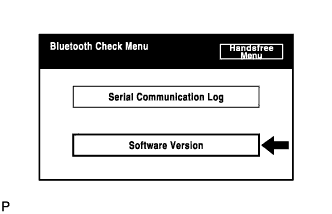
Select "Software Version" from the "'Bluetooth' Check Menu" screen.
-
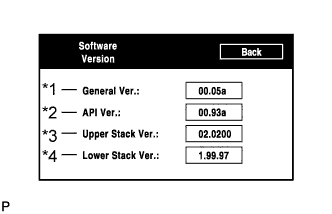
Check the software version of the "Bluetooth" module.
Screen Description: Display Contents General Version/*1
-
General software version of "Bluetooth" module
-
If any of the API version, upper stack version, and low stack version is updated, the general version is upgraded.
API Version/*2 API software version is displayed. Upper Stack Version/*3 Upper Stack version is displayed. Lower Stack Version/*4 Lower Stack version is displayed. Tech Tips
This function is controlled by the built-in navigation ECU.
-
-
-
-
HANDSFREE VOICE QUALITY SET
-
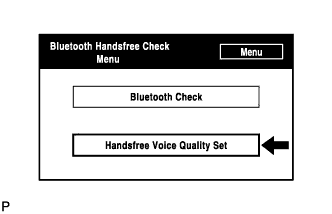
Select "Handsfree Voice Quality Set" from the "'Bluetooth' Handsfree Check Menu" screen.
-
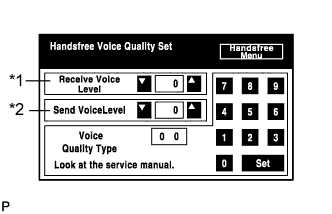
Check the handsfree voice level.
Screen Description: Display Contents Received voice level adjustment/*1 Setting possible for the voice level received from "Bluetooth" compatible phones. Sent voice level adjustment/*2 Setting possible for the voice level sent to "Bluetooth" compatible phones. Tech Tips
This function is controlled by the built-in navigation ECU.
Note
"Voice Quality Type" should not be changed.
-