RADIO RECEIVER INSTALLATION
-
INSTALL RADIO RECEIVER ASSEMBLY (for Radio Receiver Type)
-
INSTALL RADIO AND DISPLAY RECEIVER ASSEMBLY (for Radio and Display Type)
-
INSTALL EXTENSION MODULE (w/ Navigation System)
-
Connect the connector to install the extension module.
-
Connect the each connector to install the navigation wire and radio cable.
-
-
INSTALL NO. 1 RADIO BRACKET (for Radio Receiver Type)
-
Install the No. 1 radio bracket with the 4 screws.
-
-
INSTALL NO. 2 RADIO BRACKET (for Radio Receiver Type)
-
Install the No. 2 radio bracket with the 4 screws.
-
-
INSTALL NO. 1 RADIO BRACKET (for Radio and Display Type)
-
w/o Navigation System
-
Install the No. 1 radio bracket with the 3 screws.
-
-
w/ Navigation System
-
Install the No. 1 radio bracket with the 5 screws.
-
-
-
INSTALL NO. 2 RADIO BRACKET (for Radio and Display Type)
-
w/o Navigation System
-
Install the No. 2 radio bracket with the 3 screws.
-
-
w/ Navigation System
-
Install the No. 2 radio bracket with the 5 screws.
-
-
-
INSTALL RADIO RECEIVER WITH BRACKET (for Radio Receiver Type)
-
Connect each connector.
-
Engage the 4 clips.
-
Install the radio receiver with bracket with the 4 bolts.
-
-
INSTALL RADIO AND DISPLAY RECEIVER WITH BRACKET (for Radio and Display Type)
-
Connect each connector.
-
Install the radio and display receiver with bracket with the 4 bolts.
-
-
INSTALL CENTER INSTRUMENT CLUSTER FINISH PANEL SUB-ASSEMBLY (for Radio and Display Type)
-
Engage the 4 clips and install the center instrument cluster finish panel sub-assembly.
-
-
INSTALL CENTER INSTRUMENT PANEL REGISTER ASSEMBLY
-
Connect the connector.
-
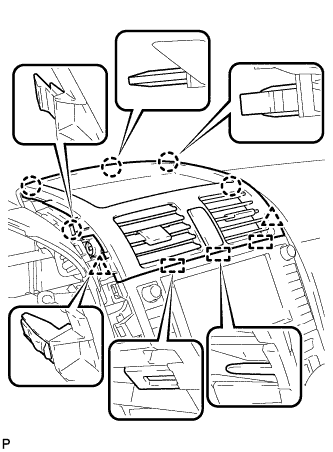
Engage the 3 guides, 5 claws and 2 clips, and install the center instrument panel register assembly.
-
-
INSTALL INSTRUMENT PANEL FINISH PANEL END LH
-
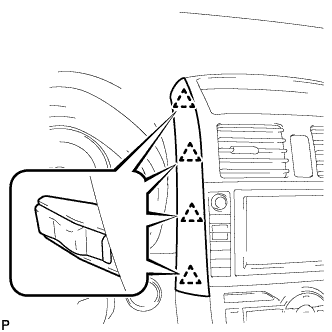
Engage the 4 clips and install the instrument panel finish panel end LH.
-
-
INSTALL INSTRUMENT PANEL FINISH PANEL END RH
-
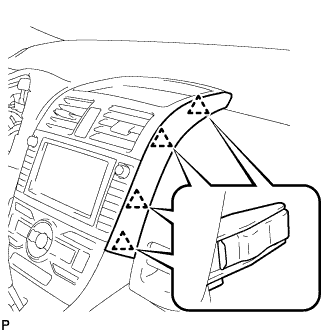
Engage the 4 clips and install the instrument panel finish panel end RH.
-