POWER WINDOW CONTROL SYSTEM OPERATION CHECK
-
CHECK WINDOW LOCK SWITCH
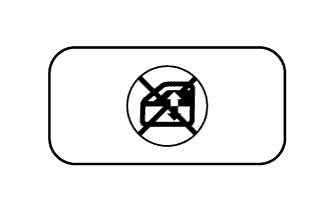
Tech Tips
Before performing the window lock switch operation check, make sure that the window lock switch is off (the switch is not pushed in).
-
Check that the front passenger and rear windows cannot be operated when the window lock switch of the power window regulator master switch assembly is pushed in.
-
Check that the front passenger and rear windows can be operated when the window lock switch of the power window regulator master switch assembly is pushed in again.
-
-
CHECK MANUAL UP / DOWN FUNCTION
-
Check that the driver side power window operates as follows:
OK Condition Master Switch Switch Operation Power Window Power switch on (IG) Driver side Pulled halfway up UP (Closes) Pushed halfway down DOWN (Opens) -
Check that the front passenger side window and rear power windows operate as follows:
OK Condition Regulator Switch Switch Operation Power Window
-
Power switch on (IG)
-
Window lock switch off
Front passenger side Pulled halfway up UP (Closes) Pushed halfway down DOWN (Opens) Rear LH side Pulled halfway up UP (Closes) Pushed halfway down DOWN (Opens) Rear RH side Pulled halfway up UP (Closes) Pushed halfway down DOWN (Opens) -
-
-
CHECK AUTO UP / DOWN FUNCTION
-
Check that the driver side power window operates as follows:
OK Condition Master Switch Switch Operation Power Window Power switch on (IG) Driver side Pulled up (One touch operation) AUTO UP (Closes) Pushed down (One touch operation) AUTO DOWN (Opens) -
Check that the front passenger side window and rear power windows operate as follows:
OK Condition Regulator Switch Switch Operation Power Window
-
Power switch on (IG)
-
Window lock switch off
Front passenger side Pulled up (One touch operation) AUTO UP (Closes) Pushed down (One touch operation) AUTO DOWN (Opens) Rear LH side Pulled up (One touch operation) AUTO UP (Closes) Pushed down (One touch operation) AUTO DOWN (Opens) Rear RH side Pulled up (One touch operation) AUTO UP (Closes) Pushed down (One touch operation) AUTO DOWN (Opens) -
-
-
CHECK REMOTE MANUAL UP / DOWN FUNCTION
-
Check that the front passenger side window and rear power windows operate as follows:
OK Condition Master Switch Switch Operation Power Window
-
Power switch on (IG)
-
Window lock switch off
Front passenger side Pulled halfway up UP (Closes) Pushed halfway down DOWN (Opens) Rear LH side Pulled halfway up UP (Closes) Pushed halfway down DOWN (Opens) Rear RH side Pulled halfway up UP (Closes) Pushed halfway down DOWN (Opens) -
-
-
CHECK REMOTE AUTO UP / DOWN FUNCTION
-
Check that the front passenger side window and rear power windows operate as follows:
OK Condition Master Switch Switch Operation Power Window
-
Power switch on (IG)
-
Window lock switch off
Front passenger side Pulled up (One touch operation) AUTO UP (Closes) Pushed down (One touch operation) AUTO DOWN (Opens) Rear LH side Pulled up (One touch operation) AUTO UP (Closes) Pushed down (One touch operation) AUTO DOWN (Opens) Rear RH side Pulled up (One touch operation) AUTO UP (Closes) Pushed down (One touch operation) AUTO DOWN (Opens) -
-
-
CHECK POWER WINDOW OPERATION FUNCTION AFTER POWER SWITCH IS TURNED OFF
-
Check that all the power windows can be operated with the power window regulator master switch assembly and power window regulator switch assemblies (for front passenger side, rear LH and RH sides) after the power switch is turned off.
Tech Tips
If the window lock switch is on, the front passenger, rear LH and RH windows cannot be operated. Therefore, turn the window lock switch off before checking the window operation.
-
Check that the key-off operation function does not operate after the driver side door or front passenger side door is opened.
Tech Tips
Even if the driver door or front passenger door is opened during automatic window operation while the key-off operation function is on, the window will continue operating.
-
Check that all the power windows cannot be operated when more than approximately 45 seconds have elapsed after the power switch was turned off.
-
-
CHECK JAM PROTECTION FUNCTION
-
Check the basic function.
CAUTION:
Do not put your fingers between the door frame and door glass to check the jam protection function. Also, prevent any part of your body from being caught during inspection.
Tech Tips
The jam protection function is operative during both the auto up and manual up operations while the engine is running or the power switch is on (IG), and even after 45 seconds have elapsed after the power switch is turned off.
-
Fully open the window.
-
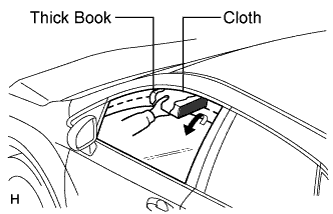
Set a thick book wrapped with a piece of cloth near the window fully closed position.
-
Operate the auto up or manual up function to check that the power window goes down after the book is caught between the window and door frame, and stops when the opening reaches approximately 200 mm (7.87 in.).
Tech Tips
The power window moves down approximately 125 mm (4.93 in.). However, when the opening does not reach 200 mm (7.87 in.), the power window continues to go down until the opening reaches 200 mm (7.87 in.) or until approximately 5 seconds elapse.
-
While the power window is moving down, check that the door glass cannot be raised using the power window switch.
-
-
-
CHECK POWER WINDOW SWITCH LED ILLUMINATION
-
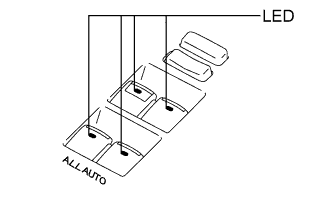
Check the LED illumination (power window regulator master switch assembly).
-
Check that the LEDs located on the power window regulator master switch assembly illuminate when the power switch is turned to on (IG).
-
-
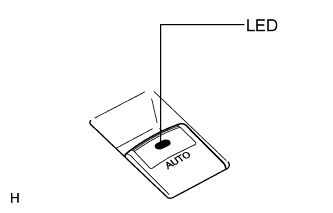
Check the LED illumination (power window regulator switch assembly).
-
Check that the LEDs located on each power window regulator switch assembly illuminate when the power switch is turned to on (IG).
Tech Tips
If the window lock switch is on, the LED located on each power window regulator switch assembly does not illuminate. Therefore, turn the window lock switch off before checking the LED illumination.
-
-