UPPER INSTRUMENT PANEL REMOVAL
-
PRECAUTION
-
REMOVE REAR FLOOR MAT
-
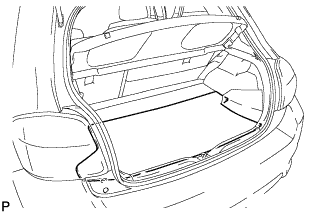
Remove the rear floor mat.
-
-
REMOVE REAR DECK FLOOR BOX
-
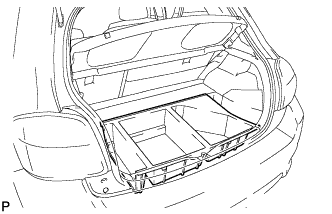
Remove the rear deck floor box.
-
-
REMOVE BATTERY BOX COVER
-
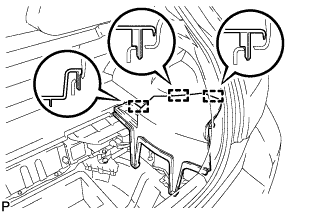
Disengage the 3 guides and remove the battery box cover.
-
-
DISCONNECT CABLE FROM NEGATIVE BATTERY TERMINAL
CAUTION:
Wait at least 90 seconds after disconnecting the cable from the negative (-) battery terminal to disable the SRS system.
Note
When disconnecting the cable, some systems need to be initialized after the cable is reconnected Click here.
-
REMOVE INSTRUMENT CLUSTER FINISH PANEL ASSEMBLY
-
Operate the tilt lever to lower the steering wheel assembly.
-
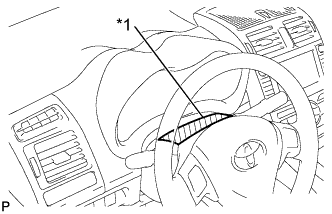
Text in Illustration *1 Protective Tape Apply protective tape to the area shown in the illustration.
-
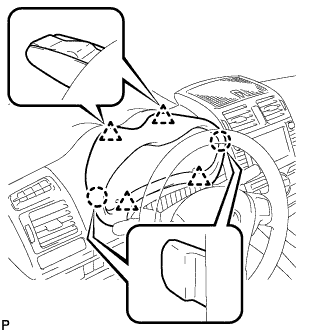
Disengage the 2 claws and 4 clips, and then remove the instrument cluster finish panel assembly.
-
-
REMOVE COMBINATION METER ASSEMBLY
-
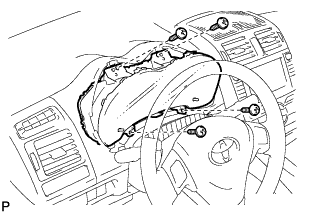
Remove the 4 screws.
-
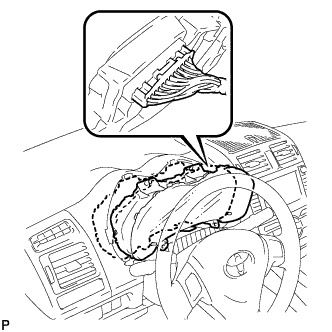
Pull the combination meter assembly, disconnect the connector, and remove the combination meter assembly.
Note
When removing the combination meter assembly, do not damage the upper instrument panel sub-assembly or combination meter assembly.
-
-
REMOVE INSTRUMENT PANEL FINISH PANEL END LH
-
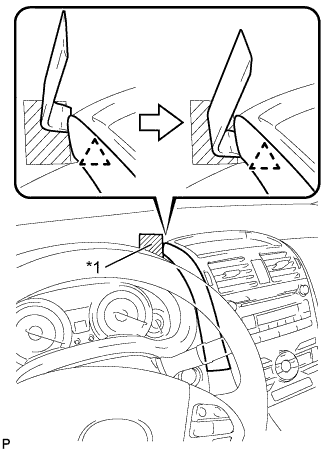
Text in Illustration *1 Protective Tape Apply protective tape to the area shown in the illustration.
-
Insert a roof moulding remover and slide the remover toward the clip.
-
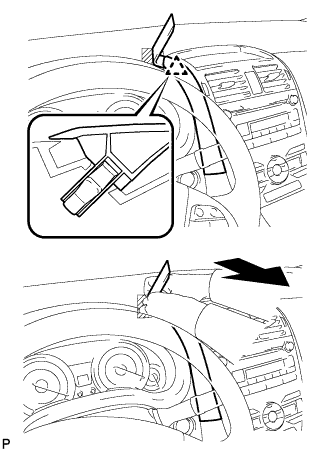
Pull the remover with both hands to disengage the clip as shown in the illustration.
-
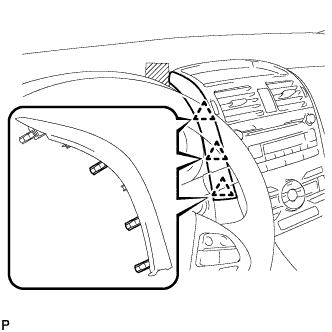
Disengage the 3 clips and remove the instrument panel finish panel end LH.
-
-
REMOVE INSTRUMENT PANEL FINISH PANEL END RH
-
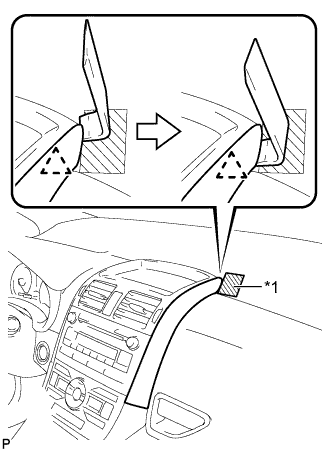
Text in Illustration *1 Protective Tape Apply protective tape to the area shown in the illustration.
-
Insert a roof moulding remover and slide the remover toward the clip.
-
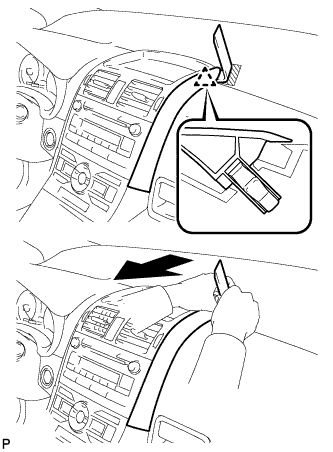
Pull the remover with both hands to disengage the clip as shown in the illustration.
-
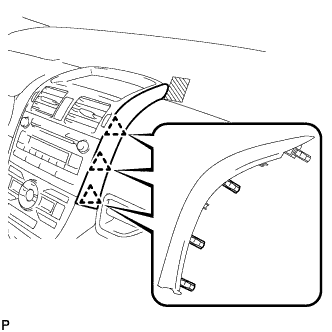
Disengage the 3 clips and remove the instrument panel finish panel end RH.
-
-
REMOVE CENTER INSTRUMENT PANEL REGISTER ASSEMBLY
-
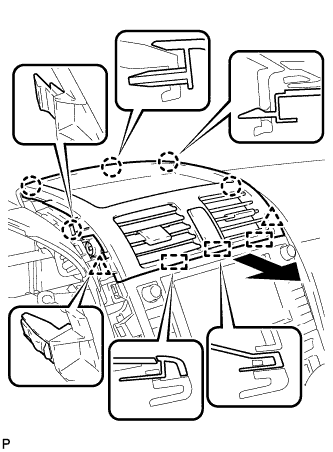
Disengage the 5 claws, 2 clips, and 3 guides.
-
Disconnect the connector and remove the center instrument panel register assembly.
-
-
REMOVE FRONT PILLAR GARNISH CORNER PIECE LH
-
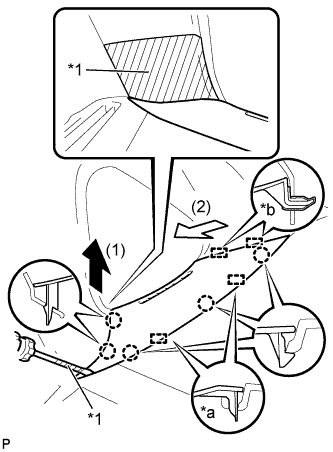
Text in Illustration *1 Protective Tape *a Guide (A) *b Guide (B) Apply protective tape to the areas shown in the illustration.
-
Using a screwdriver, disengage the 5 claws and 2 guides (A).
Tech Tips
Tape the screwdriver tip before use.
-
Disengage the 2 guides (B) and remove the front pillar garnish corner piece LH.
-
-
REMOVE FRONT PILLAR GARNISH LH
-
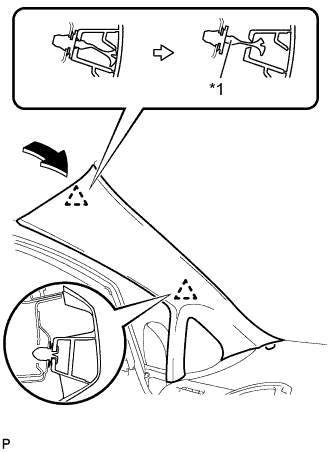
Text in Illustration *1 Front Pillar Garnish Clip Pull the upper part of the garnish toward the inside of the cabin and disengage the garnish from the base of the 2 clips.
Tech Tips
Make the front pillar garnish LH hang down from the front pillar garnish clip.
-
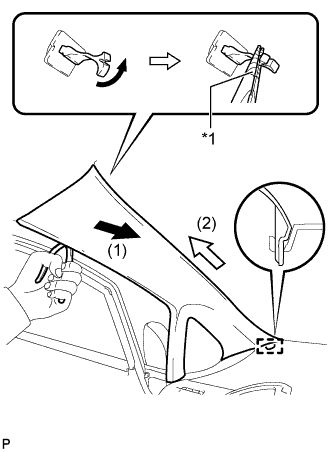
Text in Illustration *1 Protective Tape Turn the end of the front pillar garnish clip 90° with needle-nosed pliers and remove it from the front pillar garnish LH.
Note
-
Front pillar garnish clips are reusable if they are not removed from the vehicle and have no damage.
-
Replace the front pillar garnish clips with new ones if they are removed from the vehicle.
Tech Tips
Tape the tips of the needle-nosed pliers before use.
-
-
Disengage the guide at the front end of the front pillar garnish LH and remove it.
-
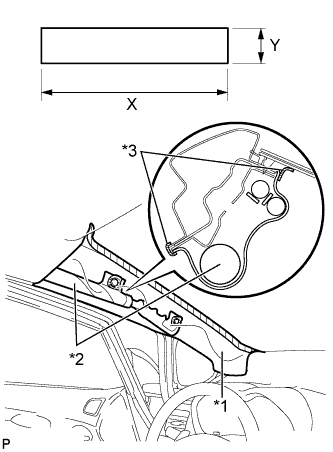
Text in Illustration *1 Protective Cover *2 Curtain Shield Airbag Assembly *3 Adhesive Tape Protect the curtain shield airbag assembly.
Protective Cover Size X 700 mm (27.56 in.) Y 120 mm (4.72 in.)
-
Cover the airbag with a 700 mm (27.56 in.) x 120 mm (4.72 in.) cloth or piece of nylon and fix the ends of the cover with tape as shown in the illustration.
Note
Cover the curtain shield airbag with a protective cover as soon as the front pillar garnish is removed.
-
-
-
REMOVE FRONT PILLAR GARNISH CORNER PIECE RH
Tech Tips
Use the same procedure as for the LH side.
-
REMOVE FRONT PILLAR GARNISH RH
Tech Tips
Use the same procedure as for the LH side.
-
REMOVE REAR CONSOLE BOX COVER
-
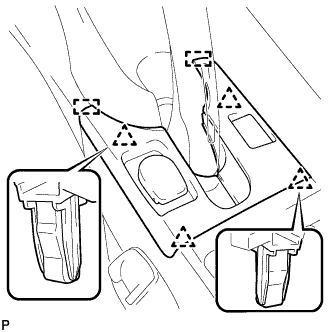
Disengage the 4 clips.
-
Disengage the 2 guides.
-
Disconnect the connector and remove the rear console box cover.
-
-
REMOVE UPPER CONSOLE PANEL
-
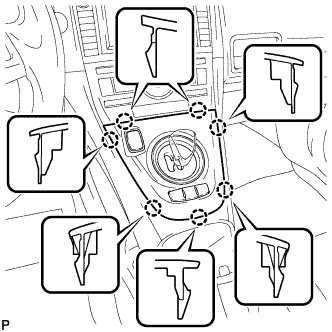
Disengage the 7 claws.
-
Disconnect the connector and remove the upper console panel.
-
-
REMOVE LOWER CENTER INSTRUMENT PANEL FINISH PANEL
-
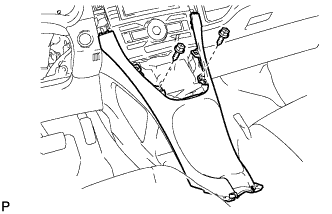
Remove the 2 screws <E> or <F>.
-
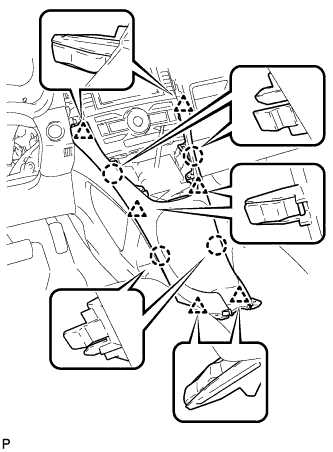
Disengage the 4 claws and 6 clips, and remove the lower center instrument panel finish panel.
-
-
REMOVE GLOVE COMPARTMENT DOOR ASSEMBLY
-
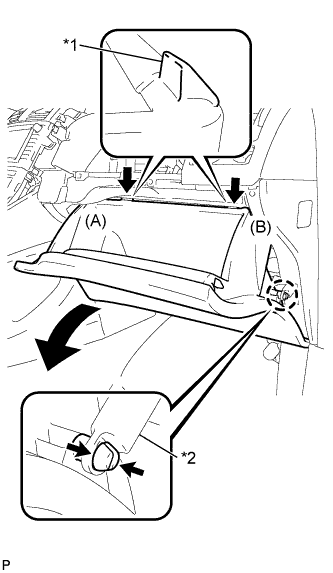
Text in Illustration *1 Stopper *2 Glove Compartment Door Stopper Disengage the claw and release the glove compartment door stopper.
-
Bend portions (A) and (B) in the direction indicated by the arrows in the illustration to release the 2 stoppers, and lower the glove compartment door assembly until the front of the door is level.
-
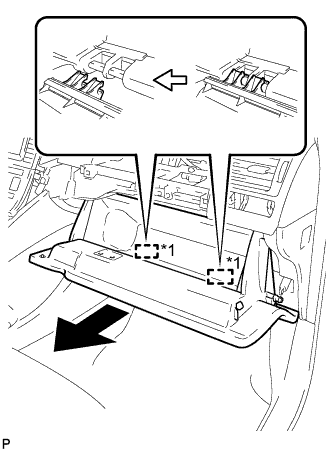
Text in Illustration *1 Hinge Pull the glove compartment door assembly horizontally toward the rear of the vehicle to release the 2 hinges, and remove the glove compartment door assembly.
Note
Pulling the glove compartment door assembly upward to remove it will cause the hinges to deform when reinstalling the door. Be sure to pull out the compartment door horizontally.
-
-
REMOVE NO. 1 INSTRUMENT PANEL BOX DOOR SUB-ASSEMBLY
-
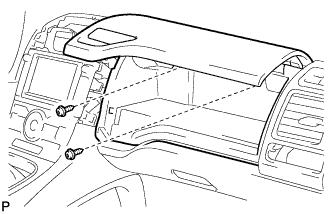
Remove the 2 screws <C> or <D>.
-
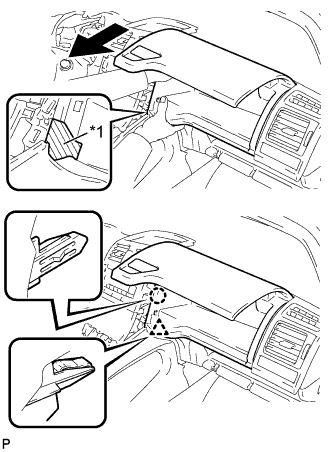
Text in Illustration *1 Protective Tape Apply protective tape to the area shown in the illustration.
-
Disengage the claw and clip.
-
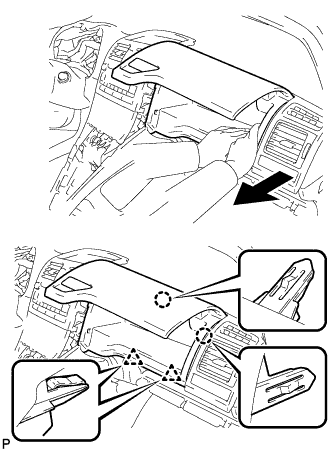
Disengage the 2 claws and 2 clips.
-
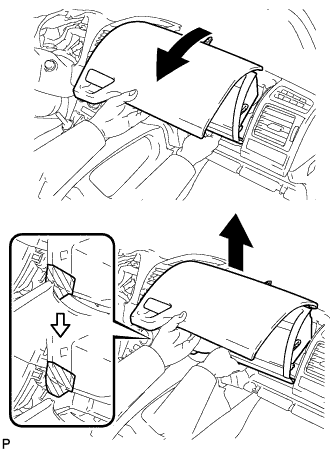
As shown in the illustration, remove the No. 1 instrument panel box door sub-assembly.
-
w/ USB Audio System:
-
Disengage the clamp and disconnect the connector.
-
-
-
DISCONNECT INSTRUMENT PANEL WIRE ASSEMBLY
-
Check that the power switch is off.
-
Check that the cable is disconnected from the negative (-) battery terminal.
CAUTION:
Wait at least 90 seconds after disconnecting the cable from the negative (-) battery terminal to disable the SRS system.
-
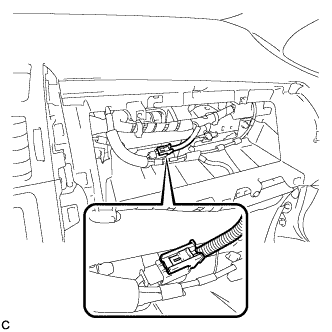
Disconnect the connector.
Note
When disconnecting any airbag connector, take care not to damage the airbag wire harness.
-
-
REMOVE UPPER INSTRUMENT PANEL SUB-ASSEMBLY
-
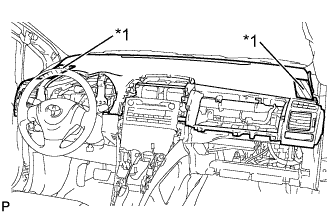
Text in Illustration *1 Protective Tape Apply protective tape to the areas shown in the illustration.
-
Operate the tilt lever to lower the steering wheel assembly.
-
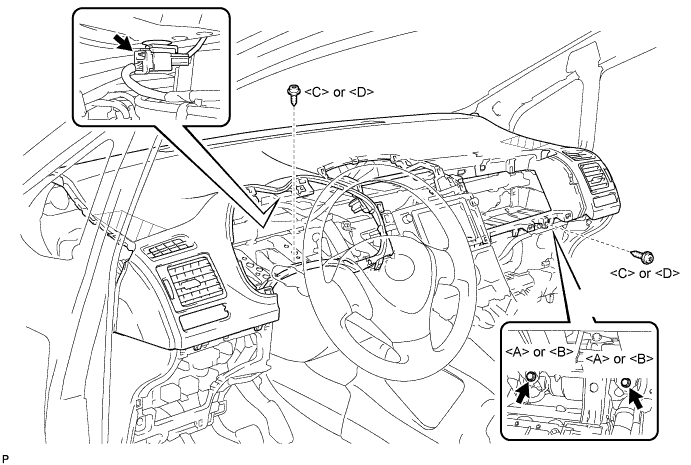
Disconnect the connector.
-
Remove the 2 screws <C> or <D>.
-
Remove the 2 passenger airbag bolts <A> or <B>.
-
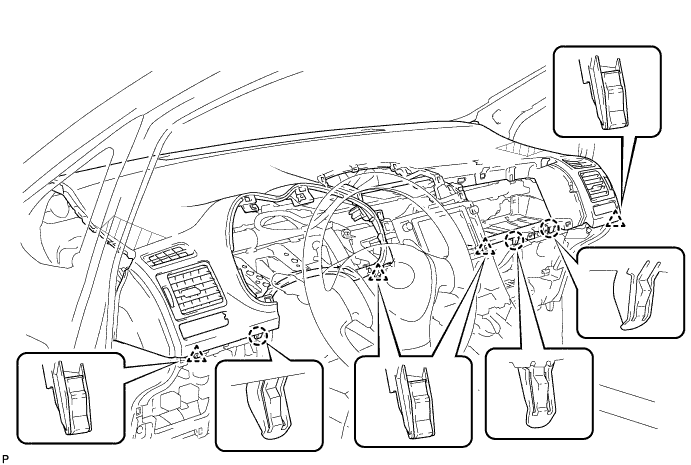
Disengage the 4 clips and 3 claws.
-
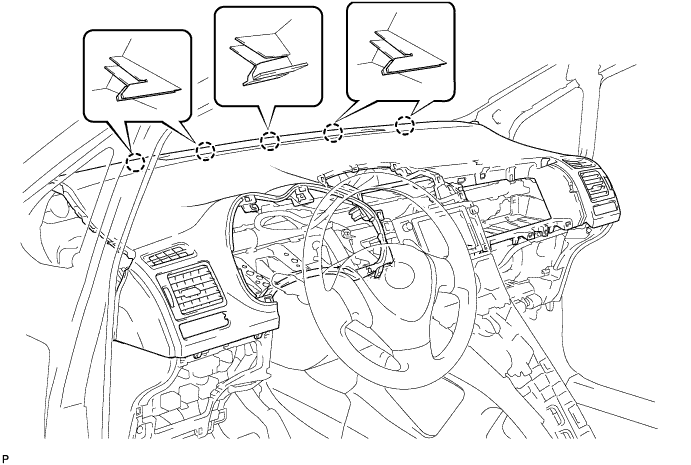
Disengage the 5 claws and remove the upper instrument panel sub-assembly.
Note
When removing the upper instrument panel sub-assembly, be careful not to damage it or the steering wheel assembly.
-