POWER OUTLET SOCKET REMOVAL
-
REMOVE REAR CONSOLE BOX COVER
-
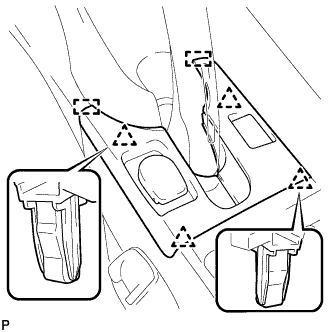
Disengage the 4 clips.
-
Disengage the 2 guides.
-
Disconnect the connector and remove the rear console box cover.
-
-
REMOVE POWER OUTLET SOCKET COVER NO.2
-
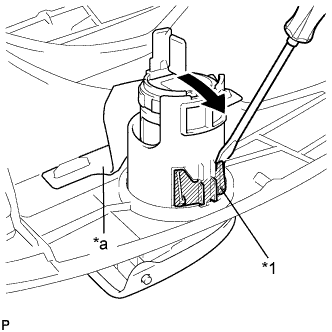
Text in Illustration *1 Claw *a Metal Support Insert a screwdriver as shown in the illustration to snap off the power outlet socket cover claw.
-
Tilt the power outlet socket cover in the direction indicated by the arrow in the illustration to allow access between the power outlet socket cover and metal support.
-
Snap off the power outlet socket cover claw on the other side using the same procedure.
Note
-
Do not pry on the metal support, as it may result in damage.
-
Do not scratch the power point socket assembly or rear console box cover.
-
-
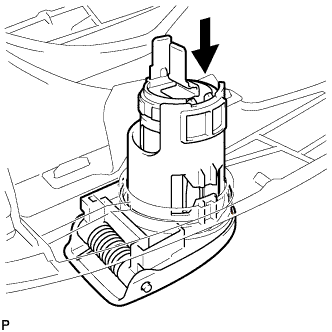
Remove the power outlet socket cover and power point socket assembly.
-
-
REMOVE POWER POINT SOCKET ASSEMBLY
-
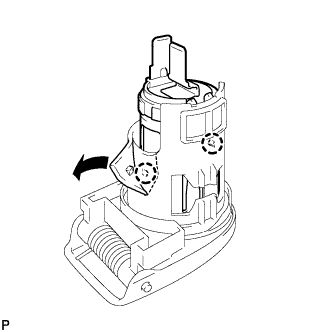
Using side cutters, cut around the 2 claws as shown in the illustration.
Note
Do not scratch the power point socket assembly.
-
Pull out the power point socket assembly from the cover side of the power outlet socket cover.
-