ROOF HEADLINING INSTALLATION
-
INSTALL ROOF HEADLINING ASSEMBLY (w/ Sliding Roof)
-
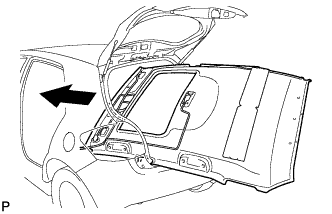
Pull the roof headlining assembly into the vehicle through the back door.
Note
Do not damage the roof headlining assembly or body interior.
-
Install the 3 clips.
Note
After installation, make sure that the back door weatherstrip does not interfere with the roof headlining assembly.
-
Connect the sliding roof drive gear connector.
-
Connect the antenna cord sub-assembly connectors to the rear pillar RH.
-
Connect the antenna cord sub-assembly connector to the rear pillar RH with the bolt.
- Torque:
- 7.0 N*m { 71 kgf*cm, 62 in.*lbf }
-
Connect the antenna cord sub-assembly connector and engage each clamp to the front pillar RH.
-
Engage each clamp to the front pillar LH.
-
Connect the No. 1 roof wire connector and engage the clamp.
-
w/ Rain Sensor:
-
Connect the rain sensor connector.
-
-
w/ EC Mirror:
-
Connect the inner rear view mirror connector.
-
-
-
INSTALL ROOF HEADLINING ASSEMBLY (w/o Sliding Roof)
-
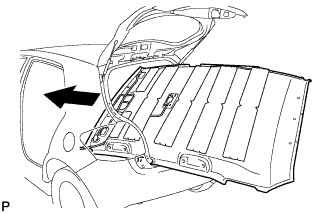
Pull the roof headlining assembly into the vehicle through the back door.
Note
Do not damage the roof headlining assembly or body interior.
-
Install the 3 clips.
Note
After installation, make sure that the back door weatherstrip does not interfere with the roof headlining assembly.
-
Connect the antenna cord sub-assembly connectors to the rear pillar RH.
-
Connect the antenna cord sub-assembly connector to the rear pillar RH with the bolt.
- Torque:
- 7.0 N*m { 71 kgf*cm, 62 in.*lbf }
-
Connect the antenna cord sub-assembly connector and engage each clamp to the front pillar RH.
-
Engage each clamp to the front pillar LH.
-
Connect the No. 1 roof wire connector and engage the clamp.
-
w/ Rain Sensor:
-
Connect the rain sensor connector.
-
-
w/ EC Mirror:
-
Connect the inner rear view mirror connector.
-
-
-
INSTALL SUN ROOF OPENING TRIM MOULDING (w/ Sliding Roof)
-
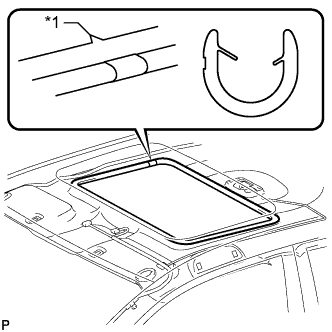
Text in Illustration *1 Notch Align the recess of the sun roof opening trim moulding with the notch of the roof headlining and install the sun roof opening trim moulding.
Note
After installation, check that the corners fit correctly.
-
-
INSTALL VISOR HOLDER
-
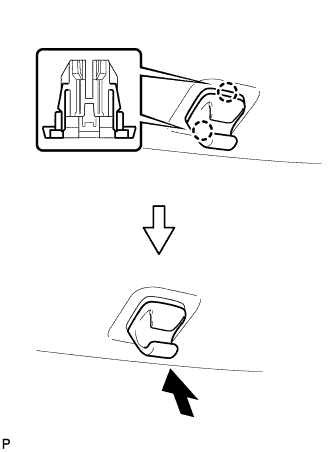
Engage the 2 claws.
-
Push in the visor holder as shown in the illustration.
Tech Tips
Use the same procedure for the RH side and the LH side.
-
-
INSTALL NO. 1 ROOM LIGHT ASSEMBLY
-
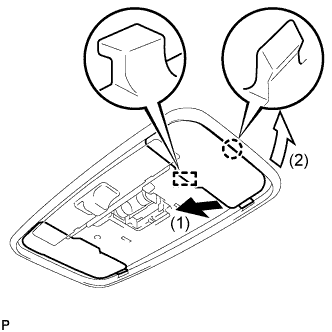
Engage the guide and claw, and install the room light cover.
Tech Tips
Use the same procedure for the RH side and the LH side.
-
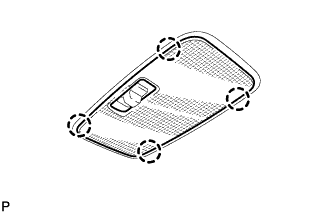
Engage the 4 claws and install the lens cover.
-
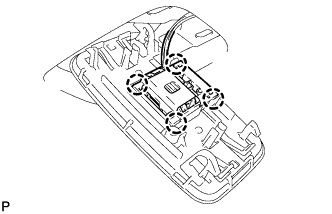
Engage the 4 claws and install the room light switch base to the No. 1 room light assembly.
-
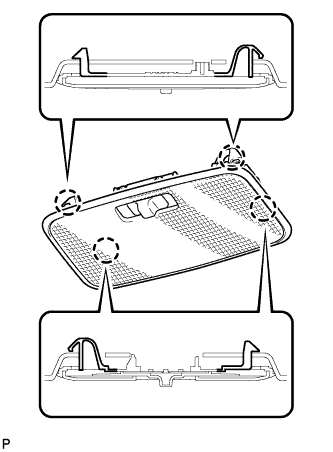
Engage the 4 claws and install the No. 1 room light assembly.
-
-
INSTALL ASSIST GRIP SUB-ASSEMBLY
-
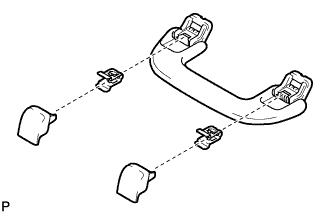
Assemble the assist grip sub-assembly as shown in the illustration.
-
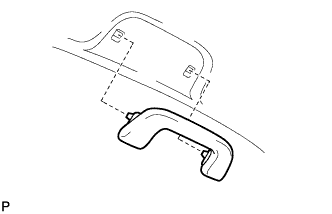
Install the assist grip sub-assembly.
Tech Tips
Use the same procedure for the other 3 assist grips.
-
-
INSTALL VISOR ASSEMBLY LH
-
Install the 2 clips to the visor assembly LH.
-
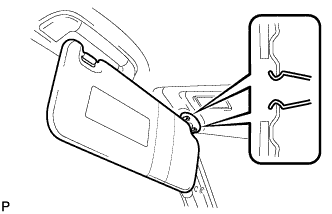
Engage the 2 clips and install the visor assembly LH.
-
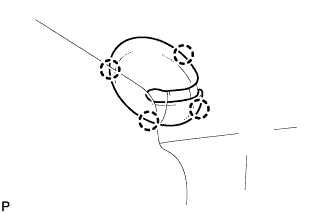
Engage the 4 claws and install the visor bracket cover.
-
-
INSTALL VISOR ASSEMBLY RH
Tech Tips
Use the same procedure as for the LH side.
-
INSTALL MAP LIGHT ASSEMBLY
-
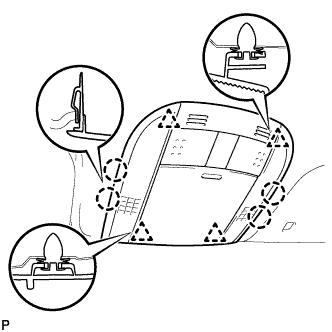
Connect the connector.
-
Engage the 4 claws and 4 clips, and install the map light assembly.
-
-
INSTALL RAIN SENSOR COVER (w/ Rain Sensor)
-
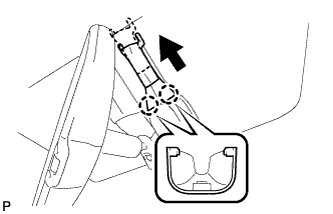
Engage the 2 claws and install the rain sensor cover.
-
-
INSTALL INNER REAR VIEW MIRROR STAY HOLDER COVER (w/ EC Mirror)
-
Engage the 6 claws and temporarily install the inner rear view mirror stay holder cover.
-
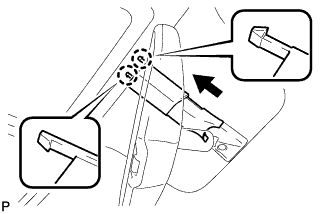
Slide the inner rear view mirror stay holder cover and engage the 2 claws as shown in the illustration to install the cover.
-
-
INSTALL ROOF SIDE INNER GARNISH ASSEMBLY LH
-
Engage the 4 clips and install the roof side inner garnish assembly LH.
Note
After installation, make sure that the back door weatherstrip does not interfere with the roof side inner garnish assembly LH.
-
-
INSTALL SIDE DECK TRIM PANEL ASSEMBLY LH
-
Engage the 2 claws and 4 clips, and install the side deck trim panel assembly LH.
Note
After installation, make sure that the back door weatherstrip does not interfere with the side deck trim panel assembly LH.
-
-
INSTALL NO. 2 ROOM LIGHT ASSEMBLY
-
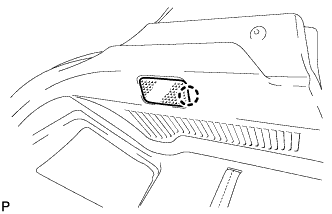
Connect the connector.
-
Engage the claw and install the No. 2 room light assembly.
-
-
INSTALL REAR SEAT SIDE GARNISH LH
-
Engage the 6 claws and 2 clips, and install the rear seat side garnish LH.
-
-
INSTALL REAR SEATBACK HINGE SUB-ASSEMBLY (for LH Side)
-
Install the rear seatback hinge sub-assembly with the bolt.
- Torque:
- 18 N*m { 185 kgf*cm, 13 ft.*lbf }
-
-
INSTALL ROOF SIDE INNER GARNISH ASSEMBLY RH
Tech Tips
Use the same procedure as for the LH side.
-
INSTALL SIDE DECK TRIM PANEL ASSEMBLY RH
-
Engage the 2 claws and 4 clips, and install the side deck trim panel assembly RH.
Note
After installation, make sure that the back door weatherstrip does not interfere with the side deck trim panel assembly RH.
-
-
INSTALL REAR SEAT SIDE GARNISH RH
-
Engage the 6 claws and 2 clips, and install the rear seat side garnish RH.
-
-
INSTALL REAR SEAT SIDE COVER RH
-
Engage the 3 claws and 2 clips, and install the rear seat side cover RH.
-
-
INSTALL REAR SEATBACK HINGE SUB-ASSEMBLY (for RH Side)
-
Install the rear seatback hinge sub-assembly with the bolt.
- Torque:
- 18 N*m { 185 kgf*cm, 13 ft.*lbf }
-
-
INSTALL REAR DECK TRIM COVER
-
Engage the 10 claws and install the rear deck trim cover.
Note
After installation, make sure that the back door weatherstrip does not interfere with the rear deck trim cover.
-
-
INSTALL REAR NO. 1 FLOOR BOARD
-
Engage the 2 claws, 2 clips and 3 guides.
-
Install the rear No. 1 floor board with the bolt.
-
-
INSTALL NO. 6 BATTERY CARRIER PANEL
-
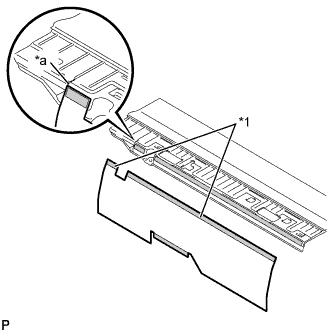
Text in Illustration *1 Double-sided tape *a Installation position guide Using the installation position guide shown in the illustration as a base, attach a new No. 6 battery carrier panel to the rear No. 1 floor board.
-
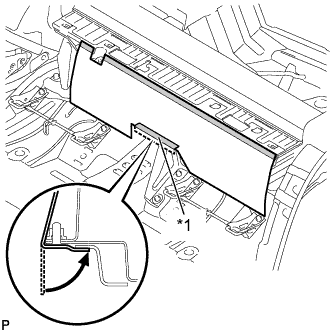
Text in Illustration *1 Double-sided tape Install the No. 6 battery carrier panel as shown in the illustration.
-
-
INSTALL DECK BOARD SUB-ASSEMBLY
-
Engage the 3 claws and 3 clips to install the deck board sub-assembly.
-
-
INSTALL DECK FLOOR BOX LH
-
Engage the 3 guides to install the deck floor box LH.
-
-
INSTALL PACKAGE TRAY TRIM PANEL ASSEMBLY
-
Engage the 2 pins.
-
Connect the 2 suspenders and install the package tray trim panel assembly.
-
-
INSTALL UPPER CENTER PILLAR GARNISH LH
-
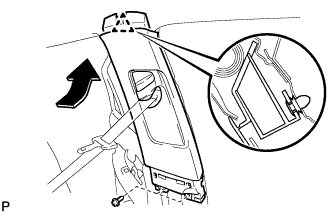
Engage the clip.
-
Install the upper center pillar garnish LH with the 2 screws.
-
-
INSTALL LOWER CENTER PILLAR GARNISH LH
-
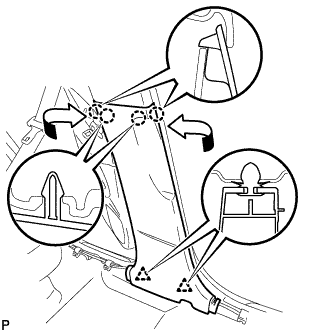
Engage the 4 claws and 2 clips, then install the lower center pillar garnish LH.
-
-
CONNECT FRONT SEAT OUTER BELT ASSEMBLY LH
-
Install the floor end of the front seat outer belt assembly LH with the bolt.
- Torque:
- 41 N*m { 420 kgf*cm, 30 ft.*lbf }
-
-
INSTALL LAP BELT OUTER ANCHOR COVER (for LH Side)
-
Engage the 3 claws and install the lap belt outer anchor cover.
-
-
INSTALL REAR DOOR OPENING TRIM WEATHERSTRIP LH
-
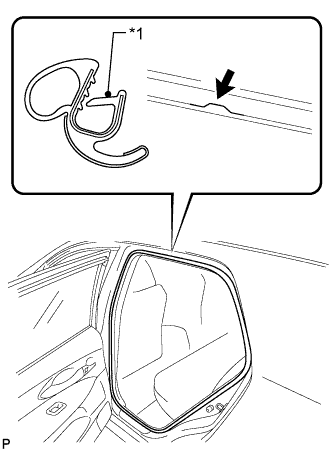
Text in Illustration *1 Alignment Mark (Yellow) Align the alignment mark (yellow) on the weatherstrip with the protruding portion on the body indicated by the arrow in the illustration, and install the rear door opening trim weatherstrip LH.
Note
After installation, check that the corners fit correctly.
-
-
INSTALL REAR DOOR SCUFF PLATE LH
-
Engage the 8 claws and install the rear door scuff plate LH.
-
-
INSTALL FRONT DOOR OPENING TRIM WEATHERSTRIP LH
-
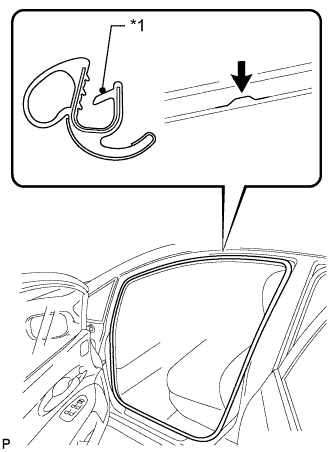
Text in Illustration *1 Alignment Mark (Pink) Align the alignment mark (pink) on the weatherstrip with the protruding portion on the body indicated by the arrow in the illustration, and install the front door opening trim weatherstrip LH.
Note
After installation, check that the corners fit correctly.
-
-
INSTALL COWL SIDE TRIM BOARD LH
-
Engage the guide and 2 clips, then install the cowl side trim board LH.
-
-
INSTALL FRONT DOOR SCUFF PLATE LH
-
Engage the 10 claws, then install the front door scuff plate LH.
-
-
INSTALL UPPER CENTER PILLAR GARNISH RH
Tech Tips
Use the same procedure as for the LH side.
-
INSTALL LOWER CENTER PILLAR GARNISH RH
Tech Tips
Use the same procedure as for the LH side.
-
CONNECT FRONT SEAT OUTER BELT ASSEMBLY RH
-
Install the floor end of the front seat outer belt assembly RH with the bolt.
- Torque:
- 41 N*m { 420 kgf*cm, 30 ft.*lbf }
-
-
INSTALL LAP BELT OUTER ANCHOR COVER (for RH Side)
Tech Tips
Use the same procedure as for the LH side.
-
INSTALL REAR DOOR OPENING TRIM WEATHERSTRIP RH
-
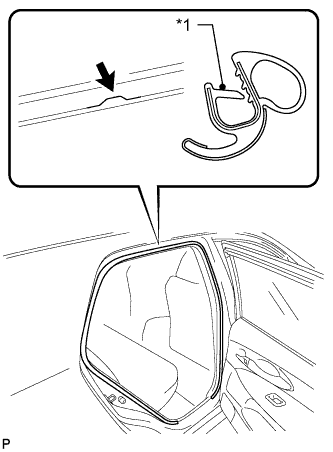
Text in Illustration *1 Alignment Mark (White) Align the alignment mark (white) on the weatherstrip with the protruding portion on the body indicated by the arrow in the illustration, and install the rear door opening trim weatherstrip RH.
Note
After installation, check that the corners fit correctly.
-
-
INSTALL REAR DOOR SCUFF PLATE RH
Tech Tips
Use the same procedure as for the LH side.
-
INSTALL FRONT DOOR OPENING TRIM WEATHERSTRIP RH
-
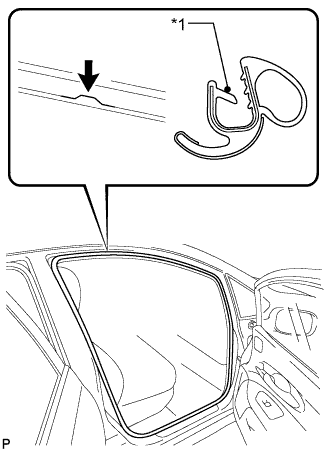
Text in Illustration *1 Alignment Mark (Blue) Align the alignment mark (blue) on the weatherstrip with the protruding portion on the body indicated by the arrow in the illustration, and install the front door opening trim weatherstrip RH.
Note
After installation, check that the corners fit correctly.
-
-
INSTALL COWL SIDE TRIM BOARD RH
Tech Tips
Use the same procedure as for the LH side.
-
INSTALL FRONT DOOR SCUFF PLATE RH
Tech Tips
Use the same procedure as for the LH side.
-
INSTALL REAR SEAT ASSEMBLY LH
-
Place the rear seat assembly LH in the cabin.
Note
Be careful not to damage the vehicle body.
-
Install the rear side of the rear seat assembly LH with the 2 bolts.
- Torque:
- 37 N*m { 377 kgf*cm, 27 ft.*lbf }
-
Install the front side of the rear seat assembly LH with the 2 bolts.
- Torque:
- 37 N*m { 377 kgf*cm, 27 ft.*lbf }
-
-
INSTALL NO. 1 REAR SEAT CUSHION HINGE COVER (for LH Side)
-
Engage the 4 claws and install the No. 1 rear seat cushion hinge cover.
-
-
INSTALL NO. 2 REAR SEAT CUSHION HINGE COVER (for LH Side)
-
Engage the 4 claws and install the No. 2 rear seat cushion hinge cover.
-
-
INSTALL REAR SEAT HEADREST ASSEMBLY (for LH Side)
-
INSTALL REAR SEAT INNER BELT ASSEMBLY RH
-
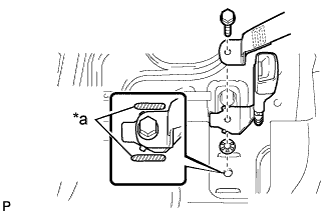
Text in Illustration *a Protective Tape Install the rear seat center outer belt assembly, rear seat inner belt assembly RH, and washer with the bolt.
- Torque:
- 41 N*m { 420 kgf*cm, 30 ft.*lbf }
Note
Do not allow the anchor part of the rear seat inner belt assembly to overlap protruding parts of the floor panel.
-
-
INSTALL REAR SEAT ASSEMBLY RH
-
Place the rear seat assembly RH in the cabin.
Note
Be careful not to damage the vehicle body.
-
Install the rear side of the rear seat assembly RH with the 2 bolts.
- Torque:
- 37 N*m { 377 kgf*cm, 27 ft.*lbf }
-
Install the front side of the rear seat assembly RH with the 2 bolts.
- Torque:
- 37 N*m { 377 kgf*cm, 27 ft.*lbf }
-
-
INSTALL NO. 1 REAR SEAT CUSHION HINGE COVER (for RH Side)
-
Engage the 4 claws and install the No. 1 rear seat cushion hinge cover.
-
-
INSTALL NO. 2 REAR SEAT CUSHION HINGE COVER (for RH Side)
-
Engage the 4 claws and install the No. 2 rear seat cushion hinge cover.
-
-
INSTALL CENTER REAR SEAT HEADREST ASSEMBLY
-
INSTALL REAR SEAT HEADREST ASSEMBLY (for RH Side)
-
INSTALL UPPER INSTRUMENT PANEL SUB-ASSEMBLY
-
When using a new upper instrument panel sub-assembly:
-
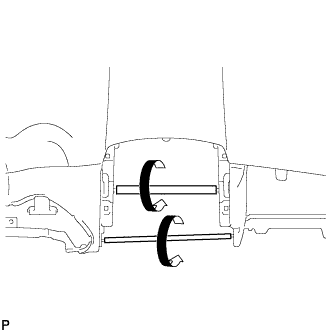
Immediately before installing the upper instrument panel sub-assembly, twist and cut off the portions shown in the illustration (joints for moulding).
-
-
When using a new upper instrument panel sub-assembly:
-
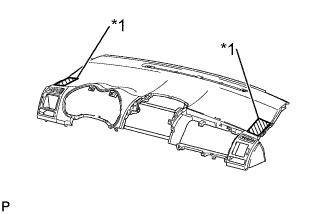
Text in Illustration *1 Protective Tape Apply protective tape to the areas shown in the illustration.
-
-
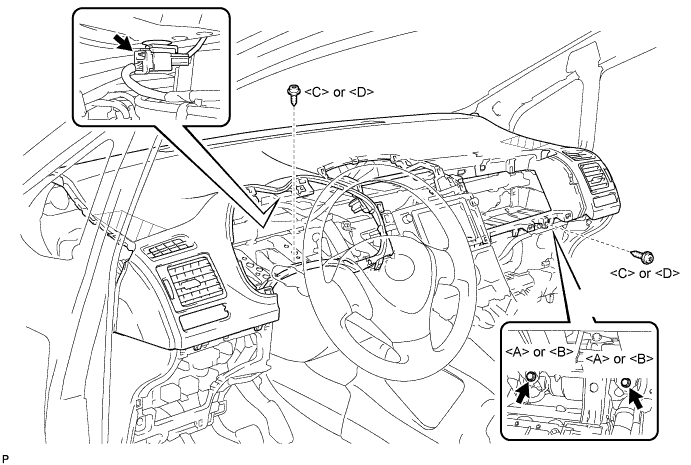
Engage the 5 claws.
Note
-
When installing the upper instrument panel sub-assembly, be careful not to damage it or the steering wheel assembly.
-
Do not allow the wire harness to get caught in the claws.
-
-
Engage the 3 claws and the 4 clips.
-
Install the 2 screws <C> or <D>.
-
Install the 2 passenger airbag bolts <A> or <B>.
- Torque:
- 20 N*m { 204 kgf*cm, 15 ft.*lbf }
-
Connect the connector and install the upper instrument panel sub-assembly.
-
Remove the protective tape.
-
-
CONNECT INSTRUMENT PANEL WIRE ASSEMBLY
-
Check that the power switch is off.
-
Check that the cable is disconnected from the negative (-) battery terminal.
CAUTION:
Wait at least 90 seconds after disconnecting the cable from the negative (-) battery terminal to disable the SRS system.
-
Connect the connector.
Note
When connecting any airbag connector, take care not to damage the airbag wire harness.
-
-
INSTALL NO. 1 INSTRUMENT PANEL BOX DOOR SUB-ASSEMBLY
-
w/ USB Audio System:
-
Connect the connector and engage the clamp.
-
-
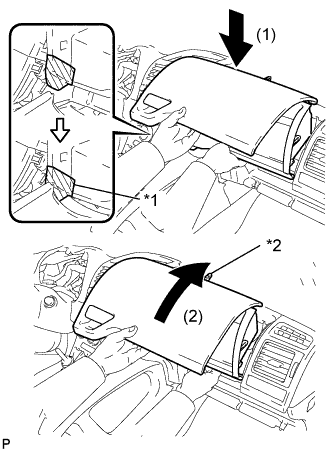
Text in Illustration *1 Protective Tape *2 Claw Apply protective tape to the area shown in the illustration.
-
Insert the instrument panel box assembly in the direction indicated by arrow (1) in the illustration so that the taped portion does not come in contact with the lower No. 1 instrument panel finish panel.
-
Push the instrument panel box assembly in the direction indicated by arrow (2) in the illustration so that the claw on the upper part of the instrument panel box assembly is inserted into the upper instrument panel sub-assembly.
-
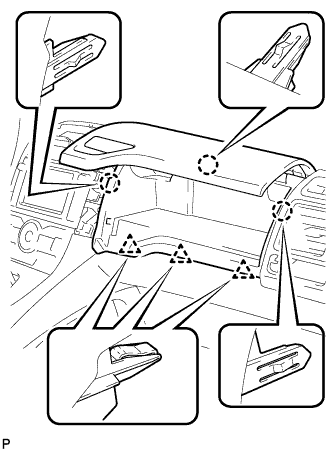
Engage the 3 claws and 3 clips.
-
Install the No. 1 instrument panel box door sub-assembly with the 2 screws <C> or <D>.
-
-
INSTALL GLOVE COMPARTMENT DOOR ASSEMBLY
-
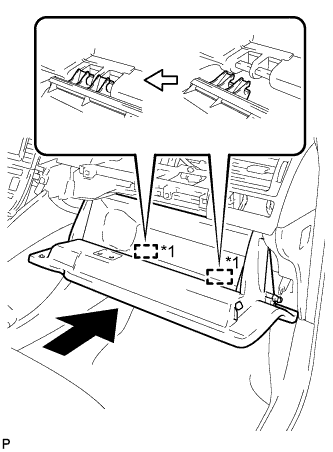
Text in Illustration *1 Hinge Insert the glove compartment door assembly horizontally and engage the 2 hinges.
Note
Engaging the hinges from the top will deform the hinges. Be sure to install the glove compartment door assembly horizontally.
-
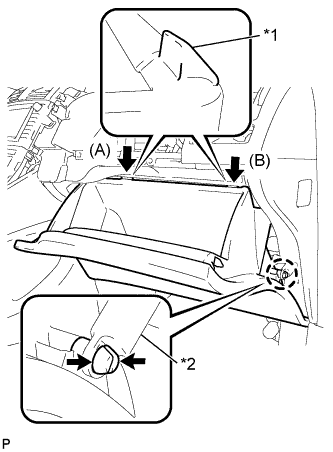
Text in Illustration *1 Stopper *2 Glove Compartment Door Stopper Bend portions (A) and (B) in the direction indicated by the arrows in the illustration to engage the 2 stoppers.
-
Engage the claw, connect the glove compartment door stopper, and install the glove compartment door assembly.
-
-
INSTALL LOWER CENTER INSTRUMENT PANEL FINISH PANEL
-
Engage the 4 claws and 6 clips.
-
Install the lower center instrument panel finish panel with the 2 screws <E> or <F>.
-
-
INSTALL UPPER CONSOLE PANEL
-
Engage the 7 claws and install the upper console panel.
-
-
INSTALL REAR CONSOLE BOX COVER
-
Connect the connector.
-
Engage the 2 guides and 4 clips to install the rear console box cover.
-
-
INSTALL FRONT PILLAR GARNISH LH
-
Remove the protective cover.
-
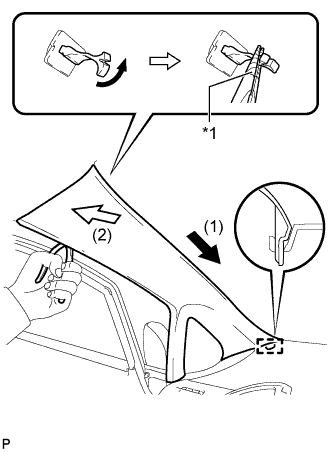
Text in Illustration *1 Protective Tape Make sure that the front pillar garnish clip is not damaged.
Note
-
If there is any damage, replace the garnish clip with a new one.
-
When a garnish clip is being replaced, make sure to install it in the direction shown in the illustration.
-
-
Engage the guide.
-
Turn the end of the front pillar garnish clip 90° with needle-nosed pliers and install it to the front pillar garnish LH.
Tech Tips
Tape the tips of the needle-nosed pliers before use.
-
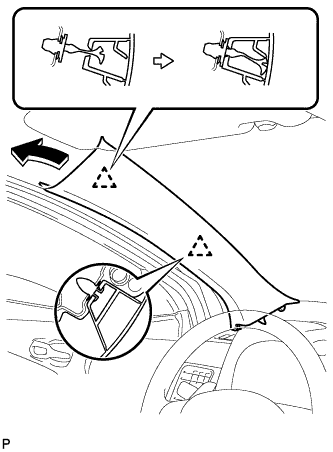
Engage the 2 clips to install the front pillar garnish LH.
-
-
INSTALL FRONT PILLAR GARNISH CORNER PIECE LH
-
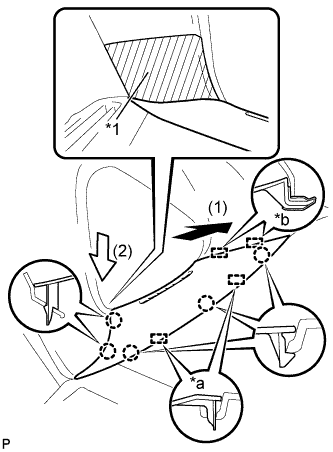
Text in Illustration *1 Protective Tape *a Guide (A) *b Guide (B) Engage the 2 guides (B).
-
Engage the 2 guides (A) and 5 claws, then install the front pillar garnish corner piece LH.
-
Remove the protective tape.
-
-
INSTALL FRONT PILLAR GARNISH RH
Tech Tips
Use the same procedure as for the LH side.
-
INSTALL FRONT PILLAR GARNISH CORNER PIECE RH
Tech Tips
Use the same procedure as for the LH side.
-
INSTALL CENTER INSTRUMENT PANEL REGISTER ASSEMBLY
-
Connect the connector.
-
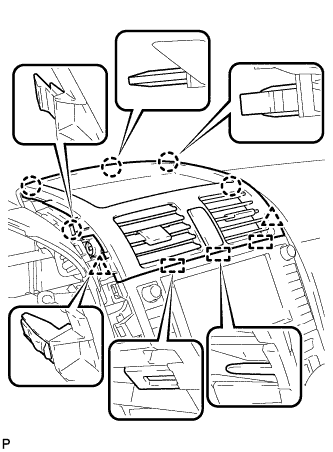
Engage the 3 guides, 5 claws and 2 clips, and install the center instrument panel register assembly.
-
-
INSTALL INSTRUMENT PANEL FINISH PANEL END LH
-
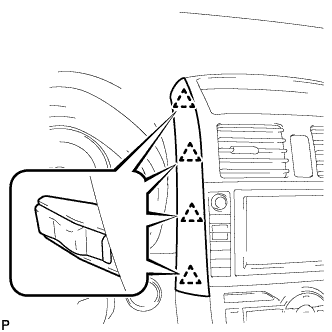
Engage the 4 clips and install the instrument panel finish panel end LH.
-
-
INSTALL INSTRUMENT PANEL FINISH PANEL END RH
-
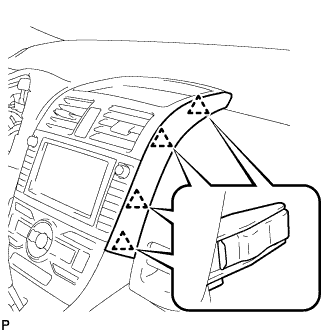
Engage the 4 clips and install the instrument panel finish panel end RH.
-
-
INSTALL COMBINATION METER ASSEMBLY
-
Connect the connector and temporarily install the combination meter assembly.
Note
When installing the combination meter assembly, do not damage the upper instrument panel sub-assembly or combination meter assembly.
-
Install the combination meter assembly with the 4 screws.
-
-
INSTALL INSTRUMENT CLUSTER FINISH PANEL ASSEMBLY
-
Engage the 2 claws and 4 clips, and install the instrument cluster finish panel assembly.
-
Remove the applied protective tape on the steering column cover.
-
-
CONNECT CABLE TO NEGATIVE BATTERY TERMINAL
Note
When disconnecting the cable, some systems need to be initialized after the cable is reconnected Click here.
-
INSTALL BATTERY BOX COVER
-
Engage the 3 guides to install the battery box cover.
-
-
INSTALL REAR DECK FLOOR BOX
-
Install the rear deck floor box.
-
-
INSTALL REAR FLOOR MAT
-
Install the rear floor mat.
-
-
INSPECT SRS WARNING LIGHT