AIRBAG SYSTEM, Diagnostic DTC:B1860/64, B1861/64, B1862/64, B1863/64

| DTC Code | DTC Name |
|---|---|
| B1860/64 | Short in Driver Side Knee Airbag Squib Circuit |
| B1861/64 | Open in Driver Side Knee Airbag Squib Circuit |
| B1862/64 | Short to GND in Driver Side Knee Airbag Squib Circuit |
| B1863/64 | Short to B+ in Driver Side Knee Airbag Squib Circuit |
DESCRIPTION
The driver side knee airbag squib circuit consists of the center airbag sensor assembly and driver side knee airbag assembly.
The center airbag sensor assembly uses this circuit to deploy the airbag when deployment conditions are met.
These DTCs are stored when a malfunction is detected in the driver side knee airbag squib circuit.
| DTC No. | DTC Detection Condition | Trouble Area |
|---|---|---|
| B1860/64 |
|
|
| B1861/64 |
|
|
| B1862/64 |
|
|
| B1863/64 |
|
|
WIRING DIAGRAM
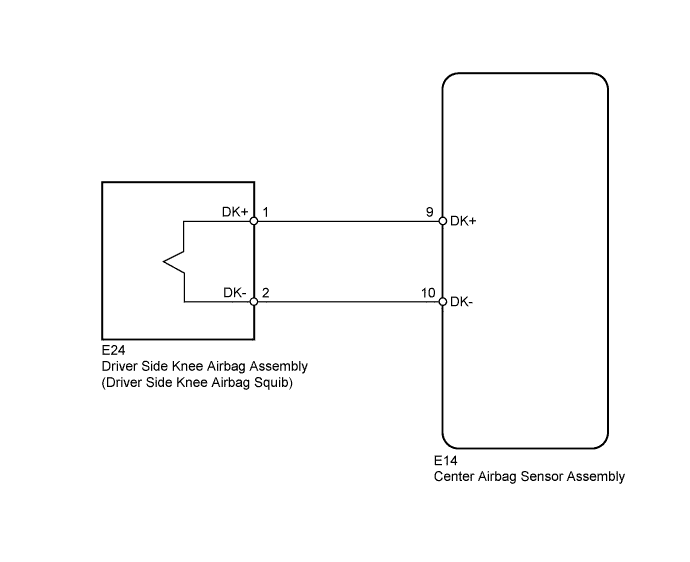
INSPECTION PROCEDURE
Tech Tips
-
Perform the simulation method by selecting check mode (Signal Check) using the intelligent tester Click here.
-
After selecting check mode (Signal Check), perform the simulation method by wiggling each connector of the airbag system or driving the vehicle on a city or rough road Click here.
PROCEDURE
-
CHECK CONNECTORS
-
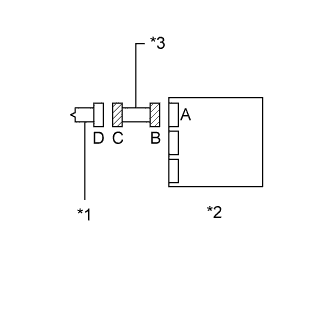
Text in Illustration *1 Driver Side Knee Airbag Squib *2 Center Airbag Sensor Assembly *3 Instrument Panel Wire Turn the power switch off.
-
Disconnect the cable from the negative (-) battery terminal.
CAUTION:
Wait at least 90 seconds after disconnecting the cable from the negative (-) battery terminal to disable the SRS system.
-
Check that the connectors are properly connected to the driver side knee airbag assembly and center airbag sensor assembly.
OK The connectors are properly connected. Tech Tips
If the connectors are not connected securely, reconnect the connectors and proceed to the next inspection.
-
Disconnect the connectors from the driver side knee airbag assembly and center airbag sensor assembly.
-
Check that the terminals of the connectors are not damaged.
OK The terminals are not deformed or damaged. -
Check that the instrument panel wire connector (on the driver side knee airbag assembly side) is not damaged.
OK The lock button is not disengaged, and the claw of the lock is not deformed or damaged. -
Check that the short spring for the instrument panel wire with the activation prevention mechanism are not deformed or damaged.
OK The short spring is not deformed or damaged.
NG 
REPLACE INSTRUMENT PANEL WIRE
OK 
-
-
CHECK DRIVER SIDE KNEE AIRBAG ASSEMBLY (DRIVER SIDE KNEE AIRBAG SQUIB)
-
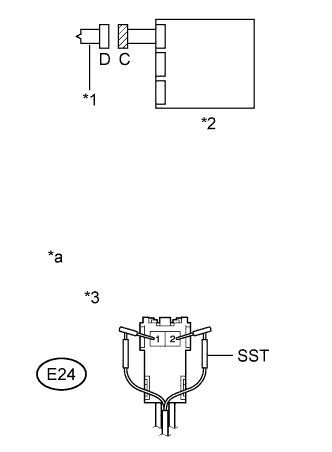
Text in Illustration *1 Driver Side Knee Airbag Squib *2 Center Airbag Sensor Assembly *3 Connector C *a Front view of wire harness connector
(to Driver Side Knee Airbag Assembly)
Connect the connector to the center airbag sensor assembly.
-
Connect SST (resistance 2.1 Ω) to connector C.
CAUTION:
Never connect the tester to the driver side knee airbag assembly (driver side knee airbag squib) for measurement, as this may lead to a serious injury due to airbag deployment.
Note
-
Do not forcibly insert SST into the terminals of the connector when connecting.
-
Insert SST straight into the terminals of the connector.
- SST
- 09843-18061
-
-
Connect the cable to the negative (-) battery terminal.
-
Turn the power switch on (IG), and wait for at least 60 seconds.
-
Clear the DTCs stored in memory Click here.
-
Turn the power switch off.
-
Turn the power switch on (IG), and wait for at least 60 seconds.
-
Check for DTCs Click here.
OK DTC B1860, B1861, B1862, B1863 or 64 is not output. Tech Tips
Codes other than DTCs B1860, B1861, B1862, B1863 and 64 may be output at this time, but they are not related to this check.
NG 
CHECK INSTRUMENT PANEL WIRE (DRIVER SIDE KNEE AIRBAG SQUIB CIRCUIT) Click here
OK 
REPLACE DRIVER SIDE KNEE AIRBAG ASSEMBLY Click here
-
-
CHECK INSTRUMENT PANEL WIRE (DRIVER SIDE KNEE AIRBAG SQUIB CIRCUIT)
-
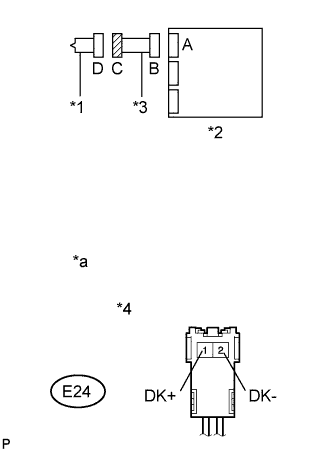
Text in Illustration *1 Driver Side Knee Airbag Squib *2 Center Airbag Sensor Assembly *3 Instrument Panel Wire *4 Connector C *a Front view of wire harness connector
(to Driver Side Knee Airbag Assembly)
Turn the power switch off.
-
Disconnect the cable from the negative (-) battery terminal.
CAUTION:
Wait at least 90 seconds after disconnecting the cable from the negative (-) battery terminal to disable the SRS system.
-
Disconnect SST from connector C.
-
Disconnect the instrument panel wire from the center airbag sensor assembly.
-
Check for a short to B+ in the circuit.
-
Connect the cable to the negative (-) battery terminal.
-
Turn the power switch on (IG).
-
Measure the voltage according to the value(s) in the table below.
Standard Voltage Tester Connection Switch Condition Specified Condition E24-1 (DK+) - Body ground Power switch on (IG) Below 1 V E24-2 (DK-) - Body ground Power switch on (IG) Below 1 V
-
-
Check for an open in the circuit.
-
Turn the power switch off.
-
Disconnect the cable from the negative (-) battery terminal.
CAUTION:
Wait at least 90 seconds after disconnecting the cable from the negative (-) battery terminal to disable the SRS system.
-
Measure the resistance according to the value(s) in the table below.
Standard Resistance Tester Connection Condition Specified Condition E24-1 (DK+) - E24-2 (DK-) Always Below 1 Ω
-
-
Check for a short to ground in the circuit.
-
Measure the resistance according to the value(s) in the table below.
Standard Resistance Tester Connection Condition Specified Condition E24-1 (DK+) - Body ground Always 1 MΩ or higher E24-2 (DK-) - Body ground Always 1 MΩ or higher
-
-
Check for a short in the circuit.
-
Release the activation prevention mechanism built into connector B Click here.
-
Measure the resistance according to the value(s) in the table below.
Standard Resistance Tester Connection Condition Specified Condition E24-1 (DK+) - E24-2 (DK-) Always 1 MΩ or higher
-
NG
REPLACE INSTRUMENT PANEL WIRE
OK
-
-
CHECK CENTER AIRBAG SENSOR ASSEMBLY
-
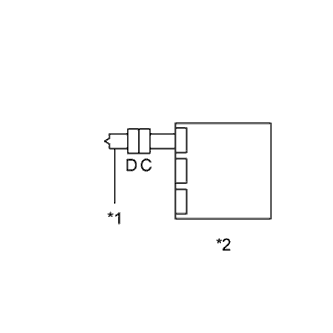
Text in Illustration *1 Driver Side Knee Airbag Squib *2 Center Airbag Sensor Assembly Restore the released activation prevention mechanism of connector B to the original condition.
-
Connect the connectors to the driver side knee airbag assembly and center airbag sensor assembly.
-
Connect the cable to the negative (-) battery terminal.
-
Turn the power switch on (IG), and wait for at least 60 seconds.
-
Clear the stored DTCs in memory Click here.
-
Turn the power switch off.
-
Turn the power switch on (IG), and wait for at least 60 seconds.
-
Check for DTCs Click here.
OK DTC B1860, B1861, B1862, B1863 or 64 is not output. Tech Tips
Codes other than DTCs B1860, B1861, B1862, B1863 and 64 may be output at this time, but they are not related to this check.
NG
REPLACE CENTER AIRBAG SENSOR ASSEMBLY Click here
OK
USE SIMULATION METHOD TO CHECK Click here
-