TELEVISION CAMERA INSTALLATION
-
INSTALL REAR TELEVISION CAMERA ASSEMBLY
-
Engage the 2 claws to temporarily install the rear television camera assembly.
-
Install the rear television camera assembly with the 2 nuts.
-
Connect the connector.
-
-
INSTALL BACK DOOR TRIM PANEL ASSEMBLY
-
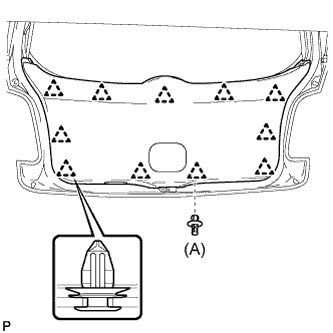
Engage the 11 clips and install the back door trim panel assembly.
-
Install the clip (A).
-
-
INSTALL BACK DOOR INSIDE HANDLE
-
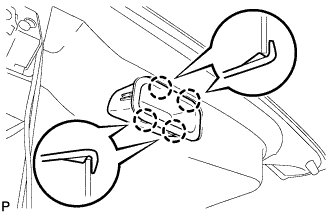
Engage the 4 claws and install the back door inside handle.
-
-
INSTALL BACK DOOR SIDE GARNISH LH
-
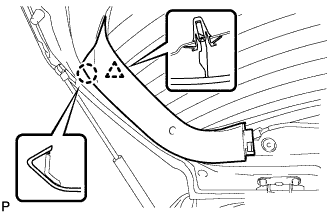
Engage the clip and claw, and install the back door side garnish LH.
-
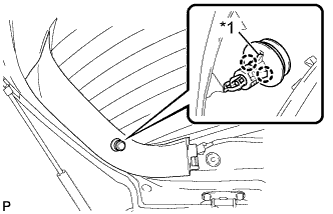
Text in Illustration *1 Guide Align the guide with the cutout, engage the 2 claws, and install the package tray trim garnish hook.
-
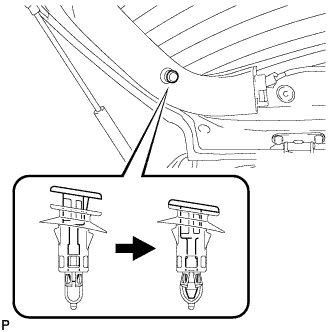
Engage the pin.
-
-
INSTALL BACK DOOR SIDE GARNISH RH
Tech Tips
Use the same procedures for the RH side and the LH side.
-
INSTALL BACK DOOR UPPER TRIM PANEL ASSEMBLY
-
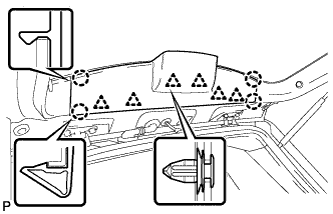
Engage the 6 clips and 4 claws, and install the back door upper trim panel assembly.
-