REAR VIEW MONITOR SYSTEM (w/o Navigation System) SYSTEM DESCRIPTION
-
GENERAL
-
To assist the driver with parking the vehicle by displaying an image of the area behind the vehicle, this system has a rear television camera assembly mounted on the back door. The system displays the image on the inner rear view mirror assembly.
-
This system consists of the following components:
-
Inner rear view mirror assembly
-
Rear television camera assembly
-
No. 1 integration relay
-
Power management control ECU
-
-
-
FUNCTION OF COMPONENTS
-
The inner rear view mirror assembly controls the system by using information from the following components:
Item Function Rear Television Camera Assembly
-
Mounted on the back door to transmit an image of the area behind the vehicle to the inner rear view mirror assembly.
-
Has a color video camera that uses a Charge Coupled Device (CCD) and a wide-angle lens.
Inner Rear View Mirror Assembly
-
Receives visual signals, which contain images of the area behind the vehicle taken with the rear television camera assembly.
-
Performs control of the system by receiving the reverse signal from the power management control ECU.
-
Displays the rear view monitor image on the display panel.
Power Management Control ECU Sends a signal to the inner rear view mirror assembly via the No. 1 integration relay to indicate that reverse (R) has been selected. No. 1 Integration Relay Receives the signal (reverse (R) has been selected) that the power management control ECU sent and sends it to the inner rear view mirror assembly. -
-
-
OPERATION EXPLANATION
-
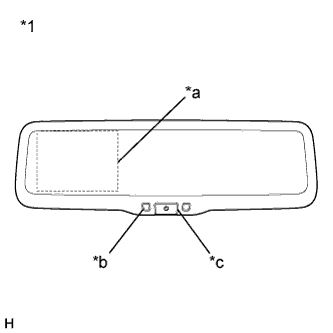
Text in Illustration *1 Inner Rear View Mirror Assembly *a Display *b LED Indicator *c AUTO Button The inner rear view mirror assembly receives the reverse signal when the power switch is on (READY) and the shift lever is moved to R. After receiving the reverse signal, the inner rear view mirror assembly displays the rear view monitor image from the rear television camera assembly. (LED: Green)
Tech Tips
-
When the shift lever moves to any position except R, the display is turned off. Also, the display is automatically turned off after continuous operation for 5 minutes.
-
When the image from the rear television camera assembly is displayed, the display can be turned off by pressing the AUTO button. (LED: Green → Amber) The image can be re-displayed by pressing the AUTO button once again. (LED: Amber → Green)
-
-
The operation conditions of the rear view monitor system (w/o Navigation System) are as follows:
-
Power switch on (READY)
-
Reverse (R) selected
-
The LED on the inner rear view mirror assembly is green. (The LED color changes by pressing the AUTO button)
-
-