NAME PLATE INSTALLATION

Tech Tips
When installing new name plates or emblems, heat the vehicle body and name plates using a heat light.
| Item | Temperature |
|---|---|
| Vehicle Body | 40 to 60°C (104 to 140°F) |
| Name Plate or emblem | 20 to 30°C (68 to 86°F) |
Note
Do not heat the vehicle body, name plates or emblems excessively.
-
INSTALL LUGGAGE COMPARTMENT DOOR EMBLEM
-
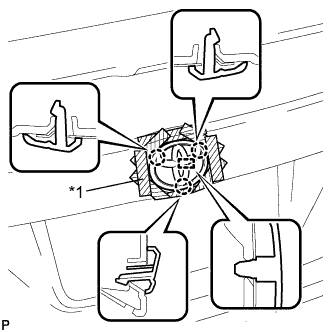
Text in Illustration *1 Protective Tape Install the luggage compartment door emblem with the pin and 3 claws.
Note
Be careful not to damage the vehicle body.
-
-
INSTALL NO. 1 LUGGAGE COMPARTMENT DOOR NAME PLATE
-
Clean the vehicle body surface.
-
Using a heat light, heat the vehicle body surface.
-
Remove any double-sided tape from the vehicle body.
-
Wipe off any tape adhesive residue with cleaner.
-
-
Install a new No. 1 luggage compartment door name plate.
-
Using a heat light, heat the vehicle body and the No. 1 luggage compartment door name plate.
-
Remove the release paper from the No. 1 luggage compartment door name plate.
Tech Tips
After removing the release paper, keep the exposed adhesive free from foreign matter.
-
Install the No. 1 luggage compartment door name plate as shown in the illustration.
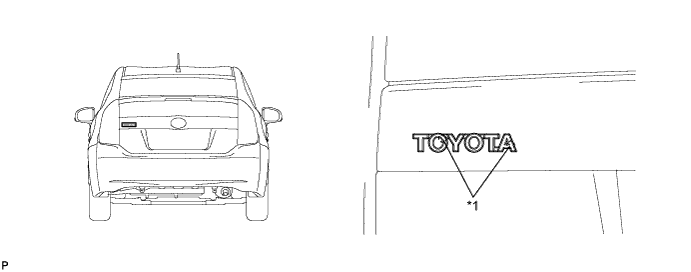
Text in Illustration *1 Location Pin - -
-
-
-
INSTALL NO. 2 BACK DOOR NAME PLATE
-
Clean the vehicle body surface.
-
Using a heat light, heat the vehicle body surface.
-
Remove any double-sided tape from the vehicle body.
-
Wipe off any tape adhesive residue with cleaner.
-
-
Install a new No. 2 back door name plate.
-
Using a heat light, heat the vehicle body and the No. 2 back door name plate.
-
Remove the release paper from the No. 2 back door name plate.
Tech Tips
After removing the release paper, keep the exposed adhesive free from foreign matter.
-
Install the No. 2 back door name plate as shown in the illustration.
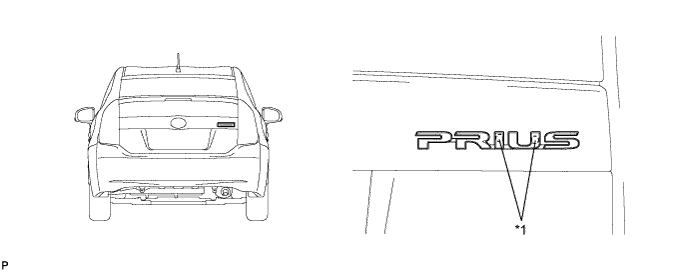
Text in Illustration *1 Location Pin - -
-
-
-
INSTALL BACK DOOR NAME PLATE
-
Clean the vehicle body surface.
-
Using a heat light, heat the vehicle body surface.
-
Remove any double-sided tape from the vehicle body.
-
Wipe off any tape adhesive residue with cleaner.
-
-
Install a new back door name plate.
-
Using a heat light, heat the vehicle body and the back door name plate.
-
Remove the release paper from the back door name plate.
Tech Tips
After removing the release paper, keep the exposed adhesive free from foreign matter.
-
Install the back door name plate as shown in the illustration.
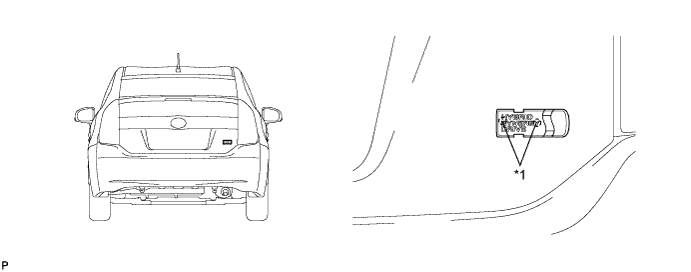
Text in Illustration *1 Location Pin - -
-
-
-
INSTALL SIDE PANEL EMBLEM
-
Clean the vehicle body surface.
-
Using a heat light, heat the vehicle body surface.
-
Remove any double-sided tape from the vehicle body.
-
Wipe off any tape adhesive residue with cleaner.
-
-
Install a new side panel emblem.
-
Using a heat light, heat the vehicle body and the side panel emblem.
-
Remove the release paper from the side panel emblem.
Tech Tips
After removing the release paper, keep the exposed adhesive free from foreign matter.
-
Install the side panel emblem as shown in the illustration.
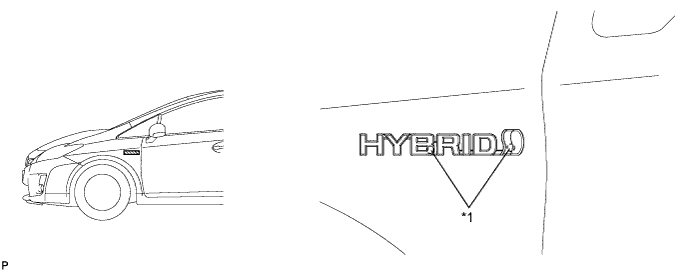
Text in Illustration *1 Location Pin - - Tech Tips
Use the same procedure for the RH side and LH side.
-
-