ROOM TEMPERATURE SENSOR INSTALLATION

-
INSTALL ROOM TEMPERATURE SENSOR
-
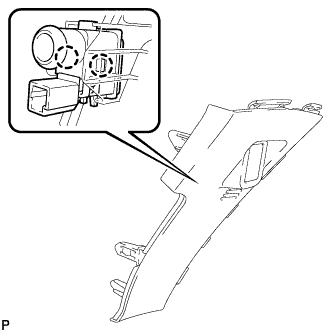
Engage the 2 claws to install the room temperature sensor to the No. 1 switch hole base.
-
-
INSTALL NO. 1 SWITCH HOLE BASE
-
Connect the connector.
-
Engage the 5 claws to install the No. 1 switch hole base.
-
-
INSTALL UPPER INSTRUMENT PANEL FINISH PANEL ASSEMBLY
-
Temporarily install the console box assembly.
-
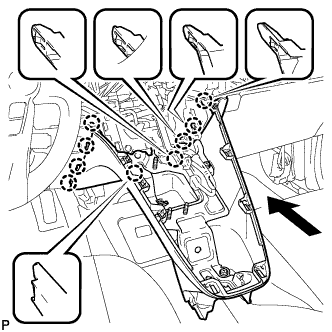
Engage the 9 claws as shown in the illustration.
-
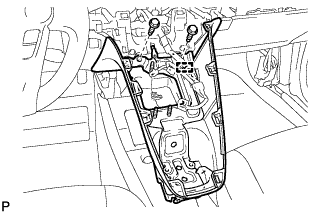
Install the to install the upper instrument panel finish panel assembly with the 2 bolts <A>.
-
Engage the clamp.
-
-
INSTALL SHIFT LOCK CONTROL UNIT ASSEMBLY
-
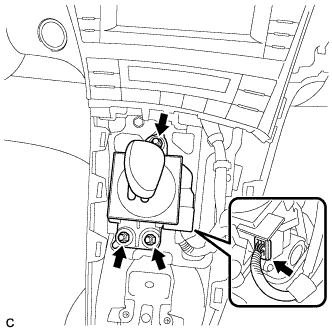
Install the shift lock control unit assembly with the 3 nuts.
- Torque:
- 12 N*m { 122 kgf*cm, 9 ft.*lbf }
-
Connect the connector to the shift lock control unit assembly.
-
-
INSTALL AIR CONDITIONING CONTROL ASSEMBLY
-
Connect the connector.
Note
Since the connectors for the air conditioning control assembly and the integration control and panel sub-assembly are the same shape, take care to connect each connector to the correct component.
-
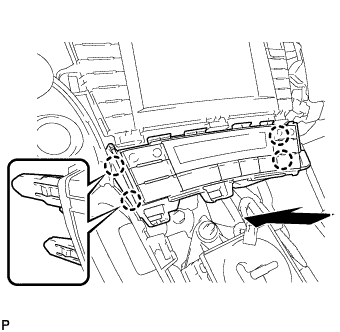
Engage the 4 claws to install the air conditioning control assembly.
-
-
INSTALL CONSOLE BOX ASSEMBLY
-
Connect each connector.
-
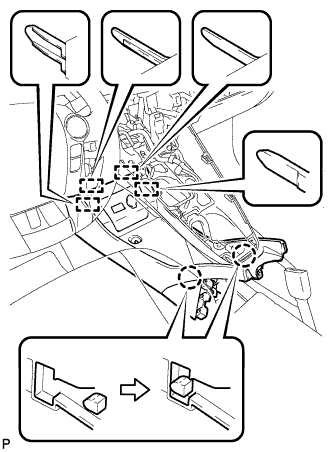
Engage the 4 guides and 2 claws as shown in the illustration.
-
Install the console box assembly with the bolt <B> and 2 clips.
-
-
INSTALL BOX BOTTOM MAT
-
Engage the fastener to install the box bottom mat.
-
-
INSTALL FRONT NO. 2 CONSOLE BOX INSERT
-
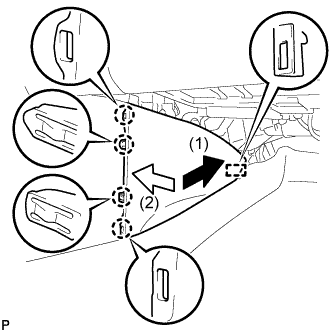
Engage the guide and 4 claws to install the front No. 2 console box insert as shown in the illustration.
-
-
INSTALL FRONT NO. 1 CONSOLE BOX INSERT
-
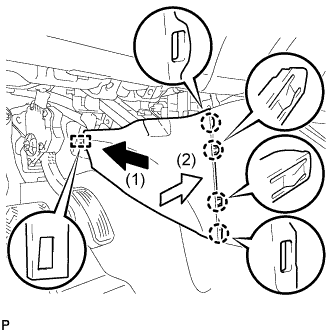
Engage the guide and 4 claws to install the front No. 1 console box insert as shown in the illustration.
-
-
INSTALL NO. 2 CONSOLE BOX MOUNTING BRACKET
-
Install the No. 2 console box mounting bracket with the 6 bolts <B>.
-
-
INSTALL ELECTRICAL KEY OSCILLATOR
-
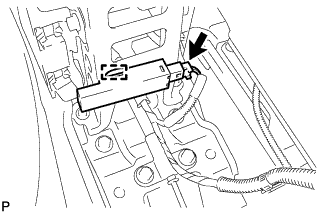
Engage the clamp and install the electrical key oscillator.
Note
Be careful when installing the electrical key oscillator. If the oscillator is dropped, replace it with a new one.
-
Connect the connector.
-
-
INSTALL REAR CONSOLE BOX ASSEMBLY
-
Connect each connector.
-
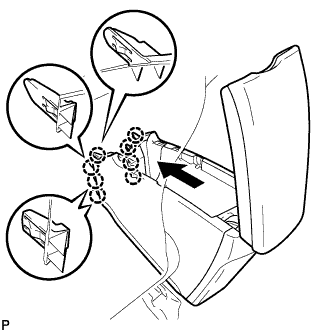
Engage the 8 claws as shown in the illustration.
-
Install the rear console box assembly with the 5 bolts.
-
-
INSTALL CONSOLE BOX CARPET
-
Install the console box carpet.
-
-
INSTALL REAR CONSOLE BOX CUP HOLDER
-
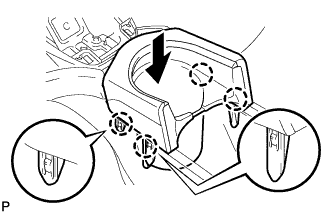
Engage the 4 claws to install the rear console box cup holder as shown in the illustration.
-
-
INSTALL UPPER INSTRUMENT PANEL FINISH PANEL SUB-ASSEMBLY
-
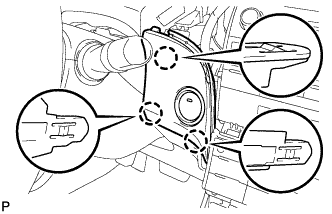
Connect the connector.
-
Engage the 3 claws to install the upper instrument panel finish panel sub-assembly.
-
-
INSTALL INSTRUMENT CLUSTER FINISH PANEL GARNISH
-
Connect the connector.
-
Engage the 14 claws to install the instrument cluster finish panel garnish.
-
-
INSTALL LOWER CENTER INSTRUMENT CLUSTER FINISH PANEL SUB-ASSEMBLY
-
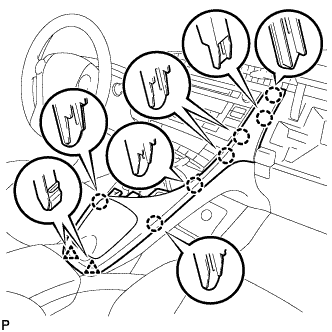
Engage the 7 claws and 2 clips to install the lower center instrument cluster finish panel sub-assembly.
-
-
INSTALL INTEGRATION CONTROL AND PANEL ASSEMBLY
-
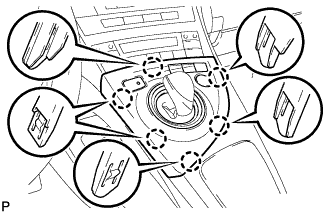
Connect each connector.
-
Engage the 6 claws to install the integration control and panel assembly.
-
-
INSPECT SHIFT LEVER
-
Turn the power switch on (READY).
-
Check that all available shift positions can be selected moving the shift lever.
Tech Tips
After the shift lever is replaced with a new one, perform the above operation. If this operation is not performed, moving the shift lever may not initially select shift positions.
-