BLOCKING SYSTEM, Diagnostic DTC:B1586

| DTC Code | DTC Name |
|---|---|
| B1586 | Open in Immobiliser Communication Circuit |
DESCRIPTION
When the communication line (EFIO - BLK4) between the ID code box (immobiliser code ECU) and telephone transceiver assembly is open, the telephone transceiver assembly stores DTC B1586.
| DTC Code | DTC Detection Condition | Trouble Area |
|---|---|---|
| B1586 | The communication line (EFIO - BLK4) between the ID code box (immobiliser code ECU) and telephone transceiver assembly is open. |
|
WIRING DIAGRAM
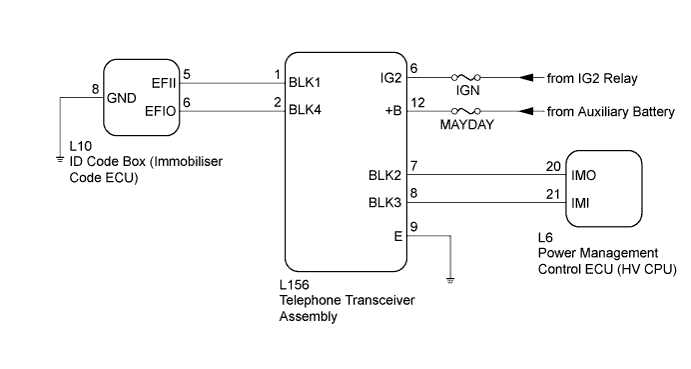
INSPECTION PROCEDURE
Note
-
Before troubleshooting for this DTC, make sure no engine immobiliser system DTCs are present. If present, troubleshoot the engine immobiliser system DTCs first.
-
Inspect the fuses for circuits related to this system before performing the following inspection procedure.
-
When replacing the telephone transceiver assembly or ID code box (immobiliser code ECU), refer to the Service Bulletin.
-
When the telephone transceiver assembly is replaced, it is necessary to set the contract mode.
PROCEDURE
-
CHECK DTC OUTPUT
-
Clear the DTCs Click here.
-
Turn the power switch off.
-
Turn the power switch on (IG).
-
After 6 seconds have elapsed, check for DTCs.
Result Result Proceed to DTC is not output. A Only DTC B1586 is output. B DTC B1586 and other DTCs are output. C
B 
CHECK CONNECTION OF CONNECTOR Click here
C 
GO TO DIAGNOSTIC TROUBLE CODE CHART Click here
A 
USE SIMULATION METHOD TO CHECK Click here
-
-
CHECK CONNECTION OF CONNECTOR
-
Turn the power switch off.
-
Check that the connectors are properly connected to the telephone transceiver assembly and ID code box (immobiliser code ECU).
OK Connectors are properly connected.
NG
CONNECT CONNECTOR CORRECTLY
OK 
-
-
CHECK HARNESS AND CONNECTOR (TELEPHONE TRANSCEIVER ASSEMBLY - ID CODE BOX (IMMOBILISER CODE ECU))
-
Disconnect the L156 telephone transceiver assembly connector.
-
Disconnect the L10 ID code box (immobiliser code ECU) connector.
-
Measure the resistance according to the value(s) in the table below.
Standard Resistance Tester Connection Condition Specified Condition L156-2 (BLK4) - L10-6 (EFIO) Always Below 1 Ω
NG
REPAIR OR REPLACE HARNESS OR CONNECTOR
OK
-
-
CHECK ID CODE BOX (IMMOBILISER CODE ECU) (OUTPUT)
-
Reconnect the L156 telephone transceiver assembly connector.
-
Reconnect the L10 ID code box (immobiliser code ECU) connector.
-
Using an oscilloscope, check the waveform.
Note
The waveform shown in the illustration is an example for reference only. Noise, chattering, etc. are not shown.
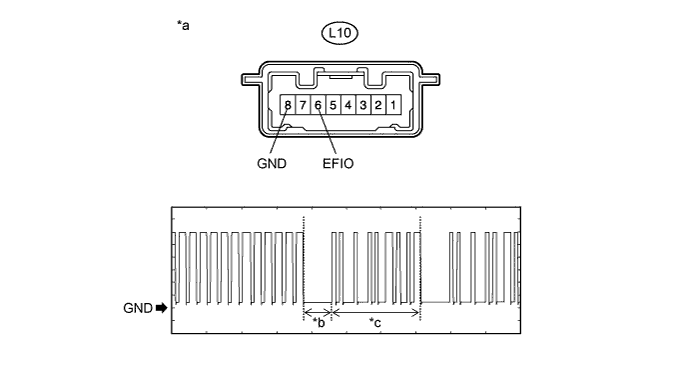
Text in Illustration *a Component with harness connected
(ID Code Box (Immobiliser Code ECU))
*b Approximately 160 ms *c Approximately 510 ms - - Measurement Condition Item Content Tester Connection L10-6 (EFIO) - L10-8 (GND) Tool Setting 2 V/DIV., 500 ms./DIV. Condition Within 3 seconds of power switch on (READY), or within 3 seconds of power switch turned on (IG) after auxiliary battery cable disconnected and reconnected OK The waveform is output normally (refer to illustration).
NG
CHECK HARNESS AND CONNECTOR (TELEPHONE TRANSCEIVER ASSEMBLY - AUXILIARY BATTERY AND BODY GROUND) Click here
OK
REPLACE TELEPHONE TRANSCEIVER ASSEMBLY
-
-
CHECK HARNESS AND CONNECTOR (TELEPHONE TRANSCEIVER ASSEMBLY - AUXILIARY BATTERY AND BODY GROUND)
-
Disconnect the L156 telephone transceiver assembly connector.
-
Measure the resistance and voltage according to the value(s) in the table below.
Standard Resistance Tester Connection Condition Specified Condition L156-9 (E) - Body ground Always Below 1 Ω Standard Voltage Tester Connection Condition Specified Condition L156-12 (+B) - Body ground Power switch off 11 to 14 V L156-6 (IG2) - Body ground Power switch off Below 1 V L156-6 (IG2) - Body ground Power switch on (IG) 11 to 14 V
NG
REPAIR OR REPLACE HARNESS OR CONNECTOR
OK
-
-
REPLACE ID CODE BOX (IMMOBILISER CODE ECU)
-
Temporarily replace the ID code box (immobiliser code ECU) with a new one.
Tech Tips
Refer to the Service Bulletin.
NEXT
-
-
PERFORM REGISTRATION
-
Perform the registration.
Tech Tips
Refer to the Service Bulletin.
NEXT
-
-
CHECK DTC OUTPUT
-
Clear the DTCs Click here.
-
Turn the power switch off.
-
Turn the power switch on (IG).
-
After 10 seconds have elapsed, check for DTCs.
OK DTC B1586 is not output.
NG
REPLACE TELEPHONE TRANSCEIVER ASSEMBLY
OK
END (ID CODE BOX (IMMOBILISER CODE ECU) WAS DEFECTIVE)
-