ENGINE IMMOBILISER SYSTEM, Diagnostic DTC:B279A

| DTC Code | DTC Name |
|---|---|
| B279A | Theft Deterrent System Communication Line High Fixation |
DESCRIPTION
If the communication line (EFIO - IMI) to the certification ECU assembly (smart key ECU assembly)*1 or ID code box (immobiliser code ECU)*2 is stuck high output (e. g. shorted to +B), the power management control ECU (HV CPU) stores this DTC.
-
*1: w/o Airbag Cut-off Switch
-
*2: w/ Airbag Cut-off Switch
| DTC No. | DTC Detection Condition | Trouble Area |
|---|---|---|
| B279A | When the communication line (EFIO - IMI) between power management control ECU (HV CPU) and certification ECU assembly (smart key ECU assembly)*1 or ID code box (immobiliser code ECU)*2 is stuck high output. |
|
-
*1: w/o Airbag Cut-off Switch
-
*2: w/ Airbag Cut-off Switch
-
*3: w/ Blocking System
WIRING DIAGRAM
-
w/o Airbag Cut-off Switch
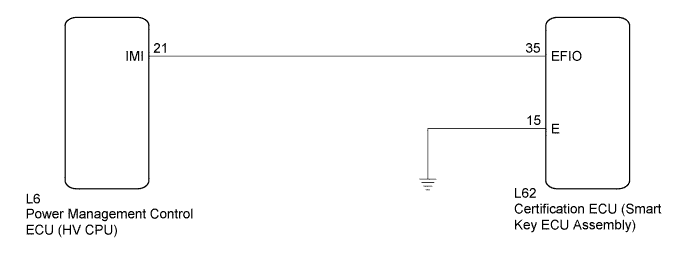
-
w/ Airbag Cut-off Switch
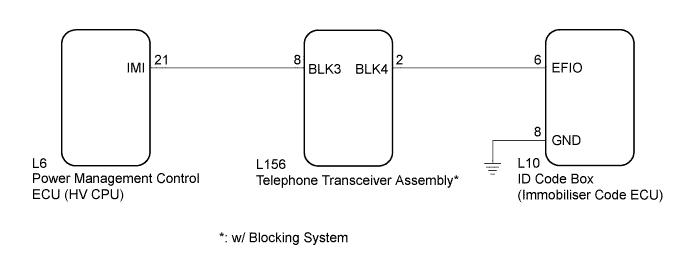
INSPECTION PROCEDURE
Note
-
If the certification ECU (smart key ECU assembly) is replaced, register all the keys and ECU communication ID.*1
-
If the ID code box (immobiliser code ECU) is replaced, register the ECU code and ECU communication ID.*2
-
When telephone transceiver is replaced, it is necessary to set the contract mode.*3
-
*1: w/o Airbag Cut-off Switch
-
*2: w/ Airbag Cut-off Switch
-
*3: w/ Blocking System
PROCEDURE
-
CHECK DTC OUTPUT
-
Clear the DTCs Click here.
-
Recheck for DTCs Click here.
Tech Tips
If any DTCs other than DTC B279A are output, troubleshoot those DTCs first.
Result Result Proceed to DTC B279A is output A DTC B279A and other DTCs are output B
B 
GO TO DIAGNOSTIC TROUBLE CODE CHART Click here
A 
-
-
SYSTEM CHECK
-
Check the vehicle specification.
Result Result Proceed to w/ Blocking System A w/o Blocking System B
B 
SYSTEM CHECK Click here
A
-
-
CHECK HARNESS AND CONNECTOR (POWER MANAGEMENT CONTROL ECU - TELEPHONE TRANSCEIVER ASSEMBLY)
-
Disconnect the telephone transceiver assembly connector.
-
Disconnect the power management control ECU connector.
-
Measure the resistance according to the value(s) in the table below.
Standard Resistance Tester Connection Condition Specified Condition L156-8 (BLK3) - L6-21 (IMI) Always Below 1 Ω L6-21 (IMI) - Body ground Always 10 kΩ or higher
NG
REPAIR OR REPLACE HARNESS OR CONNECTOR
OK
-
-
CHECK HARNESS AND CONNECTOR (ID CODE BOX (IMMOBILISER CODE ECU) - TELEPHONE TRANSCEIVER ASSEMBLY)
-
Disconnect the ID code box (immobiliser code ECU) connector.
-
Measure the resistance according to the value(s) in the table below.
Standard Resistance Tester Connection Condition Specified Condition L156-2 (BLK4) - L10-6 (EFIO) Always Below 1 Ω L10-6 (EFIO) - Body ground Always 10 kΩ or higher
NG
REPAIR OR REPLACE HARNESS OR CONNECTOR
OK
-
-
REPLACE TELEPHONE TRANSCEIVER ASSEMBLY
-
Temporarily replace the telephone transceiver assembly with a new or known good one.
Tech Tips
Refer to the Service Bulletin.
NEXT
-
-
REGISTER ECU COMMUNICATION ID
-
Register the ECU communication ID.
Tech Tips
Refer to the Service Bulletin.
NEXT
-
-
CLEAR DTC
-
Clear the DTCs Click here.
NEXT
-
-
CHECK DTC OUTPUT
-
Check for DTCs Click here.
Tech Tips
Before checking for DTCs, perform the "DTC Output Confirmation Operation" procedure.
OK DTC B279A is not output.
NG
REPLACE ID CODE BOX (IMMOBILISER CODE ECU) Click here
OK 
END (TELEPHONE TRANSCEIVER ASSEMBLY WAS DEFECTIVE)
-
-
SYSTEM CHECK
-
Check the vehicle specification.
Result Result Proceed to w/o Airbag Cut-off Switch A w/ Airbag Cut-off Switch B
B
CHECK HARNESS AND CONNECTOR (ID CODE BOX - POWER MANAGEMENT CONTROL ECU (HV CPU)) Click here
A
-
-
CHECK HARNESS AND CONNECTOR (CERTIFICATION ECU - POWER MANAGEMENT CONTROL ECU (HV CPU))
-
Disconnect the certification ECU (smart key ECU assembly) connector.
-
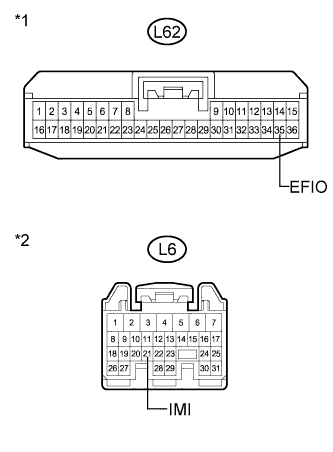
Text in Illustration *1 Front view of wire harness connector
(to Certification ECU (Smart Key ECU Assembly))
*2 Front view of wire harness connector
(to Power Management Control ECU (HV CPU))
Disconnect the power management control ECU (HV CPU) connector.
-
Measure the resistance and voltage according to the value(s) in the table below.
Standard Resistance Tester Connection Condition Specified Condition L62-35 (EFIO) - L6-21 (IMI) Always Below 1 Ω L6-21 (IMI) - Body ground Always 10 kΩ or higher Standard Voltage Tester Connection Condition Specified Condition L6-21 (IMI) - Body ground Always Below 1 V
NG
REPAIR OR REPLACE HARNESS OR CONNECTOR
OK
-
-
CHECK CERTIFICATION ECU (SMART KEY ECU ASSEMBLY) (WAVEFORM)
-
Reconnect the certification ECU (smart key ECU assembly) connector.
-
Reconnect the power management control ECU (HV CPU) connector.
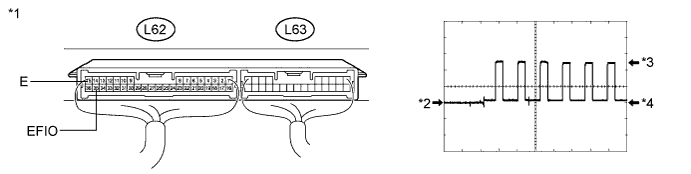
-
Using an oscilloscope, check the waveform.
Waveform (Reference) Item Content Terminal No. (Symbol) L62-35 (EFIO) - L62-15 (E) Tool Setting 5 V/DIV., 50 msec./DIV. Condition Power switch on (IG) OK Waveform is output normally (see illustration). Text in Illustration *1 Component with harness connected
(Certification ECU (Smart Key ECU Assembly))
*2 GND *3 HIGH *4 LOW
NG
REPLACE CERTIFICATION ECU (SMART KEY ECU ASSEMBLY) Click here
OK
REPLACE POWER MANAGEMENT CONTROL ECU (HV CPU) Click here
-
-
REPLACE CERTIFICATION ECU (SMART KEY ECU ASSEMBLY)
-
Replace the certification ECU (smart key ECU assembly).
Tech Tips
Refer to the Service Bulletin.
NEXT
-
-
KEY REGISTRATION
-
Register the key.
Tech Tips
Refer to the Service Bulletin.
NEXT
-
-
ECU COMMUNICATION ID REGISTRATION
-
Register the ECU communication ID.
Tech Tips
Refer to the Service Bulletin.
NEXT
-
-
CHECK DTC OUTPUT
-
Clear the DTCs Click here.
-
Recheck for DTCs Click here.
OK DTC B279A is not output.
NG
REPLACE POWER MANAGEMENT CONTROL ECU (HV CPU) Click here
OK
END (CERTIFICATION ECU (SMART KEY ECU ASSEMBLY) WAS DEFECTIVE)
-
-
CHECK HARNESS AND CONNECTOR (ID CODE BOX - POWER MANAGEMENT CONTROL ECU (HV CPU))
-
Disconnect the ID code box (immobiliser code ECU) connector.
-
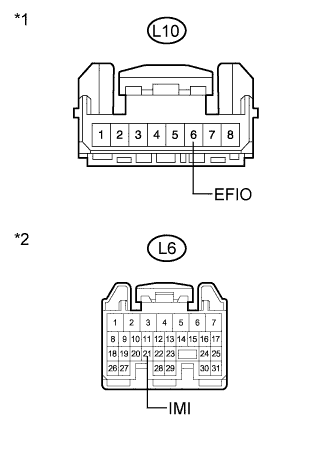
Text in Illustration *1 Front view of wire harness connector
(to ID Code Box (Immobiliser Code ECU))
*2 Front view of wire harness connector
(to Power Management Control ECU (HV CPU))
Disconnect the power management control ECU (HV CPU) connector.
-
Measure the resistance and voltage according to the value(s) in the table below.
Standard Resistance Tester Connection Condition Specified Condition L10-6 (EFIO) - L6-21 (IMI) Always Below 1 Ω L6-21 (IMI) - Body ground Always 10 kΩ or higher Standard Voltage Tester Connection Condition Specified Condition L6-21 (IMI) - Body ground Always Below 1 V
NG
REPAIR OR REPLACE HARNESS OR CONNECTOR
OK
-
-
CHECK ID CODE BOX (IMMOBILISER CODE ECU) (WAVEFORM)
-
Reconnect the ID code box (immobiliser code ECU) connector.
-
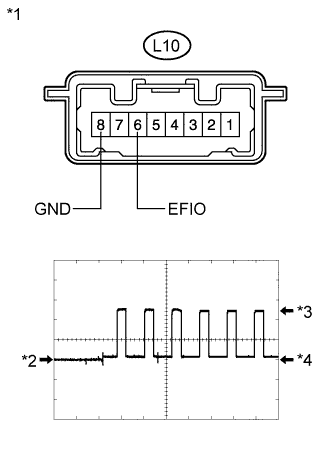
Text in Illustration *1 Component with harness connected
(ID Code Box (Immobiliser Code ECU))
*2 GND *3 HIGH *4 LOW Reconnect the power management control ECU (HV CPU) connector.
-
Using an oscilloscope, check the waveform.
Waveform (Reference) Item Content Terminal No. (Symbol) L10-6 (EFIO) - L10-8 (GND) Tool Setting 5 V/DIV., 50 msec./DIV. Condition Power switch on (IG) OK Waveform is output normally (see illustration).
NG
REPLACE ID CODE BOX (IMMOBILISER CODE ECU) Click here
OK
REPLACE POWER MANAGEMENT CONTROL ECU (HV CPU) Click here
-
-
REPLACE ID CODE BOX (IMMOBILISER CODE ECU)
-
Replace the ID code box (immobiliser code ECU).
Tech Tips
Refer to the Service Bulletin.
NEXT
-
-
ECU CODE REGISTRATION
-
Register the ECU code.
Tech Tips
Refer to the Service Bulletin.
NEXT
-
-
ECU COMMUNICATION ID REGISTRATION
-
Register the ECU communication ID.
Tech Tips
Refer to the Service Bulletin.
NEXT
-
-
CHECK DTC OUTPUT
-
Clear the DTCs Click here.
-
Recheck for DTCs Click here.
OK DTC B279A is not output.
NG
REPLACE POWER MANAGEMENT CONTROL ECU (HV CPU) Click here
OK
END (ID CODE BOX (IMMOBILISER CODE ECU) WAS DEFECTIVE)
-