TRANSMITTER BATTERY REPLACEMENT

-
REMOVE TRANSMITTER BATTERY
Note
Take extra care when handling these precision electronic components.
-
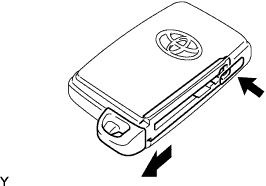
Push the release hook knob and extract the mechanical key.
-
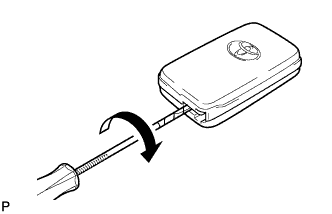
Insert a precision screwdriver into the gap, and turn the screwdriver to detach the transmitter housing cover.
Tech Tips
Tape the screwdriver tip before use.
-
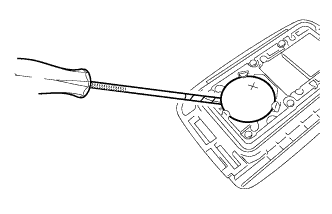
Insert a precision screwdriver into the gap and gently remove the battery (lithium battery: CR1632).
Note
-
Do not push the terminals with your finger.
-
Do not forcibly pry up the battery. The terminals may be damaged.
-
Do not touch the battery with wet hands. Water may cause rust.
-
Do not touch or move any components inside the transmitter. It may interfere with proper operation.
Tech Tips
Tape the screwdriver tip before use.
-
-
-
INSTALL TRANSMITTER BATTERY
-
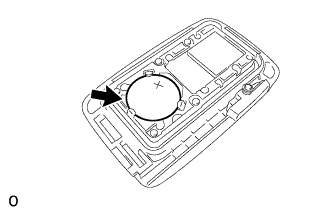
Install a new battery (lithium battery: CR1632) with the positive (+) side facing upward, as shown in the illustration.
Note
-
Do not bend the transmitter battery electrode during insertion.
-
Keep the transmitter cover interior free of dust and oil.
-
-
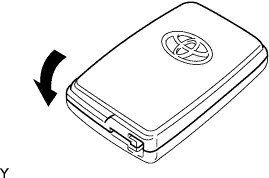
Install the transmitter housing cover by pressing down on it as shown in the illustration.
-
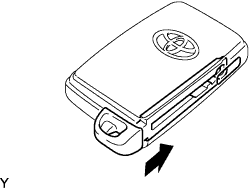
Insert the mechanical key into the transmitter.
-
Press one of the transmitter switches and check that the LED illuminates.
OK Transmitter LED illuminates when switch is pressed.
-