INTEGRATION RELAY REMOVAL

-
PRECAUTION (w/ Navigation System for HDD)
Note
After the power switch is turned off, the display and navigation module display (HDD navigation system) records various types of memory and settings. As a result, after turning the power switch off, make sure to wait at least 60 seconds before disconnecting the cable from the negative (-) battery terminal.
-
DISCONNECT CABLE FROM NEGATIVE BATTERY TERMINAL
Note
When disconnecting the cable, some systems need to be initialized after the cable is reconnected Click here.
-
REMOVE NO. 1 RELAY BLOCK COVER
-
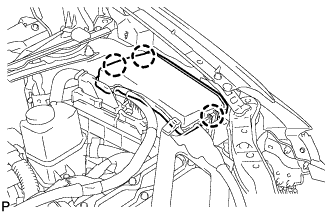
Disengage the 3 claws and remove the No. 1 relay block cover.
-
-
REMOVE NO. 1 INTEGRATION RELAY
-
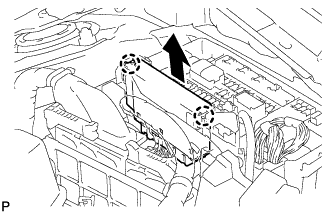
Disengage the 2 claws and pull up the No. 1 integration relay as shown in the illustration.
-
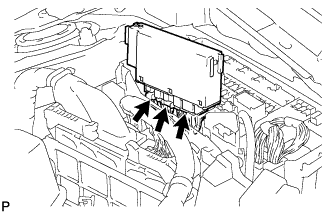
Disconnect the 3 connectors and remove the No. 1 integration relay.
-