INTELLIGENT PARKING ASSIST SYSTEM Vehicle does not Move to Set Parking Position
INSPECTION PROCEDURE
Note
-
When "System initializing" message is displayed on the navigation receiver assembly after the battery terminal disconnected, correct the steering angle neutral point Click here.
-
Depending on the parts that are replaced or operations that are performed during vehicle inspection or maintenance, calibration of other systems as well as the intelligent parking assist system may be needed Click here.
-
If initialization is necessary while performing an inspection, perform initialization first and then proceed to the next step.
PROCEDURE
-
CHECK TIRE SIZE
-
Check that the tire pressure and tire size are as specified. Check that there is no excessive wear on the tires.
Result Result Proceed to Tire size is as specified and there is no excessive wear A Tire size is as specified but there is excessive wear B Tire size is not as specified but there is no excessive wear A Tire size is not as specified and there is excessive wear B Tire size is totally different from specified size B
B 
REPLACE TIRES
A 
-
-
CHECK TIRE ROTATION
-
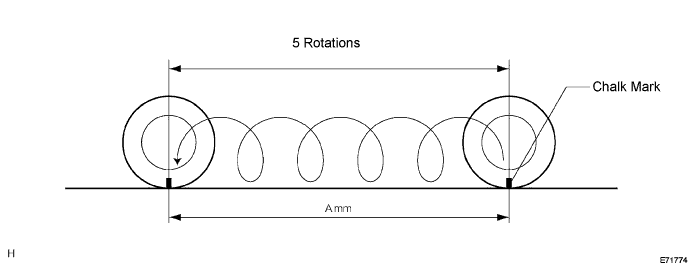
Check tire movement distance.
-
On a level surface, center the steering wheel and stop the vehicle.
-
Apply chalk to a point on the tire and on the ground.
-
Drive the vehicle straight ahead, and stop the vehicle after the tire rotates 5 times.
-
Mark the vehicle stop position on the ground, and measure the movement distance A mm (ft.). Check that the measured distance is within the standard range.
Standard 9582 to 9776 mm (31.44 to 32.07 ft.)
-
NG
REPLACE TIRES
OK
-
-
CHECK SYMPTOMS
-
Parallel parking
-
Move the vehicle to a level surface area with parking spaces.
-
Using the intelligent parking assist system, perform parallel parking. Check how the vehicle deviates from the set parking position.
Tech Tips
Begin the check with the vehicle at a 45° angle to the parking space. Perform the check from the right and left side of the parking space.
-
Select a case below that is most similar to the problem, and follow the instructions.
-
-
Deviation examples
-
Case 1
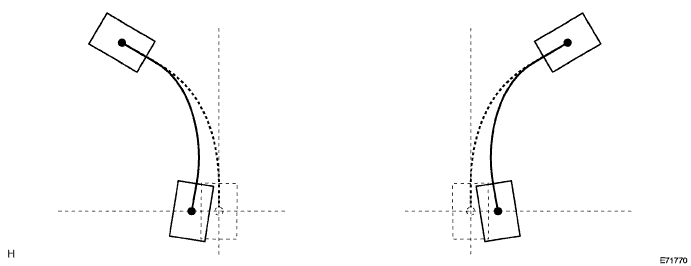
Case Type of Deviation Cause Proceed to 1 Vehicle deviates toward inner side (steering wheel is turned too much)
-
Actual turning radius is small
-
Television camera adjustment value deviated
A -
-
Case 2
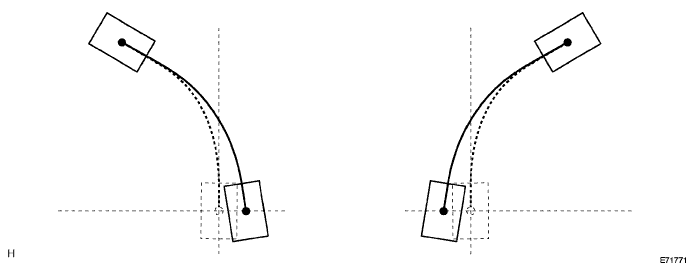
Case Type of Deviation Cause Proceed to 2 Vehicle deviates toward outer side (steering wheel is turned too little)
-
Actual turning radius is large
-
Television camera adjustment value deviated
B -
-
Case 3
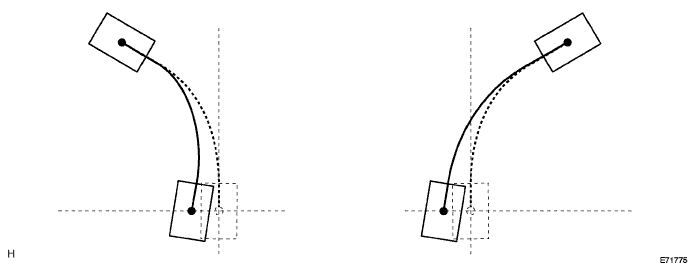
Case Type of Deviation Cause Proceed to 3 Regardless of side in which parking is performed, vehicle front deviates to right
-
Steering angle memorized value deviated
-
Television camera adjustment value deviated
C -
-
Case 4
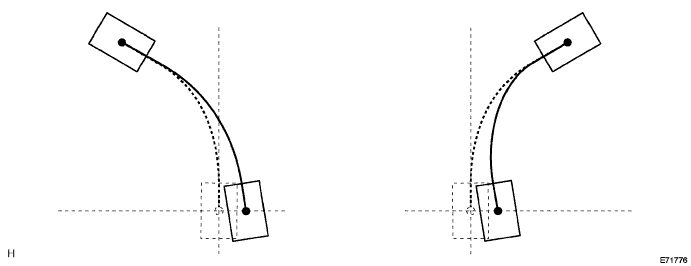
Case Type of Deviation Cause Proceed to 4 Regardless of side in which parking is performed, vehicle front deviates to left
-
Steering angle memorized value deviated
-
Television camera adjustment value deviated
C -
-
Case 5
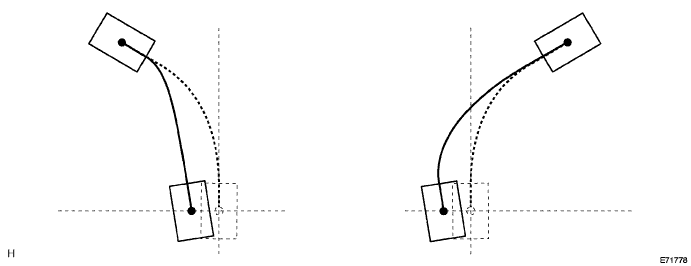
Case Type of Deviation Cause Proceed to 5 Regardless of side in which parking is performed, entire vehicle deviates to left
-
Steering angle memorized value deviated
-
Television camera adjustment value deviated
C -
-
Case 6
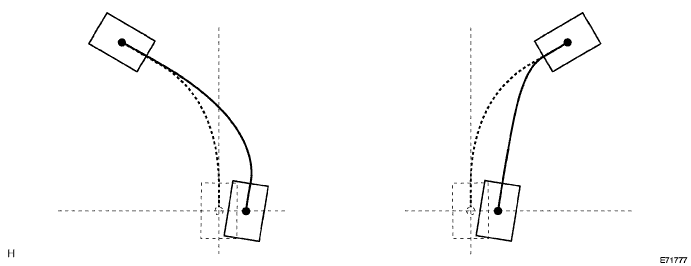
Case Type of Deviation Cause Proceed to 6 Regardless of side in which parking is performed, entire vehicle deviates to right
-
Steering angle memorized value deviated
-
Television camera adjustment value deviated
C -
-
B 
CHECK FRONT WHEEL ALIGNMENT Click here
C
ADJUST SETTINGS (STEERING ANGLE SETTING) Click here
A
-
-
ADJUST SETTINGS (HEIGHT SET AND CAMERA POSITION SETTING)
-
Perform the height control sensor vehicle height difference setting Click here.
-
Perform the rear television camera optical axis adjustment Click here.
-
Check deviation
-
Operate the intelligent parking assist system and check if the malfunction reoccurs.
OK Returns to normal
-
NG
CHECK FRONT WHEEL ALIGNMENT Click here
OK 
END
-
-
CHECK FRONT WHEEL ALIGNMENT
-
Perform the front wheel alignment inspection Click here.
Tech Tips
For alignment inspection, follow the toe-in and camber specifications.
Standard Returns to normal Tech Tips
For alignment adjustment, follow the toe-in and camber specifications.
NG
ADJUST FRONT WHEEL ALIGNMENT Click here
OK
-
-
CHECK REAR WHEEL ALIGNMENT
-
Perform the rear wheel alignment inspection Click here.
Tech Tips
For alignment inspection, follow the toe-in and camber specifications.
Standard Returns to normal Tech Tips
For alignment adjustment, follow the toe-in and camber specifications.
NG
ADJUST REAR WHEEL ALIGNMENT Click here
OK
REPLACE PARKING ASSIST ECU Click here
-
-
CHECK FRONT WHEEL ALIGNMENT
-
Perform the front wheel alignment inspection Click here.
Tech Tips
For alignment inspection, follow the toe-in and camber specifications.
Standard Returns to normal Tech Tips
For alignment adjustment, follow the toe-in and camber specifications.
NG
ADJUST FRONT WHEEL ALIGNMENT Click here
OK
-
-
CHECK REAR WHEEL ALIGNMENT
-
Perform the rear wheel alignment inspection Click here.
Tech Tips
For alignment inspection, follow the toe-in and camber specifications.
Standard Returns to normal Tech Tips
For alignment adjustment, follow the toe-in and camber specifications.
NG
ADJUST REAR WHEEL ALIGNMENT Click here
OK
-
-
ADJUST SETTINGS (HEIGHT SET AND CAMERA POSITION SETTING)
-
Perform the height control sensor vehicle height difference setting Click here.
-
Perform the rear television camera optical axis adjustment Click here.
-
Check deviation
-
Operate the intelligent parking assist system and check if the malfunction reoccurs.
OK Returns to normal
-
NG
REPLACE PARKING ASSIST ECU Click here
OK
END
-
-
ADJUST SETTINGS (STEERING ANGLE SETTING)
-
Perform the steering angle setting Click here.
-
Check deviation
-
Operate the intelligent parking assist system and check if the malfunction reoccurs.
OK Returns to normal
-
NG
ADJUST SETTINGS (HEIGHT SET AND CAMERA POSITION SETTING) Click here
OK
END
-
-
ADJUST SETTINGS (HEIGHT SET AND CAMERA POSITION SETTING)
-
Perform the height control sensor vehicle height difference setting Click here.
-
Perform the rear television camera optical axis adjustment Click here.
-
Check deviation
-
Operate the intelligent parking assist system and check if the malfunction reoccurs.
OK Returns to normal
-
NG
CHECK FRONT WHEEL ALIGNMENT Click here
OK
END
-
-
CHECK FRONT WHEEL ALIGNMENT
-
Perform the front wheel alignment inspection Click here.
Tech Tips
For alignment inspection, follow the toe-in and camber specifications.
Standard Returns to normal Tech Tips
For alignment adjustment, follow the toe-in and camber specifications.
NG
ADJUST FRONT WHEEL ALIGNMENT Click here
OK
-
-
CHECK REAR WHEEL ALIGNMENT
-
Perform the rear wheel alignment inspection Click here.
Tech Tips
For alignment inspection, follow the toe-in and camber specifications.
Standard Returns to normal Tech Tips
For alignment adjustment, follow the toe-in and camber specifications.
NG
ADJUST REAR WHEEL ALIGNMENT Click here
OK
REPLACE PARKING ASSIST ECU Click here
-