NAVIGATION SYSTEM (for HDD) Voice Guidance does not Function
INSPECTION PROCEDURE
PROCEDURE
-
CHECK NAVIGATION SETTING
-
Display the "Voice Settings" screen.
-
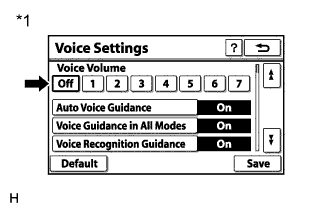
Text in Illustration *1 Example Check that "Off" is not selected.
OK "Off" is not selected.
NG 
SELECT VOICE VOLUME SETTING OTHER THAN "Off"
OK 
-
-
CHECK NAVIGATION SETTING
-
Display the "Voice Settings" screen.
-
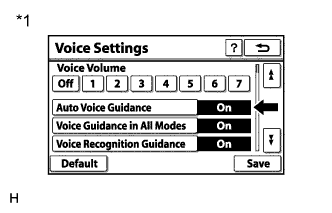
Text in Illustration *1 Example Check that "Auto Voice Guidance" is not "Off".
OK "Auto Voice Guidance" is not "Off".
NG
TURN AUTO VOICE GUIDANCE "On"
OK
-
-
CHECK NAVIGATION SETTING
-
Display the "Voice Settings" screen.
-
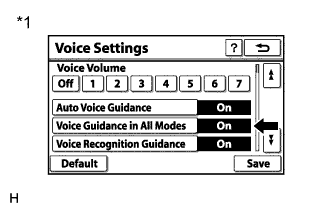
Text in Illustration *1 Example Check that "Voice Guidance in All Modes" is not "Off".
OK "Voice Guidance in All Modes" is not "Off".
NG
REPLACE NAVIGATION RECEIVER ASSEMBLY Click here
OK
-
-
CHECK HARD DISK DRIVE (OPERATION CHECK)
-
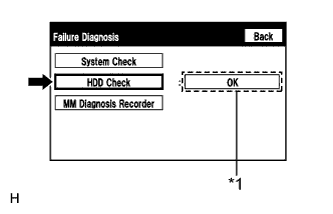
Text in Illustration *1 Result Enter the "Failure Diagnosis" screen. Refer to Check Hard Disk Drive in Operation Check Click here.
-
Select "HDD Check" and check the result.
OK "OK" is displayed. Tech Tips
After "HDD Check" is selected, it may take a while until the result is displayed.
NG
REPLACE NAVIGATION RECEIVER ASSEMBLY Click here
OK
-
-
CHECK CABIN
-
Check that condensation is not likely to occur in the cabin, and that the temperature is not high or extremely low in the cabin.
Tech Tips
-
A humid cabin and a rapid change in temperature may lead to condensation. Condensation in the cabin may cause a short circuit.
-
The navigation system may not operate normally when the temperature is -20°C (-4°F) or lower, or 65°C (149°F) or higher.
OK Condensation is not likely being produced and the temperature is not high or extremely low. -
NG
SET CABIN TO APPROPRIATE TEMPERATURE
OK
-
-
CHECK AUDIO FUNCTION
-
Check that audio sound can be heard from the driver side speaker.
OK Audio sound can be heard.
NG
PROCEED TO NEXT SUSPECTED AREA SHOWN IN PROBLEM SYMPTOMS TABLE Click here
OK 
REPLACE NAVIGATION RECEIVER ASSEMBLY Click here
-