BRAKE PEDAL STROKE SENSOR (for RHD) INSTALLATION

Note
While the battery is connected, even if the power switch is off, the brake control system activates when the brake pedal is depressed or any door courtesy switch turns on. Therefore, when servicing the brake system components, do not operate the brake pedal or open/close the doors while the battery is connected.
-
INSPECT AND ADJUST BRAKE PEDAL
-
Check the brake pedal height.
-
Turn back the carpet.
-
Turn back the dash silencer from the slit provided on the dash silencer.
-
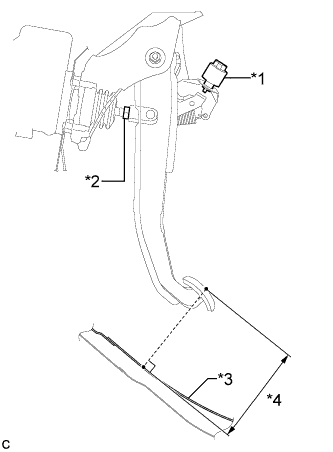
Text in Illustration *1 Stop Light Switch Assembly *2 Clevis Lock Nut *3 Floor Panel *4 Brake Pedal Height Measure the shortest distance between the brake pedal surface and floor panel.
Brake pedal height from floor panel 131.3 to 141.3 mm (5.17 to 5.56 in.)
-
-
Adjust the brake pedal height.
-
Remove the stop light switch assembly Click here.
-
Loosen the clevis lock nut.
-
Adjust the brake pedal height by turning the push rod.
-
Tighten the clevis lock nut.
- Torque:
- 26 N*m { 260 kgf*cm, 19 ft.*lbf }
-
Install and adjust the stop light switch assembly Click here.
-
-
-
INSTALL BRAKE PEDAL STROKE SENSOR ASSEMBLY
Note
-
Do not drop the brake pedal stroke sensor assembly.
-
If the brake pedal stroke sensor assembly has been dropped, replace the brake pedal stroke sensor assembly with a new one.
-
When installing a new brake pedal stroke sensor assembly:
Note
Do not break the brake pedal stroke sensor assembly lever set pin before installing the brake pedal stroke sensor assembly with the 2 nuts.
-
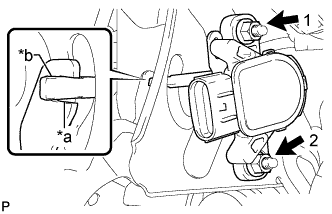
Text in Illustration *a Brake Pedal Groove *b Brake Pedal Stroke Sensor Assembly Lever Install a new brake pedal stroke sensor assembly with the 2 nuts.
- Torque:
- 7.0 N*m { 71 kgf*cm, 62 in.*lbf }
Note
-
Engage the brake pedal stroke sensor assembly lever with the brake pedal groove.
-
Check that there is no foreign matter attached to the contact surface of the brake pedal stroke sensor assembly.
-
Check that the tip of the brake pedal stroke sensor assembly lever is protruding from the brake pedal groove.
-
Tighten the 2 nuts in the order shown in the illustration.
-
Connect the connector to the brake pedal stroke sensor assembly.
-
Firmly depress the brake pedal and break the brake pedal stroke sensor assembly lever set pin.
-
Remove the broken brake pedal stroke sensor assembly lever set pin.
-
-
When reusing the brake pedal stroke sensor assembly:
-
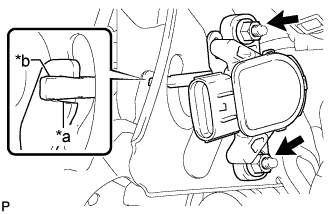
Text in Illustration *a Brake Pedal Groove *b Brake Pedal Stroke Sensor Assembly Lever Temporarily install the brake pedal stroke sensor assembly with the 2 nuts.
Note
-
Engage the brake pedal stroke sensor assembly lever with the brake pedal groove.
-
Check that there is no foreign matter attached to the contact surface of the brake pedal stroke sensor assembly.
-
-
Connect the connector to the brake pedal stroke sensor assembly.
-
-
-
INSTALL ECU INTEGRATION BOX RH
-
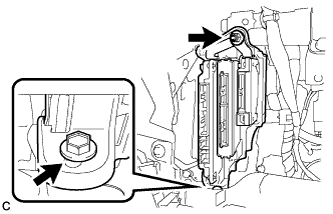
Install the ECU integration box RH with the nut and bolt.
- Torque:
- 14 N*m { 138 kgf*cm, 10 ft.*lbf }
-
Connect the connectors.
-
-
INSTALL LOWER INSTRUMENT PANEL FINISH PANEL
Tech Tips
Perform the same procedure as for the LHD Click here.
-
INSTALL COWL SIDE TRIM SUB-ASSEMBLY RH
Tech Tips
Perform the same procedure as for the LHD Click here.
-
INSTALL FRONT DOOR SCUFF PLATE RH
Tech Tips
Perform the same procedure as for the LHD Click here.
-
CONNECT CABLE TO NEGATIVE BATTERY TERMINAL
Note
When disconnecting the cable, some systems need to be initialized after the cable is reconnected Click here.
-
INSTALL REAR NO. 3 FLOOR BOARD
-
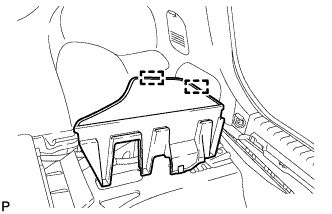
Engage the 2 guides to install the rear No. 3 floor board.
-
-
INSTALL REAR DECK FLOOR BOX
-
Install the rear deck floor box.
-
-
INSTALL REAR NO. 2 FLOOR BOARD
-
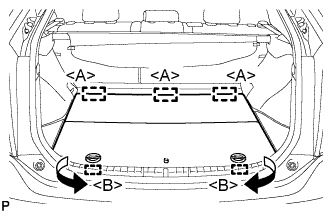
Engage the 3 guides <A>.
-
Engage the 2 guides <B> and install the rear No. 2 floor board as shown in the illustration.
-
-
ADJUST BRAKE PEDAL STROKE SENSOR ASSEMBLY
Note
When the brake pedal stroke sensor assembly is being reused, perform the following procedure to adjust it.
-
Connect the intelligent tester to the DLC3.
-
Turn the power switch on (IG).
-
Turn the intelligent tester on.
-
Enter the following menus: Chassis / ABS/VSC/TRC / Data List "Stroke Sensor".
-
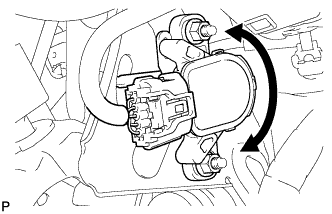
Read the stroke sensor value in the Data List, and turn the brake pedal stroke sensor assembly slowly to the right or left to adjust the output voltage so that it is within the following range.
Standard voltage (without the brake pedal depressed) 0.8 to 1.2 V -
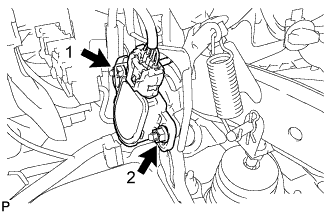
Fully tighten the 2 nuts.
- Torque:
- 7.0 N*m { 71 kgf*cm, 62 in.*lbf }
Note
-
Do not depress the brake pedal after turning the power switch on (IG).
-
Tighten the 2 nuts in the order shown in the illustration.
-
Turn the intelligent tester off.
-
Turn the power switch off.
-
Disconnect the intelligent tester.
-
-
CHECK AND CLEAR DTC
-
PERFORM LINEAR VALVE OFFSET LEARNING