HYBRID CONTROL SYSTEM EV Drive Mode Switch Circuit
DESCRIPTION
The EV mode signal is sent to the power management control ECU (HV CPU). This signal is then transmitted from the power management control ECU (HV CPU) via CAN to the combination meter assembly to illuminate the EV indicator lamp.
WIRING DIAGRAM
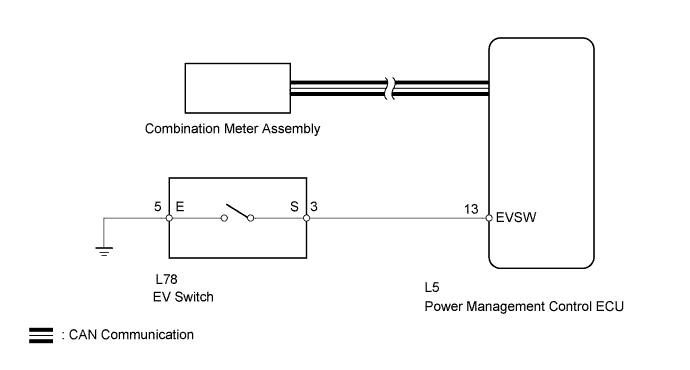
INSPECTION PROCEDURE
If any of the following conditions are not met, EV mode may not be turned on or the mode may be cancelled. (A buzzer sounds to indicate that the transition to EV mode is cancelled and a message is displayed on multi-information display.)
| EV Mode Entry Condition | Tester Display | Specified Condition |
|---|---|---|
| HV battery charge level | State of Charge | Approximately 50% or higher |
| Accelerator pedal position | Accelerator Degree | Below approximately 30% |
| Engine coolant temperature | Engine Coolant Temp | 0°C (32°F) or higher |
| HV battery temperature | Temp of Batt TB1 to TB6 | Between 10°C to 40°C (50°F to 104°F) |
| Vehicle speed (Varies depending on engine warm-up condition) |
- | Cold: 30 km/h (19 mph) or lower Warmed-up: 45 km/h (28 mph) or lower |
| Defroster | - | OFF |
| Cruise control | - | OFF |
| Win | Charge Control Value | Below -20000W |
| Wout | Discharge Control Value | 20000W or higher |
PROCEDURE
-
ASK ABOUT VEHICLE CONDITION
-
Check if a buzzer sounded and a message was displayed on the multi-information display when attempting to enter EV mode.
Result Result Proceed to No buzzer sounded and no message was displayed on multi-information display. A A buzzer sounded and a message was displayed on multi-information display. B Tech Tips
If a buzzer sounds and a message is displayed on multi-information display, one or more of the EV mode entry conditions have not been met. Check that all of the EV mode entry conditions have been met before pressing the EV mode switch.
B 
COMPLETED
A 
-
-
READ VALUE USING INTELLIGENT TESTER (CAN BUS CHECK)
-
Connect the intelligent tester to the DLC3.
-
Turn the power switch on (IG).
-
Enter the following menus: System Select / CAN Bus Check.
Result Result Proceed to All of the ECUs and sensors that are currently connected to the CAN communication system are displayed. A None of the ECUs and sensors that are currently connected to the CAN communication system are displayed, or some of them are not displayed. B
B
GO TO CAN COMMUNICATION SYSTEM Click here
A
-
-
CHECK DTC OUTPUT (ALL)
-
Connect the intelligent tester to the DLC3.
-
Turn the power switch on (IG).
-
Check for DTCs of all system by following the prompts on the tester screen.
Result Result Proceed to No DTCs are output A DTCs are output B
B
GO TO DTC CHART
A
-
-
PERFORM ACTIVE TEST USING INTELLIGENT TESTER (COMBINATION METER)
-
Connect the intelligent tester to the DLC3.
-
Turn the power switch on (IG).
-
Enter the following menus: Body Electrical / Combination Meter / Active Test / Indicat. EV Mode.
-
Perform the "Indicat. EV Mode" Active Test.
OK Tester Display Description Inspection Condition Specified Condition Indicat. EV Mode EV drive mode indicator light EV Drive Mode Comes on Result Result Proceed to The EV mode light comes on A The EV mode light does not come on B
B
REPLACE COMBINATION METER ASSEMBLY Click here
A
-
-
CHECK POWER MANAGEMENT CONTROL ECU
-
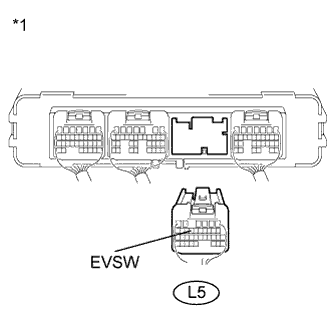
Text in Illustration *1 Rear view of wire harness connector
(to Power Management Control ECU)
Disconnect connector L5 from the power management control ECU.
-
Measure the resistance according to the value(s) in the table below.
Standard Resistance Tester Connection Condition Specified Condition L5-13 (EVSW) - Body ground EV Switch ON Below 1 Ω L5-13 (EVSW) - Body ground EV Switch OFF 10 kΩ or higher -
Connect the power management control ECU connector.
NG 
CHECK PATTERN SELECT SWITCH (EV SWITCH) Click here
OK 
CHECK FOR INTERMITTENT PROBLEMS Click here
-
-
CHECK PATTERN SELECT SWITCH (EV SWITCH)
-
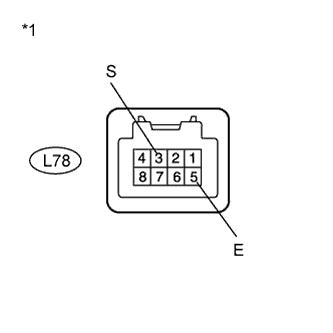
Text in Illustration *1 Pattern Select Switch (EV Switch) Remove the pattern select switch (EV switch).
-
Measure the resistance according to the value(s) in the table below.
Standard Resistance Tester Connection Condition Specified Condition L78-3 (S) - L78-5 (E) EV Switch ON Below 1 Ω L78-3 (S) - L78-5 (E) EV Switch OFF 10 kΩ or higher -
Install the pattern select switch.
NG
REPLACE PATTERN SELECT SWITCH (EV SWITCH)
OK
-
-
CHECK HARNESS AND CONNECTOR (EV SWITCH - BODY GROUND)
-
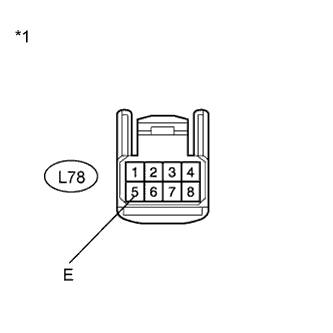
Text in Illustration *1 Front view of wire harness connector
(to Pattern Select Switch (EV Switch))
Disconnect connector L78 from the pattern select switch.
-
Measure the resistance according to the value(s) in the table below.
Standard Resistance Tester Connection Condition Specified Condition L78-5 (E) - Body ground Always Below 1 Ω -
Connect the pattern select switch connector.
NG
REPAIR OR REPLACE HARNESS OR CONNECTOR
OK
-
-
CHECK HARNESS AND CONNECTOR (EV SWITCH - POWER MANAGEMENT CONTROL ECU)
-
Disconnect connector L78 from the EV switch.
-
Disconnect connector L5 from the power management control ECU.
-
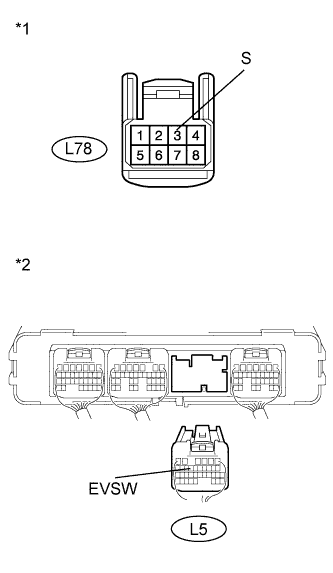
Text in Illustration *1 Front view of wire harness connector
(to Pattern Select Switch (EV Switch))
*2 Rear view of wire harness connector
(to Power Management Control ECU)
Measure the resistance according to the value(s) in the table below.
Standard Resistance Tester Connection Condition Specified Condition L78-3 (S) - L5-13 (EVSW) Always Below 1 Ω L78-3 (S) or L5-13 (EVSW) - Body ground Always 10 kΩ or higher -
Connect the pattern select switch connector.
-
Connect the power management control ECU connector.
NG
REPAIR OR REPLACE HARNESS OR CONNECTOR
OK
REPLACE POWER MANAGEMENT CONTROL ECU Click here
-