HYBRID BATTERY SYSTEM, Diagnostic DTC:P0A85-123

| DTC Code | DTC Name |
|---|---|
| P0A85-123 | Hybrid Battery Pack Cooling Fan 1 |
DESCRIPTION
Refer to the circuit description for DTC P0A84-123 Click here.
| DTC No. | DTC Detection Condition | Trouble Area |
|---|---|---|
| P0A85-123 | When the output voltage of the battery cooling blower assembly (VM) is too high compared to the target control voltage range (1 trip detection) |
|
WIRING DIAGRAM
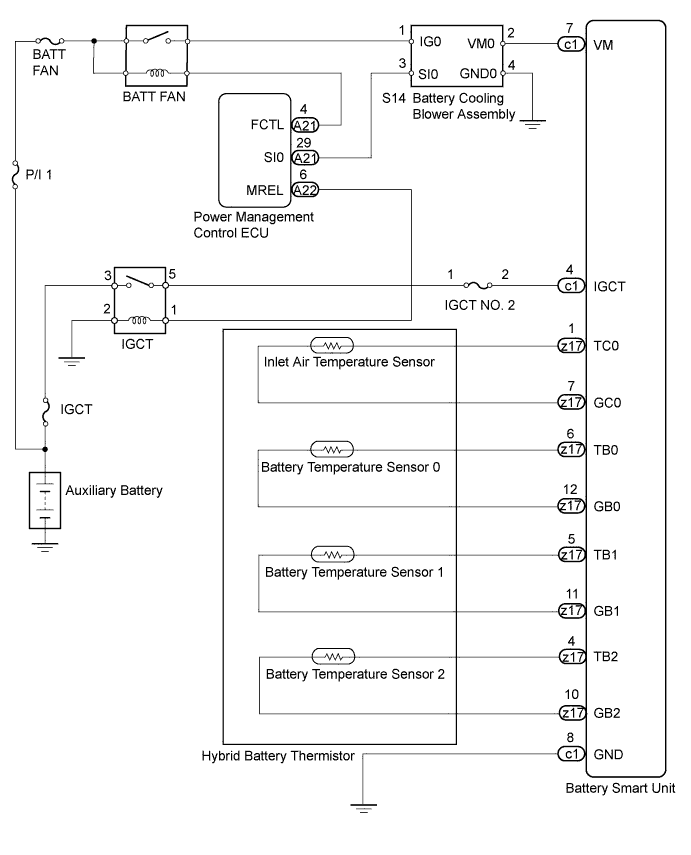
INSPECTION PROCEDURE
CAUTION:
-
Before inspecting the high-voltage system, take safety precautions such as wearing insulated gloves and removing the service plug grip to prevent electrical shocks. After removing the service plug grip, put it in your pocket to prevent other technicians from accidentally reconnecting it while you are working on the high-voltage system.
-
After disconnecting the service plug grip, wait for at least 10 minutes before touching any of the high-voltage connectors or terminals.
Tech Tips
Waiting for at least 10 minutes is required to discharge the high-voltage capacitor inside the inverter with converter assembly.
Note
After the power switch is turned off, the display and navigation module display (HDD navigation system) records various types of memory and settings. As a result, after turning the power switch off, make sure to wait at least 60 seconds before disconnecting the cable from the negative (-) battery terminal.
PROCEDURE
-
CHECK FOR DTCS (DTC P0AFC-123 IS OUTPUT)
-
Connect the intelligent tester to the DLC3.
-
Turn the power switch on (IG).
-
Enter the following menus: Powertrain / Hybrid Control / Trouble Codes.
-
Read output DTCs Click here.
Result Result Proceed to P0AFC-123 is not output. A P0AFC-123 is also output. B -
Disconnect the intelligent tester from the DLC3.
B 
GO TO DTC CHART
A 
-
-
CHECK HARNESS AND CONNECTOR (VOLTAGE)
CAUTION:
Be sure to wear insulated gloves.
-
Disconnect the cable from the negative (-) battery terminal.
-
Check that the service plug grip is not installed.
Note
After removing the service plug grip, do not turn the power switch on (READY), unless instructed by the repair manual because this may cause a malfunction.
-
Remove the No. 1 hybrid vehicle battery carrier bracket sub-assembly Click here.
-
Connect the cable to the negative (-) battery terminal.
-
Connect the intelligent tester to the DLC3.
-
Turn the power switch on (IG).
Note
-
After removing the service plug grip, do not turn the power switch on (READY), unless instructed by the repair manual because this may cause a malfunction.
-
If the power switch is turned on (IG) with the service plug grip removed, DTC P0A0D-350 for the interlock switch system will be stored. If this DTC is output, clear the DTC using the intelligent tester Click here.
-
-
Enter the following menus: Powertrain / Hybrid Control / Active Test / Driving the Battery Cooling Fan.
Note
If the active test cannot be performed, skip it and proceed to the next step to check voltage. In accordance with fail-safe system operation, the power management control ECU sends a command to operate the battery cooling fan.
-
Select each air volume mode (1 to 6) in the "Driving the Battery Cooling Fan" active test to operate the battery cooling blower assembly.
-
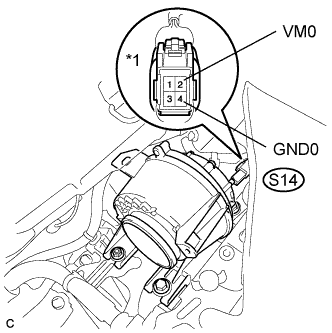
Text in Illustration *1 Component with harness connected
(Battery Cooling Blower Assembly)
Measure the voltage according to the value(s) in the table below.
Standard Voltage Tester Connection Condition Specified Condition S14-2 (VM0) - S14-4 (GND0) Battery cooling blower is operating Below 5 V Tech Tips
Measure the voltage on the wire side of the connector that is part of the battery cooling blower assembly.
-
Turn the power switch off.
-
Install the No. 1 hybrid vehicle battery carrier bracket sub-assembly Click here.
NG 
CHECK HARNESS AND CONNECTOR (VOLTAGE) Click here
OK
-
-
CHECK HYBRID BATTERY THERMISTOR (BATTERY TEMPERATURE SENSOR AND INLET AIR TEMPERATURE SENSOR)
CAUTION:
Be sure to wear insulated gloves.
-
Disconnect the cable from the negative (-) battery terminal.
-
Check that the service plug grip is not installed.
Note
After removing the service plug grip, do not turn the power switch on (READY), unless instructed by the repair manual because this may cause a malfunction.
-
Remove the No. 1 hybrid vehicle battery carrier bracket sub-assembly Click here.
-
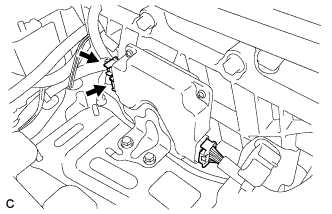
Disconnect the c1 and z17 connectors from the battery smart unit.
-
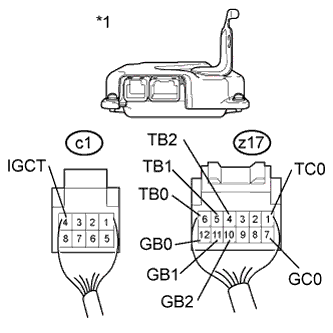
Text in Illustration *1 Rear view of wire harness connector
(to Battery Smart Unit)
Measure the resistance according to the value(s) in the table below.
Standard Resistance Tester Connection Switch Condition Specified Condition z17-6 (TB0) - c1-4 (IGCT) Power switch off 10 kΩ or higher z17-12 (GB0) - c1-4 (IGCT) Power switch off 10 kΩ or higher z17-5 (TB1) - c1-4 (IGCT) Power switch off 10 kΩ or higher z17-11 (GB1) - c1-4 (IGCT) Power switch off 10 kΩ or higher z17-4 (TB2) - c1-4 (IGCT) Power switch off 10 kΩ or higher z17-10 (GB2) - c1-4 (IGCT) Power switch off 10 kΩ or higher z17-1 (TC0) - c1-4 (IGCT) Power switch off 10 kΩ or higher z17-7 (GC0) - c1-4 (IGCT) Power switch off 10 kΩ or higher -
Connect the c1 and z17 connectors to the battery smart unit.
-
Install the No. 1 hybrid vehicle battery carrier bracket sub-assembly Click here.
-
Connect the cable to the negative (-) battery terminal.
NG
CHECK HARNESS AND CONNECTOR (INLET AIR TEMPERATURE SENSOR AND BATTERY TEMPERATURE SENSOR) Click here
OK 
REPLACE BATTERY SMART UNIT Click here
-
-
CHECK HARNESS AND CONNECTOR (INLET AIR TEMPERATURE SENSOR AND BATTERY TEMPERATURE SENSOR)
CAUTION:
Be sure to wear insulated gloves.
-
Disconnect the cable from the negative (-) battery terminal.
-
Check that the service plug grip is not installed.
Note
After removing the service plug grip, do not turn the power switch on (READY), unless instructed by the repair manual because this may cause a malfunction.
-
Remove the upper hybrid battery cover sub-assembly Click here.
-
Check the wire harness and connectors of the battery temperature sensor and inlet air temperature sensor for abnormalities by sight and touch.
Specified Condition There are no open or short circuits in the wire harness and connectors. There are no short circuits to other wire harnesses. -
Install the upper hybrid battery cover sub-assembly Click here.
-
Connect the cable to the negative (-) battery terminal.
NG
REPAIR HARNESS OR CONNECTOR
OK
REPLACE HYBRID BATTERY THERMISTOR Click here
-
-
CHECK HARNESS AND CONNECTOR (VOLTAGE)
CAUTION:
Be sure to wear insulated gloves.
-
Disconnect the cable from the negative (-) battery terminal.
-
Check that the service plug grip is not installed.
Note
After removing the service plug grip, do not turn the power switch on (READY), unless instructed by the repair manual because this may cause a malfunction.
-
Remove the No. 1 hybrid vehicle battery carrier bracket sub-assembly Click here.
-
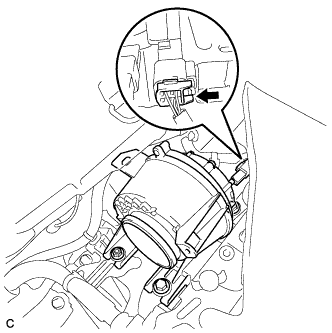
Disconnect the S14 connector of the battery cooling blower assembly.
-
Connect the cable to the negative (-) battery terminal.
-
Turn the power switch on (IG).
-
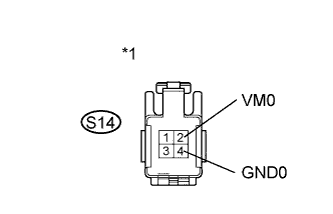
Text in Illustration *1 Front view of wire harness connector
(to Battery Cooling Blower Assembly)
Measure the voltage according to the value(s) in the table below.
Standard Voltage Tester Connection Switch Condition Specified Condition S14-2 (VM0) - S14-4 (GND0) Power switch on (IG) Below 5 V Note
If the power switch is turned on (IG) with the battery cooling blower assembly connector disconnected, DTC P0A84-123 will be stored. If this DTC is output, clear the DTC using the intelligent tester Click here.
-
Connect the S14 connector of the battery cooling blower assembly.
-
Install the No. 1 hybrid vehicle battery carrier bracket sub-assembly Click here.
NG
CHECK HARNESS AND CONNECTOR (BATTERY COOLING BLOWER - BATTERY SMART UNIT) Click here
OK
REPLACE BATTERY COOLING BLOWER ASSEMBLY Click here
-
-
CHECK HARNESS AND CONNECTOR (BATTERY COOLING BLOWER - BATTERY SMART UNIT)
CAUTION:
Be sure to wear insulated gloves.
-
Disconnect the cable from the negative (-) battery terminal.
-
Check that the service plug grip is not installed.
Note
After removing the service plug grip, do not turn the power switch on (READY), unless instructed by the repair manual because this may cause a malfunction.
-
Remove the No. 1 hybrid vehicle battery carrier bracket sub-assembly Click here.
-
Disconnect the S14 connector of the battery cooling blower assembly.
-
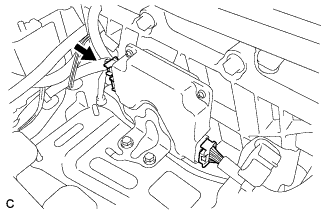
Disconnect the c1 connector of the battery smart unit.
-
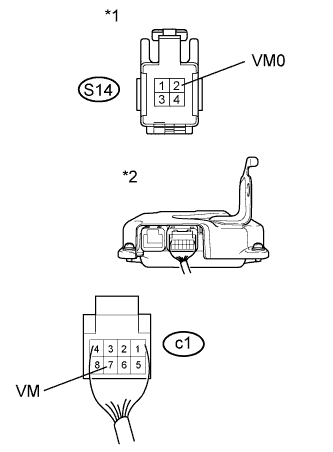
Text in Illustration *1 Front view of wire harness connector
(to Battery Cooling Blower Assembly)
*2 Rear view of wire harness connector
(to Battery Smart Unit)
Measure the resistance according to the value(s) in the table below.
Standard Resistance Tester Connection Switch Condition Specified Condition S14-2 (VM0) and c1-7 (VM) - Other terminal Power switch off 10 kΩ or higher -
Connect the c1 connector of the battery smart unit.
-
Connect the S14 connector of the battery cooling blower assembly.
-
Install the No. 1 hybrid vehicle battery carrier bracket sub-assembly Click here.
-
Connect the cable to the negative (-) battery terminal.
NG
REPAIR OR REPLACE HARNESS OR CONNECTOR
OK
REPLACE BATTERY SMART UNIT Click here
-