HYBRID CONTROL SYSTEM, Diagnostic DTC:P2511-149

| DTC Code | DTC Name |
|---|---|
| P2511-149 | ECM/PCM Power Relay Sense Circuit Intermittent |
DESCRIPTION
This DTC indicates that the power management control ECU (HV CPU) monitors the +B power source voltage to detect an instantaneous interruption.
| DTC No. | INF Code | DTC Detection Condition | Trouble Area |
|---|---|---|---|
| P2511 | 149 | When the power switch is on (READY), the power management control ECU is reset. |
|
WIRING DIAGRAM
Refer to the wiring diagram for DTC P3110-223 Click here.
INSPECTION PROCEDURE
PROCEDURE
-
CHECK BATTERY TERMINAL
-
Confirm whether the auxiliary battery terminals have been disconnected recently.
Result Result Proceed to Terminals have been disconnected. A Terminals have not been disconnected. B
B 
CHECK BATTERY TERMINAL (CONTACT PROBLEM) Click here
A 
-
-
CONFIRM THAT MASTER WARNING LIGHT ILLUMINATES
-
Turn the power switch on (READY) from off.
-
Confirm that the master warning light illuminates.
Result Result Proceed to Master warning light illuminates. A Master warning light does not illuminates. B Tech Tips
DTC P2511-149 may be stored after disconnecting and reconnecting the auxiliary battery terminals. If this happens, the DTC will not be output if the power switch is turned off and then on (READY) again. In this case, clear DTCs to complete the inspection.
-
Turn the power switch off.
B 
END
A
-
-
CLEAR DTC
-
Connect the intelligent tester to the DLC3.
-
Turn the power switch on (IG).
-
Enter the following menus: Powertrain / Hybrid Control / Trouble Codes.
-
Read and record the DTCs and freeze frame data.
-
Clear the DTCs and freeze frame data.
-
Turn the power switch off.
NEXT
-
-
CHECK WHETHER DTC OUTPUT RECURS
-
Connect the intelligent tester to the DLC3.
-
Turn the power switch on (IG).
-
Enter the following menus: Powertrain / Hybrid Control / Trouble Codes.
-
Check if DTCs are output.
Result Result Proceed to DTC P2511-149 is output again. A DTCs other than P2511-149 are also output. B -
Turn the power switch off.
B
GO TO DTC CHART Click here
A
-
-
CHECK BATTERY TERMINAL (CONTACT PROBLEM)
-
Check the connection of the auxiliary battery terminal.
OK The terminal is connected securely and there is no contact problem.
NG
CONNECT SECURELY
OK
-
-
CHECK CONNECTOR CONNECTION CONDITION (POWER MANAGEMENT CONTROL ECU CONNECTOR)
-
Check the connections of the power management control ECU connectors.
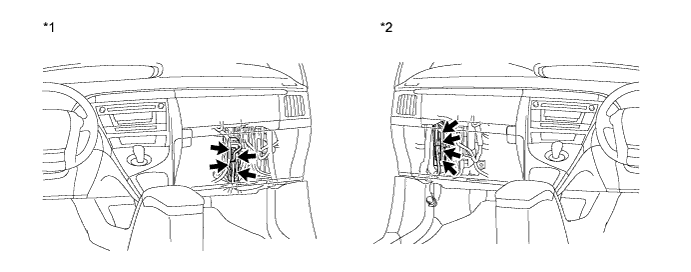
Text in Illustration *1 for LHD *2 for RHD OK The connectors are connected securely and there are no contact problems.
NG
CONNECT SECURELY
OK
-
-
CHECK HARNESS AND CONNECTOR (POWER MANAGEMENT CONTROL ECU - IGCT MAIN RELAY)
-
Remove the IGCT relay from the engine room junction block assembly.
-
Disconnect connector A21 and A22 from power management control ECU.
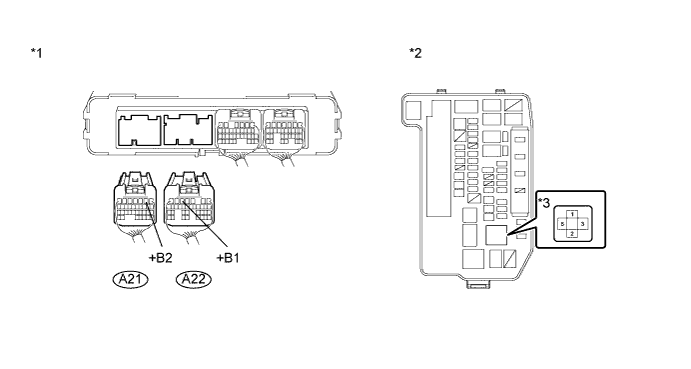
Text in Illustration *1 Rear view of wire harness connector
(to Power Management Control ECU)
*2 Engine Room Junction Block Assembly *3 IGCT Relay - - -
Measure the resistance according to the value(s) in the table below.
Standard resistance Tester Connection Switch Condition Specified Condition A22-5 (+B1) - 3 (IGCT relay) Power switch off Below 1 Ω A21-2 (+B2) - 3 (IGCT relay) Power switch off Below 1 Ω -
Install the IGCT relay.
-
Connect the power management control ECU connector.
NG
REPAIR OR REPLACE HARNESS OR CONNECTOR
OK
-
-
CHECK FOR INTERMITTENT PROBLEMS
-
Check for intermittent problems Click here.
-
Check the connection and terminal contact pressure of connectors and wire harnesses between the power management control ECU and the engine room junction block assembly.
-
When the power switch is on (READY), jiggle the connectors and wire harnesses between the power management control ECU and the engine room junction block assembly.
Result Result Proceed to Problem symptom does not recur. A Problem symptom recurs. B
-
B
REPAIR OR REPLACE MALFUNCTIONING PARTS, COMPONENT AND AREA
A 
REPLACE POWER MANAGEMENT CONTROL ECU Click here
-