NAVIGATION SYSTEM (for HDD) No Sound can be Heard from Speakers
INSPECTION PROCEDURE
PROCEDURE
-
CHECK AUDIO SETTINGS
-
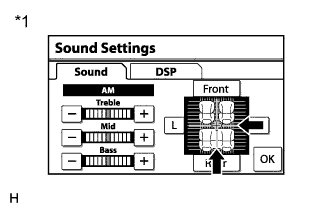
Text in Illustration *1 Example Enter the "Sound Settings" screen by pressing the "Sound" switch on the audio display.
-
Set volume, fader and balance to the initial values and check that sound is normal.
OK Audio system returns to normal. Tech Tips
Sound quality adjustment measures vary according to the type of the amplifier.
NG 
PROCEED TO NEXT SUSPECTED AREA SHOWN IN PROBLEM SYMPTOMS TABLE Click here
OK 
END
-