KNEE AIRBAG ASSEMBLY (for Driver Side) REMOVAL

-
REMOVE RADIATOR SUPPORT OPENING COVER
-
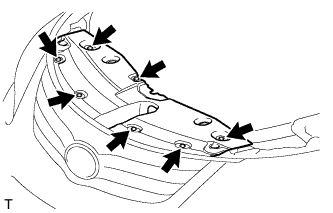
Remove the 7 clips and radiator support opening cover.
-
-
DISCONNECT CABLE FROM NEGATIVE BATTERY TERMINAL
CAUTION:
Wait at least 90 seconds after disconnecting the cable from the negative (-) battery terminal to disable the SRS system.
Note
-
w/ Navigation System for HDD:
After the ignition switch is turned off, the HDD navigation system requires approximately a minute to record various types of memory and settings. As a result, after turning the ignition switch off, wait a minute or more before disconnecting the cable from the negative (-) battery terminal.
-
When disconnecting the cable, some systems need to be initialized after the cable is reconnected Click here.
-
-
REMOVE NO. 1 INSTRUMENT PANEL UNDER COVER SUB-ASSEMBLY
-
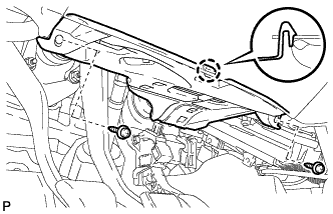
Remove the 2 screws <A>.
-
Detach the claw.
-
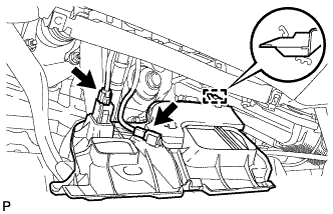
Disconnect the connectors.
-
Detach the guide and remove the under cover.
-
-
REMOVE INSTRUMENT SIDE PANEL LH
-
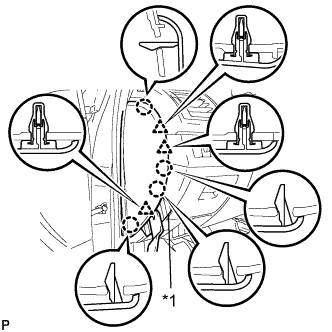
Text in Illustration *1 Protective Tape Place protective tape as shown in the illustration.
-
Using a moulding remover B, detach the 3 clips and 4 claws.
-
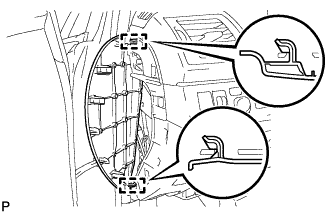
Detach the 2 hooks and remove the side panel.
-
-
REMOVE NO. 1 SWITCH HOLE BASE
-
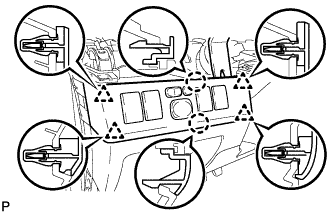
Using a moulding remover B, detach the 2 claws and 4 clips.
-
Disconnect the connectors and remove the switch hole base.
-
-
REMOVE LOWER NO. 2 STEERING COLUMN COVER (for Power Tilt and Power Telescopic Steering Column)
-
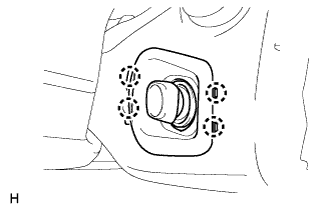
Detach the 4 claws and remove the lower No. 2 steering column cover.
-
-
REMOVE LOWER STEERING COLUMN COVER
-
for Power Tilt and Power Telescopic Steering Column:
-
Remove the lower steering column cover Click here.
-
-
for Manual Tilt and Manual Telescopic Steering Column:
-
Remove the lower steering column cover Click here.
-
-
-
REMOVE LOWER NO. 1 INSTRUMENT PANEL AIRBAG ASSEMBLY
-
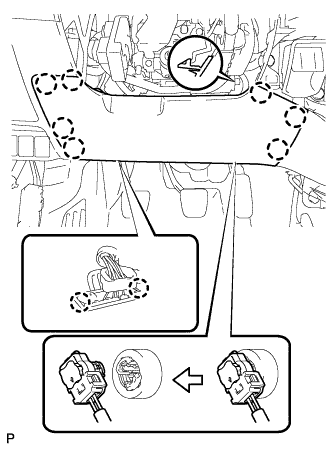
Remove the 4 bolts.
-
Detach the 7 claws and remove the instrument panel airbag.
-
Detach the 2 claws and disconnect the DLC3.
-
Disconnect the connector.
Note
When handling the airbag connector, take care not to damage the airbag wire harness.
-