NAVIGATION SYSTEM (for DVD), Diagnostic DTC:58-40, 58-41, 80-40, 80-41

| DTC Code | DTC Name |
|---|---|
| 58-40 | GPS Antenna Error |
| 58-41 | GPS Antenna Power Source Error |
| 80-40 | GPS Antenna Error |
| 80-41 | GPS Antenna Power Source Error |
DESCRIPTION
| DTC Code | DTC Detection Condition | Trouble Area |
|---|---|---|
| 58-40 | Navigation antenna error. |
|
| 58-41 | An error of the power source to the navigation antenna. | |
| 80-40 | Navigation antenna error. | |
| 80-41 | An error of the power source to the navigation antenna. |
INSPECTION PROCEDURE
Tech Tips
After the inspection is completed, clear the DTCs Click here.
PROCEDURE
-
CHECK NAVIGATION ANTENNA ASSEMBLY
-
Check that the navigation antenna cord is securely connected to the navigation receiver assembly connector.
OK The cord is securely connected.
NG 
REINSTALL NAVIGATION ANTENNA ASSEMBLY
OK 
-
-
INSPECT NAVIGATION ANTENNA ASSEMBLY
-
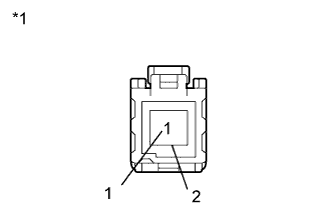
Text in Illustration *1 Component without harness connected:
(Navigation Antenna)
Disconnect the navigation antenna connector.
-
Measure the resistance according to the value(s) in the table below.
Standard Resistance Tester Connection Condition Specified Condition 1 - 2 Always 50 to 500 Ω
NG
REPLACE NAVIGATION ANTENNA ASSEMBLY Click here
OK
-
-
REPLACE NAVIGATION RECEIVER ASSEMBLY
-
Replace the navigation receiver assembly with a new or normally functioning one and check if the same problem occurs again.
-
Clear the DTCs Click here.
-
Recheck for DTCs and check if the same trouble occurs again.
OK The same problem does not occur.
-
NG
REPLACE NAVIGATION ANTENNA ASSEMBLY Click here
OK 
END
-