TILT AND TELESCOPIC MANUAL SWITCH REMOVAL

Tech Tips
-
Use the same procedure for RHD and LHD vehicles.
-
The procedure listed below is for LHD vehicles.
-
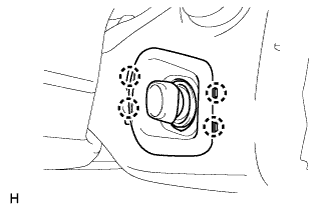
REMOVE LOWER NO. 2 STEERING COLUMN COVER
-
Detach the 4 claws and remove the lower No. 2 steering column cover.
-
-
REMOVE STEERING COLUMN COVER
Note
Removing the steering column cover in an incorrect order will cause the steering column cover to break.
-
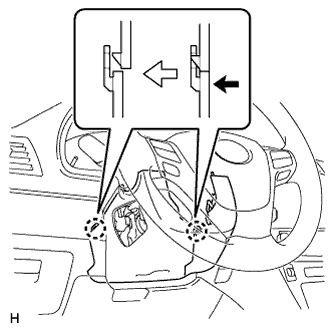
Push the right and left sides of the lower steering column cover and detach the 4 claws.
-
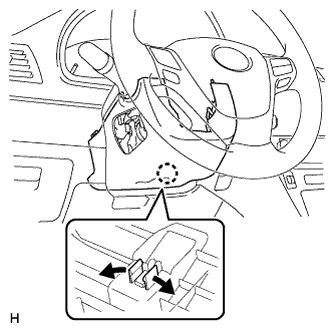
Insert fingers into the service hole of the lower steering column cover to detach the claw.
Tech Tips
Spread the claw to detach it.
-
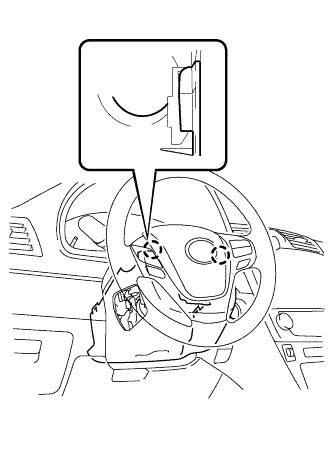
Detach the 2 claws and remove the lower steering column cover.
-
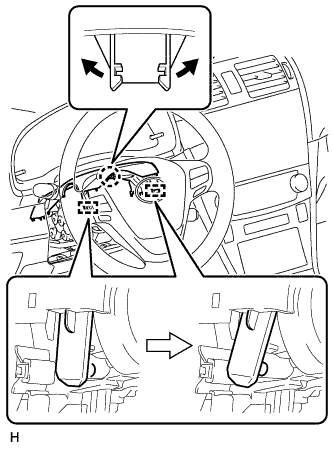
Detach the claw and 2 pins, and remove the upper steering column cover.
-
-
REMOVE TILT AND TELESCOPIC SWITCH
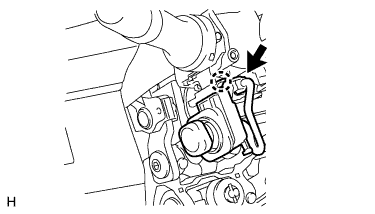
-
Disconnect the switch connector.
-
Using a screwdriver, detach the claw and remove the switch.
Note
Pushing on the claw too hard will break the claw.
Tech Tips
Tape the screwdriver tip before use.
-