STOP LIGHT SWITCH INSTALLATION
-
INSTALL STOP LIGHT SWITCH ASSEMBLY
-
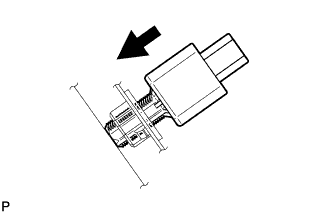
Insert the stop light switch assembly until the threaded sleeve hits the pedal.
Note
When inserting the stop light switch assembly, support the pedal from behind so that the pedal is not pushed in.
-
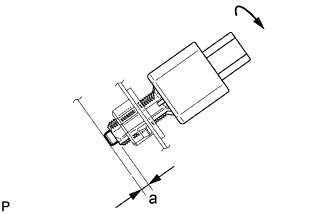
Make a quarter turn clockwise to install the stop light switch assembly.
- Torque:
- 1.5 N*m { 15 kgf*cm, 13 in.*lbf, or less }
Note
When inserting the stop light switch assembly, support the pedal from behind so that the pedal is not pushed in.
-
Connect the connector.
-
Check the protrusion of the plunger.
Protrusion of Plunger Area Measurement a 0.5 to 2.6 mm (0.0197 to 0.102 in.) If the protrusion is not as specified, recheck switch installation and inspect brake pedal adjustment if necessary Click here for LHD or Click here for RHD).
Note
Do not depress or support the brake pedal.
-
-
INSTALL NO. 1 INSTRUMENT PANEL UNDER COVER SUB-ASSEMBLY (for LHD)
-
Connect each connector.
-
Engage the guide and claw.
-
Install the No. 1 instrument panel under cover sub-assembly with the 2 screws <D>.
-
-
INSTALL NO. 1 INSTRUMENT PANEL UNDER COVER SUB-ASSEMBLY (for RHD)
-
Connect each connector.
-
Engage the guide and 2 claws.
-
Install the No. 1 instrument panel under cover sub-assembly with the screw <D>.
-