CENTER AIRBAG SENSOR ASSEMBLY INSTALLATION

-
INSTALL AIRBAG ECU ASSEMBLY
-
Check that the power switch is off.
-
Check that the cable is disconnected from the negative (-) auxiliary battery terminal.
CAUTION:
Wait at least 90 seconds after disconnecting the cable from the negative (-) auxiliary battery terminal to disable the SRS system.
-
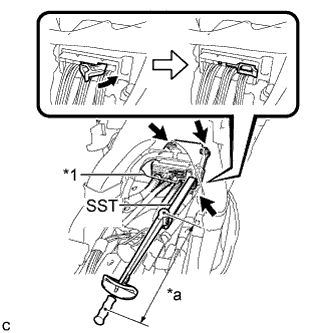
Text in Illustration *1 Waterproof Sheet *a Fulcrum Length Using SST, install the airbag ECU assembly with the 3 bolts.
- SST
- 09961-00950
- Torque:
- without SST
- 18 N*m { 178 kgf*cm, 13 ft.*lbf }
- with SST
- 11 N*m { 112 kgf*cm, 8 ft.*lbf }
Note
-
Use a torque wrench with a fulcrum length of 250 mm (9.84 in.).
-
This torque value is effective when SST is parallel to a torque wrench.
-
If the airbag ECU assembly has been dropped, or there are any cracks, dents or other defects in the case or connector, replace it with a new one.
-
When installing the airbag ECU assembly, be careful that the SRS wiring does not interfere with or is not pinched between other parts.
-
When the power switch is first turned on (IG) after the airbag ECU assembly has been replaced, make sure that no one is in the vehicle.
-
Connect the connectors to the airbag ECU assembly as shown in the illustration.
Note
When connecting any airbag connector, take care not to damage the airbag wire harness.
-
Check that the waterproof sheet is properly set.
-
Check that there is no looseness in the installation parts of the airbag ECU assembly.
-
-
INSTALL CONSOLE BOX ASSEMBLY
-
Connect each connector.
-

Engage the 4 guides and 2 claws as shown in the illustration.
-
Install the console box assembly with the bolt <B> and 2 clips.
-
-
INSTALL UPPER INSTRUMENT PANEL FINISH PANEL ASSEMBLY
-
Temporarily install the console box assembly.
-
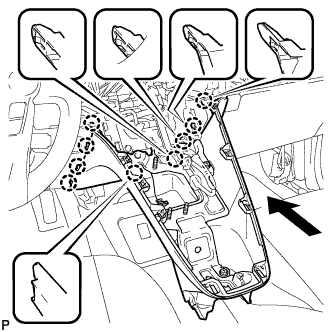
Engage the 9 claws as shown in the illustration.
-
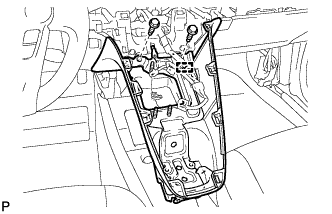
Install the upper instrument panel finish panel assembly with the 2 bolts <A>.
-
Engage the clamp.
-
-
INSTALL BOX BOTTOM MAT
-
Install the box bottom mat.
-
-
INSTALL FRONT NO. 2 CONSOLE BOX INSERT
-
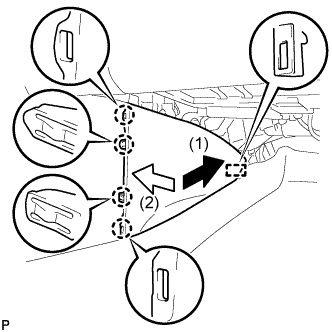
Engage the guide and 4 claws to install the front No. 2 console box insert as shown in the illustration.
-
-
INSTALL CONSOLE BOX INSERT
-

Engage the guide and 4 claws to install the console box insert as shown in the illustration.
-
-
INSTALL NO. 2 CONSOLE BOX MOUNTING BRACKET
-
Install the No. 2 console box mounting bracket with the 6 bolts <B>.
-
-
INSTALL NO. 1 INDOOR ELECTRICAL KEY ANTENNA ASSEMBLY
-
Engage the clamp and install the No. 1 indoor electrical key antenna assembly.
Note
Be careful when installing the No. 1 indoor electrical key antenna assembly. If the No. 1 indoor electrical key antenna assembly is dropped, replace it with a new one.
-
Connect the connector.
-
-
INSTALL SHIFT LOCK CONTROL UNIT ASSEMBLY
-
Install the shift lock control unit assembly with the 3 nuts.
- Torque:
- 12 N*m { 122 kgf*cm, 9 ft.*lbf }
-
Connect the connector to the shift lock control unit assembly.
-
-
INSTALL AIR CONDITIONING CONTROL ASSEMBLY
-
Connect the connector.
-
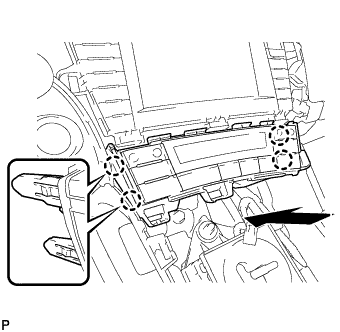
Engage the 4 claws to install the air conditioning control assembly.
-
-
INSTALL GLOVE COMPARTMENT DOOR
-
Open the glove compartment door assembly and glove compartment door.
-
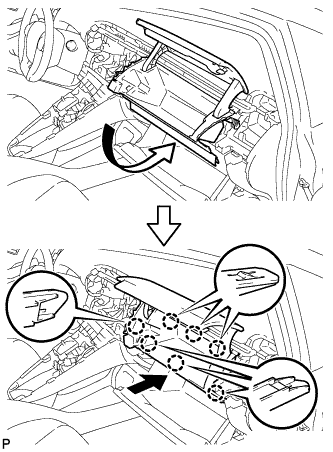
Insert the glove compartment door as shown in the illustration.
-
Engage the 7 claws to install the glove compartment door.
-
-
INSTALL NO. 2 INSTRUMENT PANEL REGISTER
-
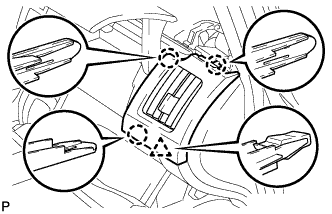
Engage the 3 claws and clip to install the No. 2 instrument panel register.
-
-
INSTALL NO. 1 SIDE DEFROSTER NOZZLE
-
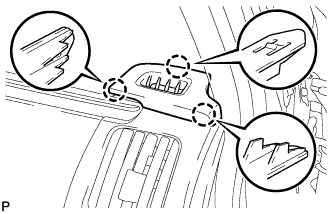
Engage the 3 claws to install the No. 1 side defroster nozzle.
-
-
INSTALL NAVIGATION RECEIVER WITH BRACKET (for Navigation Receiver Type)
-
Connect each connector.
-
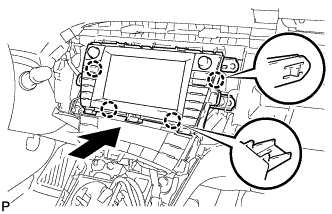
Engage the 4 claws and temporarily install the navigation receiver with bracket as shown in the illustration.
-
Install the navigation receiver with bracket with the 4 bolts.
-
-
INSTALL RADIO AND DISPLAY RECEIVER ASSEMBLY WITH BRACKET (for Radio and Display Type)
-
Connect each connector.
-
Engage the 4 claws.
-
Install the radio and display receiver assembly with bracket with the 4 bolts.
-
-
INSTALL RADIO TUNER OPENING COVER WITH BRACKET (w/o Radio Receiver)
-
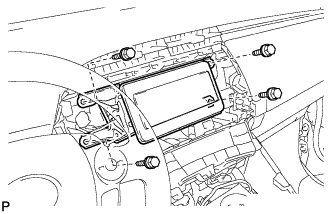
Install the radio tuner opening cover with bracket with the 4 bolts <B>.
-
-
INSTALL CENTER INSTRUMENT CLUSTER FINISH PANEL SUB-ASSEMBLY (w/o Radio Receiver)
-
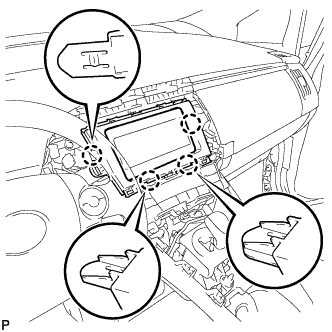
Engage the 4 claws to install the center instrument cluster finish panel sub-assembly.
-
-
INSTALL UPPER INSTRUMENT PANEL FINISH PANEL SUB-ASSEMBLY
-
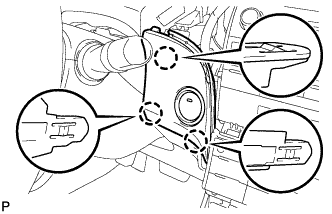
Connect the connector.
-
Engage the 3 claws to install the upper instrument panel finish panel sub-assembly.
-
-
INSTALL INSTRUMENT CLUSTER FINISH PANEL GARNISH
-
Connect the connector.
-
Engage the 14 claws to install the instrument cluster finish panel garnish.
-
-
INSTALL LOWER CENTER INSTRUMENT CLUSTER FINISH PANEL SUB-ASSEMBLY
-
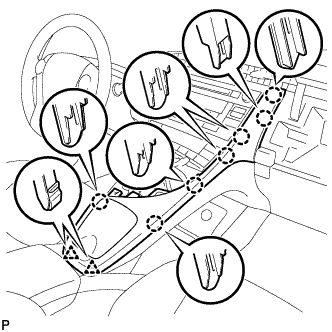
Engage the 7 claws and 2 clips to install the lower center instrument cluster finish panel sub-assembly.
-
-
INSTALL INTEGRATION CONTROL AND PANEL ASSEMBLY
-
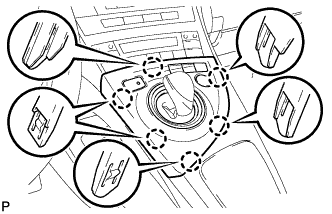
Connect each connector.
-
Engage the 6 claws to install the integration control and panel assembly.
-
-
INSTALL REAR CONSOLE BOX ASSEMBLY
-
CONNECT CABLE TO NEGATIVE AUXILIARY BATTERY TERMINAL
Note
When disconnecting the cable, some systems need to be initialized after the cable is reconnected Click here.
-
INSTALL REAR NO. 3 FLOOR BOARD UPPER PLATE
-
Engage the 2 claws to install the rear No. 3 floor board upper plate.
-
-
INSTALL DECK FLOOR BOX RH
-
Install the deck floor box RH Click here.
-
Install the rear No. 2 floor board.
-
-
INSTALL REAR NO. 3 FLOOR BOARD
-
Install the rear No. 3 floor board.
-
-
PERFORM DIAGNOSTIC SYSTEM CHECK
-
INSPECT SRS WARNING LIGHT