FRONT PASSENGER AIRBAG ASSEMBLY INSTALLATION
-
INSTALL NO. 3 INSTRUMENT PANEL WIRE
-
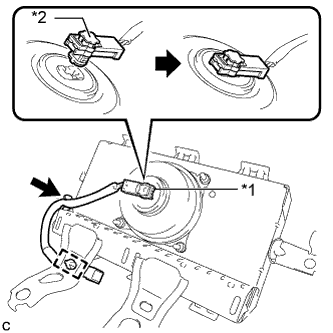
Text in Illustration *1 Airbag Connector *2 Airbag Connector Lock Connect the airbag connector of the No. 3 instrument panel wire to the instrument panel passenger airbag assembly.
Note
When connecting any airbag connector, take care not to damage the airbag wire harness.
-
Push in the lock to install the airbag connector to the instrument panel passenger airbag assembly.
-
Connect the No. 3 instrument panel wire to the instrument panel passenger airbag assembly clamp.
-
Engage the clamp to install the No. 3 instrument panel wire to the instrument panel passenger airbag assembly.
-
-
INSTALL INSTRUMENT PANEL PASSENGER AIRBAG ASSEMBLY
-
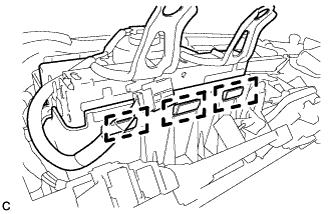
Engage the 3 hooks as shown in the illustration.
-
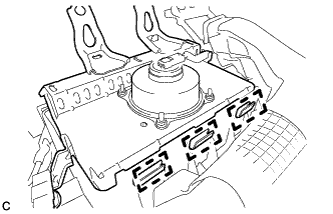
Push the instrument panel passenger airbag assembly to engage the 3 hooks.
-
Install the 2 screws to install the instrument panel passenger airbag assembly.
-
Install the 2 clamps to the instrument panel passenger airbag assembly.
-
-
INSTALL UPPER INSTRUMENT PANEL ASSEMBLY
-
When using a new upper instrument panel:
-
Immediately before installing the upper instrument panel, twist and cut off the portions shown in the illustration.
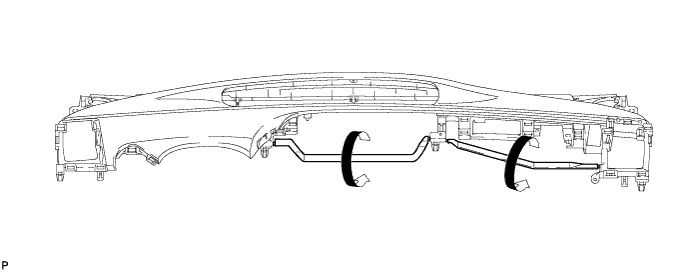
-
-
Engage the 5 claws as shown in the illustration.
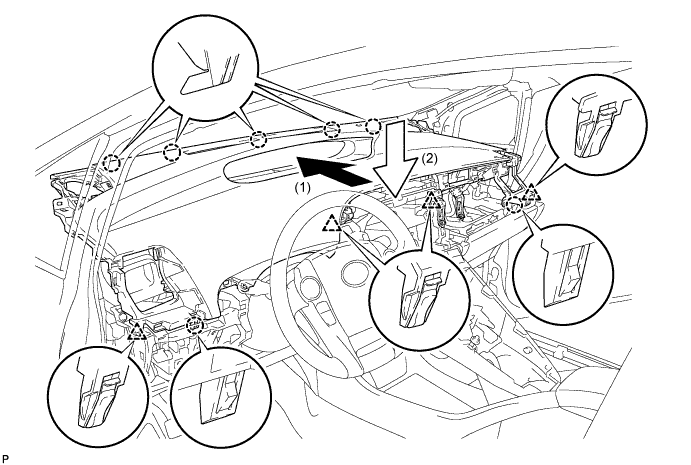
-
Engage the 2 claws and 4 clips, and install the upper instrument panel assembly as shown in the illustration.
-
Install the 2 bolts <B>.
-
Install the 2 instrument panel passenger airbag assembly bolts <A>.
- Torque:
- 20 N*m { 204 kgf*cm, 15 ft.*lbf }
-
for LHD:
-
Install the bolt <D>.
-
-
Engage the 2 clamps.
-
Connect each connector.
-
-
CONNECT NO. 3 INSTRUMENT PANEL WIRE
-
Check that the power switch is off.
-
Check that the cable is disconnected from the negative (-) auxiliary battery terminal.
CAUTION:
Wait at least 90 seconds after disconnecting the cable from the negative (-) auxiliary battery terminal to disable the SRS system.
-
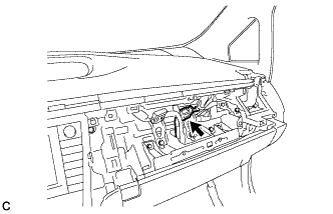
Connect the connector.
Note
When connecting any airbag connector, take care not to damage the airbag wire harness.
-
-
INSTALL CENTER INSTRUMENT CLUSTER FINISH PANEL GARNISH
-
PERFORM DIAGNOSTIC SYSTEM CHECK