AIRBAG SYSTEM SRS Warning Light Remains ON
DESCRIPTION
The SRS warning light is located on the combination meter assembly.
When the SRS is normal, the SRS warning light comes on for approximately 6 seconds after the power switch is turned from off on (IG), and then goes off automatically.
If there is a malfunction in the SRS, the SRS warning light comes on to inform the driver of a problem.
When terminals TC and CG of the DLC3 are connected, the DTC is displayed by blinking of the SRS warning light.
The SRS is equipped with a voltage-increase circuit (DC-DC converter) in the airbag ECU assembly in case the source voltage drops.
When the auxiliary battery voltage drops, the voltage-increase circuit (DC-DC converter) functions to increase the voltage of the SRS to normal voltage. In addition, when the voltage drops, the SRS warning light will illuminate.
A malfunction in this circuit is not stored in the airbag ECU assembly. The SRS warning light automatically goes off when the source voltage returns to normal.
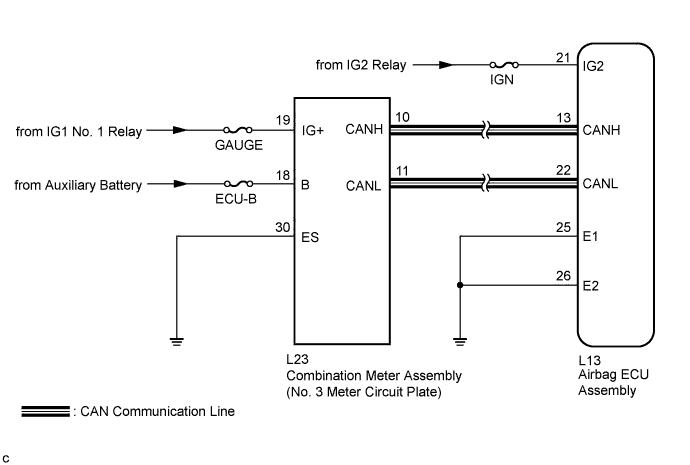
The signal to illuminate the SRS warning light is transmitted from the airbag ECU assembly to the combination meter assembly through the CAN communication system.
WIRING DIAGRAM
INSPECTION PROCEDURE
Note
-
After turning the power switch off, waiting time may be required before disconnecting the cable from the negative (-) auxiliary battery terminal. Therefore, make sure to read the disconnecting the cable from the negative (-) auxiliary battery terminal notices before proceeding with work Click here.
-
Inspect the fuses for circuits related to this system before performing the following inspection procedure.
PROCEDURE
-
CHECK SRS WARNING LIGHT OPERATION
-
Check the SRS warning light operation approximately 6 seconds after the power switch is turned on (IG).
Result SRS Warning Light Illumination Proceed to Remains on A Goes off and then comes on again B
B 
CHECK CAN COMMUNICATION SYSTEM Click here
A 
-
-
CHECK AUXILIARY BATTERY VOLTAGE
-
Measure the voltage of the auxiliary battery.
Standard Voltage 11 to 14 V
NG 
INSPECT CHARGING SYSTEM AND AUXILIARY BATTERY Click here
OK
-
-
CHECK CONNECTOR
-
Turn the power switch off.
-
Disconnect the cable from the negative (-) auxiliary battery terminal.
CAUTION:
Wait at least 90 seconds after disconnecting the cable from the negative (-) auxiliary battery terminal to disable the SRS system.
-
Check that the connector is properly connected to the airbag ECU assembly.
OK The connector is properly connected. Tech Tips
If the connector is not connected securely, reconnect the connector and proceed to the next inspection.
-
Disconnect the connector from the airbag ECU assembly.
-
Check that the terminal of the connector is not damaged.
OK The terminal is not deformed or damaged.
NG
REPLACE WIRE HARNESS
OK
-
-
CHECK WIRE HARNESS (AIRBAG ECU ASSEMBLY - BODY GROUND)
-
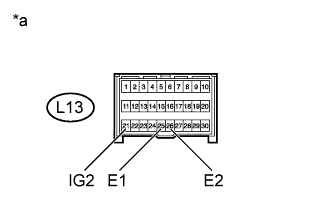
Text in Illustration *a Front view of wire harness connector
(to Airbag ECU Assembly)
Connect the cable to the negative (-) auxiliary battery terminal.
-
Turn the power switch on (IG).
-
Operate all components of the electrical system (defogger, wipers, headlights, heater blower, etc.).
-
Measure the voltage according to the value(s) in the table below.
Standard Voltage Tester Connection Condition Specified Condition L13-21 (IG2) - Body ground Power switch on (IG) 8 to 16 V -
Turn the power switch off.
-
Measure the resistance according to the value(s) in the table below.
Standard Resistance Tester Connection Condition Specified Condition L13-25 (E1) - Body ground Always Below 1 Ω L13-26 (E2) - Body ground Always Below 1 Ω
NG
REPLACE WIRE HARNESS
OK
-
-
CHECK SRS WARNING LIGHT
-
Turn the power switch on (IG).
-
Check the SRS warning light condition.
OK After the primary check period, the SRS warning light goes off for approximately 10 seconds and turns back on. Tech Tips
The primary check period is approximately 6 seconds after the power switch is turned on (IG).
NG
REPLACE NO. 3 METER CIRCUIT PLATE Click here
OK 
REPLACE AIRBAG ECU ASSEMBLY Click here
-
-
CHECK CAN COMMUNICATION SYSTEM
-
Use the GTS to check if the CAN communication system is functioning normally.
Tech Tips
-
Refer to Bus Check for the CAN communication system Click here.
-
The airbag ECU assembly is connected to the CAN communication system. Therefore, before starting troubleshooting, make sure to check that there is no trouble in the CAN communication system.
Result Result Proceed to DTC is not output A DTC is output B -
B
GO TO CAN COMMUNICATION SYSTEM Click here
A
-
-
CHECK AUXILIARY BATTERY VOLTAGE
-
Measure the voltage of the auxiliary battery.
Standard Voltage 11 to 14 V
NG
INSPECT CHARGING SYSTEM AND AUXILIARY BATTERY Click here
OK
-
-
CHECK CONNECTOR
-
Turn the power switch off.
-
Disconnect the cable from the negative (-) auxiliary battery terminal.
CAUTION:
Wait at least 90 seconds after disconnecting the cable from the negative (-) auxiliary battery terminal to disable the SRS system.
-
Check that the connector is properly connected to the airbag ECU assembly.
OK The connector is properly connected. Tech Tips
If the connector is not connected securely, reconnect the connector and proceed to the next inspection.
-
Disconnect the connector from the airbag ECU assembly.
-
Check that the terminal of the connector is not damaged.
OK The terminal is not deformed or damaged.
NG
REPLACE WIRE HARNESS
OK
-
-
CHECK WIRE HARNESS (AIRBAG ECU ASSEMBLY - BODY GROUND)
-
Text in Illustration *a Front view of wire harness connector
(to Airbag ECU Assembly)
Connect the cable to the negative (-) auxiliary battery terminal.
-
Turn the power switch on (IG).
-
Operate all components of the electrical system (defogger, wipers, headlights, heater blower, etc.).
-
Measure the voltage according to the value(s) in the table below.
Standard Voltage Tester Connection Condition Specified Condition L13-21 (IG2) - Body ground Power switch on (IG) 8 to 16 V -
Turn the power switch off.
-
Measure the resistance according to the value(s) in the table below.
Standard Resistance Tester Connection Condition Specified Condition L13-25 (E1) - Body ground Always Below 1 Ω L13-26 (E2) - Body ground Always Below 1 Ω
NG
REPLACE WIRE HARNESS
OK
-
-
CHECK CONNECTOR
-
Disconnect the cable from the negative (-) auxiliary battery terminal.
CAUTION:
Wait at least 90 seconds after disconnecting the cable from the negative (-) auxiliary battery terminal to disable the SRS system.
-
Check that the connector is properly connected to the combination meter assembly.
OK The connector is properly connected. Tech Tips
If the connector is not connected securely, reconnect the connector and proceed to the next inspection.
-
Disconnect the connector from the combination meter assembly.
-
Check that the terminal of the connector is not damaged.
OK The terminal is not deformed or damaged.
NG
REPAIR OR REPLACE CONNECTOR
OK
-
-
CHECK WIRE HARNESS (COMBINATION METER ASSEMBLY - BODY GROUND)
-
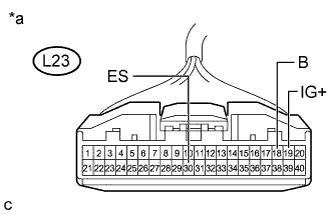
Text in Illustration *a Front view of wire harness connector
(to Combination Meter Assembly)
Connect the cable to the negative (-) auxiliary battery terminal.
-
Turn the power switch on (IG).
-
Measure the voltage according to the value(s) in the table below.
Standard Voltage Tester Connection Condition Specified Condition L23-19 (IG+) - Body ground Power switch on (IG) 11 to 14 V L23-18 (B) - Body ground Power switch off 11 to 14 V -
Turn the power switch off.
-
Measure the resistance according to the value(s) in the table below.
Standard Resistance Tester Connection Condition Specified Condition L23-30 (ES) - Body ground Always Below 1 Ω
NG
REPAIR OR REPLACE WIRE HARNESS
OK
-
-
CHECK SRS WARNING LIGHT
-
Disconnect the cable from the negative (-) auxiliary battery terminal.
CAUTION:
Wait at least 90 seconds after disconnecting the cable from the negative (-) auxiliary battery terminal to disable the SRS system.
-
Connect the connector to the combination meter assembly.
-
Connect the cable to the negative (-) auxiliary battery terminal.
-
Turn the power switch on (IG).
-
Check the SRS warning light condition.
OK After the primary check period, the SRS warning light goes off for approximately 10 seconds and turns back on. Tech Tips
The primary check period is approximately 6 seconds after the power switch is turned on (IG).
NG
REPLACE NO. 3 METER CIRCUIT PLATE Click here
OK
REPLACE AIRBAG ECU ASSEMBLY Click here
-