METER / GAUGE SYSTEM ON-VEHICLE INSPECTION
-
INSPECT COMBINATION METER ASSEMBLY
-
Check speedometer operation
Note
-
The meter ECU (No. 3 meter circuit plate) receives the vehicle speed signal from the skid control ECU via CAN communication. Therefore, perform the following inspection referring to values on the Data List of the skid control ECU because it is the source of the vehicle speed signal.
-
The Data List values of the skid control ECU are used for this inspection. Therefore, make sure to perform the inspection after confirming that no DTCs are output from the brake control system.
-
If the tire size or tire inflation pressure is not within the specified range, or the tires are excessively worn, the speedometer indication error will increase. Therefore, make sure to perform the inspection after checking that the tire size, tire inflation pressure and tire wear are in the specified range.
-
Before starting the following inspection, check if the Brake Control System outputs the DTCs.
-
Check the values by referring to the table below.
ABS/VSC/TRAC Tester Display Measurement Item/Range Normal Condition Diagnostic Note Vehicle Speed Vehicle speed/Min.: 0 mph (0 km/ h), Max.: 326 km/h (203 mph) Vehicle stop: 0 km/h (0 mph) - Reference: mph GTS Indication (mph) Acceptable Range (mph) 20 21.0 to 23.0 40 42.0 to 44.0 60 63.0 to 66.0 80 83.0 to 87.0 100 104.0 to 108.0 120 125.0 to 129.0 140 146.0 to 150.0 Reference: km/h (for Australia) GTS Indication (km/h) Acceptable Range (km/h) 20 21.0 to 23.6 40 41.0 to 44.7 60 61.0 to 65.2 80 81.0 to 86.3 100 102.0 to 105.9 120 122.0 to 126.5 140 142.0 to 147.1 160 162.0 to 167.7 180 183.0 to 187.2 Reference: km/h (except Australia) GTS Indication (km/h) Acceptable Range (km/h) 20 21.0 to 25.0 40 42.0 to 46.0 60 63.0 to 67.0 80 84.0 to 88.0 100 104.0 to 109.0 120 125.0 to 130.0 140 146.0 to 151.0 160 167.0 to 173.0 180 187.0 to 194.0
-
-
Check LED illumination (Bulb check)
-
Check the illumination function of the warning or indicator lights listed below when turning the power switch on (IG).
OK Warning or Indicator Light Specified Condition Master warning light Warning or indicator light comes on for about 3 seconds after turning the power switch on (IG). Engine coolant temperature hot warning light PCS warning light*1 Headlight leveling indicator light*2 Tire pressure warning light*3 SRS warning light Warning light comes on for about 6 seconds after turning the power switch on (IG). Charge warning light Warning light comes on when turning the power switch on (IG). EPS warning light MIL (Check engine warning light) Brake warning light / red (malfunction)
-
Warning or indicator light comes on for about 3 seconds after turning the power switch on (IG).
-
Warning or indicator light comes on when turning the power switch from off to on (READY) for 3 seconds, then goes off.
Slip indicator light ABS warning light Brake warning light / yellow (minor malfunction)
-
*1: w/ Pre-crash safety system
-
*2: w/ Automatic headlight beam level control system
-
*3: w/ Tire pressure warning system
-
-
-
-
INSPECT HEADUP DISPLAY (COMBINATION METER MIRROR ECU)
Tech Tips
When the headup display (combination meter mirror ECU) position or illuminance has not adjusted properly, headup display (combination meter mirror ECU) may not be seen in the front glass. Before starting following inspection, confirm the headup display (combination meter mirror ECU) position and illuminance.
-
Turn the power switch off.
-
Turn the power switch on (IG) while pressing and holding the headup display (combination meter mirror ECU) on switch.
-
Keep pressing the headup display (combination meter mirror ECU) on switch and turn the power switch off.
-
Keep pressing the headup display (combination meter mirror ECU) on switch and turn the power switch on (IG).
-
The headup display (combination meter mirror ECU) will show "TEST MODE".
-
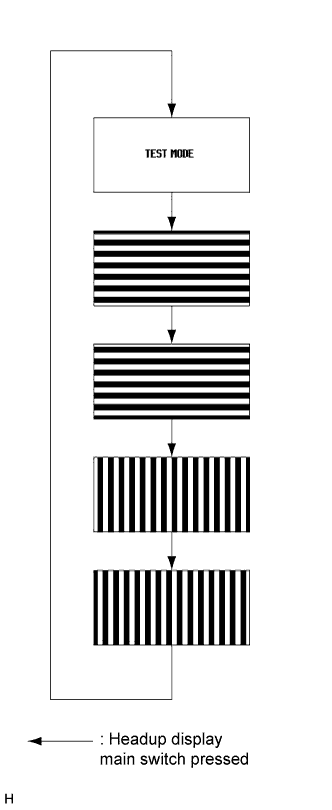
Inspect the headup display (combination meter mirror ECU) as shown in the illustration.
-
Turn the power switch off to finish test mode.
-