BATTERY BLOWER REMOVAL
-
REMOVE REAR NO. 2 FLOOR BOARD
-
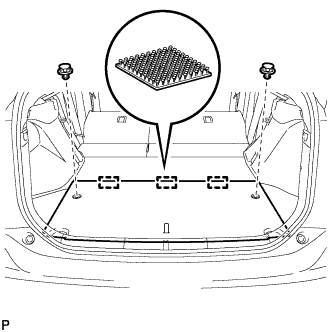
Using a clip remover, remove the 2 clips.
-
Disengage the 3 fasteners and remove the rear No. 2 floor board.
-
-
REMOVE REAR NO. 3 FLOOR BOARD
-
Remove the rear No. 3 floor board.
-
-
REMOVE DECK FLOOR BOX RH
-
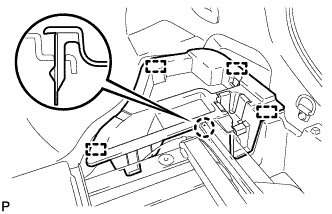
Disengage the claw and 4 guides and remove the deck floor box RH.
-
-
REMOVE REAR NO. 4 FLOOR BOARD SUB-ASSEMBLY
-
Remove the rear No.4 floor board sub-assembly.
-
-
REMOVE DECK FLOOR BOX LH
Tech Tips
Use the same procedure described for the RH side.
-
REMOVE DECK TRIM SERVICE HOLE COVER
-
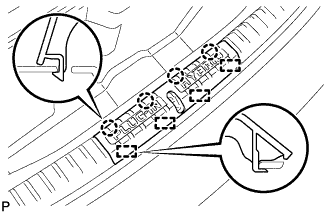
Disengage the 4 claws.
-
Disengage the 4 guides and remove the deck trim service hole cover.
-
-
REMOVE REAR DECK TRIM COVER
-
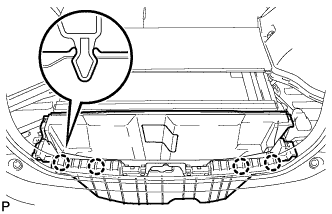
Disengage the 4 claws and remove the rear deck trim cover.
-
-
REMOVE BATTERY COOLING BLOWER ASSEMBLY (for RH Side)
Note
-
Be sure not to touch the fan part of the battery cooling blower assembly.
-
Do not lift the battery cooling blower assembly using the wire harness.
-
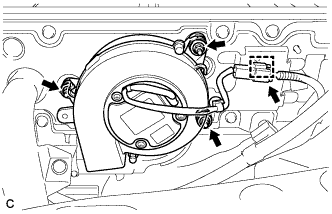
Disconnect the connector and clamp from the battery cooling blower assembly.
-
Remove the 3 nuts and battery cooling blower assembly (for RH side).
-
-
REMOVE BATTERY COOLING BLOWER ASSEMBLY (for LH Side)
Note
-
Be sure not to touch the fan part of the battery cooling blower assembly.
-
Do not lift the battery cooling blower assembly using the wire harness.
-
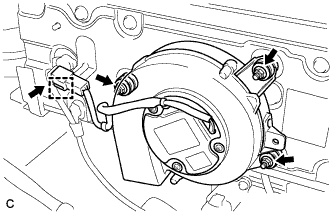
Disconnect the connector and clamp from the battery cooling blower assembly.
-
Remove the 3 nuts and battery cooling blower assembly (for LH side).
-