WATER PUMP WITH MOTOR INSTALLATION
-
INSTALL INVERTER WATER PUMP ASSEMBLY
-
Install the inverter water pump assembly and water pump bracket with the 3 bolts.
- Torque:
- 6.1 N*m { 62 kgf*cm, 54 in.*lbf }
Note
Do not hold the inverter water pump assembly by the connector terminals when removing or installing it.
-
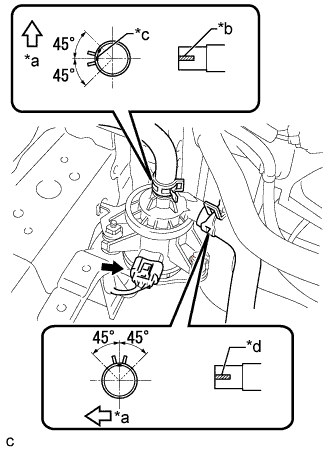
Text in Illustration *a Front Side *b Alignment Mark (Yellow) *c Alignment Mark (Green) *d Alignment Mark (White) Connect the water hoses and connector.
Note
-
Make sure that the clip is positioned as shown in the illustration.
-
Make sure to align the alignment marks of the hoses with the ribs of the inverter water pump assembly.
-
Do not remove the pieces of cloth from the pipes and disconnected hoses until installation to prevent foreign matter from entering the inverter water pump and cooling system.
-
-
-
INSTALL INVERTER TRAY BRACKET
-
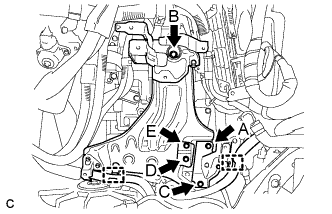
Position the inverter tray bracket as shown in the illustration.
-
Temporarily install the inverter tray bracket with bolt B.
-
Tighten the 5 bolts to the inverter tray bracket in the following order: bolt A, bolt C, bolt D, bolt E and bolt B.
- Torque:
- 18 N*m { 184 kgf*cm, 13 ft.*lbf }
-
Connect the 2 clamps to the inverter tray bracket.
-
-
INSTALL INVERTER RESERVE TANK ASSEMBLY
-
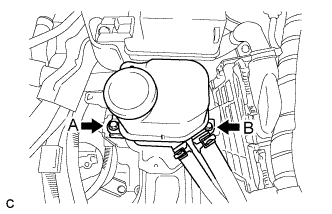
Temporarily instal the inverter reserve tank assembly with bolt A.
-
Tighten the 2 bolts to the inverter reserve tank assembly in the following order: bolt B and bolt A.
- Torque:
- 10 N*m { 102 kgf*cm, 7 ft.*lbf }
-
-
INSTALL INVERTER WITH CONVERTER ASSEMBLY