PLUG-IN CHARGE CONTROL SYSTEM, Diagnostic DTC:P316C-846
| DTC Code | DTC Name |
|---|---|
| P316C-846 | On-Board Charger Unable to Start |
DESCRIPTION
Refer to the description for DTC P0D67-844 Click here.
| DTC No. | INF Code | DTC Detection Condition | Trouble Area |
|---|---|---|---|
| P316C | 846 | The electric vehicle charger assembly is not activated while the vehicle is being plug-in charged and the electric vehicle charger assembly is requested to turn on. (The electric vehicle charger assembly cannot be activated.) (1 trip detection logic) |
|
| DTC No. | INF Code | Data List |
|---|---|---|
| P316C | 846 |
|
WIRING DIAGRAM
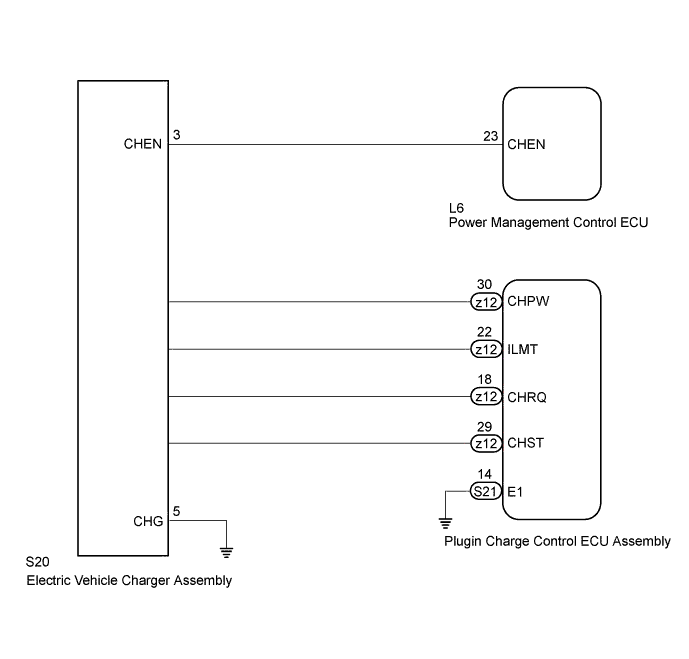
INSPECTION PROCEDURE
CAUTION:
-
Before inspecting the high-voltage system or disconnecting the low voltage connector of the inverter with converter assembly or electric vehicle charger assembly, turn the power switch off. Also, take safety precautions such as wearing insulated gloves and removing the service plug grip to prevent electrical shocks. After removing the service plug grip, put it in your pocket to prevent other technicians from accidentally reconnecting it while you are working on the high-voltage system.
-
After removing the service plug grip, wait for at least 10 minutes before touching any of the high-voltage connectors or terminals. After waiting for 10 minutes, check the voltage at the terminals in the inspection point in the inverter with converter assembly. The voltage should be 0 V before beginning work Click here.
Tech Tips
Waiting for at least 10 minutes is required to discharge the high-voltage capacitor inside the inverter with converter assembly and electric vehicle charger assembly.
Note
After turning the power switch off, waiting time may be required before disconnecting the cable from the negative (-) auxiliary battery terminal. Therefore, make sure to read the disconnecting the cable from the negative (-) auxiliary battery terminal notices before proceeding with work Click here.
Tech Tips
After the repair, check that the Data List item "State of Charge (All Bat)" is 70% or less, then plug-in charge the vehicle until it completes and check that DTCs are not output.
PROCEDURE
-
CHECK DTC OUTPUT (HYBRID CONTROL)
-
Connect the GTS to the DLC3.
-
Turn the power switch on (IG).
-
Enter the following menus: Powertrain / Hybrid Control / Trouble Codes.
-
Check if DTCs are output.
Result Result Proceed to Only P316C-846 is output or P316C-846 and DTCs other than the ones in the table below are also output. A Any of the following DTCs are also output. B DTC No. Relevant Diagnosis P0A1D-144, 148, 162, 721, 722, 723, 787, 818, 821, 823 Hybrid Powertrain Control Module P0ADC-226 Hybrid Battery Positive Contactor Control Circuit High P0AE0-228 Hybrid Battery Negative Contactor Control Circuit High P2511-149 HV CPU Power Relay Sense Circuit Intermittent No Continuity P3004-131, 803 Power Cable Malfunction U019B-440 Lost Communication with Battery Charger Control Module Tech Tips
P316C-846 may be output due to a malfunction which causes the DTCs in the table above to be output. In this case, first troubleshoot the output DTCs in the table above. Then, perform a reproduction test to check that no DTCs are output.
-
Turn the power switch off.
B 
GO TO DTC CHART (HYBRID CONTROL SYSTEM) Click here
A 
-
-
CHECK DTC OUTPUT (PLUG-IN CONTROL)
-
Connect the GTS to the DLC3.
-
Turn the power switch on (IG).
-
Enter the following menus: Powertrain / Plug-in Control / Trouble Codes.
-
Check if DTCs are output.
Result Result Proceed to Only P316C-846 is output or P316C-846 and DTCs other than the ones in the table below are also output. A Any of the following DTCs are also output. B DTC No. Relevant Diagnosis P0D20-422 Charger Relay Stuck Open P0D3E-234 On-Board Charger Input AC Voltage Sensor Range / Performance P0D3F-235 On-Board Charger Input AC Voltage Sensor Circuit Low P0D40-236 On-Board Charger Input AC Voltage Sensor Circuit High P2511-441 Reset Detected U0293-439, 449 Lost Communication with Hybrid Powertrain Control Module Tech Tips
P316C-846 may be output due to a malfunction which causes the DTCs in the table above to be output. In this case, first troubleshoot the output DTCs in the table above. Then, perform a reproduction test to check that no DTCs are output.
-
Turn the power switch off.
B
GO TO DTC CHART (PLUG-IN CHARGE CONTROL SYSTEM) Click here
A
-
-
CHECK CHARGING
Tech Tips
-
Check with the customer if the 220 to 240 V power used for plug-in charging was supplied by a power company.
-
If the electric vehicle charger cable assembly that was used to plug-in charge the vehicle is available, perform a reproduction test using it and a known good socket as follows. This allows the electric vehicle charger cable assembly to be determined as OK or NG when the vehicle is not malfunctioning.
-
Plug-in charge the vehicle using a known good socket.
-
Connect the Techstream to the DLC3.
-
Turn the power switch on (IG).
-
Clear DTC.
-
Enter the following menus: Powertrain / Plug-in Control / Data List.
-
Check that "State of Charge (All Bat)" shows 70% or less.
-
Turn the power switch off.
-
Connect the electric vehicle charger cable assembly and fully charge the vehicle. Check that plug-in charge control system DTCs are not output.
Note
Use the same 220 to 240 V power that the customer used to plug-in charge the vehicle when the DTC was stored, if possible.
Result Result Proceed to DTCs are output or plug-in charge cannot be completed. A DTCs are not output and plug-in charge has been completed. B Tech Tips
-
This DTC is output if the vehicle cannot be plug-in charged because the AC input voltage rises or fluctuates, AC input voltage sine waveform fluctuates, or frequency is too high or too low.
-
As the voltage fluctuates quickly, it is difficult to check the plug-in charge status by checking the freeze frame data or Data list.
-
-
B
END (NO MALFUNCTION VEHICLE)
A
-
-
CHECK HARNESS AND CONNECTOR (CHECK FOR SHORT (CHRQ))
-
Measure the resistance according to the value(s) in the table below.
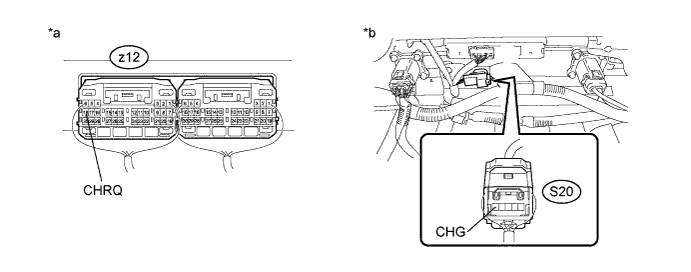
Standard Resistance Tester Connection Condition Specified Condition z12-18 (CHRQ) - S20-5 (CHG) Power switch off 4.2 kΩ or higher Text in Illustration *a Component with harness connected
(Plugin Charge Control ECU Assembly)
*b Component with harness connected
(Electric Vehicle Charger Assembly)
NG 
CHECK ELECTRIC VEHICLE CHARGER ASSEMBLY (CHECK FOR SHORT (CHRQ)) Click here
OK
-
-
CHECK HARNESS AND CONNECTOR (CHECK FOR SHORT (CHEN))
-
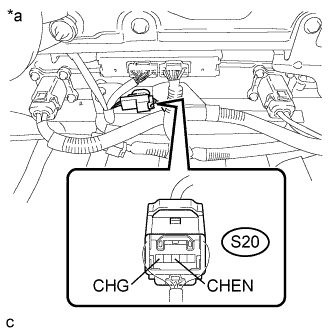
Text in Illustration *a Component with harness connected
(Electric Vehicle Charger Assembly)
Measure the resistance according to the value(s) in the table below.
Standard Resistance Tester Connection Condition Specified Condition S20-3 (CHEN) - S20-5 (CHG) Power switch off 3.8 kΩ or higher
NG
CHECK HARNESS AND CONNECTOR (CHECK FOR SHORT (CHEN)) Click here
OK
-
-
CHECK HARNESS AND CONNECTOR (CHPW FREQUENCY INSPECTION)
-
Turn the power switch on (IG).
-
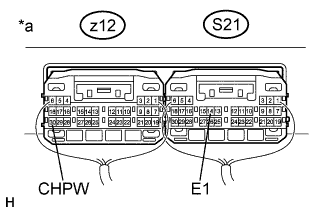
Text in Illustration *a Component with harness connected
(Plugin Charge Control ECU Assembly)
Measure the frequency according to the following table.
Standard Frequency Tester Connection Condition Specified Condition z12-30 (CHPW) - S21-14 (E1) Power switch on (IG) 9 to 11 Hz -
Turn the power switch off.
NG
CHECK PLUGIN CHARGE CONTROL ECU ASSEMBLY (CHPW FREQUENCY INSPECTION) Click here
OK
-
-
CHECK HARNESS AND CONNECTOR (ILMT FREQUENCY INSPECTION)
-
Turn the power switch on (IG).
-
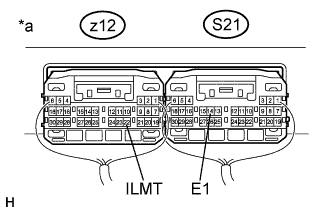
Text in Illustration *a Component with harness connected
(Plugin Charge Control ECU Assembly)
Measure the frequency according to the following table.
Standard Frequency Tester Connection Condition Specified Condition z12-22 (ILMT) - S21-14 (E1) Power switch on (IG) 9 to 11 Hz -
Turn the power switch off.
NG
CHECK PLUGIN CHARGE CONTROL ECU ASSEMBLY (ILMT FREQUENCY INSPECTION) Click here
OK
-
-
CHECK PLUGIN CHARGE CONTROL ECU ASSEMBLY (CHECK WAVEFORM (CHST))
Tech Tips
The following procedure is used to check for a malfunction in an internal circuit of the plugin charge control ECU assembly.
-
Connect the GTS to the DLC3.
-
Connect an oscilloscope between the plugin charge control ECU assembly terminals specified in the table below.
-
Turn the power switch on (IG).
-
Enter the following menus: Powertrain / Plug-in Control / Data List
-
Select "Charger State Pulse Duty Ratio" in the Data List.
Tester Display Measurement Item/Range Charger State Pulse Duty Ratio Electric vehicle charger assembly charging status indicated by duty/
Min.: 0.0 %, Max.: 100.0 %
-
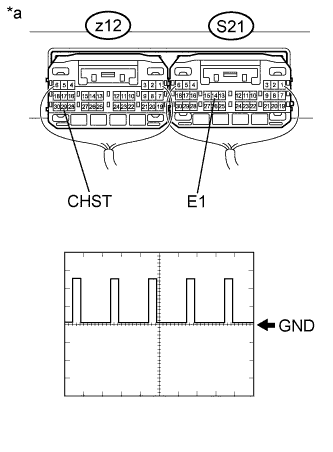
Text in Illustration *a Component with harness connected
(Plugin Charge Control ECU Assembly)
Measure the waveform.
Item Contents Tester Connection z12-29 (CHST) - S21-14 (E1) Equipment Setting 5 V/DIV., 50 ms/DIV. Condition Power switch on (IG) Tech Tips
The waveform output from terminal CHST can be measured without connecting the electric vehicle charger cable assembly by turning the power switch on (IG).
-
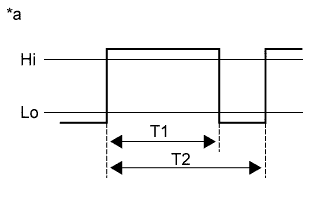
Text in Illustration *a Reference diagram for duty calculation Calculate duty (%) based on the CHST waveform.
Tech Tips
Calculate duty (%) using the following formula: Duty (%) = T1 / T2 x 100 (%)
-
Compare the Data List item "Charger State Pulse Duty Ratio" with the duty (%) calculated based on CHST waveform.
Result Result Proceed to The difference between "Charger State Pulse Duty Ratio" and the duty (%) calculated based on CHST waveform is less than 20 %. A The difference between "Charger State Pulse Duty Ratio" and the duty (%) calculated based on CHST waveform is 20 % or more. B -
Turn the power switch off.
B
REPLACE PLUGIN CHARGE CONTROL ECU ASSEMBLY Click here
A 
REPLACE ELECTRIC VEHICLE CHARGER ASSEMBLY Click here
-
-
CHECK ELECTRIC VEHICLE CHARGER ASSEMBLY (CHECK FOR SHORT (CHRQ))
CAUTION:
Be sure to wear insulated gloves.
-
Check that the service plug grip is not installed.
Note
After removing the service plug grip, do not turn the power switch on (READY), unless instructed by the repair manual because this may cause a malfunction.
-
Disconnect the z12 plugin charge control ECU assembly connector.
-
Measure the resistance according to the value(s) in the table below.
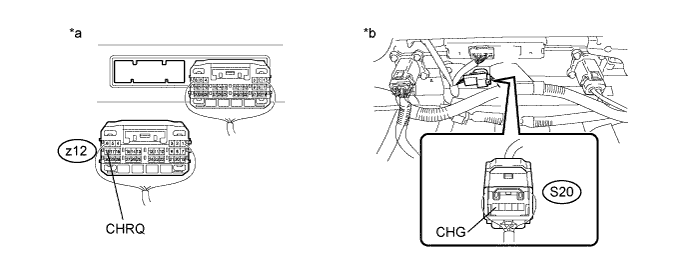
Standard Resistance Tester Connection Condition Specified Condition z12-18 (CHRQ) - S20-5 (CHG) Power switch off 4.2 kΩ or higher Text in Illustration *a Rear view of wire harness connector
(to Plugin Charge Control ECU Assembly)
*b Component with harness connected
(Electric Vehicle Charger Assembly)
-
Reconnect the z12 plugin charge control ECU assembly connector.
NG
REPLACE ELECTRIC VEHICLE CHARGER ASSEMBLY Click here
OK
REPLACE PLUGIN CHARGE CONTROL ECU ASSEMBLY Click here
-
-
CHECK HARNESS AND CONNECTOR (CHECK FOR SHORT (CHEN))
-
Disconnect the L6 power management control ECU connector.
-
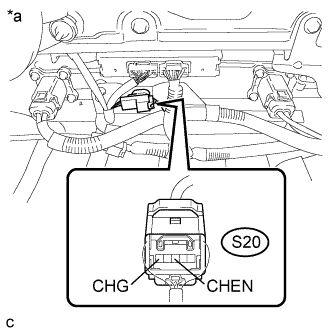
Text in Illustration *a Component with harness connected
(Electric Vehicle Charger Assembly)
Measure the resistance according to the value(s) in the table below.
Standard Resistance Tester Connection Condition Specified Condition S20-3 (CHEN) - S20-5 (CHG) Power switch off 4.0 kΩ or higher -
Reconnect the L6 power management control ECU connector.
NG
CHECK HARNESS AND CONNECTOR (CHECK FOR SHORT (CHEN)) Click here
OK
REPLACE POWER MANAGEMENT CONTROL ECU Click here
-
-
CHECK HARNESS AND CONNECTOR (CHECK FOR SHORT (CHEN))
-
Disconnect the L6 power management control ECU connector.
-
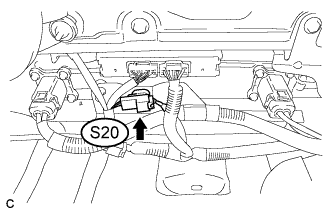
Disconnect the S20 electric vehicle charger assembly connector.
-
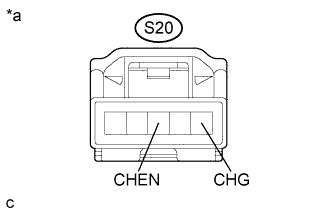
Text in Illustration *a Front view of wire harness connector
(to Electric Vehicle Charger Assembly)
Measure the resistance according to the value(s) in the table below.
Standard Resistance Tester Connection Condition Specified Condition S20-3 (CHEN) - S20-5 (CHG) Power switch off 10 kΩ or higher -
Reconnect the S20 electric vehicle charger assembly connector.
-
Reconnect the L6 power management control ECU connector.
NG
REPAIR OR REPLACE HARNESS OR CONNECTOR
OK
REPLACE ELECTRIC VEHICLE CHARGER ASSEMBLY Click here
-
-
CHECK PLUGIN CHARGE CONTROL ECU ASSEMBLY (CHPW FREQUENCY INSPECTION)
CAUTION:
Be sure to wear insulated gloves.
-
Check that the service plug grip is not installed.
Note
After removing the service plug grip, do not turn the power switch on (READY), unless instructed by the repair manual because this may cause a malfunction.
-
Disconnect the z12 plugin charge control ECU assembly connector .
-
Connect the cable to the negative (-) auxiliary battery terminal.
-
Turn the power switch on (IG).
-
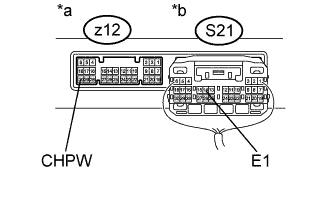
Text in Illustration *a Component without harness connected
(Plugin Charge Control ECU Assembly)
*b Component with harness connected
(Plugin Charge Control ECU Assembly)
Measure the frequency according to the following table.
Standard Frequency Tester Connection Condition Specified Condition z12-30 (CHPW) - S21-14 (E1) Power switch on (IG) 9 to 11 Hz Note
Turning the power switch on (IG) with the plugin charge control ECU assembly connector disconnected causes other DTCs to be stored. Clear the DTCs after performing this inspection.
-
Turn the power switch off.
-
Disconnect the cable from the negative (-) auxiliary battery terminal.
-
Reconnect the z12 plugin charge control ECU assembly connector.
NG
REPLACE PLUGIN CHARGE CONTROL ECU ASSEMBLY Click here
OK
REPLACE ELECTRIC VEHICLE CHARGER ASSEMBLY Click here
-
-
CHECK PLUGIN CHARGE CONTROL ECU ASSEMBLY (ILMT FREQUENCY INSPECTION)
CAUTION:
Be sure to wear insulated gloves.
-
Check that the service plug grip is not installed.
Note
After removing the service plug grip, do not turn the power switch on (READY), unless instructed by the repair manual because this may cause a malfunction.
-
Disconnect the z12 plugin charge control ECU assembly connector .
-
Connect the cable to the negative (-) auxiliary battery terminal.
-
Turn the power switch on (IG).
-
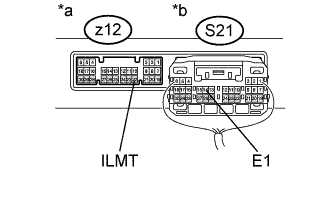
Text in Illustration *a Component without harness connected
(Plugin Charge Control ECU Assembly)
*b Component with harness connected
(Plugin Charge Control ECU Assembly)
Measure the frequency according to the following table.
Standard Frequency Tester Connection Condition Specified Condition z12-22 (ILMT) - S21-14 (E1) Power switch on (IG) 9 to 11 Hz Note
Turning the power switch on (IG) with the plugin charge control ECU assembly connector disconnected causes other DTCs to be stored. Clear the DTCs after performing this inspection.
-
Turn the power switch off.
-
Disconnect the cable from the negative (-) auxiliary battery terminal.
-
Reconnect the z12 plugin charge control ECU assembly connector.
NG
REPLACE PLUGIN CHARGE CONTROL ECU ASSEMBLY Click here
OK
REPLACE ELECTRIC VEHICLE CHARGER ASSEMBLY Click here
-