HYBRID BATTERY SYSTEM UTILITY
CAUTION:
Before performing diagnosis and repair, do not perform "HV Batt Cell Low Volt READY ON Prevention Cancel".
Note
-
Make sure to perform "Normal Battery Stack Average Voltage Calculation" using the utility function before removing the hybrid vehicle supply stack sub-assembly.
-
When "HAVE TRACTION BATTERY INSPECTED" is displayed on the multi-information display, perform battery diagnosis. If the traction battery is continually used without performing battery diagnosis for a few weeks*, "VEHICLE START WILL SOON BE DISABLED HAVE TRACTION BATTERY INSPECTED" will be displayed and the use of the HV battery (input/output voltage) will be limited. If the HV battery is continually used, the power on (READY) operation will be disabled.
*: Timing may vary depending on vehicle usage.
Tech Tips
If "HAVE TRACTION BATTERY INSPECTED" is displayed, Click here.
-
Purpose
Utility Items
(GTS Display)
Main Purpose Control Description Battery Diagnosis To perform battery diagnosis when "HAVE TRACTION BATTERY INSPECTED" is displayed on the multi-information display. Performs diagnosis of the extent of deterioration of the HV battery by measuring the SOC (state of charge) of each HV battery stack sub-assembly. Battery Status Info Update
-
Clears the "HAVE TRACTION BATTERY INSPECTED" screen on the multi-information display after performing "Battery Diagnosis".
-
If hybrid vehicle supply stack sub-assemblies or the HV battery are replaced, perform "Battery Status Info Update" after replacing them.
Updates the SOC (state of charge) record to the normal value. Temporary Vehicle Start Up - Temporarily enable the power switch on (READY) operation which has been disabled due to continual usage of the vehicle without performing battery diagnosis. HV Batt Cell Low Volt READY ON Prevention Cancel Used to cancel the READY On Prevention, which is enabled when the vehicle is repaired after DTC P31AB-123, P1A61-123, P1A64-123 or P1A67-123 was output. Cancels the power switch on (READY) prevention after repairing the Hybrid battery cell low voltage malfunction. Normal Battery Stack Average Voltage Calculation To calculate the average battery stack voltage of the known good HV battery stack sub-assemblies to adjust the voltage of a new HV supply stack sub-assembly correctly before replacement. Measures the HV battery temperature and average voltage of known good hybrid vehicle supply stack sub-assemblies. 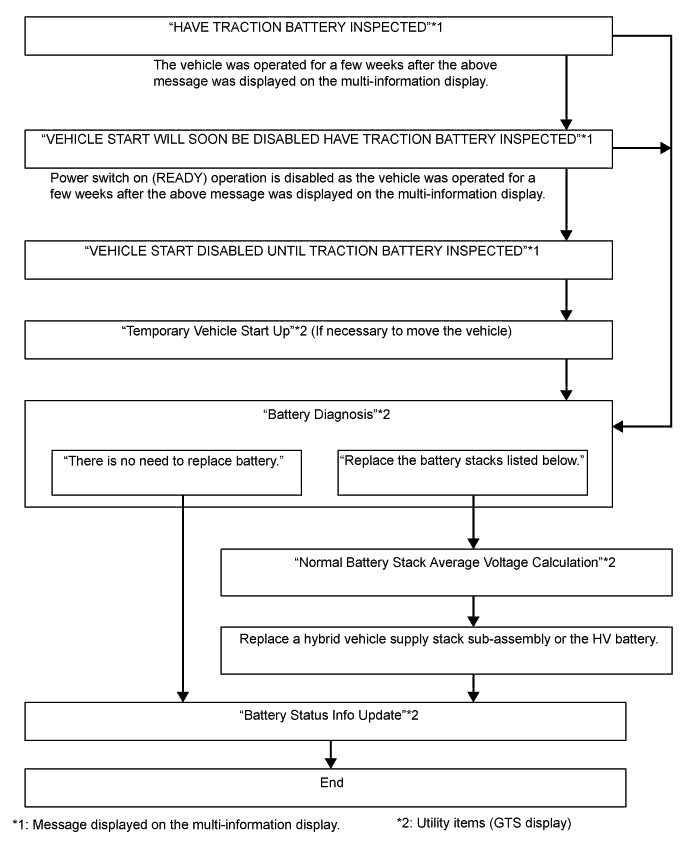
-
-
Battery Diagnosis
Note
-
Do not perform battery diagnosis while the hybrid system light is illuminated.
-
Perform battery diagnosis with the HV battery installed correctly.
-
Do not perform battery diagnosis while changing from inspection mode to another mode.
-
Make sure to turn the power switch off after battery diagnosis to prevent the auxiliary battery from being discharged.
-
If the SOC (state of charge) learning has not been performed*1, perform battery diagnosis after plug-in charging the vehicle as specified.
-
*1: Refer to "Procedure when Battery Diagnosis is Suspended".
-
Connect the GTS to the DLC3.
-
Turn the power switch on (IG).
-
Enter the following menus: Powertrain / Hybrid Control / Utility / Battery Diagnosis.
-
Check items on the display and press "Next".
-
The screen transitions to the next screen and "Now diagnosing" is displayed.
Tech Tips
-
"Progress" is displayed as a reference to the estimated time to complete the diagnosis.
-
To suspend battery diagnosis, press "Exit" and turn the power switch off.
-
-
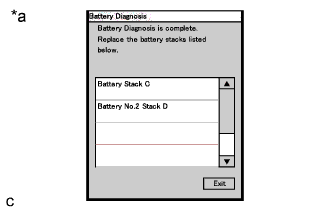
Text in Illustration *a Example of a diagnosis result When battery diagnosis is complete, the result will be displayed.
-
Check the diagnosis result.
GTS Display Diagnosis Result After performing diagnosis There is no need to replace the battery. Be sure to refer to the repair manual for procedures to take after this. There is no need to replace battery. Perform "Battery Status Info Update". Replace the hybrid vehicle supply stack sub-assemblies listed below. Replace the listed battery stack sub-assemblies. Replace the listed hybrid vehicle supply stack sub-assemblies. Tech Tips
-
If "HAVE TRACTION BATTERY INSPECTED" is displayed on the multi-information display, the message will not be cleared even after it is determined that "There is no need to replace battery". It can be cleared only after performing "Battery Status Info Update".
-
If the listed hybrid vehicle supply stack sub-assemblies are replaced, perform "Battery Status Info Update" after replacing them.
-
-
Turn the power switch off.
Note
Make sure to turn the power switch off after battery diagnosis to prevent the auxiliary battery from being discharged.
-
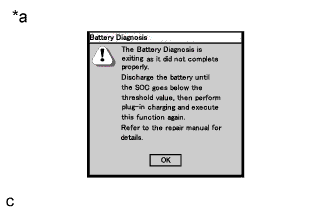
Text in Illustration *a Example of a suspended battery diagnosis. When the battery diagnosis is suspended because the diagnosis conditions are not met anymore, the reasons of suspension are displayed on the GTS. Perform "Battery Status Info Update" after checking the causes and troubleshoot the suspected area in accordance with instructions in the "Procedure when battery diagnosis is suspended" table.
Procedure when battery diagnosis is suspended. GTS Display Reason of Diagnosis Suspension
(Related Condition)
Procedure The Battery Diagnosis is exiting as it did not complete properly. Discharge the battery until the SOC goes below the threshold value, then perform plug-in charging and execute this function again. Refer to the repair manual for details. SOC (state of charge) learning has not completed.
-
Lower the SOC (state of charge) of the HV battery by driving the vehicle in EV mode until the mode changes to HV mode.
-
Make a note of the Data List items from "Temp of Batt TB1" to "Temp of Batt TB12".
-
If the lowest measured battery temperature is 10°C or lower, drive the vehicle until the temperature exceeds 15°C.
If "HAVE TRACTION BATTERY INSPECTED" is displayed on the multi-information display and the hybrid vehicle system cannot be started, perform "Temporary Vehicle Start Up" and drive the vehicle.
-
Perform plug-in charging.
Note
Do not use the charging timer function.
-
After plug-in charging, wait for 35 minutes or more, then turn the power switch on (IG) or on (READY). (Do not turn the power switch on (IG) or on (READY) for at least 35 minutes after plug-in charging. If the vehicle is not fully charged, perform the procedure from step 1 again.)
-
Leave the vehicle with the power switch on (IG) or on (READY) for 10 minutes or more, turn the power switch off, and then perform battery diagnosis.
Communication error The power switch was turned off or a communication error occurred.
-
Turn the power switch on (IG), and then perform battery diagnosis again.
-
Check that the connector of the GTS is not disconnected from the DLC3, perform battery diagnosis again.
-
-
Battery Status Info Update
Note
-
Do not perform battery status info update while the hybrid system light is illuminated.
-
Perform battery status info update with the HV battery installed correctly.
-
Make sure to turn the power switch off after battery status info update to prevent the auxiliary battery from being discharged.
-
If "Battery Status Info Update" is performed more than necessary, it may deteriorate the HV battery.
-
Make sure to perform "Battery Status Info Update" if the hybrid vehicle supply stack sub-assembly or HV battery is replaced.
-
Connect the GTS to the DLC3.
-
Turn the power switch on (IG).
-
Enter the following menus: Powertrain / Hybrid Control / Utility / Battery Status Info Update.
-
Check items on the display and press "Next".
-
The screen transitions to the next screen and "Now diagnosing" is displayed.
Tech Tips
-
"Progress" is displayed as a reference to the "Battery Status Info Update" status.
-
To suspend "Battery Status Info Update", press "Exit" and turn the power switch off.
-
-
If "Battery Status Info Update" has completed properly, "Now ready to update" will be displayed.
Note
If "HAVE TRACTION BATTERY INSPECTED" is displayed on the multi-information display, the message will not be cleared even after "Battery Status Info Update" has completed. The message will be cleared by turning the power switch from off to on (IG) or on (READY) after "Battery Status Info Update" has completed.
-
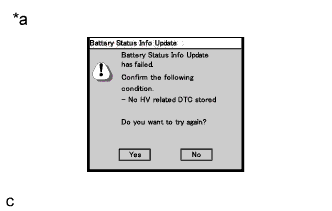
Text in Illustration *a An example of suspended "Battery Status Info Update" Turn the power switch off.
Note
-
Make sure to turn the power switch off after battery status info update to prevent the auxiliary battery from being discharged.
-
When the battery status info update is suspended because the diagnosis condition is not met anymore, the reasons for the suspension are displayed on the GTS. Perform "Battery Status Info Update" after checking the causes and troubleshoot the suspected area in accordance with instructions in the "Procedure when battery status info update is suspended" table.
-
-
Perform the SOC (state of charge) learning as follows:
-
Lower the SOC (state of charge) of the HV battery by driving the vehicle in EV mode until the mode changes to HV mode.
-
Make a note of the Data List items from "Temp of Batt TB1" to "Temp of Batt TB12".
-
If the lowest measured battery temperature is 10°C or lower, drive the vehicle until the temperature exceeds 15°C.
-
Turn the power switch off and wait for 30 seconds or more.
-
Perform plug-in charging.
Note
Do not use the charging timer function.
-
After plug-in charging, wait for 35 minutes or more, then turn the power switch on (IG) or on (READY). (Do not turn the power switch on (IG) or on (READY) for at least 35 minutes after plug-in charging. If the vehicle is not fully charged, perform the procedure from step 1 again.)
-
Leave the vehicle with the power switch on (IG) or on (READY) for 10 minutes or more, then turn the power switch off.
-
-
-
Temporary Vehicle Start Up
Note
-
Do not perform temporary vehicle start up while the hybrid system light is illuminated.
-
Perform only when "VEHICLE START DISABLED UNTIL TRACTION BATTERY INSPECTED" is displayed on the multi-information display and the vehicle cannot be started.
-
"VEHICLE START DISABLED UNTIL TRACTION BATTERY INSPECTED" will not be cleared after "Temporary Vehicle Start Up" is performed.
-
Connect the GTS to the DLC3.
-
Turn the power switch on (IG).
-
Enter the following menus: Powertrain / Hybrid Control / Utility / Temporary Vehicle Start Up.
Note
If the power switch is turned on (READY) while depressing the brake pedal, "Temporary Vehicle Start Up" is not possible. Retry after turning the power switch off.
-
Check items on the display and press "Next".
-
The screen transitions to the next screen and "Please wait" is displayed.
-
The screen transitions to the next screen and "Now the vehicle is ready to start." is displayed.
Tech Tips
-
If the power switch is turned off after "Temporary Start Up", the vehicle will not be able to start again.
-
The GTS can be disconnected after turning the power switch on (READY).
-
-
Turn the power switch on (READY).
-
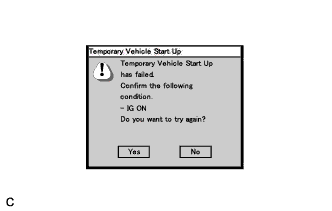
When the condition to perform "Temporary Vehicle Start Up" is not met, the reasons for suspension are displayed on the GTS. Perform "Temporary Vehicle Start Up" again after checking the causes and troubleshoot the suspected area in accordance with instructions in the "Procedure when temporary vehicle start up is suspended" table.
Procedure when "Temporary Vehicle Start Up" is suspended. GTS Display Reason of Diagnosis Suspension
(Related Condition)
Procedure Temporary Vehicle Start Up has failed. Confirm the following condition. GTS communication error After checking that the connector of the GTS is not disconnected and the power switch is on (IG), perform "Temporary Vehicle Start Up" again. -
-
HV Batt Cell Low Volt READY ON Prevention Cancel
CAUTION:
Before performing diagnosis and repair, do not use this function.
Note
-
Use this function only when the power switch cannot be turned on (READY) after repair.
-
Hybrid battery cell low voltage DTCs will not be cleared even after "HV Batt Cell Low Volt READY ON Prevention Cancel" is performed.
-
The master warning light does not turn off even after "HV Batt Cell Low Volt READY ON Prevention Cancel" is performed.
-
Connect the GTS to the DLC3.
-
Turn the power switch on (IG).
-
Enter the following menus: Powertrain / Hybrid Control / Utility / HV Batt Cell Low Volt READY ON Prevention Cancel.
Note
-
This procedure can be performed only once per trip.
-
If the procedure fails or has been suspended, turn the power switch off and on (IG) and perform the procedure again.
-
-
Check items on the display and press "Next".
-
The screen transitions to the next screen and "Now Canceling" is displayed.
-
The screen transitions to the next screen and "HV Batt Cell Low Volt READY ON Prevention Cancel is complete" is displayed.
Tech Tips
-
Hybrid battery cell low voltage DTCs will not be cleared.
-
The master warning light does not turn off.
-
-
Clear the DTCs. Click here.
-
Turn the power switch off.
-
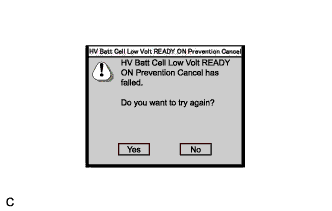
When the condition to perform "HV Batt Cell Low Volt READY ON Prevention Cancel" is not met, the reasons for suspension are displayed on the GTS. Perform "HV Batt Cell Low Volt READY ON Prevention Cancel" after checking the causes and troubleshooting the suspected area in accordance with instructions listed in the "Procedure when hv batt cell low volt READY ON is suspended" table.
Procedure when "HV Batt Cell Low Volt READY ON Prevention Cancel" is suspended. GTS Display Reason of Diagnosis Suspension
(Related Condition)
Procedure HV Batt Cell Low Volt READY ON Prevention Cancel has failed. GTS communication error After checking that the connector of the GTS is not disconnected and checking for HV battery system related DTCs, turn the power switch off and on (IG). Then perform "HV Batt Cell Low Volt READY ON Prevention Cancel" again. -
-
Normal Battery Stack Average Voltage Calculation
Note
Perform the following procedure before removing a hybrid vehicle supply stack sub-assembly.
-
Connect the GTS to the DLC3.
-
Turn the power switch on (IG).
-
Enter the following menus: Powertrain / Hybrid Control / Utility / Normal Battery Stack Average Voltage Calculation.
Note
If the procedure fails or is suspended, turn off and on (IG) the power switch and perform the procedure again.
-
Check items on the display and press "Next".
-
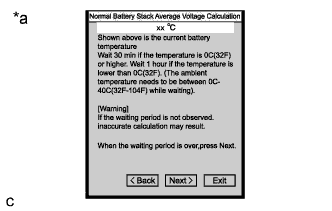
Text in Illustration *a HV battery temperature display example The screen transitions to the next screen and "Shown above is the current battery temperature" is displayed.
-
Select the stack to be replaced and press "Next".
-
The screen transitions to the next screen and "Now Calculating" is displayed.
-
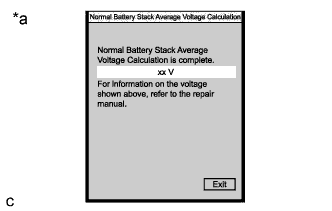
Text in Illustration *a Example of a "Normal Battery Stack Average Voltage Calculation" result The screen transitions to the next screen and "Normal Battery Stack Average Voltage Calculation is complete" is displayed.
Tech Tips
Make a note of the calculated voltage.
-
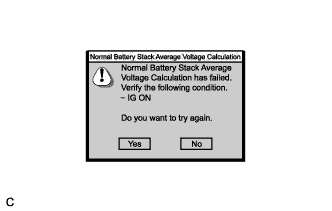
When the condition to perform "Normal Battery Stack Average Voltage Calculation" is not met, the reasons for suspension are displayed on the GTS. Perform "Battery Status Info Update" after checking the causes and troubleshooting the suspected area in accordance with instructions listed in the "Procedure when normal battery stack average voltage calculation is suspended" table and perform "Normal Battery Stack Average Voltage Calculation" again.
Procedure when "Normal Battery Stack Average Voltage Calculation" is suspended. GTS Display Reason of Diagnosis Suspension
(Related Condition)
Procedure Normal Battery Stack Average Voltage Calculation has failed. Verify the following condition. GTS communication error After checking that the connector of the GTS is not disconnected and checking for HV battery system related DTCs, turn the power switch off and on (IG), and then perform "Normal Battery Stack Average Voltage Calculation" again. -