INSTRUMENT PANEL SPEAKER INSTALLATION
-
INSTALL FRONT NO. 2 SPEAKER ASSEMBLY
-
Connect the connector.
-
Install the front No. 2 speaker assembly with the 2 bolts.
-
-
INSTALL INSTRUMENT PANEL SPEAKER PANEL SUB-ASSEMBLY
-
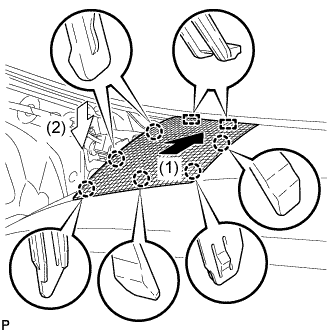
Engage the 2 guides and 6 claws to install the No. 1 instrument panel speaker panel sub-assembly as shown in the illustration.
-
-
INSTALL FRONT PILLAR GARNISH CORNER PIECE
-
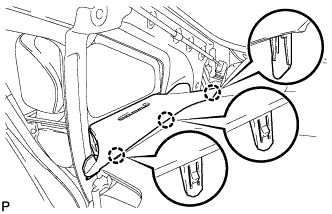
Engage the 3 claws to install the front pillar garnish corner piece LH.
-
-
INSTALL FRONT PILLAR GARNISH
-
Remove the protective cover.
-
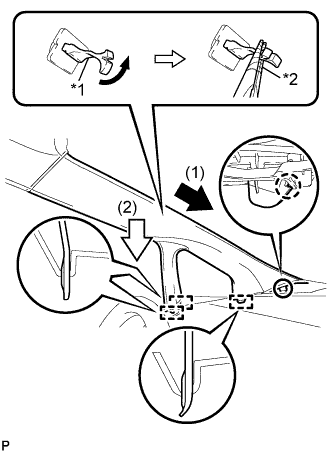
Text in Illustration *1 Front Pillar Garnish Clip *2 Protective Tape Make sure that the front pillar garnish clip is not damaged.
Note
-
If there is any damage, replace the garnish clip with a new one.
-
When a garnish clip is being replaced, make sure to install it in the direction shown in the illustration.
-
-
Engage the claw to direction indicated by the arrow (1).
-
Engage the 3 guides to direction indicated by the arrow (2).
-
Turn the end of the front pillar garnish clip 90° with needle-nosed pliers and install it to the front pillar garnish LH.
Tech Tips
Tape the needle-nosed pliers tip before use.
-
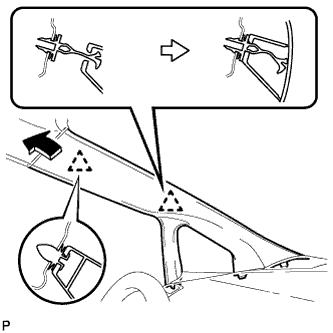
Engage the 2 clips to install the front pillar garnish LH.
-