POWER STEERING SYSTEM DTC CHECK / CLEAR
-
CHECK DTCs (USING THE GTS)
-
Turn the power switch off.
-
Connect the GTS to the DLC3.
-
Turn the power switch on (IG).
-
Turn the GTS on.
-
Read the DTCs following the display on the GTS. Enter the following menus: Chassis / EMPS / Trouble Codes.
-
Refer to the Diagnostic Trouble Code Chart for DTC information Click here.
-
-
CHECK DTCs (USING SST CHECK WIRE)
-
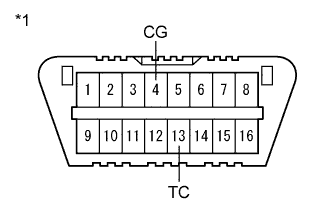
Text in Illustration *1 DLC3 Using SST, connect terminals 13 (TC) and 4 (CG) of the DLC3.
- SST
- 09843-18040
-
Turn the power switch on (IG).
-
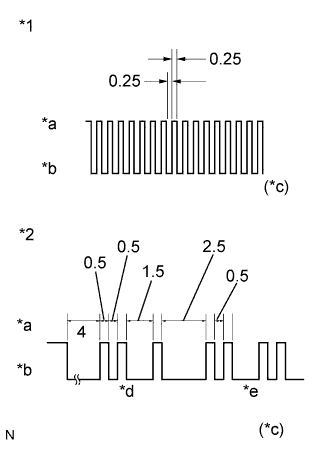
Text in Illustration *1 Normal code *2 Codes 21 and 22 *a ON *b OFF *c Seconds *d Code 21 *e Code 22 Read and write down any DTCs indicated by the EPS warning light on the combination meter. Refer to the chart on the left for examples of a normal code and DTCs 21 and 22.
Tech Tips
-
If the EPS warning light does not blink to display any DTCs set or the normal code Click here.
-
If two or more malfunctions are detected simultaneously, DTCs will be displayed in ascending numerical order.
-
-
Refer to the Diagnostic Trouble Code Chart for DTC information Click here.
-
Check the details of the DTCs.
EPS DTC EPS Warning Light Display Tester Display 11 C1511 12 C1512 13 C1513 14 C1514 15 C1515 16 C1516 17 C1517 24 C1524 31 C1531 32 C1532 33 C1533 34 C1534 35 C1535 51 C1551 52 C1552 53 C1553 54 C1554 55 C1555 81 C1581 82 C1582 92 U0100 93 U0129
-
-
CLEAR DTCs (USING THE GTS)
-
Turn the power switch off.
-
Connect the GTS to the DLC3.
-
Turn the power switch on (IG).
-
Turn the GTS on.
-
Clear the DTCs following the display on the GTS. Enter the following menus: Chassis / EMPS / Trouble Codes.
-
According to the display on the GTS, select the trouble code data display with the clear button.
-
Turn the power switch off.
-
Disconnect the GTS from the DLC3.
-
-
CLEAR DTCs (USING SST CHECK WIRE)
-
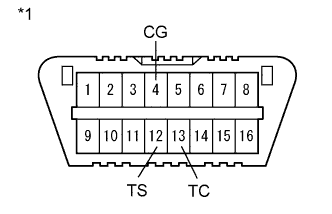
Text in Illustration *1 DLC3 Using SST, connect terminals 12 (TS) and 4 (CG) of the DLC3, and also terminals 13 (TC) and 4 (CG) of the DLC3.
- SST
- 09843-18040
-
Turn the power switch on (IG).
-
Disconnect and reconnect terminal 13 (TC) of the DLC3 4 times or more within 8 seconds.
-
Check that the EPS warning light blinks a code to indicate normality.
-
Turn the power switch off.
-
Remove SST from the DLC3.
-