WINDSHIELD GLASS REMOVAL

-
DISCONNECT CABLE FROM NEGATIVE BATTERY TERMINAL
CAUTION:
Wait at least 90 seconds after disconnecting the cable from the negative (-) battery terminal to prevent airbag and seat belt pretensioner activation.
-
REMOVE INNER REAR VIEW MIRROR ASSEMBLY
-
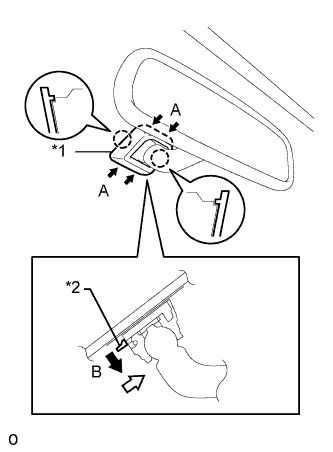
Text in Illustration *1 Cover *2 Claw w/o Screw:
-
Push the cover in the direction indicated by the arrows labeled A and remove it.
-
While holding down the claw in the direction of the black arrow labeled B, slide the inner rear view mirror assembly in the direction of the white arrow and remove it.
-
-
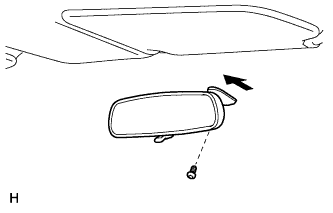
w/ Screw:
-
Using a T20 "TORX" socket wrench, remove the screw.
-
Slide the inner rear view mirror assembly in the direction of the arrow and remove it.
-
-
-
REMOVE FRONT DOOR OPENING TRIM LH
-
Partially remove the front door opening trim weatherstrip LH so that the front pillar garnish LH can be removed Click here.
-
-
REMOVE FRONT DOOR OPENING TRIM RH
Tech Tips
Use the same procedures described for the LH side.
-
REMOVE ASSIST GRIP SUB-ASSEMBLY FRONT
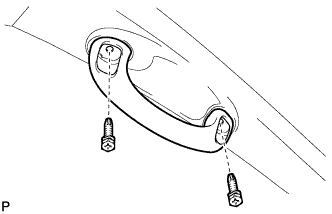
Tech Tips
Use the same procedure for both front assist grips.
-
Remove the 2 screws and front assist grip.
-
-
REMOVE FRONT PILLAR GARNISH LH
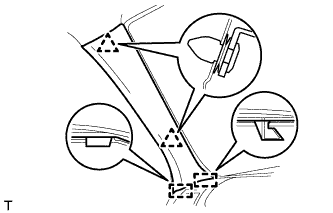
-
Detach the 2 clips and 2 guides and remove the front pillar garnish.
-
-
REMOVE FRONT PILLAR GARNISH RH
Tech Tips
Use the same procedure described for the LH side.
-
REMOVE MAP LIGHT ASSEMBLY
-
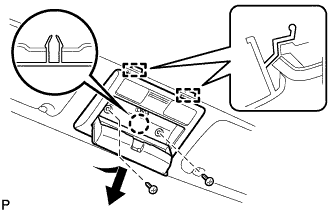
Remove the 2 screws.
-
Detach the claw and 2 guides and remove the map light assembly.
-
Disconnect the connector.
-
-
REMOVE ROOM NO. 1 LIGHT LENS
-
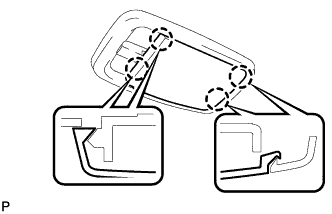
Using a screwdriver, detach the 4 claws and remove the lens.
Tech Tips
Tape the screwdriver tip before use.
-
-
REMOVE ROOM NO. 1 LIGHT ASSEMBLY
-
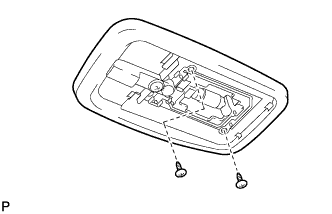
Remove the 2 screws and room light.
-
Disconnect the light connector.
-
-
REMOVE VISOR ASSEMBLY LH
-
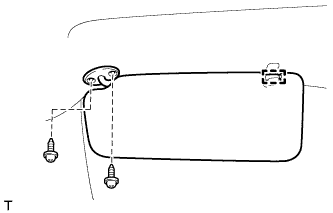
Detach the guide.
-
Remove the 2 screws and visor.
-
-
REMOVE VISOR ASSEMBLY RH
Tech Tips
Use the same procedure described for the LH side.
-
REMOVE VISOR HOLDER LH
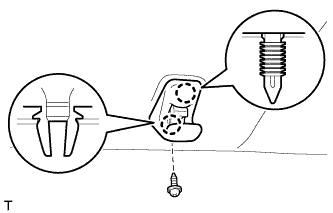
-
Remove the screw.
-
Detach the 2 claws and remove the visor holder.
-
-
REMOVE VISOR HOLDER RH
Tech Tips
Use the same procedure described for the LH side.
-
REMOVE ASSIST GRIP
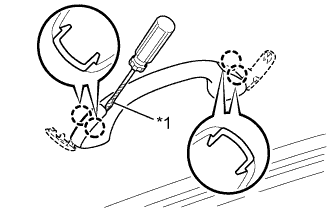
Tech Tips
Use the same procedure for all assist grips.
-
Using a screwdriver, detach the 4 claws and open the 2 covers.
Tech Tips
Tape the screwdriver tip before use.
Text in Illustration *1 Protective Tape -
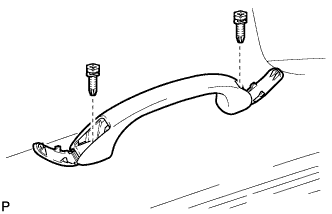
Remove the 2 screws and assist grip.
-
-
REMOVE ROOF HEADLINING ASSEMBLY
Tech Tips
It is not necessary to completely remove the roof headlining. Slightly lower the front section of the roof headlining.
-
Partially remove the roof headlining Click here.
-
-
REMOVE FRONT WIPER ARM HEAD CAP
-
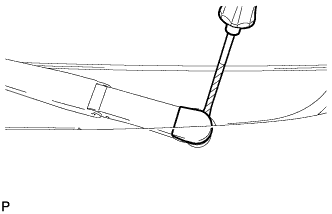
Using a screwdriver, remove the front wiper arm head cap.
Tech Tips
-
Tape the screwdriver tip before use.
-
Use the same procedure for both front wiper arm head caps.
-
-
-
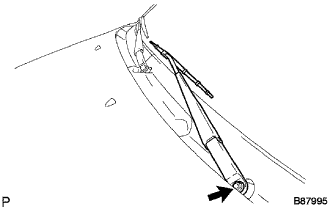
REMOVE FRONT WIPER ARM AND BLADE ASSEMBLY LH
-
Remove the nut and arm and blade.
-
-
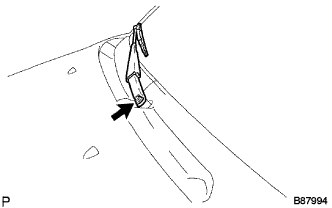
REMOVE FRONT WIPER ARM AND BLADE ASSEMBLY RH
-
Remove the nut and arm and blade.
-
-
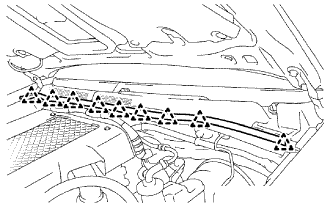
REMOVE HOOD TO COWL TOP SEAL
-
Detach the 9 clips and remove the seal.
-
-
REMOVE COWL TOP VENTILATOR LOUVER LH
-
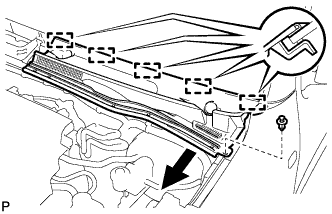
Remove the clip.
-
Detach the 5 guides, and remove the cowl top ventilator louver LH in the direction indicated by the arrow in the illustration.
-
-
REMOVE COWL TOP VENTILATOR LOUVER RH
-
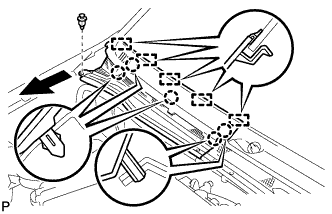
Remove the clip.
-
Detach the 5 claws and 5 guides, and remove the cowl top ventilator louver RH in the direction indicated by the arrow in the illustration.
-
-
REMOVE WINDSHIELD MOULDING OUTER UPPER
-
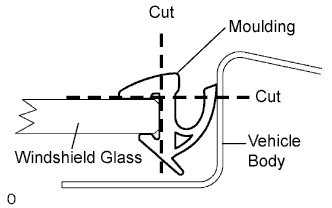
Using a knife, cut off the moulding as shown in the illustration.
Note
Be careful not to damage the vehicle body.
-
Remove the remaining moulding.
Tech Tips
Make a partial cut in the moulding. Then pull and remove it by hand.
-
-
REMOVE WINDSHIELD GLASS
-
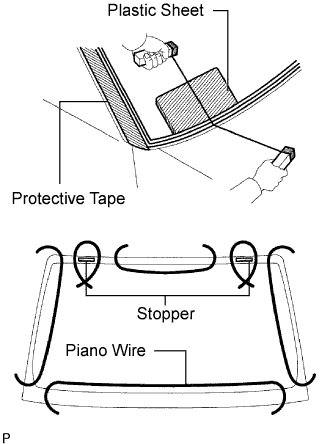
Apply protective tape to the outer surface of the vehicle body to prevent scratches.
-
From the interior, insert a piano wire between the vehicle body and glass as shown in the illustration.
-
Tie objects that can serve as handles (for example, wooden blocks) to both wire ends.
Note
-
When separating the glass from the vehicle, be careful not to damage the vehicle's paint or interior/exterior ornaments.
-
To prevent the instrument panel from being scratched when removing the glass, place a plastic sheet between the piano wire and instrument panel.
-
-
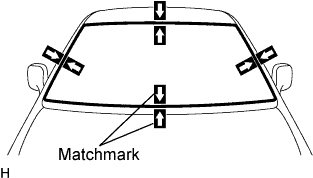
Place matchmarks over the glass and vehicle body on the locations indicated in the illustration.
Tech Tips
Matchmarks do not need to be placed if not reusing the glass.
-
Cut through the adhesive by pulling the piano wire around the glass.
Note
Leave as much adhesive on the vehicle body as possible when cutting through the adhesive.
-
Disengage the stoppers.
-
Using suction cups, remove the glass.
-
-
CLEAN WINDSHIELD GLASS
-
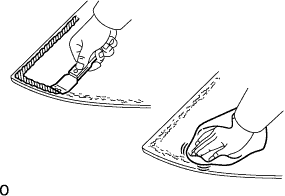
Using a scraper, remove the damaged stoppers, dams and adhesive sticking to the glass.
-
Clean the outer edges of the glass with non-residue solvent.
Note
Do not touch the glass surface after cleaning it.Even if using new glass, clean it with non-residue solvent.
-
-
CLEAN VEHICLE BODY
-
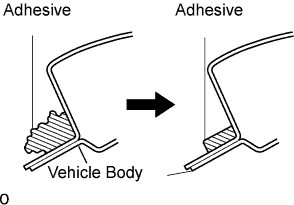
Clean and shape the contact surface of the vehicle body.
-
On the contact surface of the vehicle body, use a knife to cut away excess adhesive as shown in the illustration.
Tech Tips
Leave as much adhesive on the vehicle body as possible.
Note
Be careful not to damage the vehicle body.
-
-
Clean the contact surface of the vehicle body with cleaner.
Tech Tips
Even if all the adhesive has been removed, clean the vehicle body.
-