AUDIO AND VISUAL SYSTEM (for Radio and Display Type) Screen Flicker or Color Distortion
INSPECTION PROCEDURE
PROCEDURE
-
CHECK DISPLAY SETTING
-
Press the "SETUP" switch and select the "Display" button.Display the "Display(General)" screen.
-
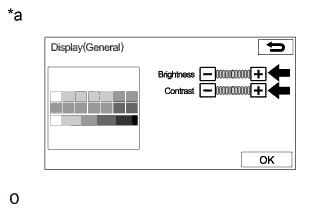
Text in Illustration *a Example Select the "General" and enter the "Display (General)" screen.
-
Reset display settings (contrast, brightness) and check that the screen appears normal.
OK The display returns to normal.
NG 
REPLACE RADIO AND DISPLAY RECEIVER ASSEMBLY Click here
OK 
PROCEED TO NEXT SUSPECTED AREA SHOWN IN PROBLEM SYMPTOMS TABLE Click here
-