AUDIO AND VISUAL SYSTEM (for Radio and Display Type) DTC CHECK / CLEAR

-
START DIAGNOSTIC MODE
Tech Tips
-
Illustrations may differ from the actual vehicle depending on the device settings and options. Therefore, some detailed areas may not be shown exactly the same as on the actual vehicle.
-
If the system cannot enter the diagnostic mode, replace the radio and display receiver assembly Click here.
-
Start the engine.
-
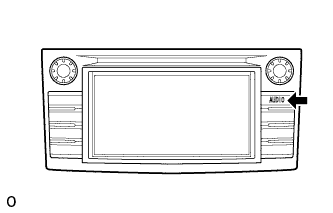
While pressing and holding the "AUDIO" switch, operate the light control switch: off → turn on → turn off → turn on → turn off → turn on → turn off.
-
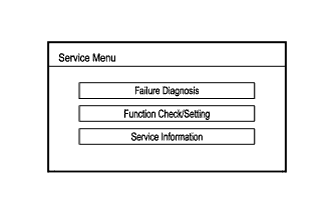
Diagnostic mode starts and the "Service Menu" screen is displayed.
-
-
FINISH DIAGNOSTIC MODE
-
There are 2 methods to end diagnostic mode. Use one of them.
-
Turn the ignition switch off.
-
Press and hold the "AUDIO" switch for 3 seconds.
-
-
-
FAILURE DIAGNOSIS
-
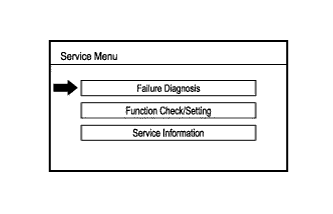
Touch the "Failure Diagnosis" button on the "Service Menu" screen.
-
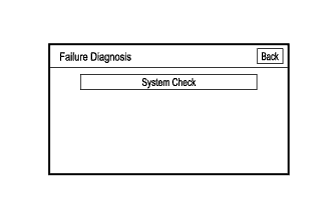
The "Failure Diagnosis" screen is displayed.
-
-
SYSTEM CHECK
-
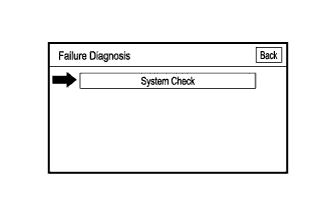
Touch the "System Check" button on the "Failure Diagnosis" screen.
-
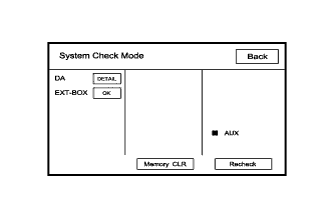
The "System Check Mode" screen is displayed.
-
-
CHECK DTC (CHECK USING SYSTEM CHECK MODE SCREEN)
-
Read the system check result.
-
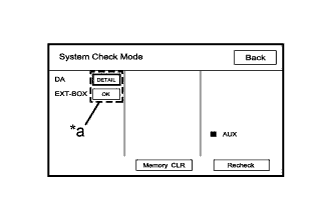
Text in Illustration *a Check Result If the check result is "DETAIL", touch the displayed check result.
-
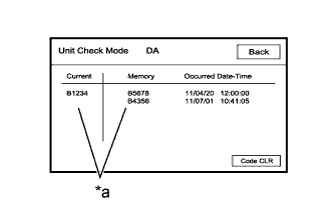
Text in Illustration *a Diagnostic Code View the results on the "Unit Check Mode" screen and record them.
-
When proceeding to view the results of another device, touch the "Back" button to return to the "System Check Mode" screen.
Tech Tips
To check the other items, repeat this procedure from the first step.
-
-
DTC CLEAR/RECHECK (CLEAR USING SYSTEM CHECK MODE SCREEN)
-
Clear DTC
-
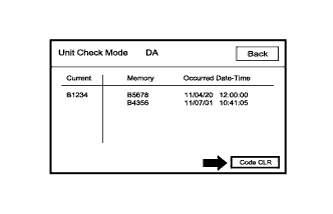
Touch the "Code CLR" button for 3 seconds.
-
Confirm that the check results are cleared.
Tech Tips
-
To clear the DTC for a specific device, clear the DTC using the "Unit Check Mode" screen.
-
When clearing a DTC using the "Unit Check Mode" screen, touch the "Code CLR" button for 3 seconds.
-
-
-
Recheck
-
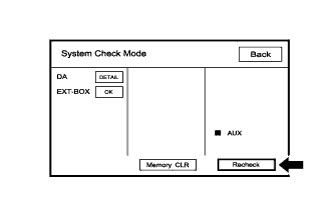
Touch the "Recheck" button.
-
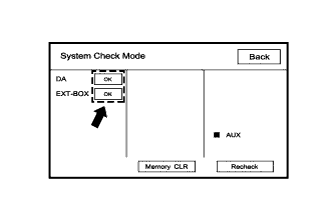
Confirm that all check results are "OK" when the check results are displayed. If a result other than "OK" is displayed, troubleshoot again.
Tech Tips
When a DTC is cleared using the "Unit Check Mode" screen, touch the "Back" button to return to the "System Check Mode" screen and perform this operation.
-
-