AUDIO AND VISUAL SYSTEM (for Radio Receiver Type) Radio Broadcast cannot be Received (Bad Reception)
INSPECTION PROCEDURE
PROCEDURE
-
CHECK IF RADIO AUTO-SEARCH FUNCTIONS PROPERLY
-
Perform the auto-search of the radio and check that it functions normally.
OK Radio auto-search functions normally.
NG 
CHECK OPTIONAL COMPONENTS Click here
OK 
REPLACE RADIO RECEIVER ASSEMBLY Click here
-
-
CHECK OPTIONAL COMPONENTS
-
Check if the telephone antenna or other optional components are installed.
OK Optional component(s) installed. Note
Do not remove any optional components installed by the customer without his or her consent.
NG
CHECK ANTENNA FOR NOISE PRODUCTION Click here
OK
EFFECT FROM OPTIONAL COMPONENTS
-
-
CHECK ANTENNA FOR NOISE PRODUCTION
-
With the ignition switch ACC, turn on the radio and choose the AM mode.
-
Place the tip of a screwdriver on the antenna and check that noise is heard from the speakers.
OK Noise is heard.
NG
CHECK RADIO RECEIVER ASSEMBLY (ANTENNA) Click here
OK
REPLACE RADIO RECEIVER ASSEMBLY Click here
-
-
CHECK RADIO RECEIVER ASSEMBLY (ANTENNA)
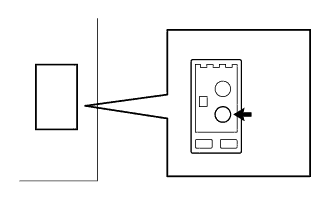
-
Disconnect the antenna connector from the radio receiver assembly.
-
With the radio receiver assembly connector connected, turn the ignition switch to ACC.
-
Turn on the radio and choose the AM mode.
-
Place a flat-head screwdriver or a piece of metal, such as a thin wire, on the antenna jack of the radio receiver assembly. Check that noise is heard from the speakers.
OK Noise is heard.
NG 
REPLACE RADIO RECEIVER ASSEMBLY Click here
OK
ANTENNA ASSEMBLY IS DEFECTIVE
-