REAR BLOWER CONTROL SWITCH REMOVAL

-
REMOVE COOLER CONTROL SWITCH ASSEMBLY
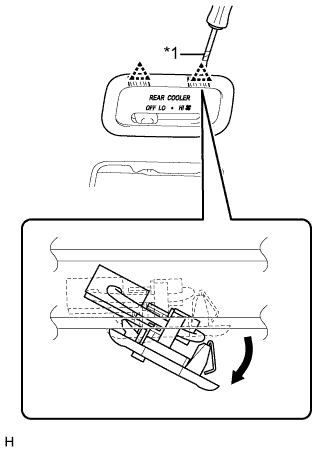
Text in Illustration *1 Protective Tape
-
Using a screwdriver, detach the 2 clips and remove the cooler control switch assembly (rear blower control switch) as shown in the illustration.
Tech Tips
Tape the screwdriver tip before use.
-
-
REMOVE CENTER INSTRUMENT CLUSTER FINISH PANEL ASSEMBLY
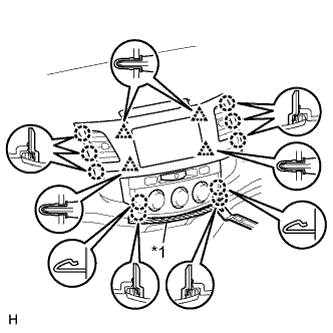
-
for Manual Air Conditioning System:
-
Put protective tape around the center instrument cluster finish panel.
-
Using a moulding remover, detach the 10 claws and 4 clips.
-
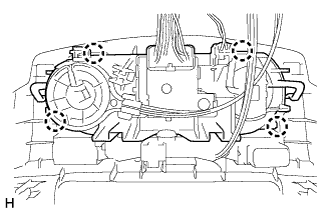
Text in Illustration *1 Protective Tape Detach the 4 claws and disconnect the air conditioner control.
-
Disconnect the connectors and remove the center instrument cluster finish panel.
-
-
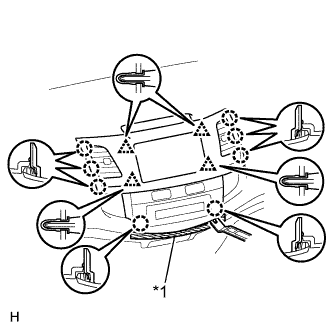
Text in Illustration *1 Protective Tape for Automatic Air Conditioning System:
-
Put protective tape around the center instrument cluster finish panel.
-
Using a moulding remover, detach the 8 claws and 4 clips.
-
Disconnect the connectors and remove the center instrument cluster finish panel.
-
-
-
REMOVE GLOVE COMPARTMENT DOOR ASSEMBLY
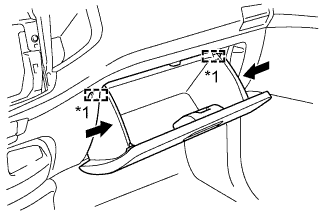
Text in Illustration *1 Stopper
-
Slightly bend the upper part of the glove compartment door to release the 2 stoppers and open the glove compartment door until it is horizontal.
-
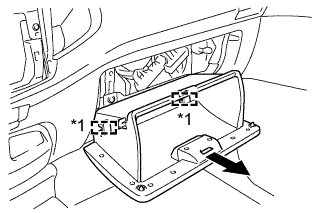
Text in Illustration *1 Hinge Pull the glove compartment door toward the rear of the vehicle to detach the 2 hinges and remove the glove compartment door.
-
-
REMOVE LOWER INSTRUMENT PANEL FINISH PANEL SUB-ASSEMBLY
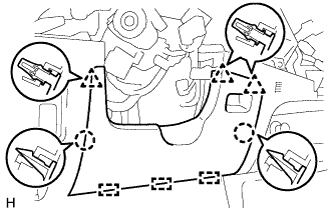
-
Detach the 2 claws, 3 clips and 3 guides and remove the lower instrument panel finish panel.
-
-
REMOVE SWITCH BASE
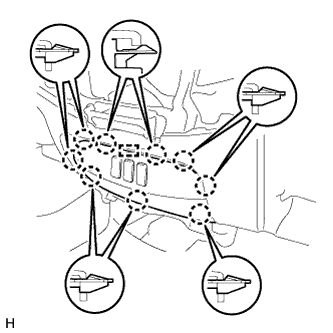
-
Detach the 8 claws.
Tech Tips
If the claws are difficult to detach, detach the claws from the back of the switch base.
-
Disconnect the connectors and remove the switch base.
-
-
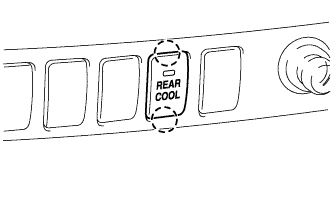
REMOVE COOLER (REAR) SWITCH
-
Detach the 2 claws and remove the cooler (rear) switch.
-
Disconnect the connector.
-