AIR CONDITIONING SYSTEM (for Automatic Air Conditioning System) DTC CHECK / CLEAR

-
CHECK INDICATOR
-
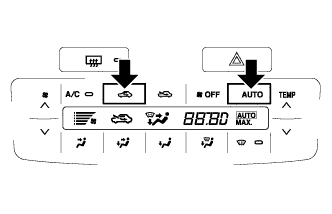
Turn the ignition switch to ON while pressing the air conditioning control AUTO and recirculation switches simultaneously.
-
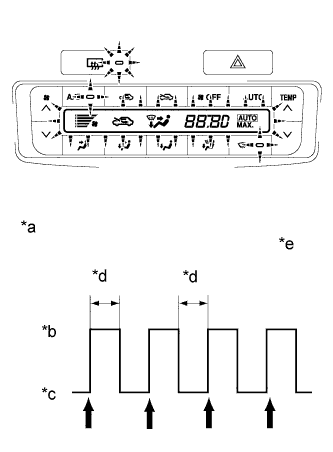
Text in Illustration *a Blinking Pattern *b On *c Off *d 1 sec. *e 4 times Check that the indicators turn on and off 4 times at 1 second intervals.
Tech Tips
After the indicator check is completed, the system enters the DTC check mode automatically.
-
-
CHECK DTC (SENSOR CHECK)
-
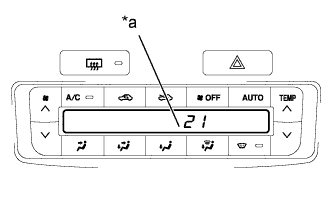
Text in Illustration *a Diagnostic Trouble Code (DTC) After the indicator check is completed, check that the system enters the DTC check mode automatically.
Tech Tips
-
Press the OFF switch to cancel the check mode.
-
In the sensor check mode, troubleshooting may be only partially completed. Be sure to perform the actuator check, and then perform the sensor check again.
-
-
Read the DTCs displayed on the panel (temperature display). Refer to the list of DTCs Click here when reading the codes.
-
If manual switching of the DTC display is desired, press the front DEF switch. This will stop the automatic progression of the DTC display. The DTC display can then be advanced manually by pressing the front DEF switch.
-
-
CLEAR DTC
-
There are 2 methods for clearing the DTC memory.
-
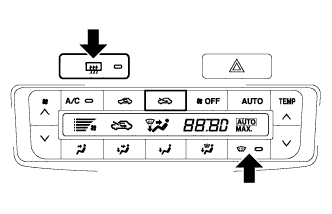
During sensor check, press the front DEF switch and rear DEF switch at the same time.
-
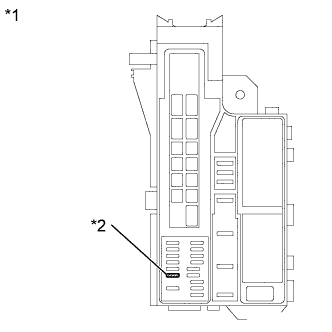
Text in Illustration *1 Engine Room Relay Block and Junction Block Assembly *2 ECU-B NO.2 Fuse Remove the ECU-B NO.2 fuse from the engine room relay block and junction block assembly for 20 seconds or more.
-
-