ANTI-LOCK BRAKE SYSTEM, Diagnostic DTC:C1243/43, C1244/44, C1245/45, C1279/79

| DTC Code | DTC Name |
|---|---|
| C1243/43 | Acceleration Sensor Stuck Malfunction |
| C1244/44 | Open or Short in Deceleration Sensor Circuit |
| C1245/45 | Acceleration Sensor Output Malfunction |
| C1279/79 | Acceleration Sensor Output Voltage Malfunction (Test Mode DTC) |
DESCRIPTION
This sensor detects vehicle deceleration. The sensor signal is used in ABS control. If the sensor functions abnormally, the ABS warning light turns ON.
DTC C1279/79 can be deleted when the deceleration sensor sends a deceleration sensor signal or the test mode ends. DTC C1279/79 is output only in the test mode.
| DTC No. | DTC Detection Condition | Trouble Area |
|---|---|---|
| C1243/43 | Following condition repeats 16 times: GL1 does not change when vehicle decelerates from 30 km/h (19 mph) to 0 km/h (0 mph) |
|
| C1244/44 | When one of following (1 to 3) is detected: 1. Deceleration G calculated by ECU based on GL1 signal is not within -1.5 and 1.5 G for 1.2 sec. 2. When sensor operating voltage is not within 4.75 to 5.25 V 3. Deceleration sensor malfunction signal occurs more than 7 times |
|
| C1245/45 | Difference between value calculated from deceleration sensor value and vehicle speed exceeds 0.35 G for at least 60 seconds |
|
| C1279/79 | Detected only during test mode |
|
WIRING DIAGRAM
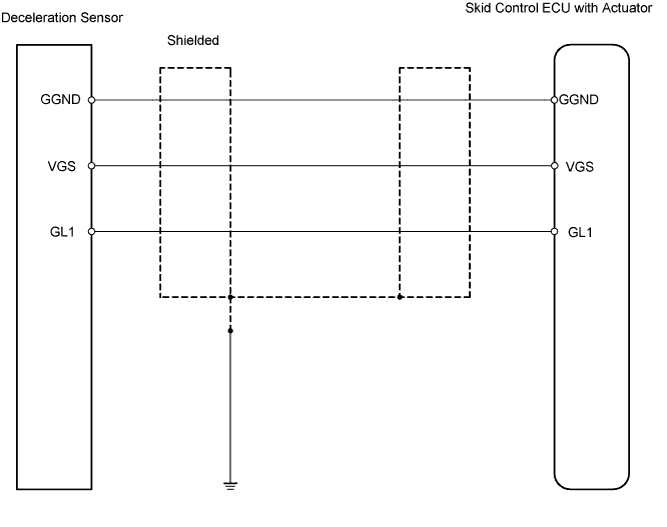
INSPECTION PROCEDURE
PROCEDURE
-
CHOOSE DIAGNOSIS METHOD
-
Choose the diagnosis method.
Method Method Proceed to Using intelligent tester A Not using intelligent tester B
B 
INSPECT DECELERATION SENSOR Click here
A 
-
-
READ VALUE USING INTELLIGENT TESTER (DECELERATION SENSOR 1)
-
Check the Data List for proper functioning of the deceleration sensor.
Skid control ECU Item Measurement Item / Range (Display) Normal Condition Diagnostic Note Deceleration Sensor 1 Deceleration sensor 1
reading / min.: -1.869 G, max.: 1.869 G
Approx. 0 +-0.13 G when vehicle is not moving Reading changes when vehicle is shaken OK Deceleration value changes.
OK 
REPLACE BRAKE ACTUATOR ASSEMBLY
NG
-
-
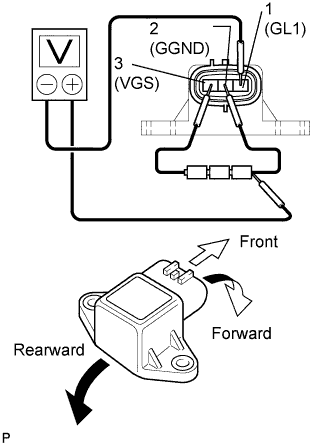
INSPECT DECELERATION SENSOR
-
Remove the console box and deceleration sensor.
-
Connect 3 dry cell batteries of 1.5 V in series.
Tech Tips
Do not apply 6 V or more to terminals 3 (VGS) and 2 (GGND).
-
Check the output voltage of terminal 1 (GL1) when the sensor is tilted forward and rearward.
Standard voltage Tester Connection Sensor Position Specified Condition 1 (GL1) - Battery's negative (-) lead Horizontal Approx. 2.25 V 1 (GL1) - Battery's negative (-) lead Tilted forward Approx. 0.45 to 2.25 V 1 (GL1) - Battery's negative (-) lead Tilted rearward Approx. 2.25 to 4.05 V Tech Tips
-
If the sensor is tilted too much, it may output the wrong value.
-
If the voltage drops, the sensor should be replaced with a new one.
-
When replacing the sensor, it should not be placed upside down.
-
NG
REPLACE DECELERATION SENSOR
OK
-
-
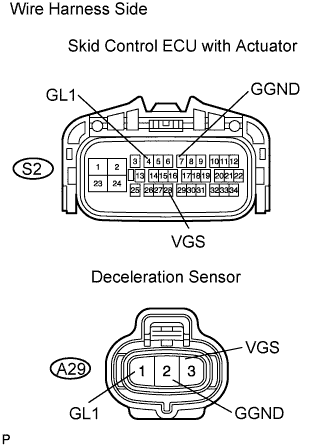
CHECK WIRE HARNESS (SKID CONTROL ECU - DECELERATION SENSOR)
-
Disconnect the S2 ECU connector.
-
Disconnect the A29 sensor connector.
-
Measure the resistance of the wire harness side connectors.
Standard resistance Tester Connection Specified Condition S2-4 (GL1) - A29-1 (GL1) Below 1 Ω S2-7 (GGND) - A29-2 (GGND) Below 1 Ω S2-28 (VGS) - A29-3 (VGS) Below 1 Ω A29-1 (GL1) - Body ground 10 kΩ or higher A29-2 (GGND) - Body ground 10 kΩ or higher A29-3 (VGS) - Body ground 10 kΩ or higher
NG
REPAIR OR REPLACE HARNESS AND CONNECTOR
OK
-
-
CHECK FOR DTC
-
Install the deceleration sensor to the vehicle.
-
Clear the DTCs.
-
Drive the vehicle at 6 km/h (4 mph) or more.
-
Check for DTCs.
Result Result Proceed to DTC is output A DTC is not output B
B
END
A 
REPLACE BRAKE ACTUATOR ASSEMBLY
-