AIR CONDITIONING UNIT INSTALLATION
PROCEDURE
-
INSTALL NO. 2 AIR DUCT
-
Engage the 3 claws and install the air duct.
-
-
INSTALL NO. 1 AIR DUCT
-
Engage the 3 claws and install the air duct.
-
-
INSTALL COOLER AIR HOSE
-
Install the cooler air hose.
-
-
INSTALL AIR CONDITIONING RADIATOR ASSEMBLY
-
Install the air conditioning radiator with the 3 screws.
-
-
INSTALL AIR CONDITIONING AMPLIFIER ASSEMBLY
-
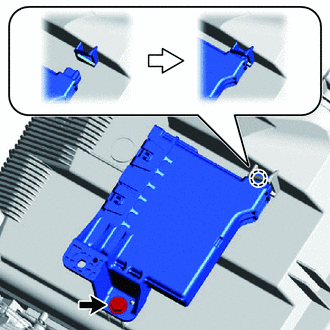
Engage the claw and install the air conditioning amplifier as shown in the illustration.
-
Tighten the screw.
-
Connect the connector.
-
-
INSTALL AIR CONDITIONING HARNESS ASSEMBLY (for LHD)
-
Connect the connectors and engage the clamps, then install the air conditioning harness.
-
-
INSTALL AIR CONDITIONING HARNESS ASSEMBLY (for RHD)
-
Connect the connectors and engage the clamps, then install the air conditioning harness.
-
-
TEMPORARILY TIGHTEN AIR CONDITIONER UNIT ASSEMBLY
-
Temporarily tighten the air conditioning unit with the 3 bolts and nut.
Note
To prevent damage to the installation bracket for the air conditioning unit, be sure to support the air conditioning unit in place.
-
-
INSTALL INSTRUMENT PANEL REINFORCEMENT
-
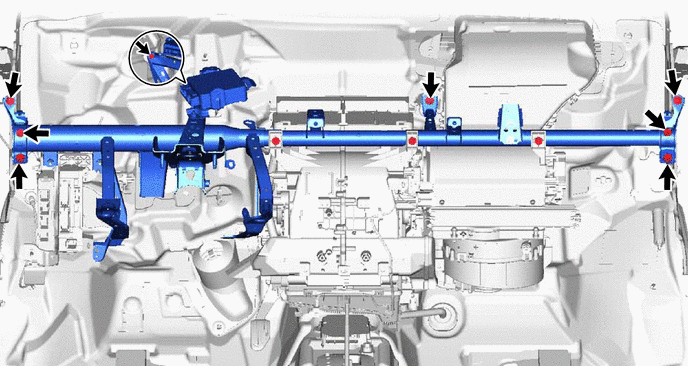
Install the instrument panel reinforcement with the 8 bolts.
-
-
INSTALL REAR NO. 1 AIR DUCT (for Cold Area Specification Vehicles)
-
Engage the 2 claws and install the rear No. 1 air duct.
-
-
INSTALL NO. 1 INSTRUMENT PANEL BRACE SUB-ASSEMBLY
-
Install the instrument panel brace with the 2 bolts, nut and screw.
-
-
INSTALL AIR CONDITIONER UNIT ASSEMBLY (for LHD)
-
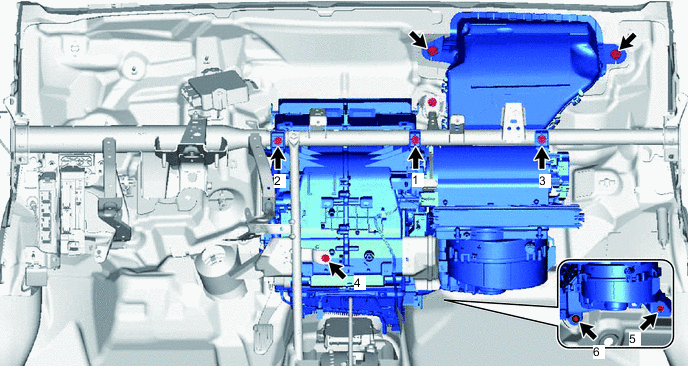
Install the air duct with the 2 bolts.
- Torque:
- 9.8 N*m { 100 kgf*cm, 87 in.*lbf }
-
Install the bolt, nut and 4 screws in the order shown in the illustration.
- Torque:
- 9.8 N*m { 100 kgf*cm, 87 in.*lbf }
- for bolt
- Torque:
- 4.0 N*m { 41 kgf*cm, 35 in.*lbf }
- for nut
- Torque:
- 4.0 N*m { 41 kgf*cm, 35 in.*lbf }
- for screw 1, 2, 3
-
-
INSTALL AIR CONDITIONER UNIT ASSEMBLY (for RHD)
-
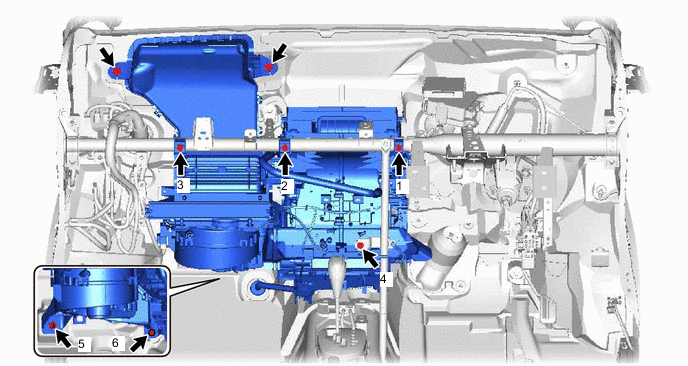
Install the air duct with the 2 bolts.
- Torque:
- 9.8 N*m { 100 kgf*cm, 87 in.*lbf }
-
Install the bolt, nut and 4 screws in the order shown in the illustration.
- Torque:
- 9.8 N*m { 100 kgf*cm, 87 in.*lbf }
- for bolt
- Torque:
- 4.0 N*m { 41 kgf*cm, 35 in.*lbf }
- for nut
- Torque:
- 4.0 N*m { 41 kgf*cm, 35 in.*lbf }
- for screw 1, 2, 3
-
-
INSTALL INSTRUMENT PANEL WIRE (for LHD)
-
Connect the connectors and engage the clamps, then install the instrument panel wire.
-
Install the ground wire with the bolts.
- Torque:
- 8.4 N*m { 86 kgf*cm, 74 in.*lbf }
-
Engage the clamp and connect the instrument panel wire.
-
Connect the 2 connectors.
-
Engage the 3 clamps and install the connector holders.
-
Install the bolt.
- Torque:
- 8.4 N*m { 86 kgf*cm, 74 in.*lbf }
-
Connect the connectors.
-
Install the connector holder with the screw.
-
Connect the 2 clamps and install the connector holders.
-
Tighten the screw.
-
Connect the connectors.
-
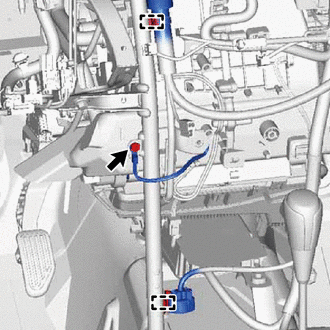
Connect the 2 clamps.
-
for Cold Area Specification Vehicles:
-
Install the ground wire with the bolt.
- Torque:
- 8.4 N*m { 86 kgf*cm, 74 in.*lbf }
-
-
-
INSTALL INSTRUMENT PANEL WIRE (for RHD)
-
Connect the connectors and engage the clamps, then install the instrument panel wire.
-
Install the ground wire with the bolts.
- Torque:
- 8.4 N*m { 86 kgf*cm, 74 in.*lbf }
-
Engage the 3 clamps and connect the instrument panel wire.
-
Connect the 2 connectors.
-
Engage the 3 clamps and install the connector holders.
-
Install the bolt.
- Torque:
- 8.4 N*m { 86 kgf*cm, 74 in.*lbf }
-
Connect the connectors.
-
Install the connector holder with the screw.
-
Connect the 2 clamps and install the connector holders.
-
Tighten the screw.
-
Connect the connectors.
-
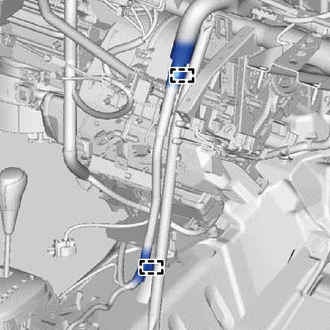
Connect the 2 clamps.
-
-
INSTALL INSTRUMENT PANEL JUNCTION BLOCK ASSEMBLY
-
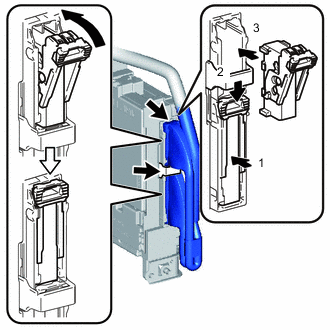
Connect the back side connectors and install the instrument panel junction block as shown in the illustration.
Note
Securely connect the connector.
-
Install the instrument panel junction block with the bolt.
- Torque:
- 8.4 N*m { 86 kgf*cm, 74 in.*lbf }
-
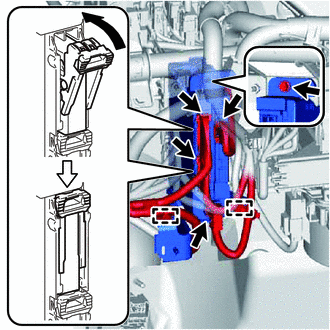
Connect the front side connectors as shown in the illustration.
Note
Securely connect the connector.
-
Engage the clamps.
-
-
INSTALL DRAIN COOLER HOSE
-
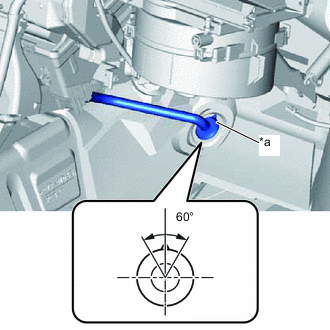
Text in Illustration *a UP Mark Install the drain cooler hose as shown in the illustration.
Note
-
Install the drain hose with its UP mark facing upward, within the 60 degree range shown in the illustration.
-
Install the drain hose without twisting it.
-
-
-
INSTALL REAR NO. 3 AIR DUCT (for Cold Area Specification Vehicles)
-
Install the 2 claws and install the air duct.
-
-
INSTALL REAR NO. 4 AIR DUCT (for Cold Area Specification Vehicles)
-
Install the 2 claws and install the air duct.
-
-
INSTALL REAR NO. 2 AIR DUCT (for Cold Area Specification Vehicles)
-
Install the 2 claws and install the air duct.
-
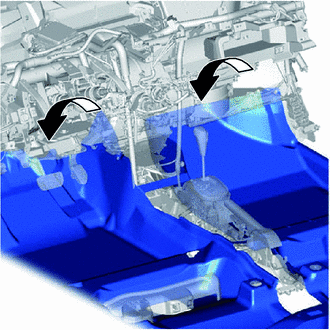
Return the floor carpet.
-
-
INSTALL DEFROSTER NOZZLE ASSEMBLY
-
Engage the 2 claws and 3 guides, then install the defroster nozzle.
-
Engage the clamps and connect the connectors, then connect the wire harness.
-
-
INSTALL NAVIGATION ANTENNA ASSEMBLY (w/ Navigation System)
-
INSTALL HEATER TO REGISTER DUCT ASSEMBLY (w/ Navigation System)
-
Engage the 3 claws and install the heater to register duct.
-
Engage the clamp and connect the wire harness.
-
-
INSTALL HEATER TO REGISTER DUCT ASSEMBLY (w/o Navigation System)
-
Engage the 3 claws and install the heater to register duct.
-
-
INSTALL STEERING COLUMN ASSEMBLY (for LHD)
-
INSTALL STEERING COLUMN ASSEMBLY (for RHD)
-
INSTALL LOWER INSTRUMENT PANEL SUB-ASSEMBLY
-
CONNECT WATER HOSE SUB-ASSEMBLY
-
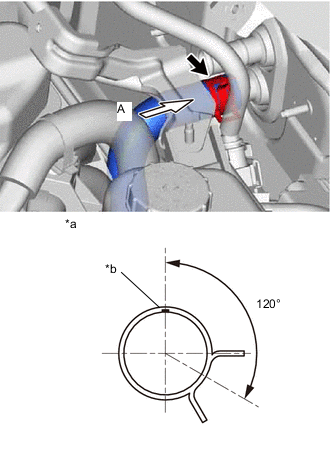
Text in Illustration *a View A *b White Paint Mark Connect the water hose onto the air conditioning unit.
Tech Tips
Perform the installation with the hose clip and mark at the correct angle.
-
-
CONNECT WATER HOSE SUB-ASSEMBLY B
-
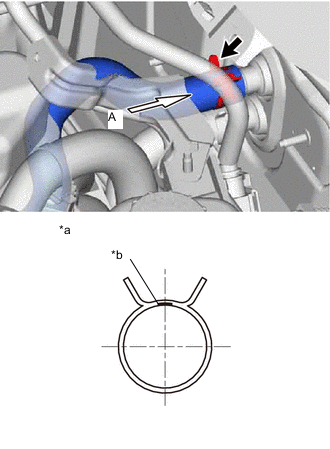
Text in Illustration *a View A *b Purple Paint Mark Connect the water hose onto the air conditioning unit.
Tech Tips
Perform the installation with the hose clip and mark at the correct angle.
-
-
CONNECT LIQUID TUBE SUB-ASSEMBLY A
-
Remove the vinyl tape from liquid tube and the connecting portion of the unit.
-
Apply sufficient compressor oil (ND-OIL11) to a new O-ring and the connecting part of the liquid tube.
Compressor oil ND-OIL11 or equivalent -
Install the O-ring onto the liquid tube.
-
Connect the liquid tube to the unit.
-
-
CONNECT SUCTION TUBE SUB-ASSEMBLY B
-
Remove the vinyl tape from suction tube and the connecting portion of the unit.
-
Apply sufficient compressor oil (ND-OIL11) to a new O-ring and the connecting part of the suction tube.
Compressor oil ND-OIL11 or equivalent -
Install the O-ring onto the suction tube.
-
Securely connect the suction tube to the air conditioning unit.
-
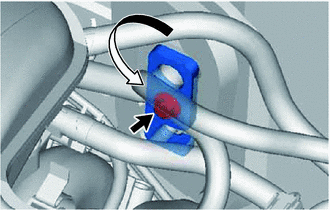
Turn the hook connector in the direction indicated by the arrow in the illustration.
-
Insert the pipe joints securely into the fitting holes and tighten the bolt.
- Torque:
- 9.8 N*m { 100 kgf*cm, 87 in.*lbf }
-
-
INSTALL OUTER COWL TOP PANEL
-
INSTALL INNER COWL TOP TO COWL BRACE
-
INSTALL FRONT AIR SHUTTER SEAL RH
-
INSTALL FRONT NO. 1 VENTILATOR SEAL
-
INSTALL WINDSHIELD WIPER MOTOR AND LINK
-
CONNECT CABLE TO AUXILIARY BATTERY NEGATIVE TERMINAL
- Torque:
- 5.4 N*m { 55 kgf*cm, 48 in.*lbf }
Note
When disconnecting the cable, some systems need to be initialized after the cable is reconnected Click here.
-
INSTALL FRONT FLOOR COVER RH (for Front Floor Cover Type A)
-
INSTALL FRONT FLOOR COVER RH (for Front Floor Cover Type B)
-
INSTALL CENTER FRONT FLOOR COVER (for Front Floor Cover Type B)
-
ADD ENGINE COOLANT
-
CHARGE AIR CONDITIONING SYSTEM WITH REFRIGERANT
-
INSPECT FOR COOLANT LEAK
-
WARM UP COMPRESSOR
-
INSPECT FOR REFRIGERANT LEAK