CENTER AIRBAG SENSOR ASSEMBLY INSTALLATION
CAUTION / NOTICE / HINT
CAUTION:
Some of these service operations affect the SRS airbag system. Read the precautionary notices concerning the SRS airbag system before servicing Click here.
PROCEDURE
-
INSTALL AIRBAG SENSOR ASSEMBLY
-
Check that the ignition switch is off.
-
Check that the cable is disconnected from the negative (-) auxiliary battery terminal.
CAUTION:
-
Check that the negative auxiliary battery terminal is disconnected before performing the operation. Even an impact to only the airbag sensor assembly will cause the airbag to deploy.
-
Wait at least 90 seconds after disconnecting the cable from the negative (-) auxiliary battery terminal to disable the SRS system.
-
-
Install the airbag sensor assembly with the 3 bolts.
- Torque:
- 17.5 N*m { 178 kgf*cm, 13 ft.*lbf }
Note
-
Do not use an airbag sensor assembly that has been dropped.
-
Do not subject the airbag sensor assembly to any impact or force.
-
Check that the carpet does not interfere with the installation plane.
-
Check that there is no looseness by shaking the airbag sensor assembly.
-
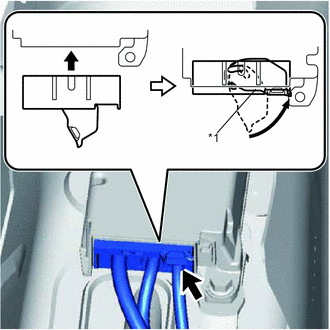
Text in Illustration *1 Lever Connect the connector holder to lock the lever.
Note
Check that the lever is locked.
-
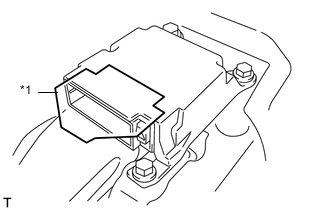
Text in Illustration *1 Drip-proof Sheet Check that the drip-proof sheet has not been removed and does not cut into the connectors.
-
-
INSTALL REAR CONSOLE BOX
-
CONNECT CABLE TO NEGATIVE AUXILIARY BATTERY TERMINAL
- Torque:
- 5.4 N*m { 55 kgf*cm, 48 in.*lbf }
Note
When disconnecting the cable, some systems need to be initialized after the cable is reconnected Click here.
-
INSTALL FRONT FLOOR COVER RH (for Front Floor Cover Type A)
-
INSTALL FRONT FLOOR COVER RH (for Front Floor Cover Type B)
-
INSTALL CENTER FRONT FLOOR COVER (for Front Floor Cover Type B)
-
PERFORM YAW RATE SENSOR ZERO POINT CALIBRATION
-
INSPECT SRS WARNING LIGHT