LIGHTING SYSTEM Power Switch Illumination Circuit
DESCRIPTION
The illuminated entry system controls the power switch illumination.
WIRING DIAGRAM
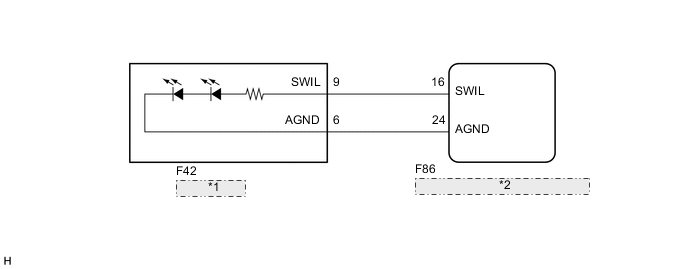
| *1 | Power Switch |
| *2 | Certification ECU (Smart Key ECU Assembly) |
CAUTION / NOTICE / HINT
Note
Before replacing the certification ECU (smart key ECU assembly), refer to the entry and start system (for Entry Function) Click here.
PROCEDURE
-
PERFORM ACTIVE TEST USING GTS
-
Connect the GTS to the DLC3.
-
Turn the ignition switch to ON (IG).
-
Turn the GTS on.
-
Enter the following menus: Body Electrical / Entry & Start / Active Test.
-
According to the display on the GTS, perform the Active Test.
Entry & Start Tester Display Test Part Control Range Diagnostic Note Power/Engine SW Light Power switch light OFF or ON When performing this Active Test, make sure the following condition is met:
The power switch illumination is off (15 seconds or more have elapsed since it turned from on to off) and the power switch is on (ACC) or on (IG), or the hybrid control system is running.
OK Power switch illumination comes on.
OK 
PROCEED TO NEXT SUSPECTED AREA SHOWN IN PROBLEM SYMPTOMS TABLE Click here
NG 
-
-
INSPECT POWER SWITCH
-
Inspect the power switch Click here.
NG
REPLACE POWER SWITCH Click here
OK
-
-
CHECK HARNESS AND CONNECTOR (POWER SWITCH - CERTIFICATION ECU (SMART KEY ECU ASSEMBLY))
-
Disconnect the F42 power switch connector.
-
Disconnect the F86 certification ECU (smart key ECU assembly) connectors.
-
Measure the resistance according to the value(s) in the table below.
Standard Resistance Tester Connection Condition Specified Condition F42-9 (SWIL) - F86-16 (SWIL) Always Below 1 Ω F42-6 (AGND) - F86-24 (AGND) Always Below 1 Ω F42-9 (SWIL) - Body ground Always 10 kΩ or higher F42-6 (AGND) - Body ground Always 10 kΩ or higher
OK
REPLACE CERTIFICATION ECU (SMART KEY ECU ASSEMBLY)
NG
REPAIR OR REPLACE HARNESS OR CONNECTOR
-