CAN COMMUNICATION SYSTEM(w/o Toyota Safety Sense) DIAGNOSIS SYSTEM
-
ECUS OR SENSORS WHICH COMMUNICATE THROUGH CAN COMMUNICATION SYSTEM
-
V Bus
-
ECM
-
Brake booster with master cylinder assembly (Skid control ECU)
-
Main body ECU (Multiplex network body ECU)
-
Air conditioning amplifier assembly
-
Power steering ECU assembly
-
Smart key ECU assembly (Certification ECU)*1
-
Airbag sensor assembly
-
Spiral cable with sensor sub-assembly (Steering sensor)
-
Hybrid vehicle control ECU
-
Combination meter assembly
-
Radio and display receiver assembly*2
-
*1: w/ Power Switch
-
*2: w/ Display
-
-
-
Sub Bus 15
-
ECM
-
Brake booster with master cylinder assembly (Skid control ECU)
-
Hybrid vehicle control ECU
-
-
-
CHECK FOR INSTALLED SYSTEMS (ECUS AND SENSORS) THAT ADOPT CAN COMMUNICATION
-
The systems (ECUs and sensors) that adopt CAN communication vary depending on the vehicle and optional equipment. Check which systems (ECUs and sensors) are installed on the vehicle.
Tech Tips
The names of ECUs and sensors shown on the GTS display may differ from those shown in the DTC Table by ECU section that follows.
ECU / Sensor Name GTS Display Applicability ECM ECM (Engine) Installed on all vehicles Main body ECU (Multiplex network body ECU) Main Body Installed on all vehicles Brake booster with master cylinder assembly
(Skid control ECU)
Skid Control (ABS/VSC/TRC) Installed on all vehicles Power steering ECU assembly Power Steering (EPS) Installed on all vehicles Air conditioning amplifier assembly Air Conditioning Amplifier Installed on all vehicles Airbag sensor assembly Airbag Installed on all vehicles Smart key ECU assembly
(Certification ECU)
Certification (Smart) Vehicle with power switch Hybrid vehicle control ECU Hybrid Vehicle Control Installed on all vehicles Spiral cable with sensor sub-assembly (Steering sensor) Spiral Cable (Steering Angle Sensor) Installed on all vehicles Combination meter assembly Combination Meter Installed on all vehicles Radio and display receiver assembly Display and Navigation (AVN1) Vehicle with display
-
-
CAN BUS CHECK
Tech Tips
The ECUs and sensors that are properly connected to the CAN communication system can be displayed using the GTS.
-
Using the GTS, select "CAN Bus Check" from "System Select".
Note
-
It may be possible to select buses that do not have ECUs or sensors from the bus selection pull-down menu. This is not a malfunction. (This occurs when optional devices are not on a sub bus that is monitored by a gateway function equipped ECU.)
-
In the bus selection pull down menu, all buses applicable to the model are displayed (e.g. LIN communication buses are also displayed). Therefore, refer to the wiring diagrams to check the names of sub buses for CAN communication Click here.
Tech Tips
Different connection statuses are indicated by the background color of ECUs and sensors that are displayed.
Explanation of CAN Bus Check (Communication Bus Check) screen Bus Type Background Color Connection Status V Bus White Communication has been normal since the start of the CAN bus check. Yellow Communication stop occurred at least once since the start of the CAN bus check, but communication is currently occurring (unstable communication). Red Communication was established at least once since the start of the CAN bus check, but communication is currently not occurring (unstable communication). Not displayed Communication stop has continued since the start of the CAN bus check.*1 Sub bus
(gateway function equipped ECU that does not have history of connected ECUs)*2
White Communication has been normal since the start of the CAN bus check. Yellow Communication stop occurred at least once since the start of the CAN bus check, but communication is currently occurring (unstable communication). Red Communication was established at least once since the start of the CAN bus check, but communication is currently not occurring (unstable communication). Not displayed Communication stop has continued since the start of the CAN bus check.*1 Sub bus
(gateway function equipped ECU that has history of connected ECUs)*3
White Communication has been normal since the start of the CAN bus check. Yellow Communication stop occurred at least once since the start of the CAN bus check, but communication is currently occurring (unstable communication). Red Currently not communicating (either of the following):
-
Communication stop has continued since the start of the CAN bus check
-
Communication was established at least once since the start of the CAN bus check, but communication is currently not occurring
Not displayed Either of the following:
-
If a gateway function equipped ECU cannot communicate, the sub bus and ECUs connected to the sub bus will not be displayed.
-
If no ECUs are connected to the sub bus, "There is no system found on the Communication Bus" will be displayed.
Tech Tips
-
Gateway function equipped ECUs relay signals between the ECUs connected to the different buses.
-
*1: ECUs that are present in the vehicle but are not displayed on the CAN Bus Check.
-
*2: Gateway function equipped ECU that does not memorize the sub bus ECUs that are connected to it.
-
*3: Gateway function equipped ECU that memorizes the sub bus ECUs that are connected to it.
-
If none of the connected ECUs are displayed, or there is no response from the vehicle to the GTS, check the DLC3 branch and the V bus main bus lines for a malfunction.
-
-
Observe the connection response screen for approximately 2 minutes to check for a change in connection status of the connected ECUs and sensors.
Tech Tips
-
If an open occurs in one of the lines of a CAN branch (except DLC3), output from the other branch line (the line that is not open) will be unstable and it may interfere the response (display) of other ECUs and sensors.
-
If the connection status changes during the inspection, repair the open in the branch line of the ECU or sensor that does not respond (is not detected) and then perform the CAN bus check again.
-
-
-
HOW TO INTERPRET CAN BUS CHECK (COMMUNICATION BUS CHECK) SCREEN
-
When a communication stop is currently occurring, the probable malfunctioning part can be determined from the CAN bus check and by using the following methods.
Note
The following CAN bus wiring diagram is provided only as an example. This wiring diagram is different from the actual wiring diagram for this vehicle.
Tech Tips
-
When a communication stop is currently occurring, it is easier to determine the probable malfunctioning part from the CAN bus check rather than from communication DTCs.
-
Wait for approximately 2 minutes after turning the ignition switch to ON (IG) (or simulate the driving conditions that enable the malfunction to be reproduced) and select the CAN bus check. Then observe the communication status of each ECU on the screen.
-
-
If a communication error of only 1 ECU or sensor is indicated on the CAN Bus Check screen, a communication stop of the ECU or sensor is suspected.
Example: Open in both CAN branch lines of ECU B on the V bus
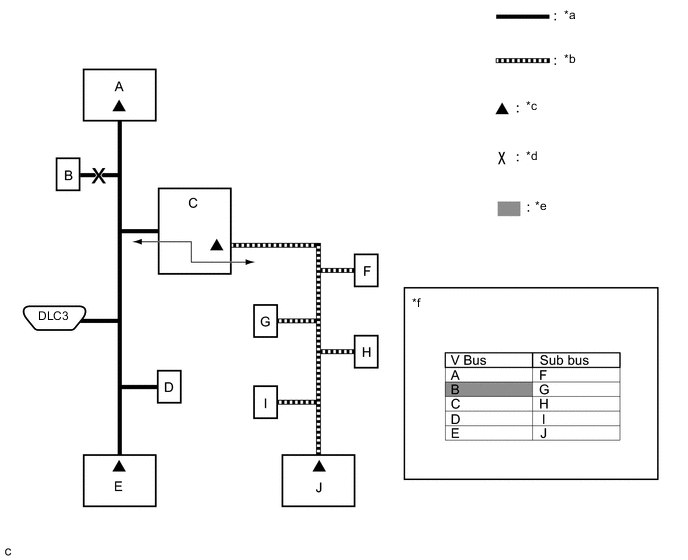
Text in Illustration *a V Bus *b Sub Bus *c Terminating Resistor *d Location of malfunction *e Not displayed or background color changes to red or yellow *f Communication Bus Check screen Tech Tips
When there are communication stops, ECUs are present in the vehicle even though they are not displayed on the Communication Bus Check screen.
-
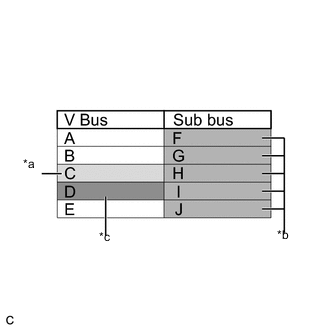
Text in Illustration *a Background color periodically changes to yellow or red *b Not displayed or background color is yellow or red *c Not displayed If communication errors for multiple ECUs or sensors are indicated on the Communication Bus Check screen, then a communication stop of the ECU or sensor that shows a more serious communication stop (an ECU or a sensor which is not displayed) is suspected.
Example: Open in a CAN branch line for ECU D on the V bus
Explanation of Bus Check (Communication Bus Check) screen Bus Type Background Color Connection Status V Bus White Communication has been normal since the start of the communication bus check. Yellow Communication stop occurred at least once since the start of the communication bus check, but communication is currently occurring (unstable communication). Red Communication was established at least once since the start of the communication bus check, but communication is currently not occurring (unstable communication). Not displayed Communication stop has continued since the start of the communication bus check.*1 Sub bus
(gateway function equipped ECU that does not have history of connected ECUs)*2
White Communication has been normal since the start of the communication bus check. Yellow Communication stop occurred at least once since the start of the communication bus check, but communication is currently occurring (unstable communication). Red Communication was established at least once since the start of the communication bus check, but communication is currently not occurring (unstable communication). Not displayed Communication stop has continued since the start of the communication bus check.*1 Sub bus
(gateway function equipped ECU that has history of connected ECUs)*3
White Communication has been normal since the start of the communication bus check. Yellow Communication stop occurred at least once since the start of the communication bus check, but communication is currently occurring (unstable communication). Red Currently not communicating (either of the following):
-
Communication stop has continued since the start of the communication bus check
-
Communication was established at least once since the start of the communication bus check, but communication is currently not occurring
Not displayed Either of the following:
-
If a gateway function equipped ECU cannot communicate, the sub bus and ECUs connected to the sub bus will not be displayed.
-
If no ECUs are connected to the sub bus, "There is no system found on the Communication Bus" will be displayed.
Tech Tips
-
Gateway function equipped ECUs relay signals between the ECUs connected to the different buses.
-
*1: ECUs that are present in the vehicle but are not displayed on the Communication Bus Check screen.
-
*2: Gateway function equipped ECU that does not memorize the sub bus ECUs that are connected to it.
-
*3: Gateway function equipped ECU that memorizes the sub bus ECUs that are connected to it.
-
The example of the Communication Bus Check screen in the illustration shows the result of electrical noise on the CAN bus which is caused by an open in a CAN branch line of ECU D (output from the other branch line is unstable) and the communication of ECU C is also unstable. In addition, in this example, ECU C is equipped with a gateway function. Therefore, communication is also unstable between the sub bus ECUs of ECU C and the V bus.
-
The example in the illustration shows that ECU D is not displayed on the Communication Bus Check screen. This indicates a more significant communication stop. In this case, a communication stop of ECU D is suspected.
-
-
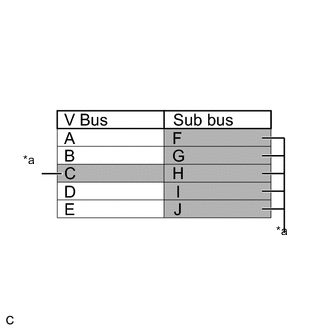
Text in Illustration *a Not displayed or background color changes to red If a communication error is indicated on both the V bus and sub bus on the Communication Bus Check screen, suspect any communication stop displayed for the V bus first.
Example: Open in both CAN branch lines of ECU C on the V bus
Tech Tips
-
In the communication bus check, it is possible to confirm the communication status of ECUs connected to the V bus after connecting the GTS to the DLC3. As for sub buses, it is possible to confirm which sub bus connected ECUs can communicate with a gateway function equipped ECU on the V bus.
-
If a gateway function equipped ECU has a communication error, ECUs connected to the gateway function equipped ECU are also affected, and communication stops will be indicated.
-
The Communication Bus Check screen in the illustration shows that ECU C has a gateway function and a communication stop in ECU C is suspected.
-
-
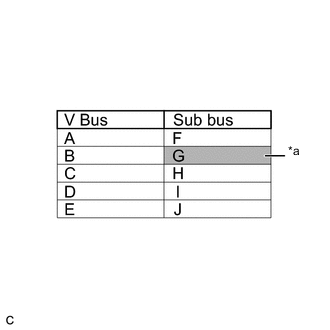
Text in Illustration *a Background color changes to red If the Communication Bus Check screen indicates a communication stop only in the sub bus, a communication stop in the sub bus is suspected.
Example: Open in both CAN branch lines of ECU G on the sub bus
Tech Tips
-
A communication error in a sub bus does not affect the V bus or other buses.
-
When a gateway function equipped ECU has memorized the ECUs that are connected to the sub bus, if any of the ECUs connected to the gateway function equipped ECU has a communication error, the background color changes to yellow or red. (The displayed name will not disappear.)
-
-
If both of the V bus main bus lines are open, ECUs or sensors that are located farther away from the DLC3 than the open part will be displayed as a communication stop on the Communication Bus Check screen.
(In this case, ECU A and B are not displayed or their background color changes to red.)
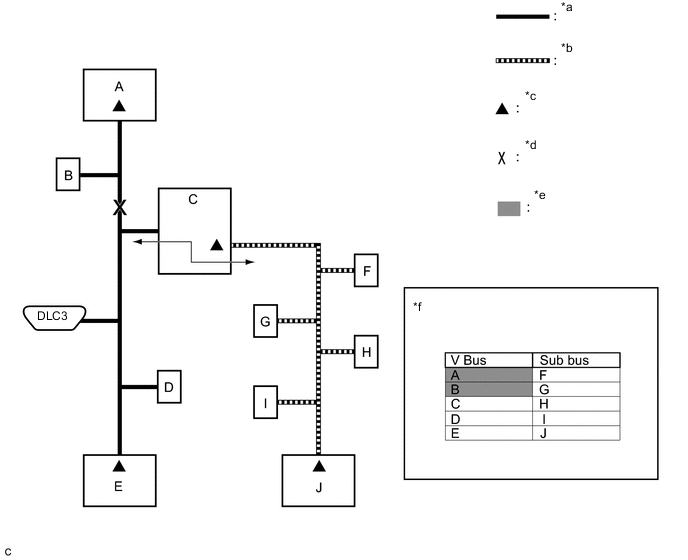
Text in Illustration *a V Bus *b Sub Bus *c Terminating Resistor *d Location of malfunction *e Not displayed or background color is red *f Communication Bus Check screen Tech Tips
If a communication error occurs in an ECU, it is not displayed on the Communication Bus Check screen even though the ECU is present.
-
If both of the sub bus main bus lines are open, ECUs that are located farther away from the gateway function equipped ECU than the open part will be displayed as a communication stop on the Communication Bus Check screen.
(In this case, ECU I and J are not displayed or their background color changes to red.)
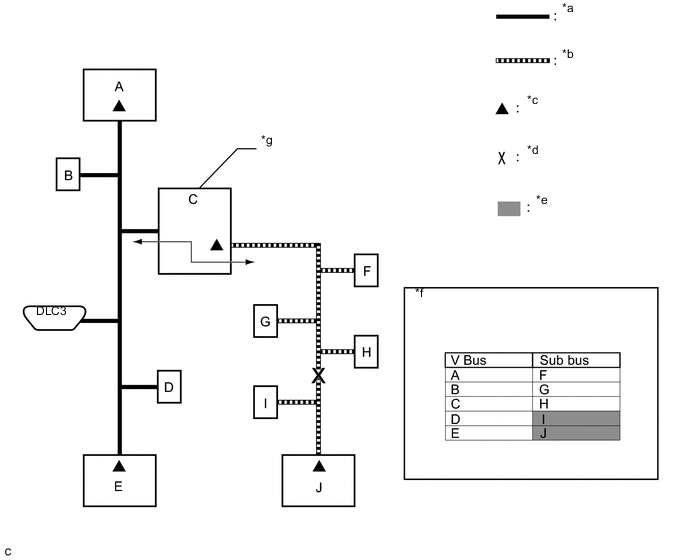
Text in Illustration *a V Bus *b Sub Bus *c Terminating Resistor *d Location of malfunction *e Not displayed or background color is red *f Communication Bus Check screen *g Gateway function equipped ECU - - -
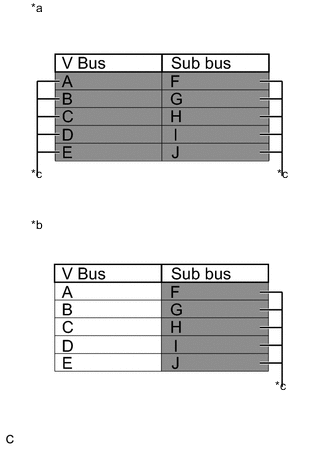
Text in Illustration *a When any of the following malfunctions occur on the V bus *b When any of the following malfunctions occur on a sub bus *c Not displayed When any of the following malfunctions occur, CAN communication cannot be established and almost all ECUs and sensors on the bus show a communication error on the Communication Bus Check screen.
Details of Malfunction Short between CAN lines (CANH and CANL) Short between a CAN line (CANH or CANL) and +B Short between a CAN line (CANH or CANL) and ground Open in a CAN main bus line Tech Tips
-
When a malfunction occurs on the V bus, almost all ECUs and sensors on the V bus and sub bus indicate a communication error (almost all ECUs are not displayed). As communication with the gateway function equipped ECU that is connected to the V bus stops, communication from the ECUs connected to the sub bus that is monitored by the gateway function equipped ECU also stops (these ECUs are not displayed).
-
When a malfunction occurs in a sub bus, almost all ECUs connected to the sub bus indicate a communication error.
-
A communication error in a sub bus does not affect the V bus or other buses.
-
The malfunctioning part can be determined by checking for a short circuit between CAN bus lines or between a CAN bus line and ground or +B short using an electrical tester.
-
-
-
HOW TO INTERPRET COMMUNICATION DTCS (DTCS THAT START WITH U)
-
If a CAN communication error cannot be reproduced, determine the suspected malfunctioning part using the DTCs stored in ECUs that are connected to the CAN buses by following the procedure below.
Tech Tips
Communication DTCs (DTCs that start with U) indicate a communication error between the ECU that stores the DTC and the ECU that is indicated by the DTC.
-
If multiple ECUs store a communication DTC for a particular ECU, a communication stop of the ECU is suspected.
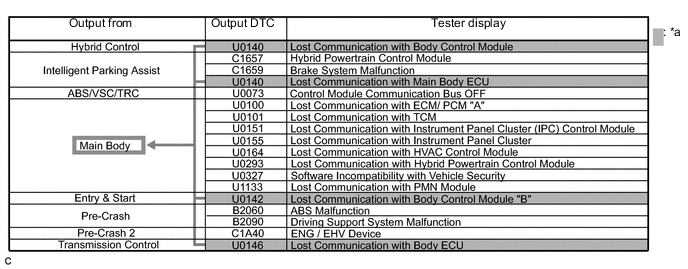
Text in Illustration *a Items to be checked - - Note
-
This DTC table is from another model, and is only used here to show an example of DTCs that are output when there is an open in a CAN branch line for the main body ECU. This table does not show DTCs applicable to this vehicle.
-
Even though a DTC title may indicate a communication error with a specific ECU, the ECU name used in the DTC name on the GTS may differ depending on the ECU that stores the DTC. (Regarding output DTCs, refer to step 6 and the DTC chart for each ECU.)
Tech Tips
As multiple ECUs indicate a communication stop with the main body ECU, the possibility of a communication stop of the main body ECU is high.
-
-
If almost all of the communication DTCs of an ECU are stored, a communication stop of the ECU is suspected.
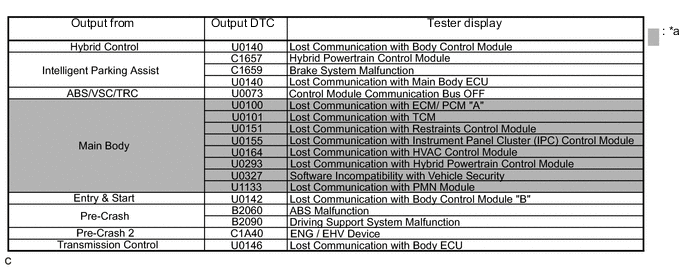
Text in Illustration *a Items to be checked - - Note
This DTC table is from another model, and is only used here to show an example of DTCs that are output when there is an open in a CAN branch line for the main body ECU. This table does not show DTCs applicable to this vehicle.
Tech Tips
-
If almost all of the DTCs of the main body ECU are stored, the possibility of a communication stop of the main body ECU is high.
-
When a CAN communication error occurs, many DTCs are output. DTCs other than communication error DTCs (such as DTCs that start with C or B) and communication DTCs for the ABS system are important DTCs, however it may be easier to determine the malfunctioning part by examining the overall situation without considering these DTCs.
-
-
-
To help determine the part of the sub bus that has a communication error, prioritize the communication stop DTCs stored in the gateway function equipped ECU.
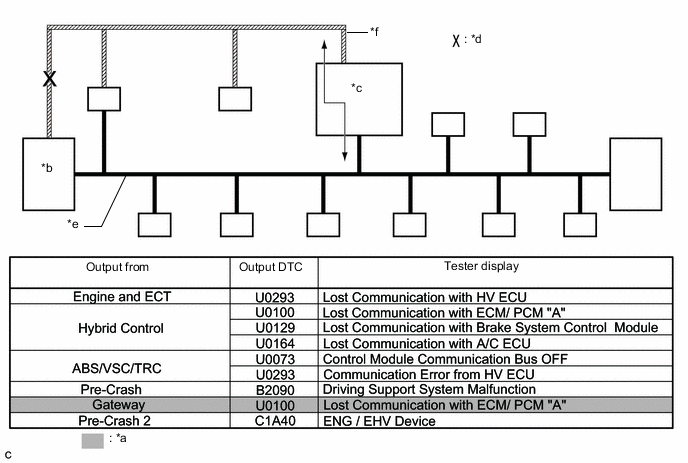
Text in Illustration *a Items to be checked *b ECM *c Gateway function equipped ECU *d Location of malfunction *e V Bus *f Sub bus Note
This DTC table is from another model, and is only used here to show the ECUs connected to both a V bus and a sub bus. It shows DTCs output when there is an open in the main bus lines for the ECM on the sub bus. This table does not show DTCs applicable to this vehicle.
Tech Tips
-
As gateway function equipped ECUs (sub bus monitor ECU) monitor signals from all ECUs that are connected to sub buses, gateway function equipped ECUs can detect ECUs with a communication stop more accurately.
-
When there is a communication stop for the gateway function equipped ECU (gateway), communication with ECUs connected to other buses such as the V bus stops. Therefore, communication DTCs for ECUs connected to other buses are also stored.
-
-
When any of the following malfunctions occurs, many DTCs are likely to be output from many ECUs. Because of this, it may be difficult to determine the probable malfunctioning part.
-
Short between CAN lines (CANH and CANL)
-
Short between a CAN line (CANH or CANL) and ground
-
Short between a CAN line (CANH or CANL) and +B
-
Open in a CAN branch line (CANH or CANL) of an ECU or sensor
-
Open in a CAN main bus line (CANH or CANL) between 2 ECUs that have a terminating resistor
-
-
-
DTC TABLE BY ECU
Note
If system function temporarily returns to normal, DTCs may not be output again even though the following DTC check procedures are used.
Tech Tips
-
In the CAN communication system, the CAN communication DTCs of each ECU can be displayed using the GTS.
-
If CAN communication system DTCs are output, trouble cannot be determined only by the DTCs. Perform troubleshooting according to How to Proceed with Troubleshooting Click here.
-
Hybrid Vehicle Control ECU / GTS Display "Hybrid Control"
Tech Tips
This ECU uses the CAN communication system for DTC communication.
Hybrid Vehicle Control ECU / GTS Display "Hybrid Control" DTC Detection Item DTC Detection Condition DTC Detection Pre-condition DTC Check Procedure Warning Indication in Meter DTC Storage Method U0100 Lost Communication with ECM / PCM "A" The hybrid vehicle control ECU does not receive data from the ECM for 0.58 seconds or more. Both conditions are met:
-
The ignition switch is ON (IG) for 1 second or more.
-
The power source voltage of the hybrid vehicle control ECU is 9.5 V or more.
Turn the ignition switch to ON (IG) and wait at least 1.58 seconds.
-
Hybrid system warning light turns on.
-
MIL illuminates.
-
Displays messages on the multi-information display.
DTC is stored until it is cleared using the GTS. U0110*1 Lost Communication with Drive Motor Control Module "A" Either condition is met:
-
The hybrid vehicle control ECU does not receive data from the inverter with converter assembly for 0.12 seconds or more.
-
The hybrid vehicle control ECU does not send data to the inverter with converter assembly for 0.04 seconds or more.
Both conditions are met:
-
The ignition switch is ON (IG) for 0.1 seconds or more.
-
The power source voltage of the hybrid vehicle control ECU is 9.5 V or more.
Turn the ignition switch to ON (IG) and wait at least 0.22 seconds.
-
Hybrid system warning light turns on.
-
Displays messages on the multi-information display.
DTC is stored until it is cleared using the GTS. U0129 Lost Communication with Brake System Control Module The hybrid vehicle control ECU does not receive data from the brake booster with master cylinder assembly (skid control ECU) for 2.34 seconds or more. Both conditions are met:
-
The ignition switch is ON (IG) for 2.1 seconds or more.
-
The power source voltage of the hybrid vehicle control ECU is 9.5 V or more.
Turn the ignition switch to ON (IG) and wait at least 4.44 seconds.
-
Hybrid system warning light turns on.
-
Brake warning light / yellow (minor malfunction) illuminates.
-
Displays messages on the multi-information display.
DTC is stored until it is cleared using the GTS. U0140*3 Communication Error from Body ECU to HV ECU The hybrid vehicle control ECU does not receive data from the main body ECU (multiplex network body ECU) for 3.6 seconds or more. Both conditions are met:
-
The ignition switch is ON (IG) for 1 second or more.
-
The power source voltage of the hybrid vehicle control ECU is 9.5 V or more.
Turn the ignition switch to ON (IG) and wait at least 4.6 seconds.
-
Hybrid system warning light turns on.
-
Displays messages on the multi-information display.
DTC is stored until it is cleared using the GTS. U0151 Communication Error from Airbag ECU to HV ECU The hybrid vehicle control ECU does not receive data from the airbag sensor assembly for 10.6 seconds or more. Both conditions are met:
-
The ignition switch is ON (IG) for 1 second or more.
-
The power source voltage of the hybrid vehicle control ECU is 9.5 V or more.
Turn the ignition switch to ON (IG) and wait at least 11.6 seconds.
-
Hybrid system warning light turns on.
-
Displays messages on the multi-information display.
DTC is stored until it is cleared using the GTS. U0164 Communication Error from A/C ECU to HV ECU The hybrid vehicle control ECU does not receive data from the air conditioning amplifier assembly for 10.6 seconds or more. Both conditions are met:
-
The ignition switch is ON (IG) for 1 second or more.
-
The power source voltage of the hybrid vehicle control ECU is 9.5 V or more.
Turn the ignition switch to ON (IG) and wait at least 11.6 seconds. - DTC is stored until it is cleared using the GTS. U029A*2 Lost Communication with Hybrid Battery Pack Sensor Module The hybrid vehicle control ECU does not receive data from the battery smart unit for 0.52 seconds or more. The ignition switch is ON (IG) for 0.5 seconds or more. Turn the ignition switch to ON (IG) and wait at least 1.02 seconds.
-
Hybrid system warning light turns on.
-
MIL illuminates.
-
Displays messages on the multi-information display.
DTC is stored until it is cleared using the GTS. U0424*1 Invalid Data Received from HVAC Control Module The hybrid vehicle control ECU receives an abnormal operation value command from the air conditioning amplifier assembly for 3 seconds or more. Both conditions are met:
-
The ignition switch is ON (IG) for 0.5 seconds or more.
-
The power source voltage of the hybrid vehicle control ECU is 9.5 V or more.
Turn the ignition switch to ON (IG) and wait at least 3.5 seconds. - DTC is stored until it is cleared using the GTS. U1107*4 Lost Communication with Power Management Module The hybrid vehicle control ECU does not receive data from the smart key ECU assembly (certification ECU) for 3.6 seconds or more. Both conditions are met:
-
The ignition switch is ON (IG) for 1 second or more.
-
The power source voltage of the hybrid vehicle control ECU is 9.5 V or more.
Turn the ignition switch to ON (IG) and wait at least 4.6 seconds.
-
Hybrid system warning light turns on.
-
Displays messages on the multi-information display.
DTC is stored until it is cleared using the GTS.
-
*1: Refer to Hybrid Control System Click here.
-
*2: Refer to Hybrid Battery System Click here.
-
*3: w/o Power Switch
-
*4: w/ Power Switch
-
-
Hybrid Vehicle Control ECU / GTS Display "Cruise Control"
Tech Tips
This ECU uses the CAN communication system for DTC communication.
Hybrid Vehicle Control ECU / GTS Display "Cruise Control" DTC Detection Item DTC Detection Condition DTC Detection Pre-condition DTC Check Procedure Warning Indication in Meter DTC Storage Method U0122 Lost Communication with Vehicle Dynamics Control Module While the cruise control system is on (the system has been switched on using the ON/OFF button on the cruise control switch), the hybrid vehicle control ECU does not receive data from the brake booster with master cylinder assembly (skid control ECU) for 2.62 seconds or more. Both conditions are met:
-
The ignition switch is ON (IG) for 2.1 seconds or more.
-
The power source voltage of the hybrid vehicle control ECU is 9.5 V or more.
After turning the ignition switch to ON (IG), turn the cruise control main switch on and wait at least 4.72 seconds.
-
Hybrid system warning light turns on.
-
Displays messages on the multi-information display.
DTC is stored until it is cleared using the GTS. -
-
ECM / GTS Display "Engine and ECT"
Tech Tips
This ECU uses the CAN communication system for DTC communication.
ECM / GTS Display "Engine and ECT" DTC Detection Item DTC Detection Condition DTC Detection Pre-condition DTC Check Procedure Warning Indication in Meter DTC Storage Method U0293 Lost Communication with HV ECU The ECM does not receive data from the hybrid vehicle control ECU for 0.576 seconds or more. Both conditions are met:
-
The ignition switch is turned to ON (IG) for 1 second or more.
-
The power source voltage of the ECM is 10.5 V or more.
Turn the ignition switch to ON (IG) and wait 1.576 seconds or more. MIL illuminates. DTC is stored until it is cleared using the GTS. -
-
Power Steering ECU Assembly / GTS Display "EMPS"
Tech Tips
This ECU uses the CAN communication system for DTC communication.
Power Steering ECU Assembly / GTS Display "EMPS" DTC Detection Item DTC Detection Condition DTC Detection Pre-condition DTC Check Procedure Warning Indication in Meter DTC Storage Method U0129 Lost Communication with Brake System Control Module The power steering ECU assembly cannot receive data from the brake booster with master cylinder assembly (skid control ECU) for 2.34 seconds or more. Both conditions are met:
-
The ignition switch is turned to ON (IG) for 3 seconds or more.
-
The power source voltage of the power steering ECU assembly is 9 V or more.
Turn the ignition switch to ON (IG) and wait 5.34 seconds or more. EPS warning light illuminates. DTC remains stored only while malfunction is occurring. U0293 Lost Communication with Hybrid Control Module The power steering ECU assembly cannot receive data from the hybrid vehicle control ECU for 5 minutes or more. Both conditions are met:
-
The ignition switch is turned to ON (IG) for 3 seconds or more.
-
The power source voltage of the power steering ECU assembly is 9 V or more.
-
Vehicle speed is 20 km/h (12 mph) or more.
Drive the vehicle at a speed of 20 km/h (12 mph) or more for 5 minutes or more. EPS warning light illuminates. DTC remains stored only while malfunction is occurring. -
-
Brake Booster with Master Cylinder Assembly (Skid Control ECU) / GTS Display "ABS/VSC/TRC"
Tech Tips
This ECU uses the CAN communication system for DTC communication.
Brake Booster with Master Cylinder Assembly (Skid Control ECU) / GTS Display "ABS/VSC/TRC" DTC Detection Item DTC Detection Condition DTC Detection Pre-condition DTC Check Procedure Warning Indication in Meter DTC Storage Method U0073 Control Module Communication Bus OFF One of the following conditions is met:
-
The brake booster with master cylinder assembly (skid control ECU) keeps sending data to an ECU or a sensor for 5 seconds or more because a reception completion cannot be received.
-
The yaw rate sensor or steering sensor and brake booster with master cylinder assembly (skid control ECU) cannot communicate for 1 second or more.
-
The following condition occurs 10 times in succession within 60 seconds:
-
The yaw rate sensor or steering sensor cannot communicate with the brake booster with master cylinder assembly (skid control ECU) once or more within 5 seconds.
-
The following condition occurs 10 times in succession:
-
The brake booster with master cylinder assembly (skid control ECU) cannot send/ receive data (bus off) once or more within 0.1 seconds.
Both conditions are met:
-
The ignition switch is turned to ON (IG) for 1 second or more.
-
The power source voltage of the brake booster with master cylinder assembly (skid control ECU) is 10 to 17.4 V or more.
Turn the ignition switch to ON (IG) and wait 60 seconds or more. <When data can be sent to the combination meter>
-
ABS warning light illuminates.
-
Brake warning light / yellow (minor malfunction) illuminates.
-
Slip warning light illuminates.
DTC is stored until it is cleared using the GTS. <When data cannot be sent to the combination meter>
-
ABS warning light illuminates.
-
Brake warning light / red (malfunction) illuminates.
-
Slip warning light illuminates.
U0124 Lost Communication with Lateral Acceleration Sensor Module One of the following conditions is met:
-
The brake booster with master cylinder assembly (skid control ECU) cannot receive data from the acceleration sensor for 1 second or more.
-
The following condition occurs 10 times in succession within 60 seconds:
-
The brake booster with master cylinder assembly (skid control ECU) cannot communicate with the acceleration sensor once or more within 5 seconds.
Both conditions are met:
-
The ignition switch is turned to ON (IG) for 1 second or more.
-
The power source voltage of the brake booster with master cylinder assembly (skid control ECU) is 10 to 17.4 V or more.
Turn the ignition switch to ON (IG) and wait 60 seconds or more.
-
ABS warning light illuminates.
-
Brake warning light / yellow (minor malfunction) illuminates.
-
Slip warning light illuminates.
DTC is stored until it is cleared using the GTS. U0126 Lost Communication with Steering Angle Sensor Module One of the following conditions is met:
-
The brake booster with master cylinder assembly (skid control ECU) cannot receive data from the spiral cable with sensor sub-assembly (steering sensor) for 1 second or more.
-
The following condition occurs 10 times in succession within 60 seconds:
-
The brake booster with master cylinder assembly (skid control ECU) cannot communicate with the steering sensor once or more within 5 seconds.
Both conditions are met:
-
The ignition switch is turned to ON (IG) for 1 second or more.
-
The power source voltage of the brake booster with master cylinder assembly (skid control ECU) is 10 to 17.4 V or more.
Turn the ignition switch to ON (IG) and wait 60 seconds or more. Slip warning light illuminates. DTC is stored until it is cleared using the GTS. U0293 Communication Error from HV ECU One of the following conditions is met:
-
With the IG2 terminal voltage of the brake booster with master cylinder assembly (skid control ECU) 9.5 V or more, the brake booster with master cylinder assembly (skid control ECU) does not receive data from the hybrid vehicle control ECU for 2 seconds or more.
-
The following condition occurs 10 times in succession within 60 seconds:
-
With the IG2 terminal voltage of the brake booster with master cylinder assembly (skid control ECU) 9.5 V or more, the brake booster with master cylinder assembly (skid control ECU) does not receive data from the hybrid vehicle control ECU once or more within 5 seconds.
Both conditions are met:
-
The ignition switch is turned to ON (IG) for 1 second or more.
-
The power source voltage of the brake booster with master cylinder assembly (skid control ECU) is 10 to 17.4 V or more.
Turn the ignition switch to ON (IG) and wait 60 seconds or more.
-
Brake warning light / yellow (minor malfunction) illuminates.
-
Slip warning light illuminates.
DTC is stored until it is cleared using the GTS. -
-
Main Body ECU (Multiplex Network Body ECU) / GTS Display "Main Body"
Tech Tips
This ECU uses the CAN communication system for DTC communication.
Main Body ECU (Multiplex Network Body ECU) / GTS Display "Main Body" DTC Detection Item DTC Detection Condition DTC Detection Pre-condition DTC Check Procedure Warning Indication in Meter DTC Storage Method U0100 Lost Communication with ECM / PCM "A" The main body ECU (multiplex network body ECU) does not receive data from the ECM for 10 seconds or more. Both conditions are met:
-
Power source status change (+B OFF → ON, ACC ON ←→ OFF, IG ON ←→ OFF) is detected and 10 seconds or more elapse.
-
The power source voltage of the main body ECU (main body ECU (multiplex network body ECU)) is 10 V or more.
Turn the ignition switch to ON (IG) and wait at least 20 seconds. - DTC is stored until it is cleared using the GTS. U0101 Lost Communication with ECT The main body ECU (multiplex network body ECU) does not receive data from the hybrid vehicle control ECU for 10 seconds or more. Both conditions are met:
-
Power source status change (+B OFF → ON, ACC ON ←→ OFF, IG ON ←→ OFF) is detected and 10 seconds or more elapse.
-
The power source voltage of the main body ECU (multiplex network body ECU) is 10 V or more.
Turn the ignition switch to ON (IG) and wait at least 20 seconds. - DTC is stored until it is cleared using the GTS. U0120 Lost Communication With Starter / Generator Control Module The main body ECU (multiplex network body ECU) does not receive data from the smart key ECU assembly (certification ECU) for 10 seconds or more. Both conditions are met:
-
Power source status change (+B OFF → ON, ACC ON ←→ OFF, IG ON ←→ OFF) is detected and 10 seconds or more elapse.
-
The power source voltage of the main body ECU (multiplex network body ECU) is 10 V or more.
Turn the ignition switch to ON (IG) and wait at least 20 seconds. - DTC is stored until it is cleared using the GTS. U0151 Lost Communication with Airbag ECU The main body ECU (multiplex network body ECU) does not receive data from the airbag sensor assembly for 10 seconds or more. Both conditions are met:
-
Power source status change (+B OFF → ON, ACC ON ←→ OFF, IG ON ←→ OFF) is detected and 10 seconds or more elapse.
-
The power source voltage of the main body ECU (main body ECU (multiplex network body ECU)) is 10 V or more.
Turn the ignition switch to ON (IG) and wait at least 20 seconds. - DTC is stored until it is cleared using the GTS. U0155 Lost Communication with Combination Meter The main body ECU (multiplex network body ECU) does not receive data from the combination meter assembly for 10 seconds or more. Both conditions are met:
-
Power source status change (+B OFF → ON, ACC ON ←→ OFF, IG ON ←→ OFF) is detected and 10 seconds or more elapse.
-
The power source voltage of the main body ECU (multiplex network body ECU) is 10 V or more.
Turn the ignition switch to ON (IG) and wait at least 20 seconds. - DTC is stored until it is cleared using the GTS. U0164 Communication Error from A/C ECU to HV ECU The main body ECU (multiplex network body ECU) does not receive data from the air conditioning amplifier assembly for 10 seconds or more. Both conditions are met:
-
Power source status change (+B OFF → ON, ACC ON ←→ OFF, IG ON ←→ OFF) is detected and 10 seconds or more elapse.
-
The power source voltage of the main body ECU (multiplex network body ECU) is 10 V or more.
Turn the ignition switch to ON (IG) and wait at least 20 seconds. - DTC is stored until it is cleared using the GTS. U0293 Communication Error from HV ECU The main body ECU (multiplex network body ECU) does not receive data from the hybrid vehicle control ECU for 10 seconds or more. Both conditions are met:
-
Power source status change (+B OFF → ON, ACC ON ←→ OFF, IG ON ←→ OFF) is detected and 10 seconds or more elapse.
-
The power source voltage of the main body ECU (multiplex network body ECU) is 10 V or more.
Turn the ignition switch to ON (IG) and wait at least 20 seconds. - DTC is stored until it is cleared using the GTS. U0327 Software Incompatibility with Vehicle Security Control Module The main body ECU (multiplex network body ECU) does not receive data from the smart key ECU assembly (certification ECU) for 10 seconds or more. Both conditions are met:
-
Power source status change (+B OFF → ON, ACC ON ←→ OFF, IG ON ←→ OFF) is detected and 10 seconds or more elapse.
-
The power source voltage of the main body ECU (multiplex network body ECU) is 10 V or more.
Turn the ignition switch to ON (IG) and wait at least 20 seconds. - DTC is stored until it is cleared using the GTS. -
-
Smart Key ECU Assembly (Certification ECU) / GTS Display "Entry&Start"
Tech Tips
This ECU uses the CAN communication system for DTC communication.
Smart Key ECU Assembly (Certification ECU) / GTS Display "Entry & Start" DTC Detection Item DTC Detection Condition DTC Detection Pre-condition DTC Check Procedure Warning Indication in Meter DTC Storage Method U0100 Lost Communication with ECM The smart key ECU assembly (certification ECU) does not receive data from the ECM for 10 seconds or more. Both conditions are met:
-
Power source status change (+B OFF → ON, ACC ON ←→ OFF, IG ON ←→ OFF) is detected and 10 seconds or more elapse.
-
The power source voltage of the smart key ECU assembly (certification ECU) is 10 V or more.
Turn the ignition switch to ON (IG) and wait at least 20 seconds. - DTC is stored until it is cleared using the GTS. U0142 Lost Communication with Main Body ECU The smart key ECU assembly (certification ECU) does not receive data from the main body ECU (multiplex network body ECU) for 10 seconds or more. Both conditions are met:
-
The ignition switch is ON (IG) for 10 seconds or more.
-
The power source voltage of the smart key ECU assembly (certification ECU) is 10 V or more.
Turn the ignition switch to ON (IG) and wait at least 20 seconds. - DTC is stored until it is cleared using the GTS. U0155 Lost Communication with Combination Meter The smart key ECU assembly (certification ECU) does not receive data from the combination meter assembly for 10 seconds or more. Both conditions are met:
-
The ignition switch is turned to ON (IG) for 10 seconds or more.
-
The power source voltage of the smart key ECU assembly (certification ECU) is 10 V or more.
Turn the ignition switch to ON (IG) and wait at least 11 seconds. - DTC is stored until it is cleared using the GTS. U0293 Lost Communication with HV ECU The smart key ECU assembly (certification ECU) does not receive data from the hybrid vehicle control ECU for 10 seconds or more. Both conditions are met:
-
The ignition switch is ON (IG) for 10 seconds or more.
-
The power source voltage of the smart key ECU assembly (certification ECU) is 10 V or more.
Turn the ignition switch to ON (IG) and wait at least 20 seconds. - DTC is stored until it is cleared using the GTS. -
-
Smart Key ECU Assembly (Certification ECU) / GTS Display "Power Source Control"
Tech Tips
This ECU uses the CAN communication system for DTC communication.
Smart Key ECU Assembly (Certification ECU) / GTS Display "Power Source Control" DTC Detection Item DTC Detection Condition DTC Detection Pre-condition DTC Check Procedure Warning Indication in Meter DTC Storage Method U0140 Lost Communication with Main Body ECU The smart key ECU assembly (certification ECU) does not receive data from the main body ECU (multiplex network body ECU) for 3.1 seconds or more. Both conditions are met:
-
The ignition switch is ON (IG) for 10 seconds or more.
-
The power source voltage of the smart key ECU assembly (certification ECU) is 9.5 V or more.
Turn the ignition switch to ON (IG) and wait at least 13.1 seconds. - DTC is stored until it is cleared using the GTS. U0155 Lost Communication with Combination Meter The smart key ECU assembly (certification ECU) does not receive data from the combination meter assembly for 3.1 seconds or more. Both conditions are met:
-
The ignition switch is ON (IG) for 10 seconds or more.
-
The power source voltage of the smart key ECU assembly (certification ECU) is 9.5 V or more.
Turn the ignition switch to ON (IG) and wait at least 13.1 seconds. - DTC is stored until it is cleared using the GTS. U0293 Lost Communication with HV ECU The smart key ECU assembly (certification ECU) does not receive data from the hybrid vehicle control ECU for 3.1 seconds or more. Both conditions are met:
-
The ignition switch is ON (IG) for 10 seconds or more.
-
The power source voltage of the smart key ECU assembly (certification ECU) is 9.5 V or more.
Turn the ignition switch to ON (IG) and wait at least 13.1 seconds. - DTC is stored until it is cleared using the GTS. -
-
Air Conditioning Amplifier Assembly / GTS Display "Air Conditioner"
Tech Tips
This ECU uses the CAN communication system for DTC communication.
Air Conditioning Amplifier Assembly / GTS Display "Air Conditioner" DTC Detection Item DTC Detection Condition DTC Detection Pre-condition DTC Check Procedure Warning Indication in Meter DTC Storage Method U0142 Lost Communication with Main Body ECU The air conditioning amplifier assembly does not receive data from the main body ECU (multiplex network body ECU) for 5 seconds or more. Both conditions are met:
-
The ignition switch is turned to ON (IG).
-
The power source voltage of the air conditioning amplifier assembly is 10 V or more.
Turn the ignition switch to ON (IG) and wait at least 5 seconds. - DTC is stored until it is cleared using the GTS. U0155 Lost Communication with Combination Meter The air conditioning amplifier assembly does not receive data from the combination meter assembly for 5 seconds or more. Both conditions are met:
-
The ignition switch is turned to ON (IG).
-
The power source voltage of the air conditioning amplifier assembly is 10 V or more.
Turn the ignition switch to ON (IG) and wait at least 5 seconds. - DTC is stored until it is cleared using the GTS. U0293 Lost Communication with HV ECU The air conditioning amplifier assembly does not receive data from the hybrid vehicle control ECU for 5 seconds or more. Both conditions are met:
-
The ignition switch is turned to ON (IG).
-
The power source voltage of the air conditioning amplifier assembly is 10 V or more.
Turn the ignition switch to ON (IG) and wait at least 5 seconds. - DTC is stored until it is cleared using the GTS. -
-
Combination Meter Assembly / GTS Display "Combination Meter"
Tech Tips
This ECU uses the CAN communication system for DTC communication.
Combination Meter Assembly / GTS Display "Combination Meter" DTC Detection Item DTC Detection Condition DTC Detection Pre-condition DTC Check Procedure Warning Indication in Meter DTC Storage Method U0100 Lost Communication with ECM / PCM "A" The combination meter assembly does not receive data from the ECM for 2 seconds or more. Both conditions are met:
-
The ignition switch is turned to ON (IG).
-
The power source voltage of the combination meter assembly is 9.5 V or more.
Turn the ignition switch to ON (IG) and wait at least 2 seconds. - DTC is stored until it is cleared using the GTS. U0129 Lost Communication with Skid Control ECU The combination meter assembly does not receive data from the brake booster with master cylinder assembly (skid control ECU) for 2 seconds or 3 seconds or more. Both conditions are met:
-
The ignition switch is turned to ON (IG).
-
The power source voltage of the combination meter assembly is 9.5 V or more.
Turn the ignition switch to ON (IG) and wait at least 3 seconds. - DTC is stored until it is cleared using the GTS. U0131 Lost Communication with Power Steering Control Module The combination meter assembly does not receive data from the power steering ECU assembly for 3 seconds or more. Both conditions are met:
-
The ignition switch is turned to ON (IG).
-
The power source voltage of the combination meter assembly is 9.5 V or more.
Turn the ignition switch to ON (IG) and wait at least 3 seconds. EPS warning light illuminates. DTC is stored until it is cleared using the GTS. U0142 Lost Communication with Main Body ECU The combination meter assembly does not receive data from the main body ECU (multiplex network body ECU) for 3 seconds or more. Both conditions are met:
-
The ignition switch is turned to ON (IG).
-
The power source voltage of the combination meter assembly is 9.5 V or more.
Turn the ignition switch to ON (IG) and wait at least 3 seconds. - DTC is stored until it is cleared using the GTS. U0151 Lost Communication with Airbag ECU The combination meter assembly does not receive data from the airbag sensor assembly for 10 seconds or more. Both conditions are met:
-
The ignition switch is turned to ON (IG).
-
The power source voltage of the combination meter assembly is 9.5 V or more.
Turn the ignition switch to ON (IG) and wait at least 10 seconds. SRS warning light illuminates. DTC is stored until it is cleared using the GTS. -
-
Radio and Display Receiver Assembly / GTS Display "Navigation System"
Radio and Display Receiver Assembly / GTS Display "Navigation System" DTC Detection Item DTC Detection Condition DTC Detection Pre-condition DTC Check Procedure Warning Indication in Meter DTC Storage Method U0100 Lost Communication with ECM The radio and display receiver assembly does not receive data from the ECM for 4 seconds or more. Both conditions are met:
-
The ignition switch is turned on (IG) and 1 second elapses.
-
The power source voltage of the radio and display receiver assembly is 9.5 V or more.
Turn the ignition switch on (IG) and wait at least 5 seconds. - DTC is stored until it is cleared using the GTS. U0129 Lost Communication with Brake System Control Module The radio and display receiver assembly does not receive data from the brake booster with master cylinder assembly (skid control ECU) for 1 second or more. Both conditions are met:
-
The ignition switch is turned on (IG) for 1 second or more.
-
The power source voltage of the radio and display receiver assembly is 9.5 V or more.
Turn the ignition switch on (IG) and wait at least 2 seconds. - DTC is stored until it is cleared using the GTS. U0140 Lost Communication with Main Body ECU The radio and display receiver assembly does not receive data from the main body ECU (multiplex network body ECU) for 3 seconds or more. Both conditions are met:
-
The ignition switch is turned on (IG) and 1 second elapses.
-
The power source voltage of the radio and display receiver assembly is 9.5 V or more.
Turn the ignition switch on (IG) and wait at least 4 seconds. - DTC is stored until it is cleared using the GTS. U0155 Lost Communication with Combination Meter The radio and display receiver assembly does not receive data from the combination meter assembly for 30 seconds or more. Both conditions are met:
-
The ignition switch is turned on (IG) and 1 second elapses.
-
The power source voltage of the radio and display receiver assembly is 9.5 V or more.
Turn the ignition switch on (IG) and wait at least 31 seconds. - DTC is stored until it is cleared using the GTS. U0164 Lost Communication with A/C ECU to HV ECU The radio and display receiver assembly does not receive data from the air conditioning amplifier assembly for 10 seconds or more. Both conditions are met:
-
The ignition switch is turned on (IG) and 1 second elapses.
-
The power source voltage of the radio and display receiver assembly is 9.5 V or more.
Turn the ignition switch on (IG) and wait at least 11 seconds. - DTC is stored until it is cleared using the GTS. U0293 Lost Communication with HV ECU The radio and display receiver assembly does not receive data from the hybrid vehicle control ECU for 10 seconds or more. Both conditions are met:
-
The ignition switch is turned on (IG) and 1 second elapses.
-
The power source voltage of the radio and display receiver assembly is 9.5 V or more.
Turn the ignition switch on (IG) and wait at least 5 seconds. - DTC is stored until it is cleared using the GTS. Tech Tips
This ECU uses the CAN communication system for DTC communication.
-
-
Spiral Cable with Sensor Sub-assembly (Steering Sensor) / GTS Display "Spiral cable (Steering Angle Sensor)"
Tech Tips
The spiral cable with sensor sub-assembly (steering sensor) is connected to the CAN communication system, but the steering sensor does not store or output CAN communication DTCs.
-
Airbag Sensor Assembly / GTS Display "Airbag"
Tech Tips
The airbag sensor assembly is connected to the CAN communication system, but the airbag sensor assembly does not store or output CAN communication DTCs.
-
-
DTC COMBINATION TABLE (OPEN IN CAN BRANCH OF V BUS, PAST COMMUNICATION ERROR)
-
Regarding the past communication error of ECUs and sensors connected to the V bus (in this case, normal was displayed when performing the communication bus check, but communication DTCs are output), the probable CAN branch that had a malfunction can be determined based on the following DTC combination table.
Tech Tips
-
Based on the table below and DTCs output from ECUs connected via CAN communication, the probable part for which communication stop occurred can be determined.
-
Regarding an open in a CAN branch and a communication stop that is currently occurring, the malfunctioning part can be confirmed easily by performing the communication bus check using the GTS because the ECU or sensor connected to the CAN branch does not respond (the ECU or sensor name will not be displayed on the screen).
-
If an open in a CAN main bus line, a short between the CAN bus lines (CANH and CANL) or a +B or ground short in the CAN bus occurs, DTCs of almost all ECUs (or sensors) on the CAN bus may be output, or a message indicating a communication error may be displayed on the GTS screen. In this case, check the resistance of the CAN bus (steps 5 to 7) first Click here.
-
If an open occurs in just one of the lines of a CAN branch, DTCs which are not related to malfunctioning parts may be output (DTCs may be displayed randomly), or a message indicating a communication error may be displayed.
for LHD V Bus (Open in one CAN branch line) Trouble Mode Output ECU Output DTC Center Airbag Sensor Communication Stop Mode Click here
Air Conditioning Amplifier Communication Stop Mode Click here
Audio Receiver Assembly Communication Stop Mode Click here
Main Body ECU Communication Stop Mode Click here
Skid Control ECU Communication Stop Mode Click here
V Bus Airbag Sensor Assembly - - - - - - Air Conditioning Amplifier Assembly U0142 ▲ X ▲ X ▲ U0155 ▲ X ▲ ▲ ▲ U0293 ▲ X ▲ ▲ ▲ Radio and Display Receiver Assembly*1 U0100 ▲ ▲ X ▲ ▲ U0129 ▲ ▲ X ▲ ▲ U0140 ▲ ▲ X X ▲ U0155 ▲ ▲ X ▲ ▲ U0164 ▲ X X ▲ ▲ U0293 ▲ ▲ X ▲ ▲ Multiplex Network Body ECU U0100 ▲ ▲ ▲ X ▲ U0101 ▲ ▲ ▲ X ▲ U0120 ▲ ▲ ▲ X ▲ U0151 X ▲ ▲ X ▲ U0155 ▲ ▲ ▲ X ▲ U0164 ▲ X ▲ X ▲ U0293 ▲ ▲ ▲ X ▲ U0327 ▲ ▲ ▲ X ▲ Brake Booster with Master Cylinder Assembly (Skid Control ECU) U0073 X ▲ ▲ ▲ X U0124 X ▲ ▲ ▲ X U0126 ▲ ▲ ▲ ▲ X U0293 ▲ ▲ ▲ ▲ X Hybrid Vehicle Control ECU (HV CPU) U0100 ▲ ▲ ▲ ▲ ▲ U0129 ▲ ▲ ▲ ▲ X U0140 ▲ ▲ ▲ X ▲ U0151 X ▲ ▲ ▲ ▲ U0164 ▲ X ▲ ▲ ▲ U1107 ▲ ▲ ▲ ▲ ▲ Hybrid Vehicle Control ECU (Cruise Control) U0122 ▲ ▲ ▲ ▲ X V Bus Power Steering ECU Assembly U0129 ▲ ▲ ▲ ▲ X U0293 ▲ ▲ ▲ ▲ ▲ ECM U0293 ▲ ▲ ▲ ▲ ▲ Smart Key ECU Assembly (Certification ECU) U0100 ▲ ▲ ▲ ▲ ▲ U0142 ▲ ▲ ▲ X ▲ U0155 ▲ ▲ ▲ ▲ ▲ U0293 ▲ ▲ ▲ X ▲ Smart Key ECU Assembly (Push Start) U0140 ▲ ▲ ▲ X ▲ U0155 ▲ ▲ ▲ ▲ ▲ U0293 ▲ ▲ ▲ ▲ ▲ Combination Meter Assembly U0100 ▲ ▲ ▲ ▲ ▲ U0129 ▲ ▲ ▲ ▲ X U0131 ▲ ▲ ▲ ▲ ▲ U0142 ▲ ▲ ▲ X ▲ U0151 X ▲ ▲ ▲ ▲ Spiral Cable with Sensor Sub-assembly (Steering Sensor) - - - - - - Tech Tips
-
*1: U0073 may be stored when communication is lost.
-
X: DTC is likely to be output.
-
▲: DTC is not likely to be output.
-
-: DTC is not output.
V Bus (Open in one CAN branch line) Trouble Mode Output ECU Output DTC Hybrid Vehicle Control ECU Communication Stop Mode Click here
Power Steering ECU Communication Stop Mode Click here
Certification ECU Communication Stop Mode Click here
Steering Angle Sensor Communication Stop Mode Click here
DLC3 V Bus Airbag Sensor Assembly - - - - - - Air Conditioning Amplifier Assembly U0142 ▲ ▲ ▲ ▲ - U0155 ▲ ▲ ▲ ▲ - U0293 X ▲ ▲ ▲ - Radio and Display Receiver Assembly*1 U0100 ▲ ▲ ▲ ▲ - U0129 ▲ X ▲ ▲ - U0140 ▲ ▲ ▲ ▲ - U0155 ▲ ▲ ▲ ▲ - U0164 ▲ ▲ ▲ ▲ - U0293 X ▲ ▲ ▲ - Multiplex Network Body ECU U0100 ▲ ▲ ▲ ▲ - U0101 ▲ ▲ ▲ ▲ - U0120 X ▲ ▲ ▲ - U0151 ▲ ▲ ▲ ▲ - U0155 ▲ ▲ ▲ ▲ - U0164 ▲ ▲ ▲ ▲ - U0293 X ▲ ▲ ▲ - U0327 ▲ ▲ X ▲ - Brake Booster with Master Cylinder Assembly (Skid Control ECU) U0073 ▲ ▲ ▲ X - U0124 ▲ ▲ ▲ ▲ - U0126 ▲ ▲ ▲ X - U0293 X ▲ ▲ ▲ - Hybrid Vehicle Control ECU (HV CPU) U0100 X ▲ ▲ ▲ - U0129 X ▲ ▲ ▲ - U0140 X ▲ ▲ ▲ - U0151 X ▲ ▲ ▲ - U0164 X ▲ ▲ ▲ - U1107 X ▲ ▲ ▲ - Hybrid Vehicle Control ECU (Cruise Control) U0122 X ▲ ▲ ▲ - V Bus Power Steering ECU Assembly U0129 ▲ X ▲ ▲ - U0293 X X ▲ ▲ - ECM U0293 X ▲ ▲ ▲ - Smart Key ECU Assembly (Certification ECU) U0100 ▲ ▲ X ▲ - U0142 ▲ ▲ X ▲ - U0155 ▲ ▲ X ▲ - U0293 X ▲ X ▲ - Smart Key ECU Assembly (Push Start) U0140 X ▲ ▲ ▲ - U0155 X ▲ ▲ ▲ - U0293 X ▲ ▲ ▲ - Combination Meter Assembly U0100 ▲ ▲ ▲ ▲ - U0129 ▲ ▲ ▲ ▲ - U0131 ▲ X ▲ ▲ - U0142 ▲ ▲ ▲ ▲ - U0151 ▲ ▲ ▲ ▲ - Spiral Cable with Sensor Sub-assembly (Steering Sensor) - - - - - - Tech Tips
-
*1: U0073 may be stored when communication is lost.
-
X: DTC is likely to be output.
-
▲: DTC is not likely to be output.
-
-: DTC is not output.
for LHD V Bus (Open in both CAN branch lines) Trouble Mode Output ECU Output DTC Center Airbag Sensor Communication Stop Mode Click here
Air Conditioning Amplifier Communication Stop Mode Click here
Audio Receiver Assembly Communication Stop Mode Click here
Main Body ECU Communication Stop Mode Click here
Skid Control ECU Communication Stop Mode Click here
V Bus Airbag Sensor Assembly - - - - - - Air Conditioning Amplifier Assembly U0142 - ○ - ○ - U0155 - ○ - - - U0293 - ○ - - - Radio and Display Receiver Assembly*1 U0100 - - ○ - - U0129 - - ○ - - U0140 - - ○ ○ - U0155 - - ○ - - U0164 - ○ ○ - - U0293 - - ○ - - Multiplex Network Body ECU U0100 - - - ○ - U0101 - - - ○ - U0120 - - - ○ - U0151 ○ - - ○ - U0155 - - - ○ - U0164 - ○ - ○ - U0293 - - - ○ - U0327 - - - ○ - Brake Booster with Master Cylinder Assembly (Skid Control ECU) U0073 ○ - - - ○ U0124 ○ - - - ○ U0126 - - - - ○ U0293 - - - - ○ Hybrid Vehicle Control ECU (HV CPU) U0100 - - - - - U0129 - - - - ○ U0140 - - - ○ - U0151 ○ - - - - U0164 - ○ - - - U1107 - - - - - Hybrid Vehicle Control ECU (Cruise Control) U0122 - - - - ○ V Bus Power Steering ECU Assembly U0129 - - - - ○ U0293 - - - - - ECM U0293 - - - - - Smart Key ECU Assembly (Certification ECU) U0100 - - - - - U0142 - - - ○ - U0155 - - - - - U0293 - - - - - Smart Key ECU Assembly (Push Start) U0140 - - - ○ - U0155 - - - - - U0293 - - - - - Combination Meter Assembly U0100 - - - - - U0129 - - - - ○ U0131 - - - - - U0142 - - - ○ - U0151 ○ - - - - Spiral Cable with Sensor Sub-assembly (Steering Sensor) - - - - - - Tech Tips
-
*1: U0073 may be stored when communication is lost.
-
○ : DTC is output.
-
-: DTC is not output.
for LHD V Bus (Open in both CAN branch lines) Trouble Mode Output ECU Output DTC Hybrid Vehicle Control ECU Communication Stop Mode Click here
Power Steering ECU Communication Stop Mode Click here
Certification ECU Communication Stop Mode Click here
Steering Angle Sensor Communication Stop Mode Click here
DLC3 V Bus Airbag Sensor Assembly - - - - - - Air Conditioning Amplifier Assembly U0142 - - - - - U0155 - - - - - U0293 ○ - - - - Radio and Display Receiver Assembly*1 U0100 - - - - - U0129 - ○ - - - U0140 - - - - - U0155 - - - - - U0164 - - - - - U0293 ○ - - - - Multiplex Network Body ECU U0100 - - - - - U0101 - - - - - U0120 ○ - - - - U0151 - - - - - U0155 - - - - - U0164 - - - - - U0293 ○ - - - - U0327 - - ○ - - Brake Booster with Master Cylinder Assembly (Skid Control ECU) U0073 - - - ○ - U0124 - - - - - U0126 - - - ○ - U0293 ○ - - - - Hybrid Vehicle Control ECU (HV CPU) U0100 ○ - - - - U0129 ○ - - - - U0140 ○ - - - - U0151 ○ - - - - U0164 ○ - - - - U1107 ○ - - - - Hybrid Vehicle Control ECU (Cruise Control) U0122 ○ - - - - V Bus Power Steering ECU Assembly U0129 - ○ - - - U0293 ○ ○ - - - ECM U0293 ○ - - - - Smart Key ECU Assembly (Certification ECU) U0100 - - ○ - - U0142 - - ○ - - U0155 - - ○ - - U0293 ○ - ○ - - Smart Key ECU Assembly (Push Start) U0140 ○ - - - - U0155 ○ - - - - U0293 ○ - - - - Combination Meter Assembly U0100 - - - - - U0129 - - - - - U0131 - ○ - - - U0142 - - - - - U0151 - - - - - Spiral Cable with Sensor Sub-assembly (Steering Sensor) - - - - - - Tech Tips
-
*1: U0073 may be stored when communication is lost.
-
○ : DTC is output.
-
-: DTC is not output.
for LHD V Bus (Open in one CAN main bus line) V Bus (Open in both CAN main bus lines) Trouble Mode Trouble Mode Output ECU Output DTC ECM Communication Stop Mode Click here
CAN J/C LH to CAN J/C RH Combination Meter ECU Communication Stop Mode Click here
ECM Communication Stop Mode Click here
CAN J/C LH to CAN J/C RH Combination Meter ECU Communication Stop Mode Click here
V Bus Airbag Sensor Assembly - - - - - - - Air Conditioning Amplifier Assembly U0142 ▲ X ▲ - ○ - U0155 ▲ ▲ X - - - U0293 ▲ X ▲ - ○ - Radio and Display Receiver Assembly*1 U0100 X X ▲ - ○ - U0129 ▲ X ▲ - ○ - U0140 ▲ X ▲ - ○ - U0155 ▲ ▲ X - - ○ U0164 ▲ ▲ ▲ - - - U0293 ▲ X ▲ - ○ - Multiplex Network Body ECU U0100 X ▲ ▲ ○ - - U0101 X ▲ ▲ ○ - - U0120 ▲ ▲ ▲ - - - U0151 ▲ X ▲ - ○ - U0155 ▲ X X - ○ ○ U0164 ▲ X ▲ - ○ - U0293 ▲ ▲ ▲ - - - U0327 ▲ X ▲ - ○ - Brake Booster with Master Cylinder Assembly (Skid Control ECU) U0073 ▲ X ▲ - ○ - U0124 ▲ X ▲ - ○ - U0126 ▲ X ▲ - ○ - U0293 ▲ ▲ ▲ - - - Hybrid Vehicle Control ECU (HV CPU) U0100 X ▲ ▲ ○ - - U0129 ▲ ▲ ▲ - - - U0140 ▲ ▲ ▲ - - - U0151 ▲ X ▲ - ○ - U0164 ▲ X ▲ - ○ - U1107 ▲ ▲ ▲ - - - Hybrid Vehicle Control ECU (Cruise Control) U0122 ▲ ▲ ▲ - - - V Bus Power Steering ECU Assembly U0129 ▲ ▲ ▲ - - - U0293 ▲ ▲ ▲ - - - ECM U0293 X ▲ ▲ ○ - - Smart Key ECU Assembly (Certification ECU) U0100 X X ▲ ○ ○ - U0142 ▲ X ▲ - ○ - U0155 ▲ ▲ X - - ○ U0293 ▲ X ▲ - ○ - Smart Key ECU Assembly (Push Start) U0140 ▲ ▲ ▲ - - - U0155 ▲ X X - ○ ○ U0293 ▲ ▲ ▲ - - - Combination Meter Assembly U0100 X X X ○ ○ ○ U0129 ▲ X X - ○ ○ U0131 ▲ X X - ○ ○ U0142 ▲ X X - ○ ○ U0151 ▲ ▲ X - - ○ Spiral Cable with Sensor Sub-assembly (Steering Sensor) - - - - - - - Tech Tips
-
*1: U0073 may be stored when communication is lost.
-
○: DTC is output.
-
X: DTC is likely to be output.
-
▲: DTC is not likely to be output.
-
-: DTC is not output.
for LHD V Bus (CAN bus line short circuit) V Bus (CAN bus line short to GND) Trouble Mode Trouble Mode Output ECU Output DTC CANH to CANL CANH to GND CANL to GND V Bus Airbag Sensor Assembly - - - - Air Conditioning Amplifier Assembly U0142 ○ ○ ○ U0155 ○ ○ ○ U0293 ○ ○ ○ Radio and Display Receiver Assembly*1 U0100 ○ ○ ○ U0129 ○ ○ ○ U0140 ○ ○ ○ U0155 ○ ○ ○ U0164 ○ ○ ○ U0293 ○ ○ ○ Multiplex Network Body ECU U0100 ○ ○ ○ U0101 ○ ○ ○ U0120 ○ ○ ○ U0151 ○ ○ ○ U0155 ○ ○ ○ U0164 ○ ○ ○ U0293 ○ ○ ○ U0327 ○ ○ ○ Brake Booster with Master Cylinder Assembly (Skid Control ECU) U0073 ○ ○ ○ U0124 ○ ○ ○ U0126 ○ ○ ○ U0293 ○ ○ ○ Hybrid Vehicle Control ECU (HV CPU) U0100 ○ ○ ○ U0129 ○ ○ ○ U0140 ○ ○ ○ U0151 ○ ○ ○ U0164 ○ ○ ○ U1107 ○ ○ ○ Hybrid Vehicle Control ECU (Cruise Control) U0122 ○ ○ ○ V Bus Power Steering ECU Assembly U0129 ○ ○ ○ U0293 ○ ○ ○ ECM U0293 ○ ○ ○ Smart Key ECU Assembly (Certification ECU) U0100 ○ ○ ○ U0142 ○ ○ ○ U0155 ○ ○ ○ U0293 ○ ○ ○ Smart Key ECU Assembly (Push Start) U0140 ○ ○ ○ U0155 ○ ○ ○ U0293 ○ ○ ○ Combination Meter Assembly U0100 ○ ○ ○ U0129 ○ ○ ○ U0131 ○ ○ ○ U0142 ○ ○ ○ U0151 ○ ○ ○ Spiral Cable with Sensor Sub-assembly (Steering Sensor) - - - - Tech Tips
-
*1: U0073 may be stored when communication is lost.
-
○ : DTC is output.
-
-: DTC is not output.
for RHD V Bus (Open in one CAN branch line) Trouble Mode Output ECU Output DTC Center Airbag Sensor Communication Stop Mode Click here
Air Conditioning Amplifier Communication Stop Mode Click here
Audio Receiver Assembly Communication Stop Mode Click here
Main Body ECU Communication Stop Mode Click here
Skid Control ECU Communication Stop Mode Click here
V Bus Airbag Sensor Assembly - - - - - - Air Conditioning Amplifier Assembly U0142 ▲ X ▲ X ▲ U0155 ▲ X ▲ ▲ ▲ U0293 ▲ X ▲ ▲ ▲ Radio and Display Receiver Assembly*1 U0100 ▲ ▲ X ▲ ▲ U0129 ▲ ▲ X ▲ ▲ U0140 ▲ ▲ X X ▲ U0155 ▲ ▲ X ▲ ▲ U0164 ▲ X X ▲ ▲ U0293 ▲ ▲ X ▲ ▲ Multiplex Network Body ECU U0100 ▲ ▲ ▲ X ▲ U0101 ▲ ▲ ▲ X ▲ U0120 ▲ ▲ ▲ X ▲ U0151 X ▲ ▲ X ▲ U0155 ▲ ▲ ▲ X ▲ U0164 ▲ X ▲ X ▲ U0293 ▲ ▲ ▲ X ▲ U0327 ▲ ▲ ▲ X ▲ Brake Booster with Master Cylinder Assembly (Skid Control ECU) U0073 X ▲ ▲ ▲ X U0124 X ▲ ▲ ▲ X U0126 ▲ ▲ ▲ ▲ X U0293 ▲ ▲ ▲ ▲ X Hybrid Vehicle Control ECU (HV CPU) U0100 ▲ ▲ ▲ ▲ ▲ U0129 ▲ ▲ ▲ ▲ X U0140 ▲ ▲ ▲ X ▲ U0151 X ▲ ▲ ▲ ▲ U0164 ▲ X ▲ ▲ ▲ U1107 ▲ ▲ ▲ ▲ ▲ Hybrid Vehicle Control ECU (Cruise Control) U0122 ▲ ▲ ▲ ▲ X V Bus Power Steering ECU Assembly U0129 ▲ ▲ ▲ ▲ X U0293 ▲ ▲ ▲ ▲ ▲ ECM U0293 ▲ ▲ ▲ ▲ ▲ Smart Key ECU Assembly (Certification ECU) U0100 ▲ ▲ ▲ ▲ ▲ U0142 ▲ ▲ ▲ X ▲ U0155 ▲ ▲ ▲ ▲ ▲ U0293 ▲ ▲ ▲ X ▲ Smart Key ECU Assembly (Push Start) U0140 ▲ ▲ ▲ X ▲ U0155 ▲ ▲ ▲ ▲ ▲ U0293 ▲ ▲ ▲ ▲ ▲ Combination Meter Assembly U0100 ▲ ▲ ▲ ▲ ▲ U0129 ▲ ▲ ▲ ▲ X U0131 ▲ ▲ ▲ ▲ ▲ U0142 ▲ ▲ ▲ X ▲ U0151 X ▲ ▲ ▲ ▲ Spiral Cable with Sensor Sub-assembly (Steering Sensor) - - - - - - Tech Tips
-
*1: U0073 may be stored when communication is lost.
-
X: DTC is likely to be output.
-
▲: DTC is not likely to be output.
-
-: DTC is not output.
for RHD V Bus (Open in one CAN branch line) Trouble Mode Output ECU Output DTC Hybrid Vehicle Control ECU Communication Stop Mode Click here
Power Steering ECU Communication Stop Mode Click here
Certification ECU Communication Stop Mode Click here
Steering Angle Sensor Communication Stop Mode Click here
DLC3 V Bus Airbag Sensor Assembly - - - - - - Air Conditioning Amplifier Assembly U0142 ▲ ▲ ▲ ▲ - U0155 ▲ ▲ ▲ ▲ - U0293 X ▲ ▲ ▲ - Radio and Display Receiver Assembly*1 U0100 ▲ ▲ ▲ ▲ - U0129 ▲ X ▲ ▲ - U0140 ▲ ▲ ▲ ▲ - U0155 ▲ ▲ ▲ ▲ - U0164 ▲ ▲ ▲ ▲ - U0293 X ▲ ▲ ▲ - Multiplex Network Body ECU U0100 ▲ ▲ ▲ ▲ - U0101 ▲ ▲ ▲ ▲ - U0120 X ▲ ▲ ▲ - U0151 ▲ ▲ ▲ ▲ - U0155 ▲ ▲ ▲ ▲ - U0164 ▲ ▲ ▲ ▲ - U0293 X ▲ ▲ ▲ - U0327 ▲ ▲ X ▲ - Brake Booster with Master Cylinder Assembly (Skid Control ECU) U0073 ▲ ▲ ▲ X - U0124 ▲ ▲ ▲ ▲ - U0126 ▲ ▲ ▲ X - U0293 X ▲ ▲ ▲ - Hybrid Vehicle Control ECU (HV CPU) U0100 X ▲ ▲ ▲ - U0129 X ▲ ▲ ▲ - U0140 X ▲ ▲ ▲ - U0151 X ▲ ▲ ▲ - U0164 X ▲ ▲ ▲ - U1107 X ▲ ▲ ▲ - Hybrid Vehicle Control ECU (Cruise Control) U0122 X ▲ ▲ ▲ - V Bus Power Steering ECU Assembly U0129 ▲ X ▲ ▲ - U0293 X X ▲ ▲ - ECM U0293 X ▲ ▲ ▲ - Smart Key ECU Assembly (Certification ECU) U0100 ▲ ▲ X ▲ - U0142 ▲ ▲ X ▲ - U0155 ▲ ▲ X ▲ - U0293 X ▲ X ▲ - Smart Key ECU Assembly (Push Start) U0140 ▲ ▲ X ▲ - U0155 ▲ ▲ X ▲ - U0293 X ▲ X ▲ - Combination Meter Assembly U0100 ▲ ▲ ▲ ▲ - U0129 ▲ ▲ ▲ ▲ - U0131 ▲ X ▲ ▲ - U0142 ▲ ▲ ▲ ▲ - U0151 ▲ ▲ ▲ ▲ - Spiral Cable with Sensor Sub-assembly (Steering Sensor) - - - - - - Tech Tips
-
*1: U0073 may be stored when communication is lost.
-
X: DTC is likely to be output.
-
▲: DTC is not likely to be output.
-
-: DTC is not output.
for RHD V Bus (Open in both CAN branch lines) Trouble Mode Output ECU Output DTC Center Airbag Sensor Communication Stop Mode Click here
Air Conditioning Amplifier Communication Stop Mode Click here
Audio Receiver Assembly Communication Stop Mode Click here
Main Body ECU Communication Stop Mode Click here
Skid Control ECU Communication Stop Mode Click here
V Bus Airbag Sensor Assembly - - - - - - Air Conditioning Amplifier Assembly U0142 - ○ - ○ - U0155 - ○ - - - U0293 - ○ - - - Radio and Display Receiver Assembly*1 U0100 - - ○ - - U0129 - - ○ - - U0140 - - ○ ○ - U0155 - - ○ - - U0164 - ○ ○ - - U0293 - - ○ - - Multiplex Network Body ECU U0100 - - - ○ - U0101 - - - ○ - U0120 - - - ○ - U0151 ○ - - ○ - U0155 - - - ○ - U0164 - ○ - ○ - U0293 - - - ○ - U0327 - - - ○ - Brake Booster with Master Cylinder Assembly (Skid Control ECU) U0073 ○ - - - ○ U0124 ○ - - - ○ U0126 - - - - ○ U0293 - - - - ○ Hybrid Vehicle Control ECU (HV CPU) U0100 - - - - - U0129 - - - - ○ U0140 - - - ○ - U0151 ○ - - - - U0164 - ○ - - - U1107 - - - - - Hybrid Vehicle Control ECU (Cruise Control) U0122 - - - - ○ V Bus Power Steering ECU Assembly U0129 - - - - ○ U0293 - - - - - ECM U0293 - - - - - Smart Key ECU Assembly (Certification ECU) U0100 - - - - - U0142 - - - ○ - U0155 - - - - - U0293 - - - - - Smart Key ECU Assembly (Push Start) U0140 - - - ○ - U0155 - - - - - U0293 - - - - - Combination Meter Assembly U0100 - - - - - U0129 - - - - ○ U0131 - - - - - U0142 - - - ○ - U0151 ○ - - - - Spiral Cable with Sensor Sub-assembly (Steering Sensor) - - - - - - Tech Tips
-
*1: U0073 may be stored when communication is lost.
-
○ : DTC is output.
-
-: DTC is not output.
for RHD V Bus (Open in both CAN branch lines) Trouble Mode Output ECU Output DTC Hybrid Vehicle Control ECU Communication Stop Mode Click here
Power Steering ECU Communication Stop Mode Click here
Certification ECU Communication Stop Mode Click here
Steering Angle Sensor Communication Stop Mode Click here
DLC3 V Bus Airbag Sensor Assembly - - - - - - Air Conditioning Amplifier Assembly U0142 - - - - - U0155 - - - - - U0293 ○ - - - - Radio and Display Receiver Assembly*1 U0100 - - - - - U0129 - ○ - - - U0140 - - - - - U0155 - - - - - U0164 - - - - - U0293 ○ - - - - Multiplex Network Body ECU U0100 - - - - - U0101 - - - - - U0120 ○ - - - - U0151 - - - - - U0155 - - - - - U0164 - - - - - U0293 ○ - - - - U0327 - - ○ - - Brake Booster with Master Cylinder Assembly (Skid Control ECU) U0073 - - - ○ - U0124 - - - - - U0126 - - - ○ - U0293 ○ - - - - Hybrid Vehicle Control ECU (HV CPU) U0100 ○ - - - - U0129 ○ - - - - U0140 ○ - - - - U0151 ○ - - - - U0164 ○ - - - - U1107 ○ - - - - Hybrid Vehicle Control ECU (Cruise Control) U0122 ○ - - - - V Bus Power Steering ECU Assembly U0129 - ○ - - - U0293 ○ ○ - - - ECM U0293 ○ - - - - Smart Key ECU Assembly (Certification ECU) U0100 - - ○ - - U0142 - - ○ - - U0155 - - ○ - - U0293 ○ - ○ - - Smart Key ECU Assembly (Push Start) U0140 ○ - - - - U0155 ○ - - - - U0293 ○ - - - - Combination Meter Assembly U0100 - - - - - U0129 - - - - - U0131 - ○ - - - U0142 - - - - - U0151 - - - - - Spiral Cable with Sensor Sub-assembly (Steering Sensor) - - - - - - Tech Tips
-
*1: U0073 may be stored when communication is lost.
-
○ : DTC is output.
-
-: DTC is not output.
for RHD V Bus (Open in one CAN main bus line) V Bus (Open in both CAN main bus lines) Trouble Mode Trouble Mode Output ECU Output DTC Combination Meter ECU Communication Stop Mode Click here
CAN J/C LH to CAN J/C RH ECM Communication Stop Mode Click here
Combination Meter ECU Communication Stop Mode Click here
CAN J/C LH to CAN J/C RH ECM Communication Stop Mode Click here
V Bus Power Steering ECU Assembly U0129 ▲ X ▲ - ○ - U0293 ▲ X ▲ - ○ - ECM U0293 ▲ ▲ X - - ○ Smart Key ECU Assembly (Certification ECU) U0100 ▲ X X - ○ ○ U0142 ▲ X ▲ - ○ - U0155 X ▲ ▲ ○ - - U0293 ▲ X ▲ - ○ - Smart Key ECU Assembly (Push Start) U0140 ▲ X ▲ - ○ - U0155 X ▲ ▲ ○ ○ - U0293 ▲ X ▲ - ○ - Combination Meter Assembly U0100 X X X ○ ○ ○ U0129 X X ▲ ○ ○ - U0131 X ▲ ▲ ○ - - U0142 ▲ X ▲ - ○ - U0151 X ▲ ▲ ○ - - Spiral Cable with Sensor Sub-assembly (Steering Sensor) - - - - - - - Tech Tips
-
*1: U0073 may be stored when communication is lost.
-
○ : DTC is output.
-
X: DTC is likely to be output.
-
▲: DTC is not likely to be output.
-
-: DTC is not output.
for RHD V Bus (CAN bus line short circuit) V Bus (CAN bus line short to GND) Trouble Mode Trouble Mode Output ECU Output DTC CANH to CANL CANH to GND CANL to GND V Bus Airbag Sensor Assembly - - - - Air Conditioning Amplifier Assembly U0142 ○ ○ ○ U0155 ○ ○ ○ U0293 ○ ○ ○ Radio and Display Receiver Assembly*1 U0100 ○ ○ ○ U0129 ○ ○ ○ U0140 ○ ○ ○ U0155 ○ ○ ○ U0164 ○ ○ ○ U0293 ○ ○ ○ Multiplex Network Body ECU U0100 ○ ○ ○ U0101 ○ ○ ○ U0120 ○ ○ ○ U0151 ○ ○ ○ U0155 ○ ○ ○ U0164 ○ ○ ○ U0293 ○ ○ ○ U0327 ○ ○ ○ Brake Booster with Master Cylinder Assembly (Skid Control ECU) U0073 ○ ○ ○ U0123 ○ ○ ○ U0124 ○ ○ ○ U0126 ○ ○ ○ U0293 ○ ○ ○ Hybrid Vehicle Control ECU (HV CPU) U0100 ○ ○ ○ U0129 ○ ○ ○ U0140 ○ ○ ○ U0151 ○ ○ ○ U0164 ○ ○ ○ U1107 ○ ○ ○ Hybrid Vehicle Control ECU (Cruise Control) U0122 ○ ○ ○ V Bus Power Steering ECU Assembly U0129 ○ ○ ○ U0293 ○ ○ ○ ECM U0293 - - - Smart Key ECU Assembly (Certification ECU) U0100 ○ ○ ○ U0142 ○ ○ ○ U0155 ○ ○ ○ U0293 ○ ○ ○ Smart Key ECU Assembly (Push Start) U0140 ○ ○ ○ U0155 ○ ○ ○ U0293 ○ ○ ○ Combination Meter Assembly U0100 ○ ○ ○ U0129 ○ ○ ○ U0131 ○ ○ ○ U0142 ○ ○ ○ U0151 ○ ○ ○ Spiral Cable with Sensor Sub-assembly (Steering Sensor) - - - - Tech Tips
-
*1: U0073 may be stored when communication is lost.
-
○ : DTC is output.
-
-: DTC is not output.
-
-
-
CAN BUS WAVEFORMS
Tech Tips
-
This waveform is measured between terminals CANH and GND, and terminals CANL and GND of the DLC3. (Use this as a reference for diagnosis of CAN communication lines.)
-
When malfunctions in multiple ECUs are suspected based on the communication bus check and DTCs checked using the GTS, check the resistance of the CAN bus using an ohmmeter first Click here. If no problems are found, check the following waveforms.
-
If a waveform is not similar to one of the following 3 patterns (Group 1), then an open in a CAN main bus line, open in a CAN branch line, or a short between a CAN line (CANH or CANL) and ground is suspected (Group 2).
-
Wiggle the connector and wire harness to check if the waveform changes.
-
CAN bus waveforms (Group 1)
-
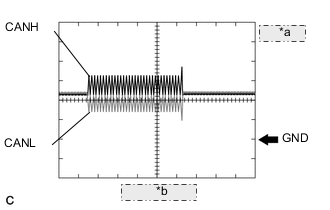
*a 1 V/DIV. *b 50 μsec./DIV. Normal waveform
-
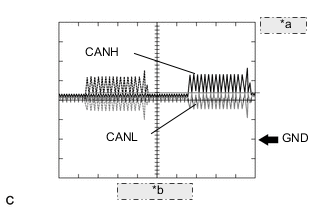
*a 1 V/DIV. *b 50 μsec./DIV. Open in both of the lines (CANH and CANL) of a CAN branch
Tech Tips
-
Waveforms (waveforms shown using dotted lines) are not present from an ECU or sensor connected to a CAN branch with an open circuit in both lines. (Waveforms from other ECUs or sensors are normal.)
-
Because this waveform is similar to a normal waveform, instead of using the waveform, the malfunctioning part can be narrowed down by performing a communication bus check.
-
-
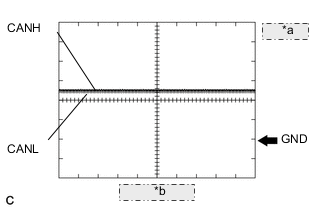
*a 1 V/DIV. *b 50 μsec./DIV. Short between the CAN bus lines (CANH and CANL)
Tech Tips
-
Waveforms disappear.
-
If the malfunction is in an ECU, disconnecting the ECU will change the waveform. If the waveform does not change, a malfunction in the wire harness is suspected.
-
-
-
CAN bus waveforms (reference) (Group 2)
Note
Waveforms (waveforms shown using dotted lines) are not present from an ECU or sensor connected to a CAN branch with an open circuit in both lines. (Waveforms from other ECUs or sensors are normal.)
-
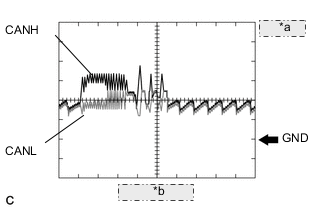
*a 1 V/DIV. *b 50 μsec./DIV. Open in a CAN branch line (CANH)
Tech Tips
-
An abnormal waveform is output from an ECU with an open in one of its CAN branch lines. Because this abnormal output interferes with the signals from other ECUs, the output of other ECUs will also appear abnormal.
-
Narrow down the malfunctioning part by checking DTCs or performing a communication bus check, or by checking waveform changes when ECUs or sensors are disconnected (disconnecting connectors from the CAN junction connector enables a quick inspection). The waveform will change to one for an open in both sides of a CAN branch when the ECU or sensor with an open CAN branch line is disconnected.
-
-
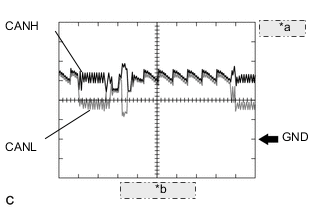
*a 1 V/DIV. *b 50 μsec./DIV. Open in a CAN branch line (CANL)
Tech Tips
-
An abnormal waveform is output from an ECU with an open in one of its CAN branch lines. Because this abnormal output interferes with the signals from other ECUs, the output of other ECUs will also appear abnormal.
-
Narrow down the malfunctioning part by checking DTCs or performing a communication bus check, or by checking waveform changes when ECUs or sensors are disconnected (disconnecting connectors from the CAN junction connector enables a quick inspection). The waveform will change to one for an open in both sides of a CAN branch when the ECU or sensor with an open CAN branch line is disconnected.
-
-
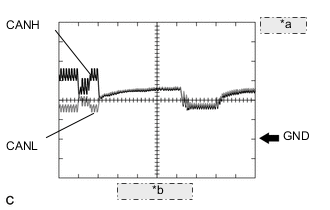
*a 1 V/DIV. *b 50 μsec./DIV. Open in a CAN main bus line (CANH)
Tech Tips
-
Waveforms of ECUs or sensors that are nearer to the DLC3 than the open part are almost normal.
-
Waveforms of ECUs or sensors that are on the opposite side of the DLC3 from the open part are abnormal.
-
An open in a CAN main bus line can be confirmed by measuring the resistance between the CANH and CANL terminals of any CAN branch.
-
-
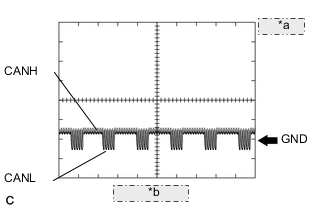
*a 1 V/DIV. *b 50 μsec./DIV. Short between a CAN bus line (CANH) and ground
Tech Tips
-
Narrow down the shorted part by checking for waveform changes when disconnecting connectors from the CAN junction connector or when disconnecting ECUs or sensors.
-
A short to ground in the CANH line can be confirmed by measuring the resistance between CANH and ground using an ohmmeter.
-
-
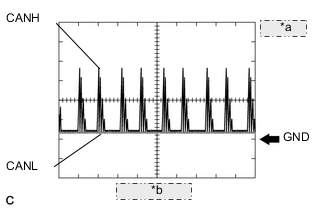
*a 1 V/DIV. *b 50 μsec./DIV. Short between a CAN bus line (CANL) and ground
Tech Tips
-
Narrow down the shorted part by checking for waveform changes when disconnecting connectors from the CAN junction connector or when disconnecting ECUs or sensors.
-
A short to ground in the CANL line can be confirmed by measuring the resistance between CANL and ground using an ohmmeter.
-
-
-
-
DATA SENDING/RECEIVING TABLE
-
Data sending/receiving table
Tech Tips
If Data List items related to sent/received data are not displayed properly, the part for which communication is interrupted can be determined using the table below.
Data content Data Detected and Sent by Data Received from
(Can be Checked in Data List)
Data Received
(Cannot be Checked in Data List)
Relevant Data List Item
[Selected System]
Accelerator position Hybrid vehicle control ECU - Combination meter assembly Accelerator Degree [Hybrid Control] Engine speed ECM -
-
Airbag sensor assembly
-
Air conditioning amplifier assembly
-
Main body ECU (Multiplex network body ECU)
-
Combination meter assembly
Engine Speed [Engine and ECT] Engine coolant temperature ECM
-
Air conditioning amplifier assembly
-
Combination meter assembly
-
-
Coolant Temp [Engine and ECT]
-
Engine Coolant Temp [Air Conditioner]
-
Coolant Temperature [Combination Meter]
Vehicle speed Brake booster with master cylinder assembly (Skid control ECU)
-
Hybrid vehicle control ECU
-
Combination meter assembly*3
-
Power steering ECU assembly
Airbag sensor assembly
-
Vehicle Speed [ABS/VSC/TRC]
-
Vehicle Spd [Hybrid Control]
-
Vehicle Speed Meter [Combination Meter]
-
Meter Vehicle Velocity [EMPS]
Combination meter assembly*3 -
-
Air conditioning amplifier assembly
-
Multiplex network body ECU
-
Smart key ECU assembly (Certification ECU)
Vehicle Speed Meter [Combination Meter] Shift position Hybrid vehicle control ECU -
-
Airbag sensor assembly
-
Main body ECU (Multiplex network body ECU)
-
Combination meter assembly*2
-
Air conditioning amplifier assembly
-
Shift Sensor Shift Pos [Hybrid Control]
-
Shift P Signal [Power Source Control]
Ambient temperature Air conditioning amplifier assembly
-
Hybrid vehicle control ECU
-
ECM
-
Combination meter assembly
Main body ECU (Multiplex network body ECU)
-
Ambient Temp Sensor [Air Conditioner]
-
Ambient Temperature [Hybrid Control]
-
Ambient Temp for A/C [Engine and ECT]
-
Ambient Temperature [Combination Meter]
Driver door courtesy Main body ECU (Multiplex network body ECU) -
-
Hybrid vehicle control ECU
-
Smart key ECU assembly (Certification ECU)
-
Combination meter assembly*2
-
FL Door Courtesy SW [Main Body]
-
FR Door Courtesy SW [Main Body]
Steering angle sensor Spiral cable with sensor sub-assembly (Steering sensor) Brake booster with master cylinder assembly (Skid control ECU) Airbag sensor assembly Steering Angle Sensor [ABS/VSC/TRC] Yaw rate sensor Airbag sensor assembly (built-in type yaw rate sensor) Brake booster with master cylinder assembly (Skid control ECU) -
-
Yaw Rate Sensor [ABS/VSC/TRC]
-
Yaw Rate Sensor2 [ABS/VSC/TRC]
Deceleration sensor Airbag sensor assembly (built-in type yaw rate sensor) Brake booster with master cylinder assembly (Skid control ECU) Hybrid vehicle control ECU
-
Deceleration Sensor [ABS/VSC/TRC]
-
Deceleration Sensor2 [ABS/VSC/TRC]
Hybrid Vehicle Control ECU power source voltage Hybrid vehicle control ECU*1 - - +B [Hybrid Control] ECM power source voltage ECM*1 - - Battery Voltage [Engine and ECT] Brake pedal stroke sensor Brake booster with master cylinder assembly (Skid control ECU)*1 - -
-
Stroke Sensor [ABS/VSC/TRC]
-
Stroke Sensor2 [ABS/VSC/TRC]
Power steering ECU assembly power source voltage Power steering ECU assembly*1 - - IG Power Supply [EMPS] Intensity of light received by the solar sensor Air conditioning amplifier assembly*1 - - Solar Sensor (D Side) [Air Conditioner] Combination meter assembly power source voltage Combination meter assembly*1 - - +B Voltage Value [Combination Meter] Radio and display receiver assembly power source voltage Radio and display receiver assembly - - Battery Voltage [Navigation System] Driver door touch sensor Smart key ECU assembly (Certification ECU)*1 - - D-Door Touch Sensor [Entry&Start] *1: Whether the ECU that sends data is functioning or not can be judged by using the GTS to check items such as switches or sensors that send signals to the ECU via direct lines.
*2: Although the received contents cannot be checked in the Data List, whether or not the data is received normally can be checked by observing the combination meter.
*3: The combination meter assembly receives a vehicle speed signal from the brake booster with master cylinder assembly (skid control ECU) and sends the signal to other ECUs.
-
-
Details of relevant Data List items (Selected system: Hybrid Control)
Note
In the table below, the values listed under "Normal Condition" are reference values. Do not depend solely on these reference values when deciding whether a part is faulty or not.
Tech Tips
Using the GTS to read the Data List allows the values or states of switches, sensors, actuators and other items to be read without removing any parts. This non-intrusive inspection can be very useful because intermittent conditions or signals may be discovered before parts or wiring is disturbed. Reading the Data List information early in troubleshooting is one way to save diagnostic time.
-
Connect the GTS to the DLC3.
-
Turn the ignition switch to ON (IG).
-
Enter the following menus: Powertrain / Hybrid Control / Data List.
-
Check the results by referring to the following table.
Hybrid Control Tester Display Measurement Item/Range Normal Condition Diagnostic Note Vehicle Spd Vehicle speed/
Min.: 0 km/h (0 mph), Max.: 255 km/h (158 mph)
Vehicle stopped:
0 km/h (0 mph)
While driving at a constant speed:
No significant fluctuation
- +B Auxiliary battery voltage/
Min.: 0.00 V, Max.: 65.53 V
Constant:
10.00 to 15.00 V
Auxiliary battery condition Ambient Temperature Ambient air temperature/
Min.: -40°C (-40°F), Max.: 215°C (419°F)
Ignition switch ON (IG):
Same as ambient air temperature
Ambient temperature sensor Accelerator Degree Accelerator pedal depressed angle/
Min.: 0.0%, Max.: 127.5%
Accelerator pedal depressed:
Changes with accelerator pedal pressure
Accelerator pedal sensor assembly Shift Sensor Shift Pos Shift position/
P/R/N/D/B
Matches currently selected shift position:
P, R, N, D or B
Shift lever position sensor
-
-
Details of relevant Data List items (Selected system: Power Source Control)
Note
In the table below, the values listed under "Normal Condition" are reference values. Do not depend solely on these reference values when deciding whether a part is faulty or not.
Tech Tips
Using the GTS to read the Data List allows the values or states of switches, sensors, actuators and other items to be read without removing any parts. This non-intrusive inspection can be very useful because intermittent conditions or signals may be discovered before parts or wiring is disturbed. Reading the Data List information early in troubleshooting is one way to save diagnostic time.
-
Connect the GTS to the DLC3.
-
Turn the ignition switch to ON (IG).
-
Turn the GTS on.
-
Enter the following menus: Body Electrical / Power Source Control / Data List.
-
Check the results by referring to the following table.
Power Source Control Tester Display Measurement Item/Range Normal Condition Diagnostic Note Shift P Signal Shift position P / OFF or ON OFF: Shift lever not in P
ON: Shift lever in P
-
Use this item to determine if the shift position switch is malfunctioning.
-
The hybrid control system cannot be started when this item is OFF.
Power Supply Condition Power supply state/IG2 ON, ST ON, All OFF, IG1 ON or ACC ON All OFF: Ignition switch off
ACC ON: Ignition switch ACC
IG1 ON: Ignition switch ON (IG) (IG1 relay on)
IG2 ON: Ignition switch ON (IG) (IG2 relay on)
ST ON: Sending hybrid control system start request signal
Since the IG1 and IG2 relays turn on at approximately the same time, IG1 ON may not be displayed (the IG1 relay turns on for a very short time). -
-
-
Details of relevant Data List items (Selected system: Engine and ECT)
Note
In the table below, the values listed under "Normal Condition" are reference values. Do not depend solely on these reference values when deciding whether a part is faulty or not.
Tech Tips
Using the GTS to read the Data List allows the values or states of switches, sensors, actuators and other items to be read without removing any parts. This non-intrusive inspection can be very useful because intermittent conditions or signals may be discovered before parts or wiring is disturbed. Reading the Data List information early in troubleshooting is one way to save diagnostic time.
Tech Tips
Normal Condition: If no conditions are specifically stated for "idling", the shift lever should be in N or P, the A/C switch should be off and all accessory switches should be off.
-
Connect the GTS to the DLC3.
-
Turn the ignition switch to ON (IG).
-
Turn the GTS on.
-
Put the engine in inspection mode (maintenance mode) Click here.
-
Warm up the engine.
-
Turn the A/C switch off.
-
Turn the ignition switch off.
-
Turn the ignition switch to ON (IG).
-
Turn the GTS on.
-
Enter the following menus: Powertrain / Engine and ECT / Data List.
-
According to the display on the GTS, read the Data List.
Engine and ECT Tester Display Measurement Item/Range Normal Condition Diagnostic Note Engine Speed Engine speed/
Min.: 0 rpm, Max.: 16384 rpm
950 to 1050 rpm: Idling When the crank position sensor is malfunctioning, "Engine Speed" is approximately 0 rpm or varies greatly from the actual engine speed. Coolant Temp Coolant temperature/
Min.: -40°C (-40°F), Max.: 140°C (284°F)
75 to 100°C (167 to 212°F): After warming up This is the engine coolant temperature.
Tech Tips
-
After warming up the engine, the engine coolant temperature is 75 to 100°C (167 to 212°F).
-
After a long soak, the engine coolant temperature, intake air temperature and ambient air temperature are approximately equal.
-
If the value is -40°C (-40°F), or 140°C (284°F), the sensor circuit is open or shorted.
-
Check if the engine overheats when the value indicates 140°C (284°F).
Battery Voltage Auxiliary battery voltage/
Min.: 0 V, Max.: 66 V
11 to 16 V: Ignition switch ON (IG) If 11 V or less, characteristics of some electrical components may change. Ambient Temp for A/C Ambient temperature for A/C/
Min.: -40°C (-40°F), Max.: 215°C (419°F)
- - -
-
-
Details of relevant Data List items (Selected system: ABS/VSC/TRC)
Note
In the table below, the values listed under "Normal Condition" are reference values. Do not depend solely on these reference values when deciding whether a part is faulty or not.
Tech Tips
Using the GTS to read the Data List allows the values or states of switches, sensors, actuators and other items to be read without removing any parts. This non-intrusive inspection can be very useful because intermittent conditions or signals may be discovered before parts or wiring is disturbed. Reading the Data List information early in troubleshooting is one way to save diagnostic time.
-
Warm up the engine.
-
Turn the ignition switch off.
-
Connect the GTS to the DLC3.
-
Turn the ignition switch to ON (IG).
-
Turn the GTS on.
-
Enter the following menus: Chassis / ABS/VSC/TRC / Data List.
-
According to the display on the GTS, read the Data List.
ABS/VSC/TRC Tester Display Measurement Item/Range Normal Condition Diagnostic Note Stroke Sensor Brake pedal stroke sensor assembly / Min.: 0.00 V, Max.: 5.00 V When brake pedal released: 0.65 to 1.35 V Reading increases when brake pedal is depressed Stroke Sensor2 Brake pedal stroke sensor assembly 2 / Min.: 0.00 V, Max.: 5.00 V When brake pedal released: 3.65 to 4.35 V Reading decreases when brake pedal is depressed Deceleration Sensor Acceleration sensor 1 / Min.: -18.525 m/s2, Max.: 18.387 m/s2
- During deceleration/acceleration: Changes continuously Deceleration Sensor2 Acceleration sensor 2 / Min.: -18.525 m/s2, Max.: 18.387 m/s2
- During deceleration/acceleration: Changes continuously Yaw Rate Sensor Yaw rate sensor 1 / Min.: -128°/s, Max.: 127°/s Vehicle stationary: 0°/s
Turning right: -128 to 0°/s
Turning left: 0 to 127°/s
- Yaw Rate Sensor2 Yaw rate sensor 2 / Min.: -128°/s, Max.: 127°/s Vehicle stationary: 0°/s
Turning right: -128 to 0°/s
Turning left: 0 to 127°/s
- Steering Angle Sensor Steering angle sensor / Min.: -1152°, Max.: 1143° Turning left: Increases
Turning right: Decreases
- Vehicle Speed Maximum wheel speed sensor / Min.: 0 km/h (0 mph), Max.: 326 km/h (202 mph) Vehicle stopped: 0 km/h (0 mph) When driving at constant speed: No large fluctuations
-
-
Details of relevant Data List items (Selected system: EMPS)
Note
In the table below, the values listed under "Normal Condition" are reference values. Do not depend solely on these reference values when deciding whether a part is faulty or not.
Tech Tips
Using the GTS to read the Data List allows the values or states of switches, sensors, actuators and other items to be read without removing any parts. This non-intrusive inspection can be very useful because intermittent conditions or signals may be discovered before parts or wiring is disturbed. Reading the Data List information early in troubleshooting is one way to save diagnostic time.
-
Turn the ignition switch off.
-
Connect the GTS to the DLC3.
-
Turn the ignition switch to ON (IG).
-
Turn the GTS on.
-
Enter the following menus: Chassis / EMPS / Data List.
-
According to the display on the GTS, read the Data List.
EMPS Tester Display Measurement Item/Range Normal Condition Diagnostic Note Meter Vehicle Velocity Vehicle speed from meter/
Min.: 0.0 km/h (0.0 mph)
Max.: 300.0 km/h (186.4 mph)
0.0 km/h (0.0 mph) Ignition switch ON (READY) and vehicle stopped No significant fluctuation Ignition switch ON (READY) and vehicle driven at a constant speed IG Power Supply ECU power source voltage/
Min.: 0.0000 V
Max.: 20.1531 V
9 to 16 V Ignition switch ON (IG)
-
-
Details of relevant Data List items (Selected system: Navigation System)
Note
In the table below, the values listed under "Normal Condition" are reference values. Do not depend solely on these reference values when deciding whether a part is faulty or not.
Tech Tips
Using the GTS to read the Data List allows the values or states of switches, sensors, actuators and other items to be read without removing any parts. This non-intrusive inspection can be very useful because intermittent conditions or signals may be discovered before parts or wiring is disturbed. Reading the Data List information early in troubleshooting is one way to save diagnostic time.
-
Turn the ignition switch off.
-
Connect the GTS to the DLC3.
-
Turn the ignition switch to ON (READY).
-
Turn the GTS on.
-
Enter the following menus: Body Electrical / Navigation System / Data List.
-
According to the display on the GTS, read the Data List.
Navigation System Tester Display Measurement Item/Range Normal Condition Diagnostic Note Battery Voltage Auxiliary battery voltage/
Min.: 0 V
Max.: 24 V
11 to 15.5 V - Reverse Signal Reverse signal/ON or OFF ON: Reverse selected
OFF: Reverse not selected
-
-
-
Details of relevant Data List items (Selected system: Entry & Start)
Note
In the table below, the values listed under "Normal Condition" are reference values. Do not depend solely on these reference values when deciding whether a part is faulty or not.
Tech Tips
-
Using the GTS to read the Data List allows the values or states of switches, sensors, actuators and other items to be read without removing any parts. This non-intrusive inspection can be very useful because intermittent conditions or signals may be discovered before parts or wiring is disturbed. Reading the Data List information early in troubleshooting is one way to save diagnostic time.
-
When using the GTS with the ignition switch off to troubleshoot:
Connect the GTS to the DLC3 and turn a courtesy light switch on and off at 1.5-second intervals until communication between the GTS and vehicle begins.
-
Connect the GTS to the DLC3.
-
Turn the ignition switch to ON (IG).
-
Turn the GTS on.
-
Enter the following menus: Body Electrical / Entry & Start / Data List.
-
Read the Data List according to the display on the GTS.
Entry & Start Tester Display Measurement Item/Range Normal Condition Diagnostic Note D-Door Touch Sensor Driver door touch sensor (unlock sensor) / ON or OFF ON: Driver door touch sensor (unlock sensor) touched
OFF: Driver door touch sensor (unlock sensor) not touched
-
Displays whether the unlock sensor is on or off (even if the sensor is touched and contact is maintained, "ON" is displayed only momentarily).
-
Use this Data List item to help determine if there is an unlock sensor malfunction when the entry unlock function does not operate.
-
-
-
Details of relevant Data List items (Selected system: Combination Meter)
Note
In the table below, the values listed under "Normal Condition" are reference values. Do not depend solely on these reference values when deciding whether a part is faulty or not.
Tech Tips
Using the GTS to read the Data List allows the values or states of switches, sensors, actuators and other items to be read without removing any parts. This non-intrusive inspection can be very useful because intermittent conditions or signals may be discovered before parts or wiring is disturbed. Reading the Data List information early in troubleshooting is one way to save diagnostic time.
-
Warm up the engine.
-
Turn the ignition switch off.
-
Connect the GTS to the DLC3.
-
Turn the ignition switch to ON (IG).
-
Turn the GTS on.
-
Enter the following menus: Body Electrical / Combination Meter / Data List.
Combination Meter Tester Display Measurement Item/Range Normal Condition Diagnostic Note Vehicle Speed Meter Vehicle speed/Min.: 0 km/h (0 mph), Max.: 255 km/h (158 mph) Almost the same as actual vehicle speed - Coolant Temperature Engine coolant temperature/-40 to 127.5°C (-40 to 261.5°F) After warming up: 75 to 100°C (167 to 212°F)
-
After warming up the engine, the engine coolant temperature is 75 to 100°C (167 to 212°F).
-
After a long soak, the engine coolant temperature, intake air temperature and ambient air temperature are approximately equal.
+B Voltage Value Auxiliary battery voltage/Min.: 0 V, Max.: 25.5 V 11 to 16 V - Ambient Temperature Outside temperature/Min.: -40°C (-40°F), Max.: 87.5°C (189.5°F) Almost the same as actual outside temperature The temperature displayed on the multi-information display is -40 to 50°C (-40 to 122°F) -
-
-
Details of relevant Data List items (Selected system: Air Conditioner)
Note
In the table below, the values listed under "Normal Condition" are reference values. Do not depend solely on these reference values when deciding whether a part is faulty or not.
Tech Tips
Using the GTS to read the Data List allows the values or states of switches, sensors, actuators and other items to be read without removing any parts. This non-intrusive inspection can be very useful because intermittent conditions or signals may be discovered before parts or wiring is disturbed. Reading the Data List information early in troubleshooting is one way to save diagnostic time.
-
Connect the GTS to the DLC3.
-
Turn the ignition switch to ON (IG).
-
Turn the GTS on.
-
Enter the following menus: Body Electrical / Air Conditioner / Data List.
-
Check the value(s) by referring to the table below.
Air Conditioner Tester Display Measurement Item/Range Normal Condition Diagnostic Note Ambient Temp Sensor Ambient temperature sensor (thermistor assembly) /
Min.: -23.30°C (-9.94°F)
Max.: 65.95°C (150.71°F)
Actual ambient temperature displayed - Solar Sensor (D Side) Solar sensor /
Min.: 0
Max.: 255
Solar sensor value increases as brightness increases - Engine Coolant Temp Engine coolant temperature sensor /
Min.: 1.30°C (34.34°F)
Max.: 90.55°C (194.99°F)
Actual engine coolant temperature displayed -
-
-
Details of relevant Data List items (Selected system: Main Body ECU)
Note
In the table below, the values listed under "Normal Condition" are reference values. Do not depend solely on these reference values when deciding whether a part is faulty or not.
Tech Tips
Using the GTS to read the Data List allows the values or states of switches, sensors, actuators and other items to be read without removing any parts. This non-intrusive inspection can be very useful because intermittent conditions or signals may be discovered before parts or wiring is disturbed. Reading the Data List information early in troubleshooting is one way to save diagnostic time.
-
Connect the GTS to the DLC3.
-
Turn the ignition switch to ON (IG).
-
Turn the GTS on.
-
Enter the following menus: Body Electrical / Main Body / Data List.
-
Read the Data List according to the display on the GTS.
Main Body Tester Display Measurement Item/Range Normal Condition Diagnostic Note FR Door Courtesy SW Front door courtesy light switch RH signal/ON or OFF ON: Front door RH open
OFF: Front door RH closed
- FL Door Courtesy SW Front door courtesy light switch LH signal/ON or OFF ON: Front door LH open
OFF: Front door LH closed
-
-
-