POWER STEERING SYSTEM CALIBRATION
-
TORQUE SENSOR ZERO POINT CALIBRATION (USING THE GTS)
Note
Perform torque sensor zero point calibration if any of the following conditions occur:
-
The power steering ECU assembly has been replaced.
-
The electric power steering column sub-assembly has been replaced.
-
There is a difference in steering effort between turning left and right.
-
Inspection before calibration
-
Turn the ignition switch off.
-
Connect the GTS to the DLC3.
-
Turn the ignition switch to ON (IG).
-
Turn the GTS on.
-
Calibrate the power steering ECU assembly. Enter the following menus: Chassis / EMPS / Data List.
-
Check the values by referring to the table below.
EMPS GTS Display Measurement Item/Range Normal Condition Diagnostic Note IG Power Supply ECU power source voltage/
Min.: 0.0000V
Max.: 20.1531 V
9 to 16 V Ignition switch ON (IG) Note
If the IG power supply voltage is 9 V or less, calibration cannot be performed. In this case, charge or replace the auxiliary battery, and then perform calibration.
-
-
Torque sensor zero point calibration
Note
If DTC C1516 (Torque Sensor Zero Point Adjustment Incomplete) is stored, the torque sensor zero point cannot be calibrated. Clear the DTCs before starting calibration.
-
Set the steering wheel to the center point and align the front wheels straight ahead.
-
Turn the ignition switch off.
-
Connect the GTS to the DLC3.
-
Turn the ignition switch to ON (IG).
-
Turn the GTS on.
-
Enter the following menus: Chassis / EMPS / Utility / Torque Sensor Adjustment.
Note
-
Do not turn the steering wheel sharply.
-
Do not touch the steering wheel during torque sensor zero point calibration (for 5 seconds).
-
-
Check for DTCs Click here.
Note
If DTC C1515, C1516, C1534 or C1581 is output, perform troubleshooting for the corresponding DTC.
-
-
-
TORQUE SENSOR ZERO POINT CALIBRATION (USING SST CHECK WIRE)
Note
Calibrate the torque sensor zero point if any of the following has occurred:
-
The power steering ECU assembly has been replaced.
-
The electric power steering column sub-assembly has been replaced.
-
Steering effort differs between left and right.
-
Check for DTCs.
-
Check for DTCs Click here.
Note
-
If DTC C1516 (Torque Sensor Zero Point Adjustment Incomplete) is stored, the torque sensor zero point cannot be calibrated. Clear the DTC before starting calibration.
-
If DTCs other than C1516 is output, refer to the "Diagnostic Trouble Code Chart" Click here.
-
-
-
Perform pre-calibration check.
-
Turn the ignition switch off.
-
Disconnect the power steering ECU assembly connector.
-
Turn the ignition switch to ON (IG).
-
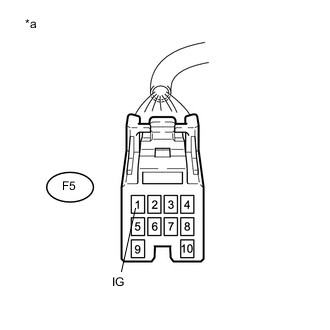
Text in Illustration *a Front view of wire harness connector
(to Power Steering ECU Assembly)
Measure the voltage according to the value(s) in the table below.
Note
If the IG power supply voltage is 9 V or less, calibration cannot be performed. In this case, charge or replace the auxiliary battery, and then perform calibration.
-
Turn the ignition switch off.
-
Connect the power steering ECU assembly connector.
-
-
Clear sensor calibration value.
-
Set the steering wheel to the center point and align the front tires straight ahead.
-
Turn the ignition switch off.
-
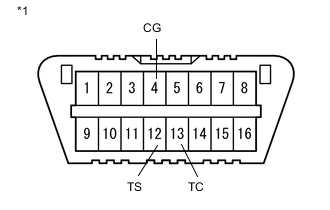
Text in Illustration *1 DLC3 Using SST, connect terminals 12 (TS) and 4 (CG) of the DLC3.
- SST
- 09843-18040
Note
Connect the terminals to the correct positions to avoid a malfunction.
-
Turn the ignition switch to ON (IG) and then connect and disconnect terminals 13 (TC) and 4 (CG) at least 20 times in 20 seconds.
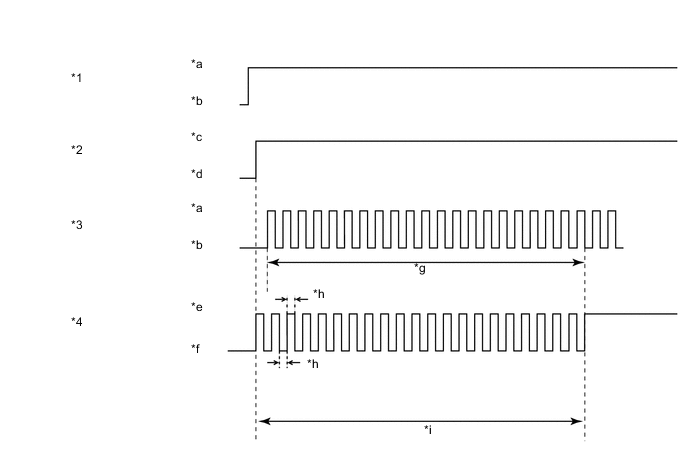
Text in Illustration (Clearing Sensor Calibration Value) *1 DLC3 (TS and CG) *2 Ignition Switch *3 DLC3 (TC and CG) *4 EPS Warning Light *a Short *b Open *c ON (IG) *d off *e ON *f OFF *g 20 Times or More *h 0.125 Seconds *i 20 Seconds -

Text in Illustration *1 EPS Warning Light Check that the EPS warning light blinks and then remains illuminated.
Tech Tips
The EPS warning light illumination indicates that DTCs C1515 has been stored.
-
Turn the ignition switch off.
Note
After erasing the sensor calibration value zero point calibration cannot be performed if the ignition switch is ON (IG).
-
-
Perform torque sensor zero point calibration.
Note
As torque sensor zero point calibration cannot be performed if DTC C1515 has not been stored, be sure to perform sensor calibration value erasure before performing torque sensor zero point calibration.
-
Set the steering wheel to the center point and align the front tires straight ahead.
-
Turn the ignition switch off.
-
Text in Illustration *1 DLC3 Using SST, connect terminals 12 (TS) and 4 (CG) of the DLC3.
- SST
- 09843-18040
-
Turn the ignition switch to ON (IG) and then connect terminals 13 (TC) and 4 (CG).
Note
Do not touch the steering wheel during calibration (for 5 seconds).
Tech Tips
The EPS warning light remains illuminated even after calibration has completed.
-
With terminals 12 (TS) and 4 (CG), and 13 (TC) and 4 (CG) connected, and the ignition switch to ON (IG), continue to perform rotation angle sensor initialization.
-
-
-
ASSIST MAP WRITING (USING THE GTS)
Note
Perform assist map writing if any of the following conditions occur:
-
The power steering ECU assembly has been replaced.
-
Turn the ignition switch off.
-
Connect the GTS to the DLC3.
-
Turn the ignition switch to ON (IG).
-
Turn the GTS on.
-
Enter the following menus: Chassis / EMPS / Utility / Signal Check.
Tech Tips
-
Follow the instructions on the GTS to perform Signal Check.
-
With DTC C1581 output, performing Signal Check will cause the power steering ECU assembly to enter Test Mode and the assist map will be written automatically.
-
-
Wait for at least 5 seconds.
-
Check for DTCs Click here.
Tech Tips
After writing the assist map, if DTC C1581 is output, perform the troubleshooting procedure for DTC C1581 Click here.
-
-
ASSIST MAP WRITING (USING SST CHECK WIRE)
Note
Perform assist map writing if any of the following conditions occur:
-
The power steering ECU assembly has been replaced.
Tech Tips
If DTC C1581 is output after torque sensor zero point calibration, perform assist map writing.
-
Text in Illustration *1 DLC3 Turn the ignition switch off.
-
Using SST, connect terminals 12 (TS) and 4 (CG) of the DLC3.
- SST
- 09843-18040
Note
Connect the terminals correctly to avoid a malfunction.
-
Turn the ignition switch to ON (IG).
-
Wait for 5 seconds or more.
-
Check for DTCs Click here.
Tech Tips
After writing the assist map, if DTC C1581 is output, perform the troubleshooting procedure for DTC C1581 Click here.
-